Free Lessons
Courses
Seminars
TechHelp
Fast Tips
Templates
Topic Index
Forum
ABCD
 
Home   Courses   TechHelp   Help   Contact   Merch   Join   Order   Logon   Forums   
 
Back to Access Forum    Comments List
Upload Images   @Reply   Bookmark    Link   Email   Next Unseen 
subreports in a report
Ludwig Willems 
      
2 years ago
hi, are there examples of how to place subreports in a main report, videos of it maybe???? I don't really know how to start...
Kevin Robertson  @Reply  
          
2 years ago
Pretty much the same as adding a Subform to a Form.

Subreports are covered in Access Expert 9.
Ludwig Willems OP  @Reply  
      
2 years ago
Ok thanks  :)
Ludwig Willems OP  @Reply  
      
2 years ago
Sami, you had more experience with sub reports. Can you tell me more about that, give hints. Sub reports seem useful to me but my report is rather complicated. Maybe it is better to build a report like expert 12. 15 sub reports would be different. Do you perhaps have database examples with sub reports from which I can extract information. ... I think you once said that you used a lot of sub reports in a main report.
Sami Shamma  @Reply  
             
2 years ago
Ludwig
I am nowhere near as experienced as Kevin and the other Moderators.
I am at a stage where I am writing code every day now.

I will be happy to answer any of your specific questions
Ludwig Willems OP  @Reply  
      
2 years ago
Sami
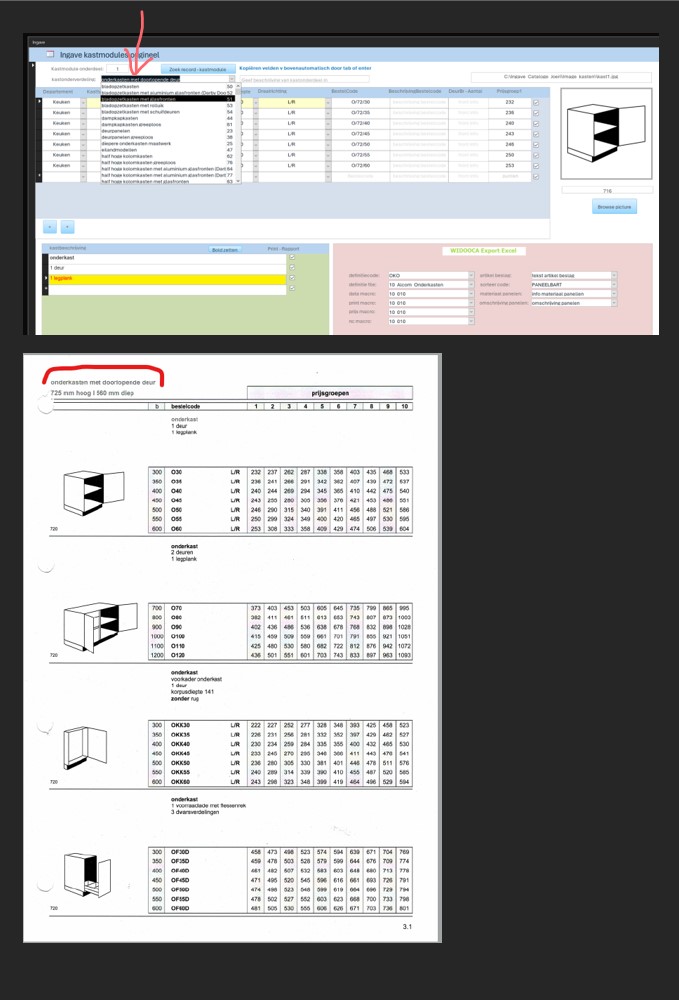
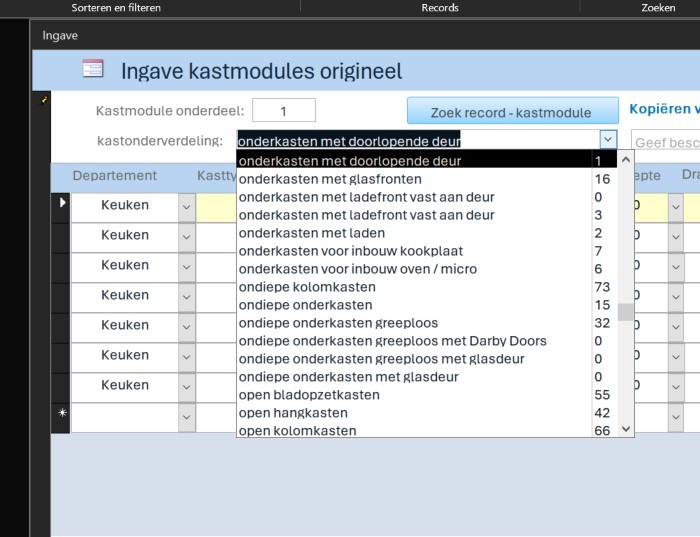
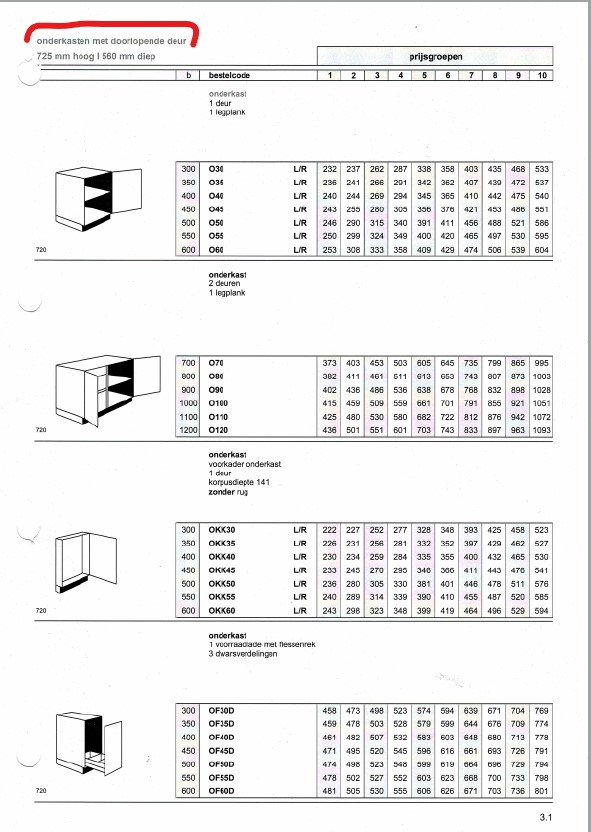
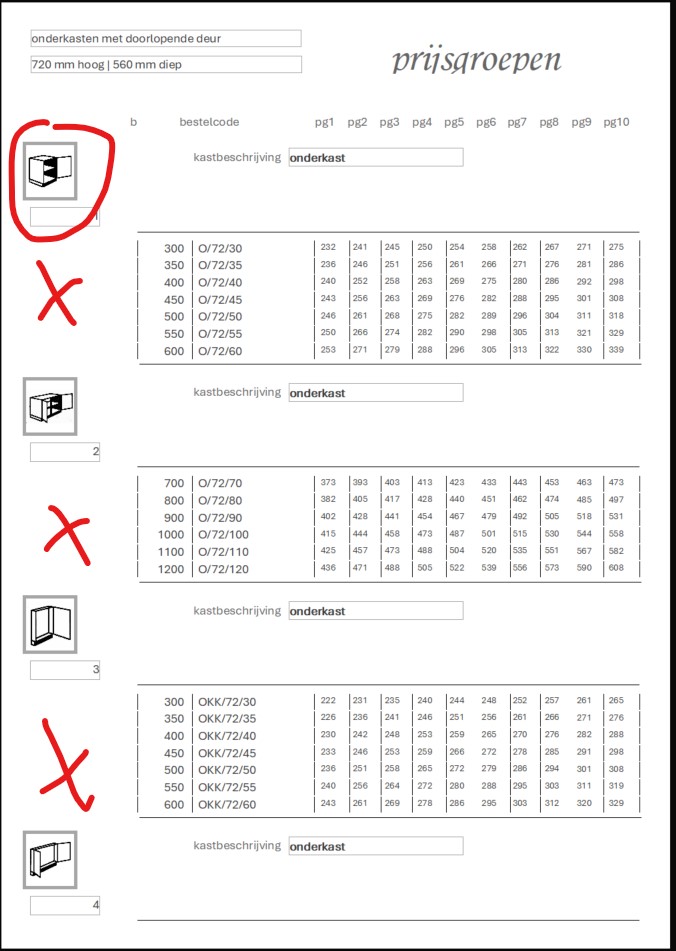
I am making a catalog for all our cabinets, about 10,000 pieces as cabinet modules. The cabinets are divided into cabinet subdivisions of type cabinets "see detail print". Per cabinet subdivision there are hundreds of cabinet modules that belong together with price groups and also have to be included in the report like image "vb of excel as they still work now.". To put all of these in a report, my question now is, can I do it better in subreports and add each separately or create them all separately with grouping and sorting. The cabinet subdivision subdivision must remain separate from each other. How would you build this up. It is a lot of work but my start must be good so that I am doing well from the start, you see. I do not know what the best method is for this.
Ludwig Willems OP  @Reply  
      
2 years ago

Sami Shamma  @Reply  
             
2 years ago
Ludwig
Re send the images separately. I cannot read them. use higher resolution.
Kevin Robertson  @Reply  
          
2 years ago
Yeah. I always enlarge my images. That my when they are rendered you can click on them to zoom in.
I like to open an image before posting. If I can't see things clearly it probably means no-one else will either.
Ludwig Willems OP  @Reply  
      
2 years ago
Kevin, if I crop the picture, how do I save it in a higher resolution? how do I render it or improve the quality for display here. any tips please.
Ludwig Willems OP  @Reply  
      
2 years ago

Ludwig Willems OP  @Reply  
      
2 years ago

Sami Shamma  @Reply  
             
2 years ago
allowing for the fact that I don't understand you Table structure, this looks to me like a single report with multiple Grouping levels.
This is easy and straight forward.

assuming your cabinet table has the following categories:

-Base/Wall Cabinets
-Width
-Number of Dorse
-price range

You sort your Table/query as above
and then just Add those categories as grouping levels in your report.
Ludwig Willems OP  @Reply  
      
2 years ago
lots of practice for sure yes, I'm not quite there yet, lots of playing around until I see results, I sometimes think that once you get the hang of it it's easy, I've experienced that several times. So just practice.
Ludwig Willems OP  @Reply  
      
2 years ago
Sami, I can't get it to show the photo to the left of the block of records once, the photo may only be shown once per block. Every time I put the photo in the header I get the drawing back for each record. Is it possible to place the drawing to the left of the block of records once.
Ludwig Willems OP  @Reply  
      
2 years ago

Ludwig Willems OP  @Reply  
      
2 years ago

Sami Shamma  @Reply  
             
2 years ago
Ludwig

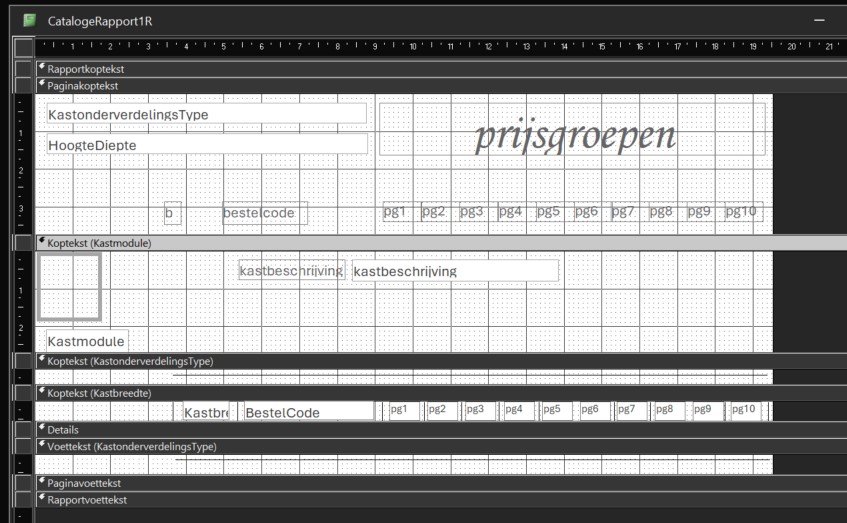
It is very hard to figure out what you are doing. Your Access it is in Dutch, I can't tell what the section names are.

your best option is to start fresh with only one grouping level (the highest) in my example that will be "Wall" or "Base"

get the report to work, then add the second level "Width" and so on
Ludwig Willems OP  @Reply  
      
2 years ago
Sami, ok, just the question to Richard then, is it possible to place a picture to the left of a grouped records as in the drawing, that's all I need to know. Then I can continue. I've been trying for 2 days. help.
Sami Shamma  @Reply  
             
2 years ago
Are you trying to move the cabinet picture to the location where you place the red "X" in the image above?
Ludwig Willems OP  @Reply  
      
2 years ago
Yes :)
indeed, but drawing may only appear once on the block of records. If I move picture, I get the drawing per record and that is not allowed.
Ludwig Willems OP  @Reply  
      
2 years ago
Sami, what part of united states are you from to know the time difference between us. ... :) What is the time difference between you and Belgium.
Sami Shamma  @Reply  
             
2 years ago
I am in Connecticut EST
now it is 2:30 pm
Brussels is 8:30 pm

6 hours
Sami Shamma  @Reply  
             
2 years ago
For that you will need a subreport.

Put the subreport in the Group section, so you will have the image and next to it the subreport showing the detailed records.
Ludwig Willems OP  @Reply  
      
2 years ago
toppy, I'll try it today. Tanks :) I'll watch the expert 9 videos again, there were subtreports in there.
Sami Shamma  @Reply  
             
2 years ago
The important thing to remember with subreports is in the Data tab of the Subreport control you have parent and child field setup correctly.
Ludwig Willems OP  @Reply  
      
2 years ago
Sami, if data needs to be grouped, and you are working with subreports, do you group it in the subreport or later in the main report?
Adam Schwanz  @Reply  
           
2 years ago
If you have the parent/child setup, you should only need to setup the main report, and the subreport should only show what is in the main report that is linked by parent/child.
Sami Shamma  @Reply  
             
2 years ago
What Adam said
Ludwig Willems OP  @Reply  
      
2 years ago
so if i understand correctly then i have to do the grouping in the subreport and not in the main report. i can't make head or tail of it for now... :(, probably once you get it it seems logical but i can't make anything of it for now. should see more examples of multiple subreports inserted in a main report. are there videos about that... i don't think so... maybe richard wants to make a video about it.... :)
Sami Shamma  @Reply  
             
2 years ago
Ludwig.

All depends on your table structure. You seem to have this as the major database you work on. It is worth creating a table structure just with the important elements in English so we can help you. Just the table names, the Primary keys and the foreign keys.
Kevin Robertson  @Reply  
          
2 years ago
Ludwig,

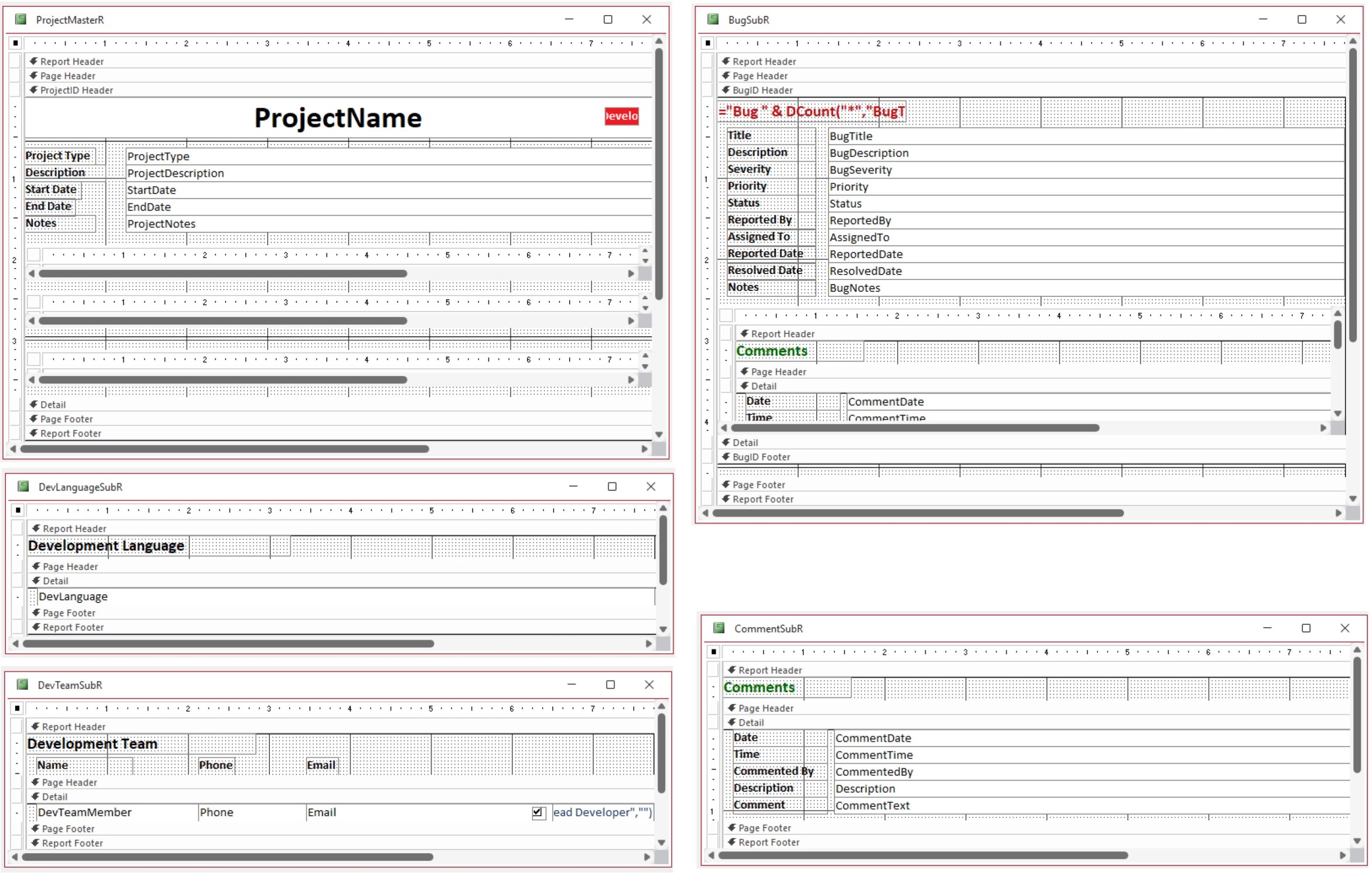
Here is one of my reports. I hope this gives you some ideas on how to set yours up.
This report consists of a Master Report which contains three Subreports.
One of the Subreports also contains its own Subreport.
Kevin Robertson  @Reply  
          
2 years ago

This thread is now CLOSED. If you wish to comment, start a NEW discussion in Access Forum.
 

Next Unseen

 
New Feature: Comment Live View


The following is a paid advertisement
Computer Learning Zone is not responsible for any content shown or offers made by these ads.
 

Learn
 
Access - index
Excel - index
Word - index
Windows - index
PowerPoint - index
Photoshop - index
Visual Basic - index
ASP - index
Seminars
More...
Customers
 
Login
My Account
My Courses
Lost Password
Memberships
Student Databases
Change Email
Info
 
Latest News
New Releases
User Forums
Topic Glossary
Tips & Tricks
Search The Site
Code Vault
Collapse Menus
Help
 
Customer Support
Web Site Tour
FAQs
TechHelp
Consulting Services
About
 
Background
Testimonials
Jobs
Affiliate Program
Richard Rost
Free Lessons
Mailing List
PCResale.NET
Order
 
Video Tutorials
Handbooks
Memberships
Learning Connection
Idiot's Guide to Excel
Volume Discounts
Payment Info
Shipping
Terms of Sale
Contact
 
Contact Info
Support Policy
Mailing Address
Phone Number
Fax Number
Course Survey
Email Richard
[email protected]
Blog RSS Feed    YouTube Channel

LinkedIn
Copyright 2026 by Computer Learning Zone, Amicron, and Richard Rost. All Rights Reserved. Current Time: 8/8/2026 12:26:46 PM. PLT: 1s