Free Lessons
Courses
Seminars
TechHelp
Fast Tips
Templates
Topic Index
Forum
ABCD
 
Home   Courses   TechHelp   Forums   Help   Contact   Merch   Join   Order   Logon  
 
Back to Access Developer Forum    Comments List
Upload Images   @Reply   Bookmark    Link   Email   Next Unseen 
Date format Issue for UK users
Abraham Breuer 
     
2 years ago
When working with dates in MS Access, especially when searching between dates, you might encounter an issue where using the # sign causes the dates to revert to the USA format (mm/dd/yyyy), regardless of your regional settings or date format preferences. This can lead to incorrect results and considerable frustration.

I ran into this exact issue recently. Despite setting my regional settings to the UK format (dd/mm/yyyy) and using functions like `Format` and `DateValue` to ensure consistency, MS Access would revert to the USA format as soon as I used the # sign. This completely messed up my date searches and was driving me crazy.

After a lot of trial and error, I found a practical solution that avoids this problem by converting dates to numeric values, allowing you to search between them accurately and keep your preferred UK date format (dd/mm/yyyy).

With the ISO format, you might think you're safe with date formatting. However, as soon as you use the # sign, Access forces the date to revert to the USA mm/dd/yyyy format. This is incredibly frustrating because it ignores all the formatting functions you've applied, like `Format`, `DateValue`, or any other method you used to convert dates to your desired format. Access sees the # sign and reverts everything back to square one!

The real working solution is to convert dates to a long integer, which is the actual value stored behind the scenes in Access. Access doesn't inherently understand dates; it treats them as numbers. By converting the date to a numeric value, you can bypass the formatting issues entirely.

Be aware that you will need to have the date already converted before running a search query. The date must first be converted to a numeric value to enable accurate searching. You can either run a preliminary `DateToNumeric` query and then use those results for your search, or create a global function like I did:


Public Function DateToNumeric(D As Date) As Long

    DateToNumeric = CLng(D)

End Function


I hope this helps you as much as it helped me. Give it a try, and you'll see how smoothly it works!
Thomas Gonder  @Reply  
      
2 years ago
@Abraham Can you be more specific with examples of what error you are encountering?
I tried this in VBA, Access 2021, Build 16.0.17830.20056 64-bit.
Are you referring to query, SQL or VBA?
When you say revert to USA format, exactly where are you referring to?
If it's SQL, I wouldn't be surprised in that decimals have to be a "." and a "," will error.
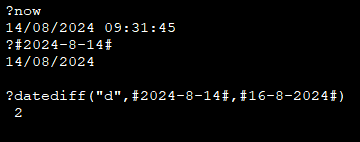
However, if you are talking about date formatting, I try to show everything in ISO date format, and haven't encountered a problem.
Thomas Gonder  @Reply  
      
2 years ago

Thomas Gonder  @Reply  
      
2 years ago

Thomas Gonder  @Reply  
      
2 years ago
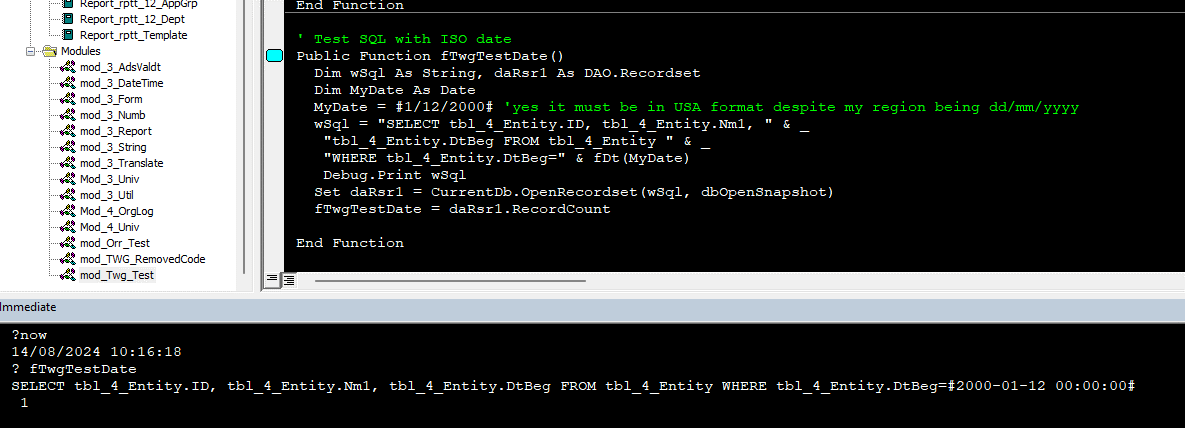
If it's this later situation you're talking about, I too have a function, mine converts dates to ISO format, and then I use that function in the VBA's SQL statement variable build. It's rare to hardcode a date into VBA. I'm not sure if this is the "correct" way, but after lots of testing, I found it worked.
Thomas Gonder  @Reply  
      
2 years ago

Abraham Breuer OP  @Reply  
     
2 years ago
Lets say you have a OwnerT
ComapnyT
OwnerComapnyT with the following Frields: ComapnyId, OwnerID, PercentOwned, ShareholdFrom, ShareholdEnd
ProfitT: which has the following: ProfitAmount, ProfitStartDate, ProfitEndDate

Try this with out my way and tell me if your computer is in the UK regioeon and access is in the uk Region to do this:

CompanyProfit: DSum("ProfitAmount","ProfitT","CompanyID=" & [CompanyOwnerT].[CompanyID] & " AND DateToNumeric(ProfitStartDate) >= " & DateToNumeric([ShareholdFrom]) & " AND DateToNumeric(TheProfitEndDate) <= " & DateToNumeric([ShareholdEnd])
Abraham Breuer OP  @Reply  
     
2 years ago
ignore my spelling mistakes

only DateToNumeric was the solution.
Kevin Robertson  @Reply  
          
2 years ago
Why not just use CLng directly?
DateToNumeric(MyDate) and CLng(MyDate) will give the same results.

The Format function has always worked for me, then when I switched to ISO I didn't have any problems with the date formats. The only problem is if the database is distributed to other people who may not use the ISO date format. So formatting the date is my preferred option in that case.
Alex Hedley  @Reply  
           
2 years ago
DLOOKUP has caused me issues with Dates and me being in the UK so many times.
Thomas Gonder  @Reply  
      
2 years ago
As a final note(s), I have one record with a DtBeg of 2000/1/12 and the time is 0:0:0. If I change the date in the Entity record to a time of 0:0:01, then the record won't be found in the VBA example above. Changing the variable MyDate to add 0:0:1 does a very interesting thing, try it (and if you don't want to try, the VBA Editor changes the date variable similar to how the Query Builder changes dates).

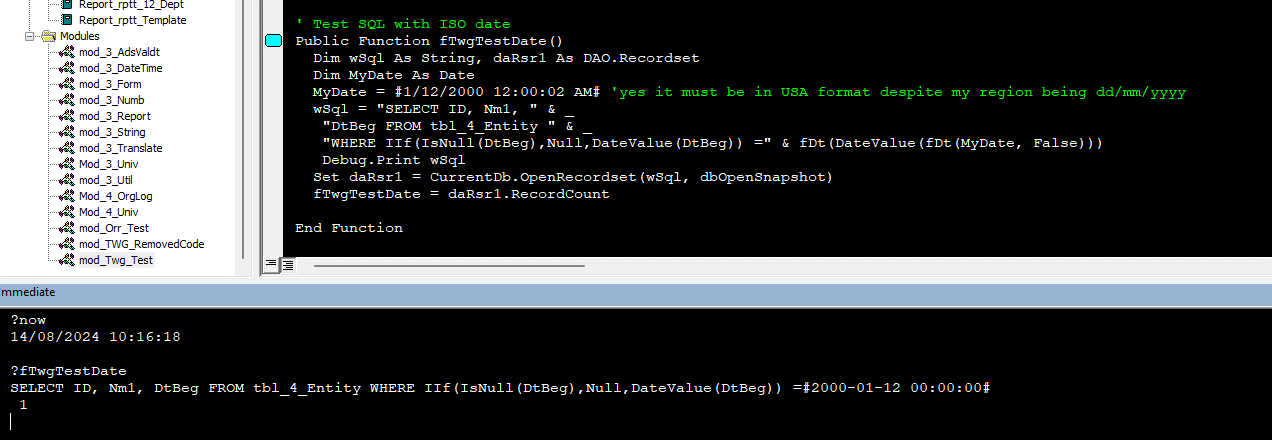
If you want to get all the records of a given date (or similar types of date manipulation), ignoring the time, then try the approach shown in the next image. The big problem with the DateValue() function is that it will fail when encountering a Null date. This in VBA is easy to overcome, but in queries and SQL, it fails when your query runs.

If you're talking about getting just the date in VBA code, check out this article (which ignores international date formatting problems):
https://nolongerset.com/removing-time-in-vba/
Thomas Gonder  @Reply  
      
2 years ago

Kevin Yip  @Reply  
     
2 years ago
Just use the month name in your date, and Access will always interpret it correctly: #28/Mar/2023#, #28-March-2023# #Mar-28-2023#.  

You CAN use British date format if it can be unequivocally and correctly be converted to a US date.  For instance, Access will always sees #28/3/2024# as 28th of March, 2024 because there is no 28th month on the calendar.

But if a date is #8/3/23#, then Access can only interpret it one way: August 3rd, 2023.  It will never see it as 8th of March, 2023.  That's because "8" and "3" can both be valid month number.

If a date is invalid, Access may even take it upon itself and "correct" it to a different date from what you intend.  For instance, if you write #29/02/01#, intending it to be 29th February, 2001, Access will not interpret "29" as the day because there was no 29th day in February of 2001.  Access will, in fact, interpret "29" as the YEAR in the ISO date format, because that is the only way that makes sense to Access.  So your date will be "corrected" to February 1st, 2029!

Conclusion: use month NAMES in your dates to avoid all the headaches above, and it won't matter if you put the month name in the middle or the left.
Abraham Breuer OP  @Reply  
     
2 years ago
As Alex Said, Domain Function will simply make problems, but i found that the problem triggred when wrapping them in # signs,

on the other hand Yes you can use Clng() but sometimes you will need to have the results first and then be able to do Dsum based on this.
Thomas Gonder  @Reply  
      
2 years ago
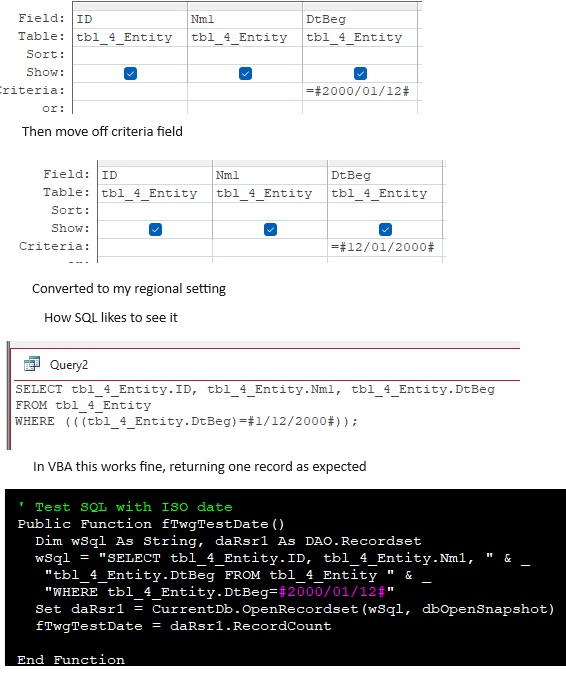
@Abraham I didn't understand your example given above. A simple question: If you use yyyy-mm-dd for the date, do you still get your problem when "wrapping" in the # sign? If so, can you show the actual line of code or an image?
Kevin Yip  @Reply  
     
2 years ago
Domain aggregate functions can use British dates with no problems if month names are used, as I said.  E.g.:

     Dlookup("OrderID", "OrderT", "Date=#28/Mar/2023#")
     Dlookup("OrderID", "OrderT", "Date=#28-March-2023#")
     Dlookup("OrderID", "OrderT", "Date=#March/28/2023#")
     Dlookup("OrderID", "OrderT", "Date=#Mar-28-2023#")
Thomas Gonder  @Reply  
      
2 years ago
Kevin Yes, I know, but Richard and I use ISO date formats. (That DLookup works good, if there is only one order every day, not that ISO dates would be any better.) Dates are rarely hard coded, so we need a way to convert a variable to a format that SQL can understand and process correctly. That's what my fDt() does. For me, ISO dates are easier on the eyes, and numerically easier to check when debugging, in highest to lowest value order (i.e. y/m/d).

This thread is now CLOSED. If you wish to comment, start a NEW discussion in Access Developer Forum.
 

Next Unseen

 
New Feature: Comment Live View


The following is a paid advertisement
Computer Learning Zone is not responsible for any content shown or offers made by these ads.
 

Learn
 
Access - index
Excel - index
Word - index
Windows - index
PowerPoint - index
Photoshop - index
Visual Basic - index
ASP - index
Seminars
More...
Customers
 
Login
My Account
My Courses
Lost Password
Memberships
Student Databases
Change Email
Info
 
Latest News
New Releases
User Forums
Topic Glossary
Tips & Tricks
Search The Site
Code Vault
Collapse Menus
Help
 
Customer Support
Web Site Tour
FAQs
TechHelp
Consulting Services
About
 
Background
Testimonials
Jobs
Affiliate Program
Richard Rost
Free Lessons
Mailing List
PCResale.NET
Order
 
Video Tutorials
Handbooks
Memberships
Learning Connection
Idiot's Guide to Excel
Volume Discounts
Payment Info
Shipping
Terms of Sale
Contact
 
Contact Info
Support Policy
Mailing Address
Phone Number
Fax Number
Course Survey
Email Richard
[email protected]
Blog RSS Feed    YouTube Channel

LinkedIn
Copyright 2026 by Computer Learning Zone, Amicron, and Richard Rost. All Rights Reserved. Current Time: 6/14/2026 9:48:58 PM. PLT: 1s