Please do more on custom ribbons. I really enjoyed this.
Sandra TruaxOP
@Reply 2 years ago
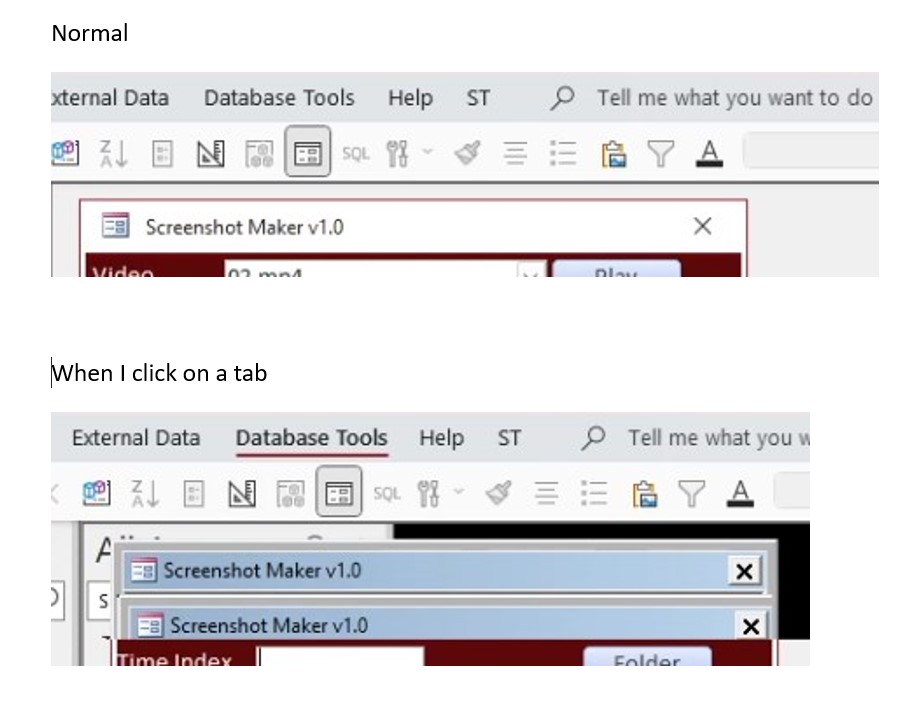
<< UPDATE >> Do not like at all! Whenever I click on any tab, I title bar on the open form flashes blue, then duplicates below it so that I have two title bars on the form, then the ribbon opens. Same thing when the ribbon closes. I have deleted the table. Didn't help. I used a backup from before I added the ribbons table, didn't help. I created a new database and brought in all the tables, forms, etc. Didn't help. I opened four other forms that I had not put the ribbons table in. They worked right. Opened both the forms I put the ribbons table in, and flashing title bars. I even used a back up from last week that worked perfect. Title bar flashes! Grrrr.
Sandra TruaxOP
@Reply 2 years ago
I opened four other databases, not forms. They work right. Just the two that I put the ribbons table in are messing up, and they would be the two of my most used databases. I don't understand how it can be messing up my backups.
Sandra TruaxOP
@Reply 2 years ago
Now it happens in ALL of my databases. Even the ones that I NEVER put the code in. According to ChatGPT:
The shadow effect you're seeing when you click on a tab is likely caused by the rendering delay of the custom ribbon in Access.
Unfortunately nothing ChatGPT suggested worked. I have removed the ribbons table from both databases, restarted the computer, and still get the shadow, even when there isn't a form loaded, I get a black shadow the width of my database when ANY tab is clicked. :(
There's two ways to add ribbons, one is to Access itself, the other is via the hidden table in a specific file.
Which one did you try?
Kevin Yip
@Reply 2 years ago
Try disabling the custom ribbon. Go to Access Options -> Current Database -> Ribbon Name, and delete the ribbon name (press the Delete key to make the box blank). Restart Access. To re-enable the custom name, go back there and choose the ribbon name again. I suspect either the XML code and/or the VBA code were written incorrectly, because those are the two places that control the custom ribbon.
Sami Shamma
@Reply 2 years ago
Tell you the truth, I never saw the need for custom ribbons. The standard ones are bad enough. I like to control everything from my menus.
Kevin Yip
@Reply 2 years ago
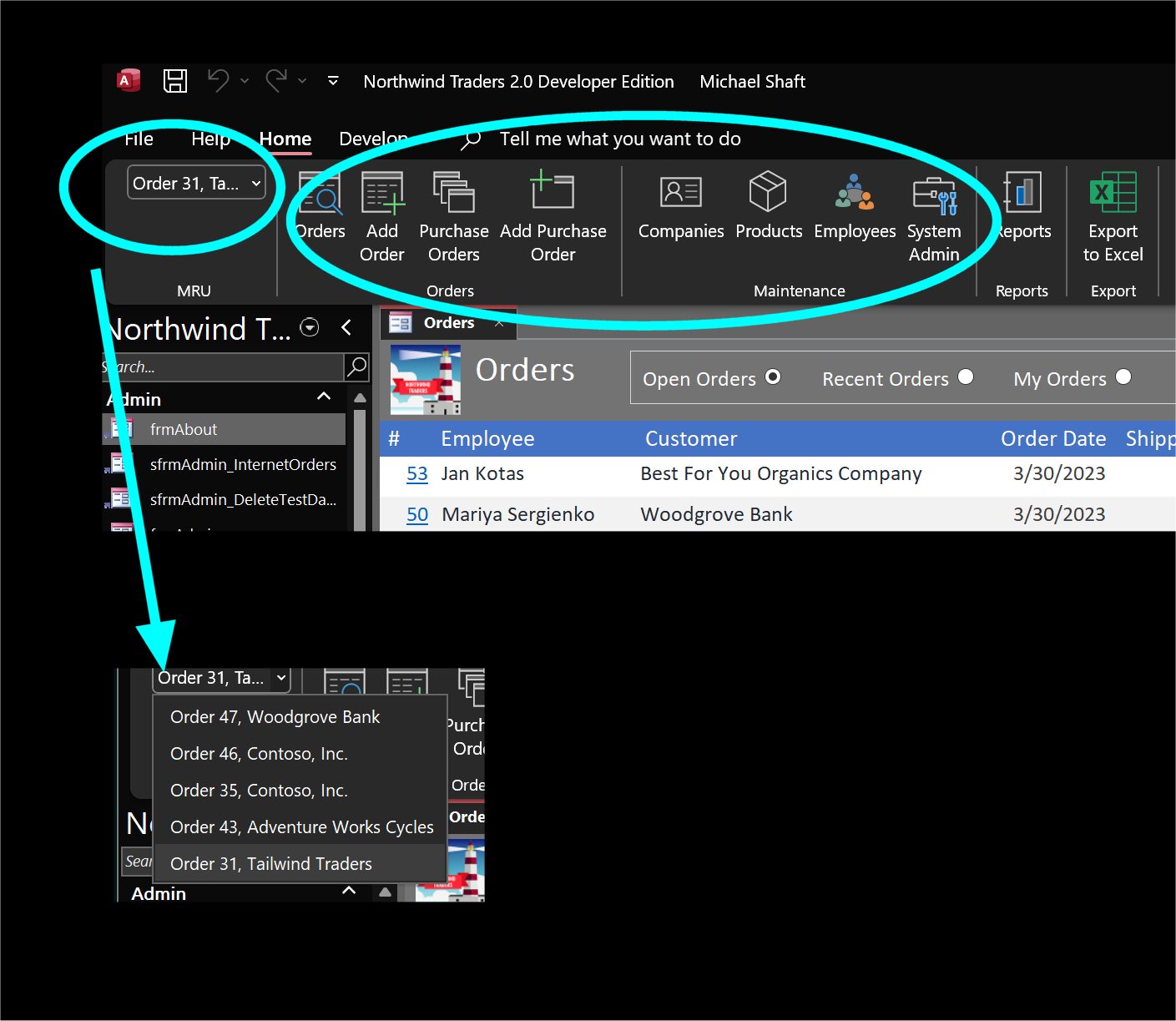
The Northwind developer edition database has a sample ribbon with all custom buttons and even a most recently used (MRU) list (picture below). It's fascinating coding to study even if you don't use it.
Kevin Yip
@Reply 2 years ago
Sandra TruaxOP
@Reply 2 years ago
Thanks everyone.
Alex - I followed Developer 44 and made a USysRibbons table. I liked the tab because it has all the links I use in one place instead of having to hunt for them, but shadow flash is driving me nuts.
Sami - You have a menu that you use to select Create a Table / Create a Module / Condition Formatting / Add Exiting Fields / etc.?
Kevin - I deleted it out of Ribbon Name > restarted the database, and then the computer, didn't fix it > deleted the table that I created and restarted both the database and computer > didn't help.
Kevin Yip
@Reply 2 years ago
Hi Sandra, show us some screenshots of what you are seeing, that you think are glitches.
Sami Shamma
@Reply 2 years ago
No Sandra, I use the ribbon when developing. My users don't
Sandra TruaxOP
@Reply 2 years ago
Sandra TruaxOP
@Reply 2 years ago
I flashes on, and there seems to be a small delay in the ribbon actually opening, and then the caption on the form is normal again.
Richard, yep. When restarting windows didn't work, I updated Access (which it did have an update), and then tried everything again. I guess in the scheme of life, it ain't but a thang. Kinda like nails on a chalkboard. :)
Sorry, only students may add comments.
Click here for more
information on how you can set up an account.
If you are a Visitor, go ahead and post your reply as a
new comment, and we'll move it here for you
once it's approved. Be sure to use the same name and email address.
This thread is now CLOSED. If you wish to comment, start a NEW discussion in
Access Developer 44.