Free Lessons
Courses
Seminars
TechHelp
Fast Tips
Templates
Topic Index
Forum
ABCD
 
Home   Courses   TechHelp   Help   Contact   Merch   Join   Order   Logon   Forums   
 
Back to Access Forum    Comments List
Upload Images   @Reply   Bookmark    Link   Email   Next Unseen 
Date entries
Mark Budinger 
     
2 years ago
I have a date field in a table. Is it possible to write the date as 08272024 instead of having to type it as 8/27/2024 or 8/7/24? I use the Format as mmddyyyy to display the date as I want.

Regards,
Mark
Adam Schwanz  @Reply  
           
2 years ago
I know I've done something similar with the after update event in the past, I think I had to make the date or time field a short text field though. It would just automatically add the "/" at the correct character place.
Kevin Robertson  @Reply  
          
2 years ago
Adam I did something similar to that in VB.NET. I had a keypad to enter the digits for date and time. My code would enter the "/", space and ":" in the correct places. Obviously the date/time have to be in a uniform format.
Mark Budinger OP  @Reply  
     
2 years ago
How would i set up the Update query to change the date from 8/27/2024 to 08272024
John Davy  @Reply  
         
2 years ago
Hi Mark
Take a look at Richards video https://599cd.com/blog/display-article.asp?ID=2766 on Type Conversions. I think it will help.

John
Thomas Gonder  @Reply  
      
2 years ago
Hi Mark, are you open to a suggestion? My newer applications are more regionally oriented, as I want to sell outside the USA.
Generically, you can't enter a date as you want in your OP without writing code for the form.
I've spent many days writing such code for ISO dates, so one can enter "." or "," for the start of today (0:0:0) or "-" for the time right now, or "*" for the last second of the day. I have a lot of calculation type entries on which I'll soon be making a video for the ADS.

Other than today, I allow for the entry of dates not based on today in the format YYYY.MM.DD. HH:MM:SS. Everyone can understand that and there isn't any ambiguity. And of course, one can do MM/DD/YYYY as in the USA.
Mark Budinger OP  @Reply  
     
2 years ago
Our Lot Numbers in most of our tables is set to Date/Time since our Lot Numbers are assigned by dates. On the forms I set the Format to mmddyyyy. Now I have a new table that the Lot Number field is set to Short text so my foreman can enter the lot number as 08272024 and not have to type 8/27/2004 or click the calendar icon that appears for that Date field.

The form I use to add to this table adds the Lot Number to the table as 8/27/2024.  I use an Append Query to add my information to the new table. I have tried using the Left, Mid and Right but it ends up leaving the / in the results and doesn't give me a zero at first character.  Is there something else I can do with an Update Query that will correct this?
Richard Rost  @Reply  
          
2 years ago
Of course the best solution is to switch to ISO Date Format.

If the data is stored in a Date field, you can DISPLAY it however you want with a FORMAT, and INPUT it however you want with an INPUT MASK.

Format
Input Mask
Thomas Gonder  @Reply  
      
2 years ago

Thomas Gonder  @Reply  
      
2 years ago
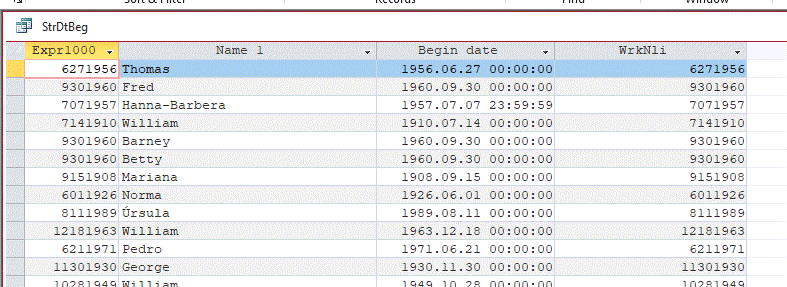
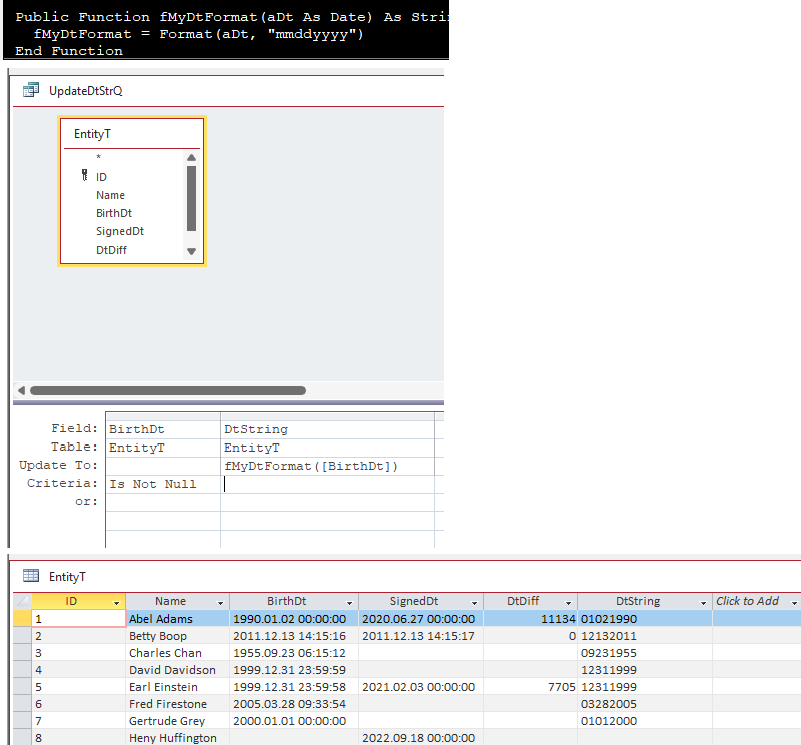
Unfortunately, in my test with a query, the same format in a query drops the leading zero for Jan-Sep.
So, we have to get tricky. And unfortunately, many functions don't work at all in Update Queries.
Maybe even resorting to VBA to get 'er done.
Thomas Gonder  @Reply  
      
2 years ago

Thomas Gonder  @Reply  
      
2 years ago

Mark Budinger OP  @Reply  
     
2 years ago
Hi Richard,

Input mask and Format took care of my issue for the time being. Hopefully by the end of the year our company database will be set to ISO Date Format.  Thanks for the suggestion.

Thomas,
I am always open to suggestions.
Thomas Gonder  @Reply  
      
2 years ago
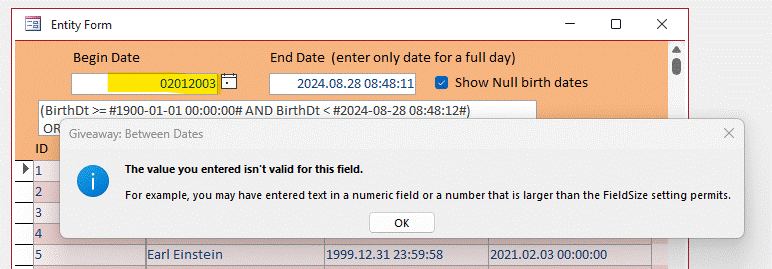
@Mark I'm curious how masking or formatting solved your two problems:
1. Entering without the "/" (It doesn't work on my version of Access for a date entry that is bound)
2. In an update query, as I showed above, simple formatting dropped the leading "0" that you wanted.
Inquiring minds want to know.
Thomas Gonder  @Reply  
      
2 years ago

Richard Rost  @Reply  
          
2 years ago
One of the tricks I sometimes play is the use a text field for data entry and display, and then store the actual value in a hidden field behind the scenes. That way you can control what the user can enter, verify it yourself, store it in a proper date (or currency or whatever) field for internal purposes, and still display it however you want.

It's how I let people type in Excel-like calculations in Account Balances. You can type in:

200-50-25+100

And the VAL function will figure everything out after you submit it, store the proper value in a hidden Currency field, and then display that value in the same text field. You can do the same thing with dates. The user can type in:

01311990

And you can parse it out behind the scenes, store it in an actual date field, and display it however you want.
Richard Rost  @Reply  
          
2 years ago
The user only ever sees and interacts with your text field, and you control the input and the display... we control the horizontal and the vertical...
Thomas Gonder  @Reply  
      
2 years ago
A funny thing I learned today, while testing Mark's question, is how the unbound fields work. There doesn't seem to be a way to specify what kind of unbound field you want in the properties during form design. At least I haven't found it. That's always bugged me.

But if I put a Format (Format tab) in of "yyyy\.mm\.dd hh:nn:ss", magically Access started validating it as a date entry.  The help says the field is for "Format for printing and printing numbers, dates, times and text".  Nothing about entry.
Thomas Gonder  @Reply  
      
2 years ago
Richard, I found a little trick using the regular entry field control for dates. If someone enters "2024.8.28", Access will throw an error for the bound field (or unbound with formatting as described above). I then trap the error, and call a routine to do the parsing you mentioned. I convert it into a format that Access would expect for the table's field, and the entry goes on its merry way.

So for example, if my Now = "2024-08-28 0:0:0" then an entry of "-1.+2.+3 +4.+5.+6 would return as display "2023.10.30 04:05:06".
Richard Rost  @Reply  
          
2 years ago
Nice. Elegant.
Mark Budinger OP  @Reply  
     
2 years ago
Thomas,  
     I used Input Mask: ##/##/#### and Format: mmddyyyy on the form. I changed the Field from a short text to a Date/Time on the table. My Foreman tested it today and was happy that he was still able to just type 08282024. Since our Lot Numbers are dates, I am ok with the date being stored in the LotNumber field of the table as 8/28/2024 and not 08242024.
Thomas Gonder  @Reply  
      
2 years ago
@ Mark Just so you know, what is stored inside Access tables for a date field is NOT a date as we are used to seeing it. It's a Double or eight-byte floating-point number.

In the immediate window you can see this by typing:
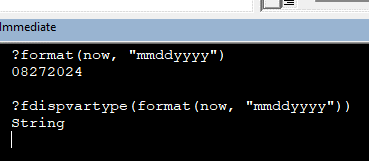
?cdbl(now)
Access can format that Double in a variety of ways via the Format (except it fails in an Update Query as we showed earlier).

Since the short text and the Double are both 8 bytes, it has no field size impact.
I'm wondering why you just didn't make the Lot Number a Short Text field?
How does your foreman get around the Input Mask requiring a "/"?
What happens if you ever have more than one lot in a day? I'm guessing you will rue using a "date".
Why isn't there a Lot table, as I'm guessing there is a lot more information that goes into a lot other than just the date of production? (But maybe that's on paper somewhere and doesn't need to be in Access.)
Mark Budinger OP  @Reply  
     
2 years ago
Thomas,

We are a small machine shop. I head the IT and QC Department and in charge of inspecting all parts made. I only introduced lot numbers to our database a couple of years ago. I got tired of my room filled with misc parts and then having to go through all the records to find where they belonged. The "Lot Number" actually comes from a field in another tabled called "JOB_DATE" which is a Date/Time Field. Once we get an order from the customer, my foreman will then open a new job, and the date that he opened the job now becomes the lot number as well. So now we track the Part number and it's lot number. Different parts that we make can have the same lot number.  Our database needs a lot of work done to it. We tried a company to help us with it and they charged way too much and did nothing that we asked for. I took it upon myself to learn access all thanks to Richard and his videos. I am basically rigging the database to work the way everyone wants it.


Mark Budinger OP  @Reply  
     
2 years ago
Thomas,

Our inventory control is a nightmare, it takes 4 queries to update it. Database is from 1999.

"How does your foreman get around the Input Mask requiring a "/"?"

When my foreman enters a new record and it gets the the Lot Number field, all he has to do is just type 08302024, once he tabs out the (Format: mmddyyyy) changed it to 08302024.  The "/" does show up when he is typing the lot number. My foreman is "Old School" doesn't like change, so I am tasked to make things as simple as possible for the higher ups.
Thomas Gonder  @Reply  
      
2 years ago
I get they don't like change Mark. Especially in an old-school machine shop.
Most job shop production (as opposed to continuous flow and batch production) software that I've seen uses a part #, manufactured date and possibly serial number for the product. For the job there is a job number (like an order number, more than one in a day), order date, completion date, ship/delivery date, etc. I would consider a label that prints the job number, part number and serial number to put on the part/bag/box and give that to the foreman, along with the order sheet, when he starts his part. Assuming that all doesn't begin with the foreman.

The only time I've seen "lot number" used is in continuous flow (with temporary stops for chemical change) or batch production, and there are hundreds or thousands of individual items in a "lot". For the lot, things like date, time, operator and even ingredients can be stored.

Anyways, thanks for answering my questions, I'm always curious about workarounds and how software can be better designed.

This thread is now CLOSED. If you wish to comment, start a NEW discussion in Access Forum.
 

Next Unseen

 
New Feature: Comment Live View


The following is a paid advertisement
Computer Learning Zone is not responsible for any content shown or offers made by these ads.
 

Learn
 
Access - index
Excel - index
Word - index
Windows - index
PowerPoint - index
Photoshop - index
Visual Basic - index
ASP - index
Seminars
More...
Customers
 
Login
My Account
My Courses
Lost Password
Memberships
Student Databases
Change Email
Info
 
Latest News
New Releases
User Forums
Topic Glossary
Tips & Tricks
Search The Site
Code Vault
Collapse Menus
Help
 
Customer Support
Web Site Tour
FAQs
TechHelp
Consulting Services
About
 
Background
Testimonials
Jobs
Affiliate Program
Richard Rost
Free Lessons
Mailing List
PCResale.NET
Order
 
Video Tutorials
Handbooks
Memberships
Learning Connection
Idiot's Guide to Excel
Volume Discounts
Payment Info
Shipping
Terms of Sale
Contact
 
Contact Info
Support Policy
Mailing Address
Phone Number
Fax Number
Course Survey
Email Richard
[email protected]
Blog RSS Feed    YouTube Channel

LinkedIn
Copyright 2026 by Computer Learning Zone, Amicron, and Richard Rost. All Rights Reserved. Current Time: 7/31/2026 11:09:07 PM. PLT: 1s