Free Lessons
Courses
Seminars
TechHelp
Fast Tips
Templates
Topic Index
Forum
ABCD
 
Home   Courses   TechHelp   Forums   Help   Contact   Merch   Join   Order   Logon  
 
Back to Access Forum    Comments List
Upload Images   @Reply   Bookmark    Link   Email   Next Unseen 
Archive Junction
Samantha Waterman 
     
2 years ago
Good Morning!

I just have a question about archiving that I'm hoping has a simple answer! And unfortunately, I'm sure a lot of the answers I need are in all the beginner, expert and developer lessons, I just don't have access to them (pardon the pun) - but anyway, I watched the Event Enrollment video and I have a TrainingXEmployee junction table.

Have also watched the Archive Records video and have been able to archive all the necessary table information I need to for my database, including my Event Table.

However, the junction table does not have a date so I don't know how to include it in the archive (it's only linked to the EventT by the EventID) - so when I practiced archiving, everything reset like it needed to but when I tried more sample data, the New event I created linked all the employees I had from the Old event into this one. So, is there a way to also archive my junction table without having to put a date in it or even just erasing it?

Hopefully all of that makes sense! And thank you!! Help and even just insight and perspective is always much appreciated!
Adam Schwanz  @Reply  
           
2 years ago
Use a loop/recordset, loop through the event table when your archiving the event table, find the eventID, delete from the junction table while you have the eventID. It's a bit more complicated.
Adam Schwanz  @Reply  
           
2 years ago
Something like this,

Dim RS
Set RS=Currentdb.openrecordset("Select * From EventT where DateField<#" & 1/1/2000 & "#")
While not rs.eof
'Your archiving code stuff, something like this would delete the records
Currentdb.execute "Delete * From JunctionT Where EventID=" & RS!EventID
rs.movenext
wend
rs.close
set rs=nothing


Then delete/archive the event table after this code
Samantha Waterman OP  @Reply  
     
2 years ago
Thank you Adam! I haven't tried Loops yet, but I will investigate and learn what I can to try and get this to work! I really appreciate it!
Adam Schwanz  @Reply  
           
2 years ago
Here's a few videos for you, my example is a recordset
Recordsets

Then there are lots of loops, heres a few
Do Until Loop
Do While Loop
For Each Loop
For Next Loop
Nested Loops
While Wend Loop
Sami Shamma  @Reply  
             
2 years ago
Adam
Excellent advice as usual.
Samantha Waterman OP  @Reply  
     
2 years ago
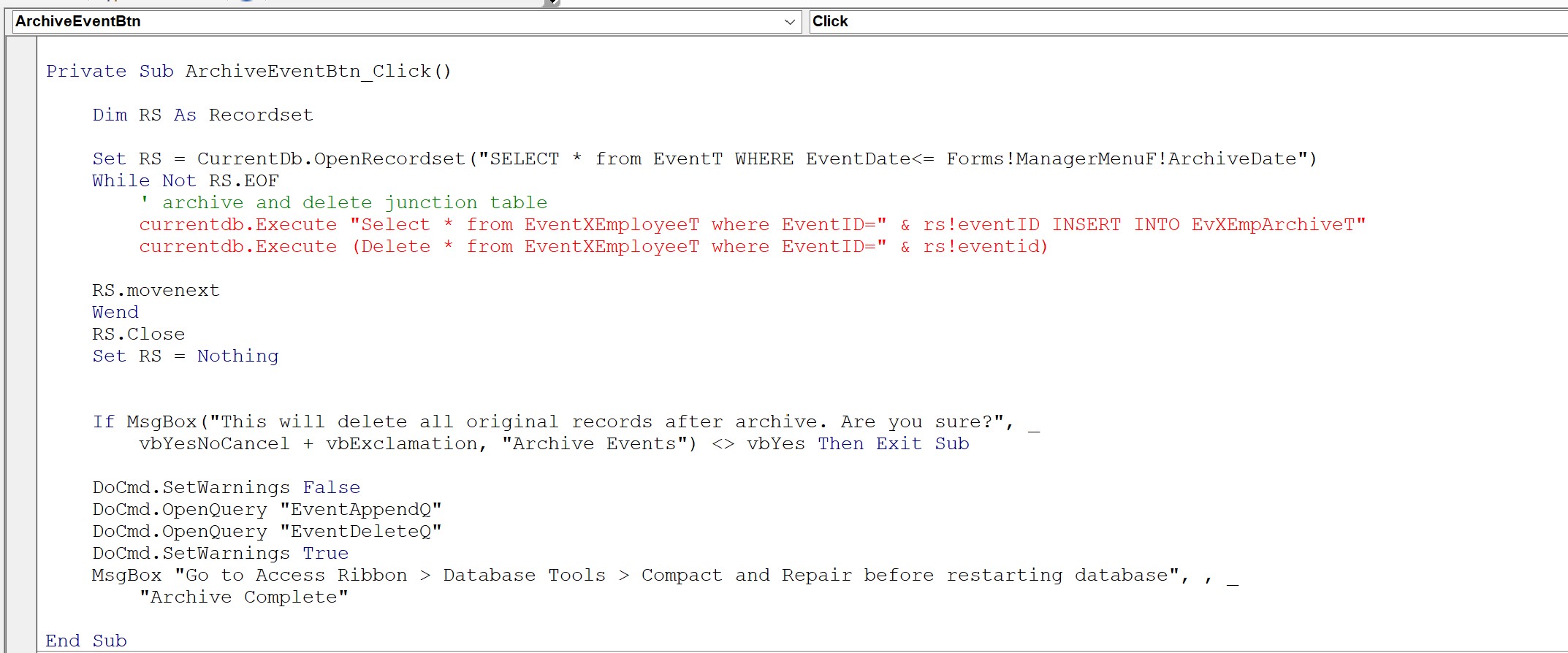
Ok, apologies right off the bat - - image below (or above, not sure how these posts line up, sorry!) is my first attempt at trying to see if I understand all of this! I think I'm taking your sample code too literally - the "DateField" I need is my ArchiveDate from the videos so I attempted to add it that way to get the recordset I need. And then I realized that I have no idea how to write any SQL so I tried to take what I could from my AppendQ and then go back to your Delete code and I feel like what you're seeing is just a big mess!! I'm think I understand what your code is saying though - you want me to make a recordset of my Events and then loop through my Junction Table to get the IDs that match the Events, correct?

But after that is where I'm unsure of how to copy them to my Junction Archive Table and then delete - but then you're saying after all that, continue with the regular archive of my Event Table? Apologies, I think I'm still confused and making this harder than it needs to be!
Samantha Waterman OP  @Reply  
     
2 years ago

Sami Shamma  @Reply  
             
2 years ago
Samantha
let's start with the error you are getting in the code.
your SQL statement is clearly not correct. What I have learned from Richard is always define a string variable call it "SQL" put the select statement in the SQL variable. then just message box it. Example:

Dim SQL as string

SQL = "SLECT * FROM EventXEmployeeT WHERE EventID = " & RS!EventID & " INSERT INTO EvXempArchiveT"

Msgbox SQL

CurrentDB.Execute SQL

This will show you where your syntax is wrong.
Kevin Robertson  @Reply  
          
2 years ago
Syntax to insert records in to a table:
    INSERT INTO table_name (field1, field2, field3, ...)
    VALUES (value1, value2, value3, ...)


Since you are in a Recordset you could use the rs.AddNew method:
    rs.AddNew
        '
        '
        '
    rs.Update


Delete statement: remove parentheses
Samantha Waterman OP  @Reply  
     
2 years ago
Thank you so much Sami and Kevin!
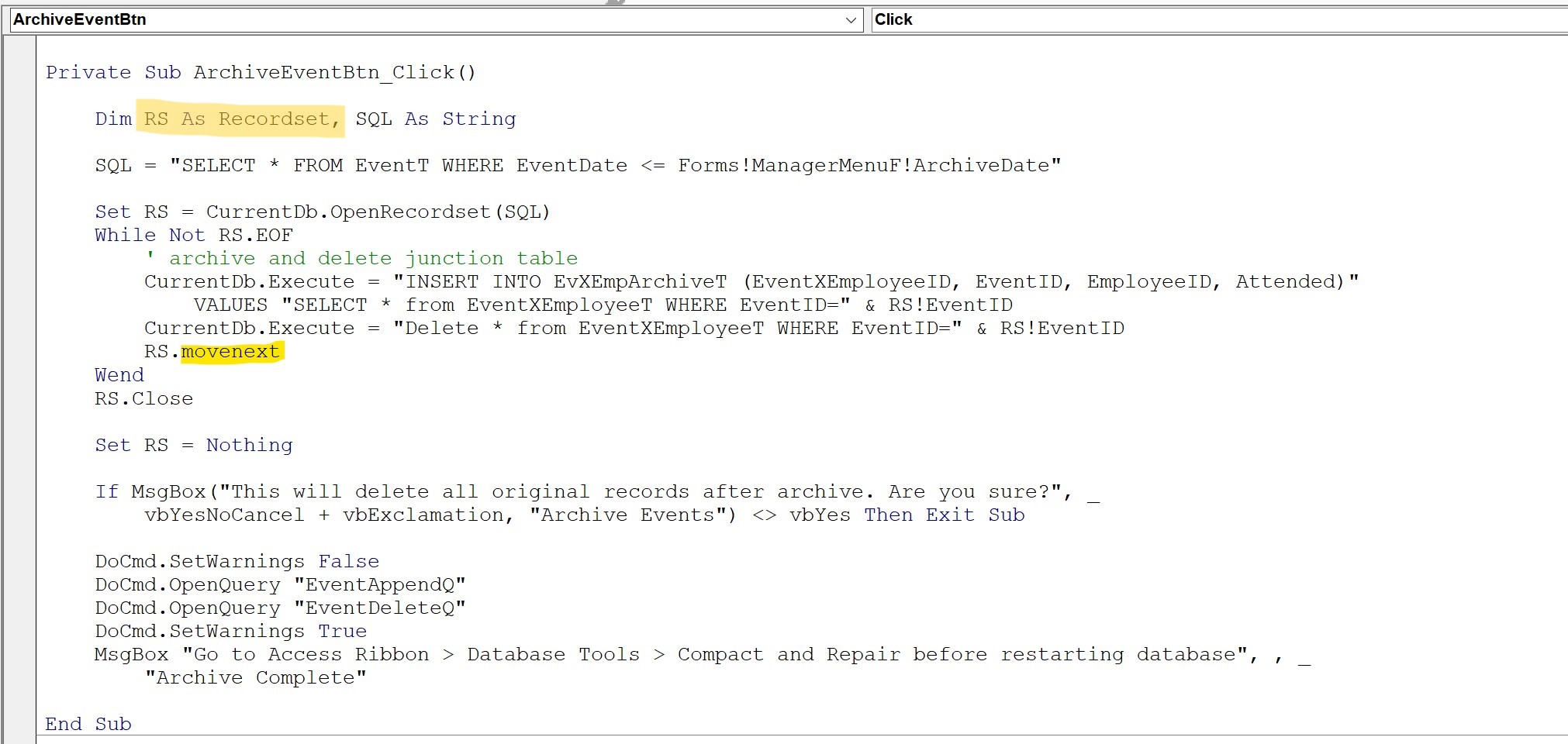
I've done what I could to incorporate both of your suggestions and I feel like I've almost got it - - I've corrected the syntax, I believe, but now it's telling me that my recordset is not defined whenever I debug/compile this code! It gives me this compile error:

user-defined type not defined

I feel like I'm still missing something - is it possible I'm not creating this recordset correctly? I do already have an append and delete query for my events so they can be archived, should I be making my recordset from my junction table instead? Apologies if I'm being confusing in trying to explain this!
Samantha Waterman OP  @Reply  
     
2 years ago

Sami Shamma  @Reply  
             
2 years ago

Kevin Robertson  @Reply  
          
2 years ago
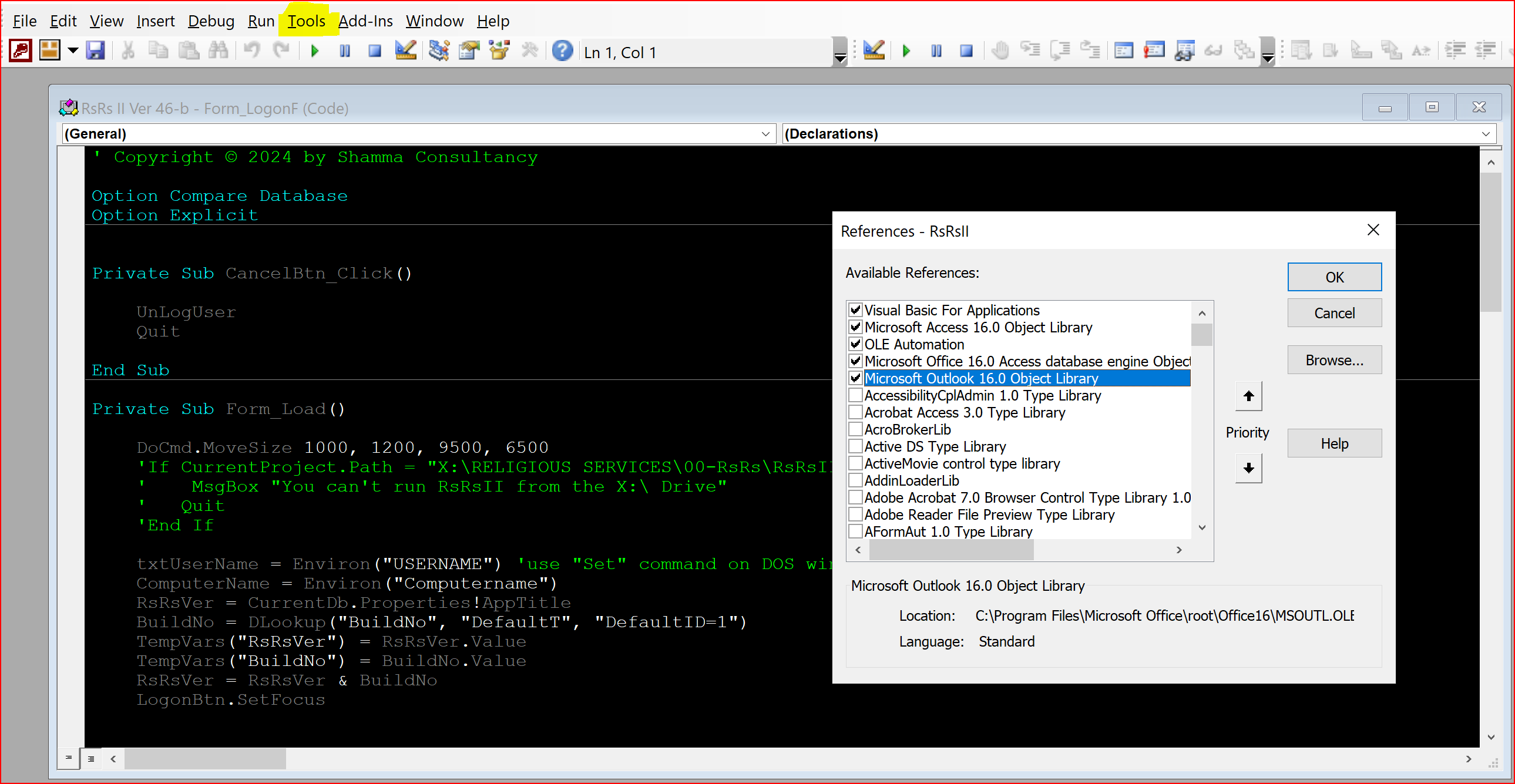
Check your References.

See this thread for details.
Kevin Robertson  @Reply  
          
2 years ago
Beat me again Sami :)
Sami Shamma  @Reply  
             
2 years ago
make sure your Microsoft Office 16.0 Access database objects is loaded.
go to Tools-->Options
Sami Shamma  @Reply  
             
2 years ago
once in a blue moon @Kevin
Samantha Waterman OP  @Reply  
     
2 years ago
Thank you again guys! I truly appreciate all of this help!
I turned on the Objects Library as suggested and it got rid of THAT compile error - - however now it gives me another compile error:

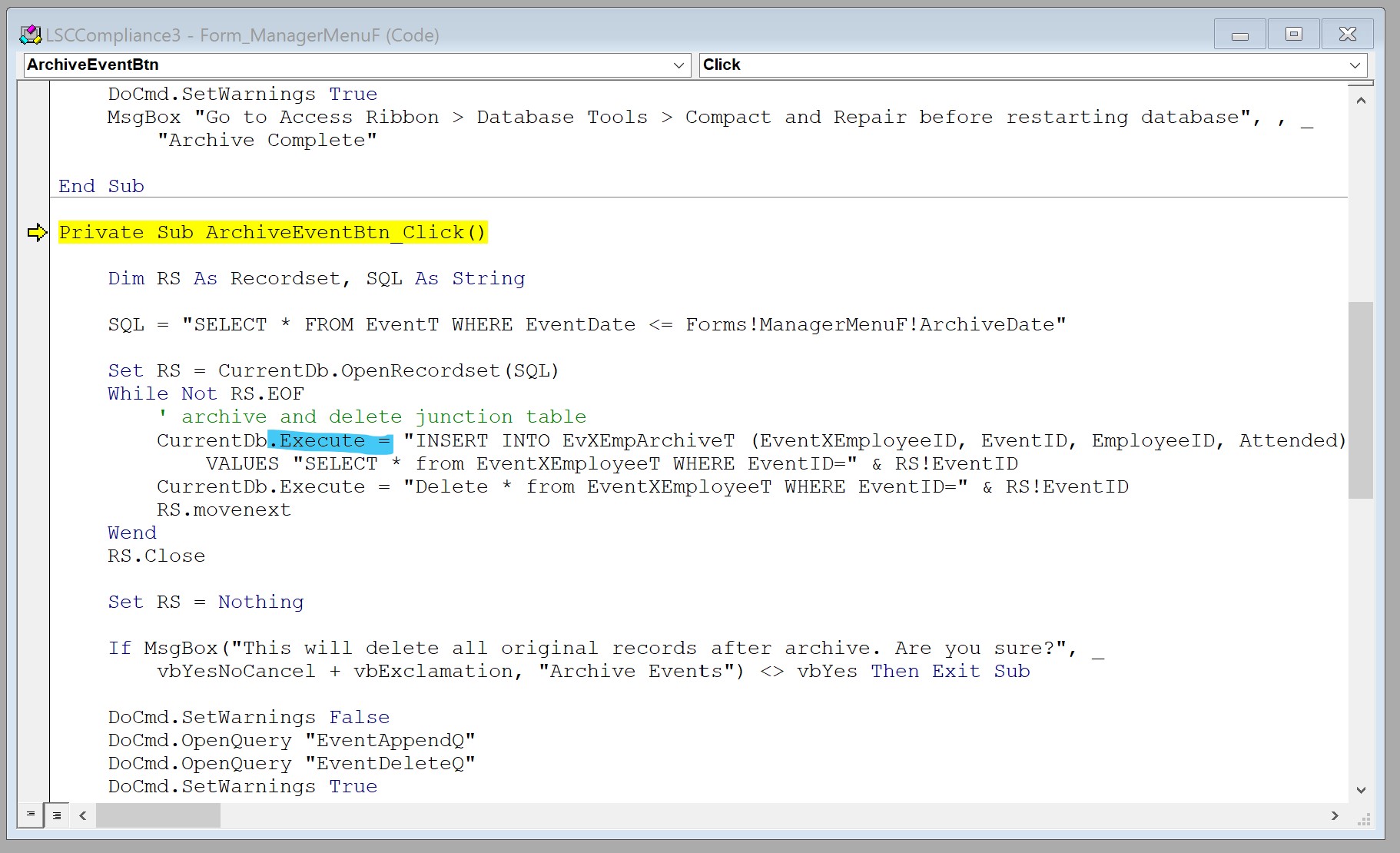
Argument not optional

Below is the screenshot I took of what that error highlighted - - I have a feeling that I possibly started that code incorrectly? But with my limited knowledge, I'm unsure of how to correct it! Again though, all of the help you guys have already given me is greatly appreciated!!
Samantha Waterman OP  @Reply  
     
2 years ago

Kevin Robertson  @Reply  
          
2 years ago
Remove the Equals sign.
Samantha Waterman OP  @Reply  
     
2 years ago
Thank you Kevin!

That fixed all the compile errors - - but now I get a runtime error:

Runtime Error 3061 - too few parameters: expected 1

and when I debug, it highlights:

Set RS = CurrentDb.OpenRecordset (SQL)

I tried researching and troubleshooting but no matter what I try I still get this runtime error, am I trying to open the wrong recordset to begin with? Should I be trying to open my junction table where it matches my Event's Append Query? Apologies if I'm making this harder than it needs to be!
Sami Shamma  @Reply  
             
2 years ago
SQL = " SELECT * FROM EventT WHERE EventDate <= " & Forms!.......
Sami Shamma  @Reply  
             
2 years ago
msgbox SQL to see what is sent to the Execute command
Kevin Robertson  @Reply  
          
2 years ago
Dates need to be enclosed in #.
Also, concatenate the Form Field name instead of including it in the String.
Since ArchiveDate is on the current Form you don't need the Full Forms!FormName!FieldName syntax.

Replace the line with:

    SQL = "SELECT * FROM EventT WHERE EventDate<=#" & ArchiveDate & "#"

This thread is now CLOSED. If you wish to comment, start a NEW discussion in Access Forum.
 

Next Unseen

 
New Feature: Comment Live View


The following is a paid advertisement
Computer Learning Zone is not responsible for any content shown or offers made by these ads.
 

Learn
 
Access - index
Excel - index
Word - index
Windows - index
PowerPoint - index
Photoshop - index
Visual Basic - index
ASP - index
Seminars
More...
Customers
 
Login
My Account
My Courses
Lost Password
Memberships
Student Databases
Change Email
Info
 
Latest News
New Releases
User Forums
Topic Glossary
Tips & Tricks
Search The Site
Code Vault
Collapse Menus
Help
 
Customer Support
Web Site Tour
FAQs
TechHelp
Consulting Services
About
 
Background
Testimonials
Jobs
Affiliate Program
Richard Rost
Free Lessons
Mailing List
PCResale.NET
Order
 
Video Tutorials
Handbooks
Memberships
Learning Connection
Idiot's Guide to Excel
Volume Discounts
Payment Info
Shipping
Terms of Sale
Contact
 
Contact Info
Support Policy
Mailing Address
Phone Number
Fax Number
Course Survey
Email Richard
[email protected]
Blog RSS Feed    YouTube Channel

LinkedIn
Copyright 2026 by Computer Learning Zone, Amicron, and Richard Rost. All Rights Reserved. Current Time: 6/22/2026 2:22:34 PM. PLT: 1s