Free Lessons
Courses
Seminars
TechHelp
Fast Tips
Templates
Topic Index
Forum
ABCD
 
Home   Courses   TechHelp   Help   Contact   Merch   Join   Order   Logon   Forums   
 
Back to Access Forum    Comments List
Upload Images   @Reply   Bookmark    Link   Email   Next Unseen 
Access on SharePoint Question
John Arnett 
    
2 years ago
Hi All,  
I'm new to Access and have been building a DB for my department use for a few months and am ready to publish it out to the group.  I immediately ran into a lot of issues with other users being able to open the .accde file due to our network security so a suggestion was made to move the DB to our department SharePoint site. I watched the SharePoint Seminar, and it seemed easy enough, so I made a simple test DB to try it out.  The problem I am running into is when I move the two tables in the test DB to our SharePoint site, they end up in the general site contents and not the folder I made for them in the navigation pane on the left side. The actual database has 20 or so tables and I don't want them scattered in with the general site contents so how can I make them go in a folder to keep them together?  Any ideas or help would be greatly appreciated.  
John
John Campbell  @Reply  
     
2 years ago
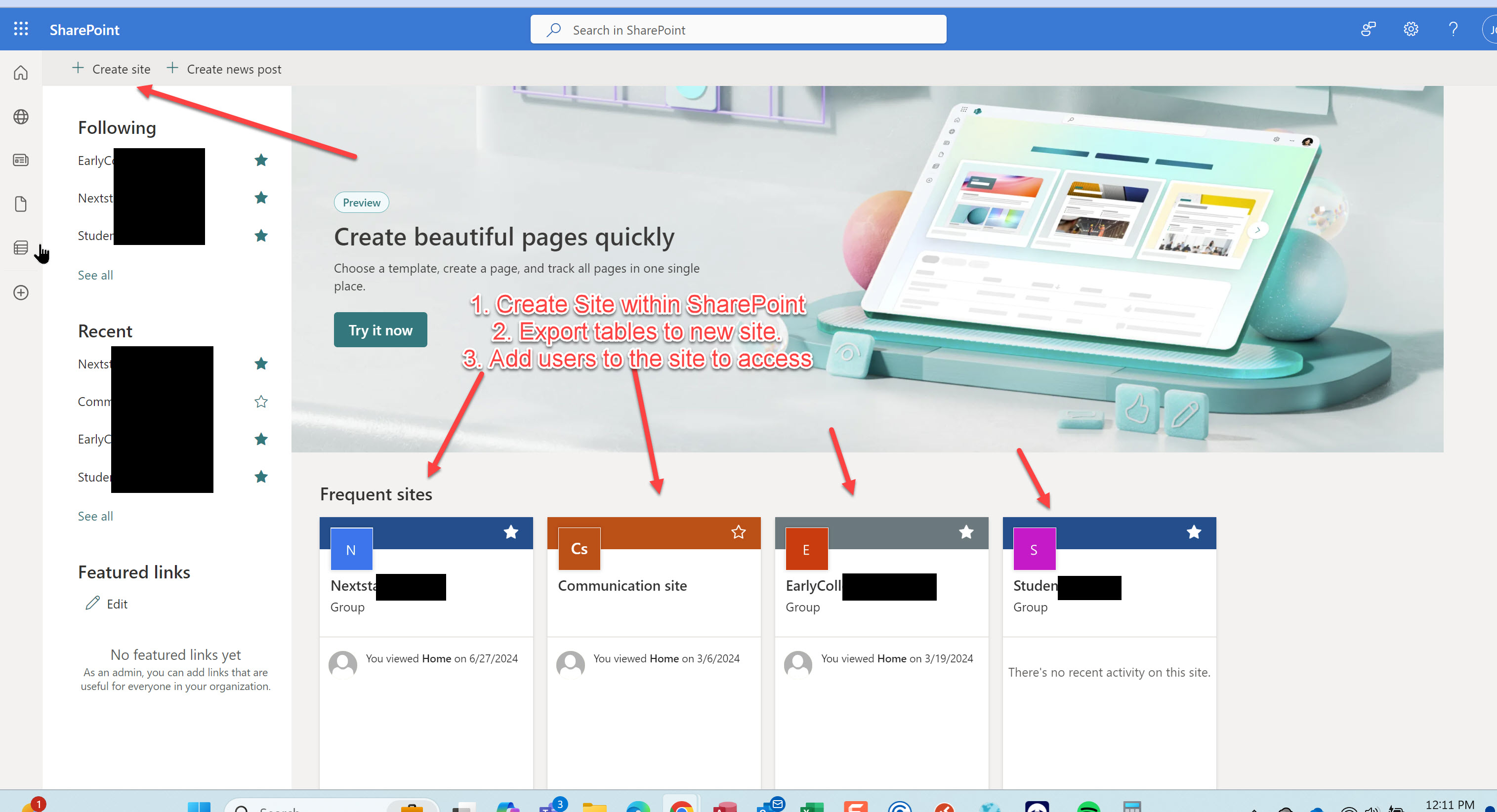
John, I have done a couple of SP site/databases and it is working for me.  The first thing you have to do is create the actual site on the SharePoint site itself.  See below example.  You then have to add the users you want to actually have access to this site and this is done on SP.

You then take your tables and export them to that site you created. Below, the "DatabaseMigrationArea" is the dumping ground on the SP site.  So then in Access, select table>Export>SharePoint List and then paste the below link/yours and then it should work.

https://CompanyName.sharepoint.com/sites/DatabaseMigrationArea
John Arnett OP  @Reply  
    
2 years ago
Thanks for replying John, I appreciate it.  My department already has an existing SP site so are you saying I need to create a whole new site in order to move the DB correctly?  I understand the process of moving the tables to SP but the problem I have is when moving them to the existing SP site, they end up as scattered files in the site contents.  If I have to create a completely new SP site for this to function correctly, please let me know.
Thanks,
John
John Campbell  @Reply  
     
2 years ago
Yes, That is correct.  I followed Richard's video, but it has been a while since I watched, it, but I think he says this in the video.  I will try and screen shot what I have done.
John Campbell  @Reply  
     
2 years ago

John Campbell  @Reply  
     
2 years ago
So you first have to create the site within your SharePoint environment as I noted above.  Then you have to add/invite users to the new site and you do this inside of Sharepoint.  It is usually the email address that the users are logging into office with.  Once you invite them, then they accept the invite.
John Arnett OP  @Reply  
    
2 years ago
Thanks John, I appreciate your clarifying or me.  Creating a new site is what I was afraid the answer would be as the company I work for is not going to allow me to do that just for a database used by a small department.  
Thanks again for your help!
John
John Campbell  @Reply  
     
2 years ago
That's too bad as a few security items would allow the invited users to only see that site on the global site itself.  I have a client that did this for me and I can only access the site I created within the whole company profile....  As long as the users have access to a shared network folder, then that would be the work around...

This thread is now CLOSED. If you wish to comment, start a NEW discussion in Access Forum.
 

Next Unseen

 
New Feature: Comment Live View


The following is a paid advertisement
Computer Learning Zone is not responsible for any content shown or offers made by these ads.
 

Learn
 
Access - index
Excel - index
Word - index
Windows - index
PowerPoint - index
Photoshop - index
Visual Basic - index
ASP - index
Seminars
More...
Customers
 
Login
My Account
My Courses
Lost Password
Memberships
Student Databases
Change Email
Info
 
Latest News
New Releases
User Forums
Topic Glossary
Tips & Tricks
Search The Site
Code Vault
Collapse Menus
Help
 
Customer Support
Web Site Tour
FAQs
TechHelp
Consulting Services
About
 
Background
Testimonials
Jobs
Affiliate Program
Richard Rost
Free Lessons
Mailing List
PCResale.NET
Order
 
Video Tutorials
Handbooks
Memberships
Learning Connection
Idiot's Guide to Excel
Volume Discounts
Payment Info
Shipping
Terms of Sale
Contact
 
Contact Info
Support Policy
Mailing Address
Phone Number
Fax Number
Course Survey
Email Richard
[email protected]
Blog RSS Feed    YouTube Channel

LinkedIn
Copyright 2026 by Computer Learning Zone, Amicron, and Richard Rost. All Rights Reserved. Current Time: 8/1/2026 4:06:16 AM. PLT: 1s