Free Lessons
Courses
Seminars
TechHelp
Fast Tips
Templates
Topic Index
Forum
ABCD
 
Home   Courses   TechHelp   Forums   Help   Contact   Merch   Join   Order   Logon  
 
Back to Access Developer Forum    Comments List
Upload Images   @Reply   Bookmark    Link   Email   Next Unseen 
ActiveControl.BackColor
Brent Rinehart 
        
2 years ago
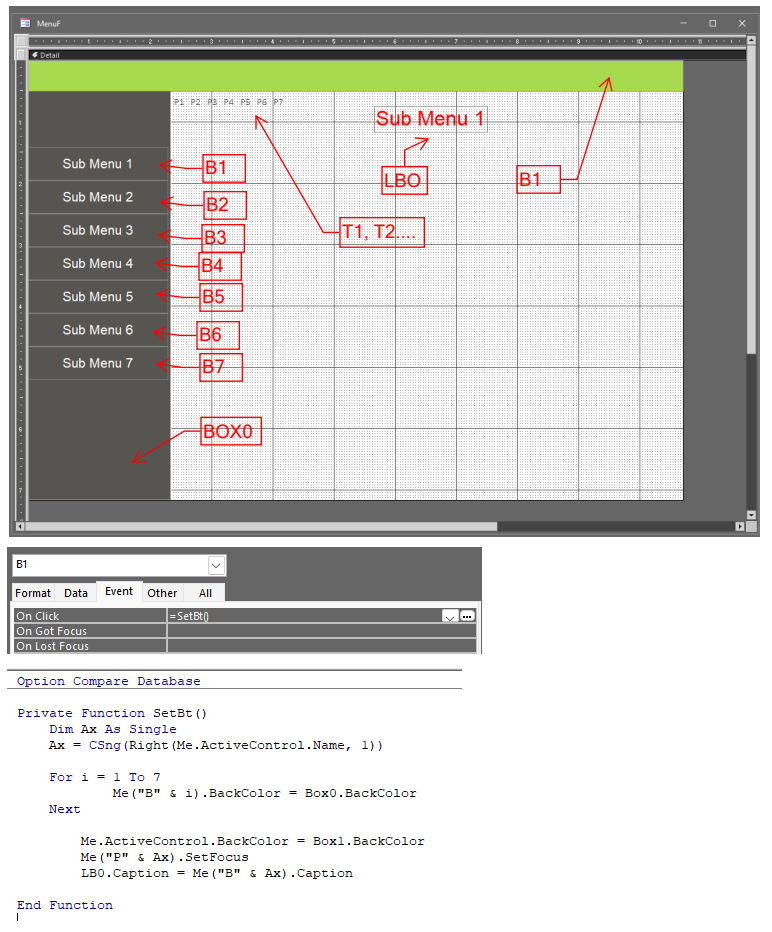
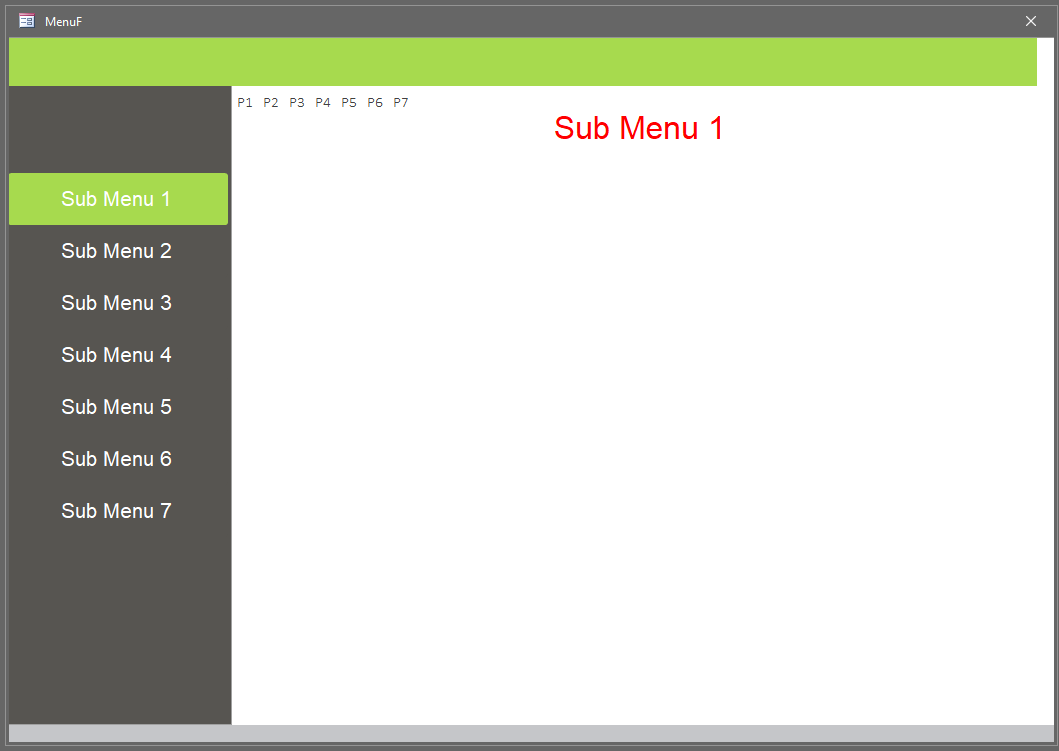
I am trying to create a menu with side buttons I found on youtube, it looks really nice and seems to be pretty simple, but for some reason it is not working, I tried version 2019 and version 2021 office thinking maybe there is a bug preventing the backcolor from changing. I am trying to get the buttons on the left to change to the green color shown on the top when you click on button on the left. but nothing changes. The buttons backcolor is set to transparent to begin with. Any help would be great.
Brent Rinehart OP  @Reply  
        
2 years ago

Richard Rost  @Reply  
          
2 years ago
What happens when you set the control's BackColor manually? B1.BackColor = vbGreen for example.
Sami Shamma  @Reply  
             
2 years ago
First, you have 2 (B1) the green box should be B0 according to your code.

If you are trying to change the back color of a Sub Menu, why don't you change the "Pressed Color" Value?
Kevin Robertson  @Reply  
          
2 years ago
You have set the BackStyle of the buttons to Transparent. You need to switch them back to Solid in your code.

    Dim i As Integer
    
    For i = 1 To 7
        Me("B" & i).BackStyle = 0   ' Transparent
        Me("B" & i).BackColor = Box0.BackColor
    Next
    
    Me.ActiveControl.BackStyle = 1  ' Solid
    Me.ActiveControl.BackColor = Box1.BackColor
    Me.ActiveControl.HoverColor = Box1.BackColor
    Me.ActiveControl.PressedColor = Box1.BackColor
Kevin Yip  @Reply  
     
2 years ago
There are THREE back color properties for a command button, and you need to choose to right one to set the value to:

HoverColor -- back color of button when your mouse is hovering over the button.
PressedColor -- back color of the button when you are clicking on the button with your mouse.
BackColor -- back color of the button when it is neither clicked on nor hovered on.

There are also the ForeColor, HoverForeColor, and PressedForeColor properties to set the colors of the text inside the button under those same conditions.
Brent Rinehart OP  @Reply  
        
2 years ago
Thank You guys for jumping in, looks like Kevin found my mistake I had the buttons back style all set to transparent once I set them to normal all the code worked. And Sami sorry for the Label B1 for the green box at the top I missed labeled that on the markup that should have been box1
Brent Rinehart OP  @Reply  
        
2 years ago

This thread is now CLOSED. If you wish to comment, start a NEW discussion in Access Developer Forum.
 

Next Unseen

 
New Feature: Comment Live View


The following is a paid advertisement
Computer Learning Zone is not responsible for any content shown or offers made by these ads.
 

Learn
 
Access - index
Excel - index
Word - index
Windows - index
PowerPoint - index
Photoshop - index
Visual Basic - index
ASP - index
Seminars
More...
Customers
 
Login
My Account
My Courses
Lost Password
Memberships
Student Databases
Change Email
Info
 
Latest News
New Releases
User Forums
Topic Glossary
Tips & Tricks
Search The Site
Code Vault
Collapse Menus
Help
 
Customer Support
Web Site Tour
FAQs
TechHelp
Consulting Services
About
 
Background
Testimonials
Jobs
Affiliate Program
Richard Rost
Free Lessons
Mailing List
PCResale.NET
Order
 
Video Tutorials
Handbooks
Memberships
Learning Connection
Idiot's Guide to Excel
Volume Discounts
Payment Info
Shipping
Terms of Sale
Contact
 
Contact Info
Support Policy
Mailing Address
Phone Number
Fax Number
Course Survey
Email Richard
[email protected]
Blog RSS Feed    YouTube Channel

LinkedIn
Copyright 2026 by Computer Learning Zone, Amicron, and Richard Rost. All Rights Reserved. Current Time: 5/6/2026 3:54:54 PM. PLT: 1s