Free Lessons
Courses
Seminars
TechHelp
Fast Tips
Templates
Topic Index
Forum
ABCD
 
Home   Courses   TechHelp   Forums   Help   Contact   Merch   Join   Order   Logon  
 
Back to Access Developer Forum    Comments List
Upload Images   @Reply   Bookmark    Link   Email   Next Unseen 
Check box update
John Valencic 
     
2 years ago
I have a membership database, with a form that has the member's birth date, and a checkbox that I tick when the member turns 70 anytime in the current year. Currently I'm ticking the box manually but would like to do it automatically to avoid any errors when sending out renewal statements. I know this can be done, but am at a loss. Can anyone assist me on this? Thanks in advance
Thomas Gonder  @Reply  
      
2 years ago
Hi John, Is the checkbox bound to a field? Do you need to see that field in a table outside the form for any reason?
I assume you mean the current calendar year, so on January 1st we could set the checkbox field with an update query for all the people that would turn 70 before January 1st of the next year?
Or do you want to wait till the form opens the members record, and then do the update to the checkbox field?
If it's a new record in the form, then you'll want to set it AfterUpdate of either the birthdate field or at record update.
John Valencic OP  @Reply  
     
2 years ago
Thomas,
Thanks for your reply.
Yes, the check box is bound to a field (Work Exemption). The field is used in calculating dues. Members are required to volunteer 8 hours work per calendar year, else there is a penalty of $25.00 for every hour less than 8. Members that reach the age of 70 are exempt from work time, thus the check box.
Thomas Gonder  @Reply  
      
2 years ago
Well then, having cleared up some of the questions, do you want to do a query to update all members at once, in case some were missed or wrongly checked, and then modify the form for the future?

It's a concept very similar to why I have the client selection, options and groups in the ADS.
If you care, I'll put together a quick video on how to do it in the evaluation version of ADS, but for my Entity table/form. Then you can do it your way in your forms.
Thomas Gonder  @Reply  
      
2 years ago
If you know how to implement it in your queries and forms, then here is the simple function/expression:

DetailsPublic Function fIsWrkExempt(aDtBeg As Date) As Boolean
  'Returns a T/F for anyone with a 70th birthday this year
  fIsWrkExempt = IIf(Year(aDtBeg) <= (Year(Now) - 70), True, False)
End Function


For those that are new to VBA, it's always a good idea to "validate" (meaning to test) your code.
A good way is to test the extremes of values and expectations.
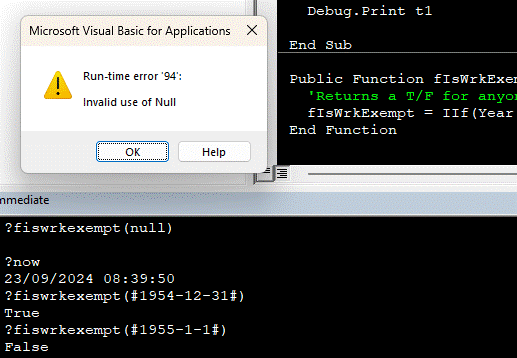
For simplicity, this function requires a valid date to be passed, or there will be a RTE (run time error).
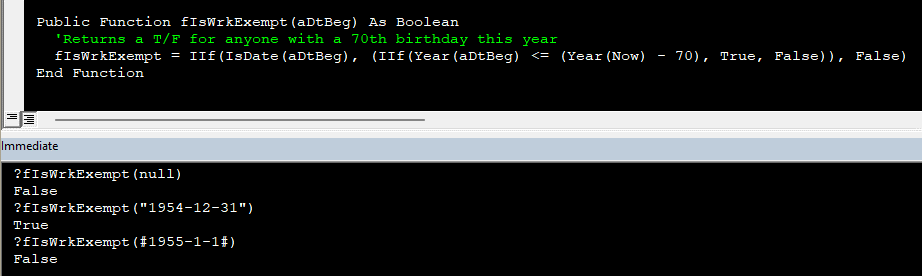
The image below shows how to do that.
Thomas Gonder  @Reply  
      
2 years ago

Thomas Gonder  @Reply  
      
2 years ago
Can some aspiring developer (no veterans) fix the one line of code to handle a Null birthdate?
Answer tomorrow if no one answers correctly.
John Valencic OP  @Reply  
     
2 years ago
Thanks Thomas, I will give it a go in a couple days and let you know the end result. Doctors appointments getting in the way.... grrrr...
Thomas Gonder  @Reply  
      
2 years ago
Well, I misled you, there were TWO lines that needed 'fixing'.
In VBA, you can only pass a Null (from code or data) to a variant variable type.
So, we need to remove 'As Date' in the first line to change aDtBeg to a variant.
Then, we fix the line of code to deal with a null by adding another IIf() function.

The IIf() is great in that you don't need to create an If/Then/Else construct.
While it can be used in VBA, it eliminates the need to write VBA code for queries in that the part to the right of the '=' can be placed directly into an update query, after a preliminary update query makes NO in all the yes/no exempt field in the table that may have errors.

One could run the update query every day, or when the form closes. But that is kind if inefficient, especially in a table with lots of records. Better to write a bit of code in the AfterUpdate procedure of the birth date textbox, using our function to set the [Work Exemption] field.

But why use the fIsWrkExempt() function when a simple line of code could be in the AfterUpdate procedure? Suppose you have code logic in many places in your application (especially if it's more complicated than this example). What if the boss comes out one day and says, 'No more exemptions until they pass their 70th birthday!' Now, all you have to do is modify one function instead of hunting down all the different lines of code (that may not all read the same to accomplish the rule).
Thomas Gonder  @Reply  
      
2 years ago

This thread is now CLOSED. If you wish to comment, start a NEW discussion in Access Developer Forum.
 

Next Unseen

 
New Feature: Comment Live View


The following is a paid advertisement
Computer Learning Zone is not responsible for any content shown or offers made by these ads.
 

Learn
 
Access - index
Excel - index
Word - index
Windows - index
PowerPoint - index
Photoshop - index
Visual Basic - index
ASP - index
Seminars
More...
Customers
 
Login
My Account
My Courses
Lost Password
Memberships
Student Databases
Change Email
Info
 
Latest News
New Releases
User Forums
Topic Glossary
Tips & Tricks
Search The Site
Code Vault
Collapse Menus
Help
 
Customer Support
Web Site Tour
FAQs
TechHelp
Consulting Services
About
 
Background
Testimonials
Jobs
Affiliate Program
Richard Rost
Free Lessons
Mailing List
PCResale.NET
Order
 
Video Tutorials
Handbooks
Memberships
Learning Connection
Idiot's Guide to Excel
Volume Discounts
Payment Info
Shipping
Terms of Sale
Contact
 
Contact Info
Support Policy
Mailing Address
Phone Number
Fax Number
Course Survey
Email Richard
[email protected]
Blog RSS Feed    YouTube Channel

LinkedIn
Copyright 2026 by Computer Learning Zone, Amicron, and Richard Rost. All Rights Reserved. Current Time: 5/1/2026 7:26:13 PM. PLT: 1s