Free Lessons
Courses
Seminars
TechHelp
Fast Tips
Templates
Topic Index
Forum
ABCD
 
Home   Courses   TechHelp   Forums   Help   Contact   Merch   Join   Order   Logon  
 
Back to Access Forum    Comments List
Upload Images   @Reply   Bookmark    Link   Email   Next Unseen 
PageBreak
Ludwig Willems 
      
2 years ago
Hi, is there any info about "PageBreak".
I am trying to divide my page into 4 but I get the error message in the code that the " PageBreak" is not recognized.

Private Sub GroupHeader0_Print(Cancel As Integer, PrintCount As Integer) 'divide section into 4 parts

Static itemCount As Integer
itemCount = itemCount + 1

' Check if itemCount is a multiple of 4
If itemCount Mod 4 = 0 Then
Me.NextRecord = False
Me.PageBreak.Visible = True
itemCount = 0 ' Reset itemCount after every fourth record
Else
Me.PageBreak.Visible = False
End If
End Sub
Ludwig Willems OP  @Reply  
      
2 years ago
Private Sub Groepskoptekst0_Print(Cancel As Integer, PrintCount As Integer) 'verdeling van sectie ikn 4 delen

    Static itemCount As Integer
    itemCount = itemCount + 1
    
    ' Check of itemCount een veelvoud van 4 is
    If itemCount Mod 4 = 0 Then
        Me.NextRecord = False
        Me.PageBreak.Visible = True
        itemCount = 0 ' Reset itemCount na elke vierde record
    Else
        Me.PageBreak.Visible = False
    End If
End Sub
Kevin Yip  @Reply  
     
2 years ago
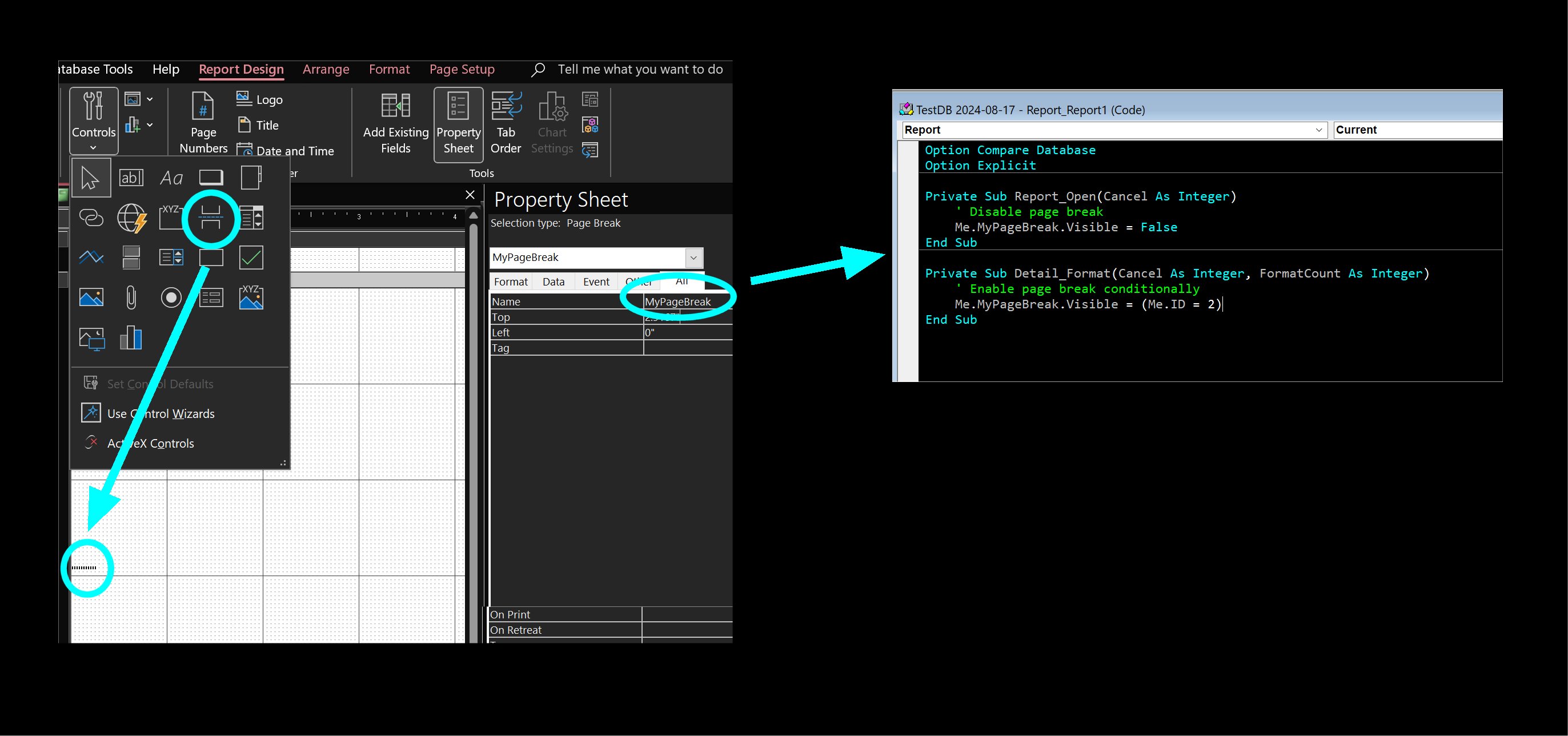
You need to add the page break control from the ribbon (where the textbox, combo box, and other controls are) onto the report before you can use it in VBA.
Ludwig Willems OP  @Reply  
      
2 years ago
ok kevin, and I'll post this in the foot need I suppose, are there any videos of it, I can't find any
Ludwig Willems OP  @Reply  
      
2 years ago
would be toppy if Richard makes a movie about that and with a division to choose the number of sections on 1 page. I should be able to say that my height of the section is exactly the page height - header and footer and this should be divided into 4 equal parts.
Sami Shamma  @Reply  
             
2 years ago
Ludwig Willems OP  @Reply  
      
2 years ago
Hi Sami, the link is not what I mean I think, I really need a limitation of the number of records displayed in detail per page. I can then apply the summary per category.
Sami Shamma  @Reply  
             
2 years ago
Ludwig

Show me an example of what you want to see
Kevin Yip  @Reply  
     
2 years ago
Hi Ludwig, the page break control can be dragged from the ribbon to the report as shown in the picture below.  Give the control a name, and you can use change its Visible property in VBA.  You can make it visible or invisible depending on the current record's field value.  This way, you can add page breaks pretty much wherever you want.  In my example below, I add a page break when the ID field's value is 2.
Kevin Yip  @Reply  
     
2 years ago

Ludwig Willems OP  @Reply  
      
2 years ago
Sami, kevin, ok another step further. I'll try it out. Thanks :)
Ludwig Willems OP  @Reply  
      
2 years ago
Hi, I added the PageBreak and want to split my page into 4 parts if the height of the entered records allows it. Via Chap GPT I got the following code but it still doesn't do what it should do. Can someone put me on the right path regarding code:

Ludwig Willems OP  @Reply  
      
2 years ago
Private Sub GroupHeader0_Print(Cancel As Integer, PrintCount As Integer) ' Print 4 items per page
Static itemCount As Integer
Const MAX_ITEMS_PER_PAGE As Integer = 4 ' Determine the number of items per page

itemCount = itemCount + 1

' Make the MyPageBreak visible after every fourth item
If itemCount Mod MAX_ITEMS_PER_PAGE = 0 Then
Me.MyPageBreak.Visible = True
Me.NextRecord = False
itemCount = 0 ' Reset itemCount after every fourth record
Else
Me.MyPageBreak.Visible = False
End If

' If there are less than 4 items on the page, add empty items
If Me.NextRecord = False And itemCount < MAX_ITEMS_PER_PAGE Then
Do While itemCount < MAX_ITEMS_PER_PAGE
' Add a blank line, for example by printing a blank Group Header0
Print " " ' Or use another method to print a blank line
itemCount = itemCount + 1
Loop
End If
End Sub
Ludwig Willems OP  @Reply  
      
2 years ago
is there really no video about this matter or can't some people with the same problem register here so that my question is higher on the pile.... :)
Kevin Yip  @Reply  
     
2 years ago
You should use the Detail Format event (as shown in my picture earlier), not the Group Header print event.  The Detail event can access each record one by one.  So all you need to do is increment a counter by 1 whenever the Detail event runs.  So the counter effectively tells you how many records have been printed at any moment.  If 4 have been printed, make the page break visible, and reset the counter to zero.

This thread is now CLOSED. If you wish to comment, start a NEW discussion in Access Forum.
 

Next Unseen

 
New Feature: Comment Live View


The following is a paid advertisement
Computer Learning Zone is not responsible for any content shown or offers made by these ads.
 

Learn
 
Access - index
Excel - index
Word - index
Windows - index
PowerPoint - index
Photoshop - index
Visual Basic - index
ASP - index
Seminars
More...
Customers
 
Login
My Account
My Courses
Lost Password
Memberships
Student Databases
Change Email
Info
 
Latest News
New Releases
User Forums
Topic Glossary
Tips & Tricks
Search The Site
Code Vault
Collapse Menus
Help
 
Customer Support
Web Site Tour
FAQs
TechHelp
Consulting Services
About
 
Background
Testimonials
Jobs
Affiliate Program
Richard Rost
Free Lessons
Mailing List
PCResale.NET
Order
 
Video Tutorials
Handbooks
Memberships
Learning Connection
Idiot's Guide to Excel
Volume Discounts
Payment Info
Shipping
Terms of Sale
Contact
 
Contact Info
Support Policy
Mailing Address
Phone Number
Fax Number
Course Survey
Email Richard
[email protected]
Blog RSS Feed    YouTube Channel

LinkedIn
Copyright 2026 by Computer Learning Zone, Amicron, and Richard Rost. All Rights Reserved. Current Time: 5/6/2026 10:20:45 PM. PLT: 1s