Free Lessons
Courses
Seminars
TechHelp
Fast Tips
Templates
Topic Index
Forum
ABCD
 
Home   Courses   TechHelp   Help   Contact   Merch   Join   Order   Logon   Forums   
 
Home > Forums > Access Forum > Error Logging by William Platt
Back to Access Forum    Comments List
Upload Images | @Reply | Bookmark | Link | Email | Next Unseen |
Error Logging
William Platt 
     
2 years ago
Is there a method to record errors as they occur or are handled, along with the specific form and field name associated with the error, even in cases where the On Error Resume Next statement is used? This would allow us to address any issues that may arise. It's often the case that when someone encounters an error message, they don't provide all the details that were displayed, making it difficult to pinpoint the problem.
Alex Hedley  @Reply  
           
2 years ago
There's a TH out in a couple of days that might help: Trap Form Errors

It then all depends how you handle those errors, do you save them to a table, log them to a file.
Kevin Yip  @Reply  
     
2 years ago
"On Error Resume Next" ignores errors so you can't log those, naturally.  To log errors, you use "On Error Goto ____" to transfer execution to an "error handler" that you wrote for that procedure, and that is where you log the error.  The error number and description are stored in Err.Number and Err.Description, which you can store in a log table if you want to.  Their values are cleared after "Exit Sub".  That means you need to put this code into every procedure in your database.  This is a daunting task if you have lots of procedures.  There is no "global error handler." You have to write this code for every single sub.
Kevin Yip  @Reply  
     
2 years ago
And yes, I've done it in my old job, and it was no fun.  In addition, you have to make sure execution is able to continue (or not) after an error is trapped.  Transactions may have to be rolled back, and variables may have to be cleared or reinstated.  Creating a "global error handler" is a like a second project on its own.
William Platt OP  @Reply  
     
2 years ago
It might be the next project within the database. I think it would be better to put it in a table so you could track it.
Kevin Yip  @Reply  
     
2 years ago
Some pointers if you've never done this before:

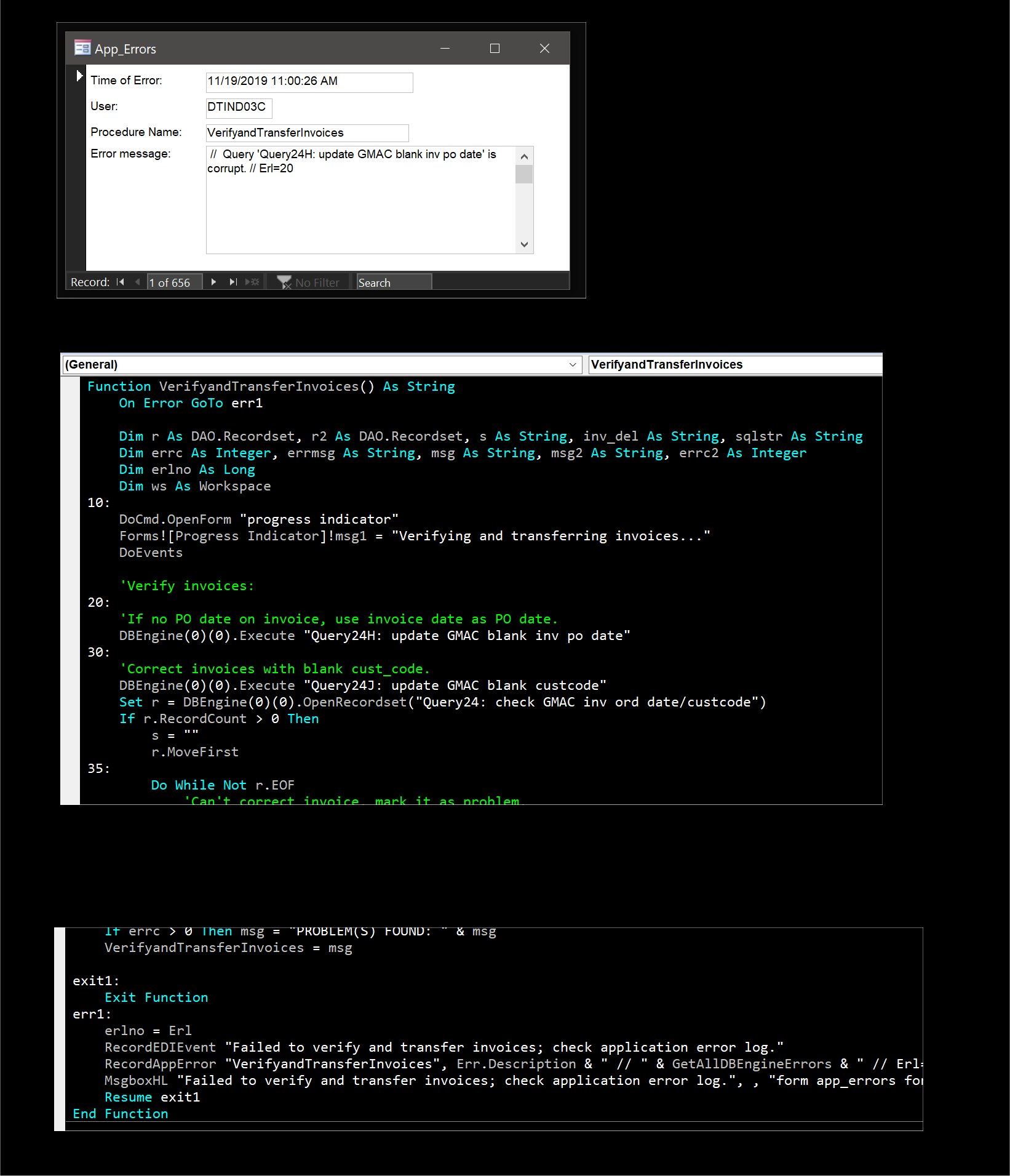
The picture below shows the error handling I used in my old job.  I have a form that shows the detail of the logged errors: the name of the procedure where the error occurred, the "line number" of the error, the error number and description.  The "line numbers" are the "10:", "20:", etc., as shown in the VBA code below.  When an error occurs, the line number that just precedes the error will be stored in the "Erl" variable.

Each procedure should always start with "On Error GoTo", naturally, in order to trap all possible errors inside it.  I use "On Error GoTo err1" below.  When an error occurs, execution will go to the portion of the code labeled "err1:" as shown below.

Important: the "err1" section can NOT have any error.  If an error occurs there, the "On Error" at the top will take effect AGAIN and send the execution back to the start of "err1," causing an infinite loop of sort.

That is why I use only procedures under "err1" -- because other procedures can have their own error-handling.  Always use procedures, not "loose code," inside an error handler.  E.g.:

Use only procedures:

     err1:
          RecordErrors A, B, C
          ShowCustomMsg "Here is a friendly error message..."
          ...
    
Do NOT use "loose code":

     err1:
          If A = B Then C = D
          For E = F to G
              H = I
              J = DLookup(...)
          ...
Kevin Yip  @Reply  
     
2 years ago

Alex Hedley  @Reply  
           
2 years ago
You could also log to the Windows Event Log

vbs
Set shell = CreateObject("WScript.Shell")
shell.LogEvent 4, "Your Message Here"


MSDN: LogEvent
Kevin Yip  @Reply  
     
2 years ago
The event log is specific to each individual PC, whereas a custom-made log can be stored in a remote, shareable database.
Kevin Yip  @Reply  
     
2 years ago
Another tip is that you need to able to turn on or off the error handling.  You need to turn it off to debug the app, and turn it back on for your users.  So every sub needs a line like this:

    If ErrorHandlingEnabled Then On Error GoTo ....

which runs "On Error" conditionally based on a global setting.
Richard Rost  @Reply  
          
2 years ago
So many options... so little time...

This thread is now CLOSED. If you wish to comment, start a NEW discussion in Access Forum.
 

Next Unseen


What's This?


The following is a paid advertisement
Computer Learning Zone is not responsible for any content shown or offers made by these ads.
 

Learn
 
Access - index
Excel - index
Word - index
Windows - index
PowerPoint - index
Photoshop - index
Visual Basic - index
ASP - index
Seminars
More...
Customers
 
Login
My Account
My Courses
Lost Password
Memberships
Student Databases
Change Email
Info
 
Latest News
New Releases
User Forums
Topic Glossary
Tips & Tricks
Search The Site
Code Vault
Collapse Menus
Help
 
Customer Support
Web Site Tour
FAQs
TechHelp
Consulting Services
About
 
Background
Testimonials
Jobs
Affiliate Program
Richard Rost
Free Lessons
Mailing List
PCResale.NET
Order
 
Video Tutorials
Handbooks
Memberships
Learning Connection
Idiot's Guide to Excel
Volume Discounts
Payment Info
Shipping
Terms of Sale
Contact
 
Contact Info
Support Policy
Mailing Address
Phone Number
Fax Number
Course Survey
Email Richard
[email protected]
Blog RSS Feed    YouTube Channel

LinkedIn
Copyright 2026 by Computer Learning Zone, Amicron, and Richard Rost. All Rights Reserved. Current Time: 10/29/2026 5:00:23 AM. PLT: 1s