Free Lessons
Courses
Seminars
TechHelp
Fast Tips
Templates
Topic Index
Forum
ABCD
 
Home   Courses   TechHelp   Forums   Help   Contact   Merch   Join   Order   Logon  
 
Back to Access Forum    Comments List
Upload Images   @Reply   Bookmark    Link   Email   Next Unseen 
Meshed Combo Boxes
Bryan Gravely 
    
2 years ago
I've watched all of the videos on cascading combo boxes and have them working in multiple places, They work great when combo boxes are always filled out in a particular order, selection from ComboA determines the list for ComboB and the selection of comboB determines the list of ComboC.  But what about fully meshed combo boxes, where there are 3 or more combo boxes and they might be filled out in any order.  So changing any one of the three updates the list values for the other two.  For example, a database of cars that tracks year, model, and category for each car.  If I select a year, then model and category would only show values for cars of that year.  Or if I select Year and Category, then Model would only show cars of the selected year and category.
Bryan Gravely OP  @Reply  
    
2 years ago

Bryan Gravely OP  @Reply  
    
2 years ago
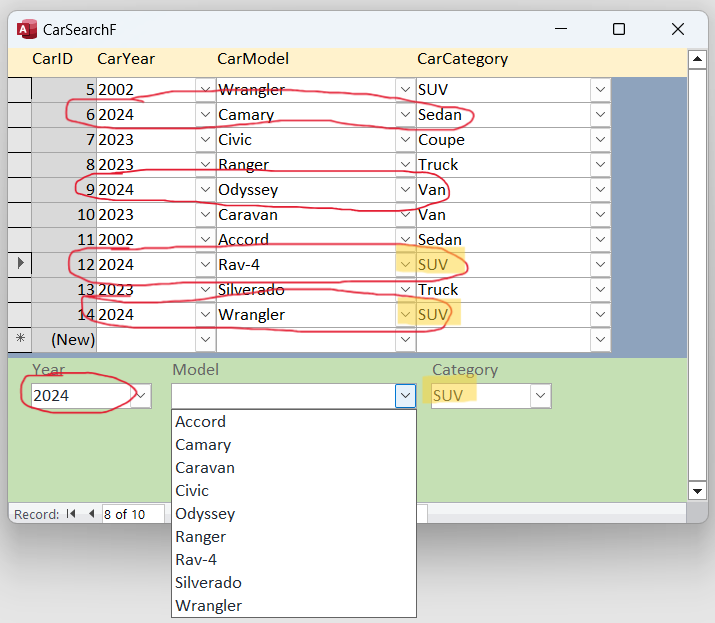
For example, here the year 2024 is selected and all of the cars for 2024 are circled.  The category SUV is selected, so all of the cars for SUV are highlighted.  So the Model list should only show the models that are both circled and highlighted, Rav-4 and Wrangler.

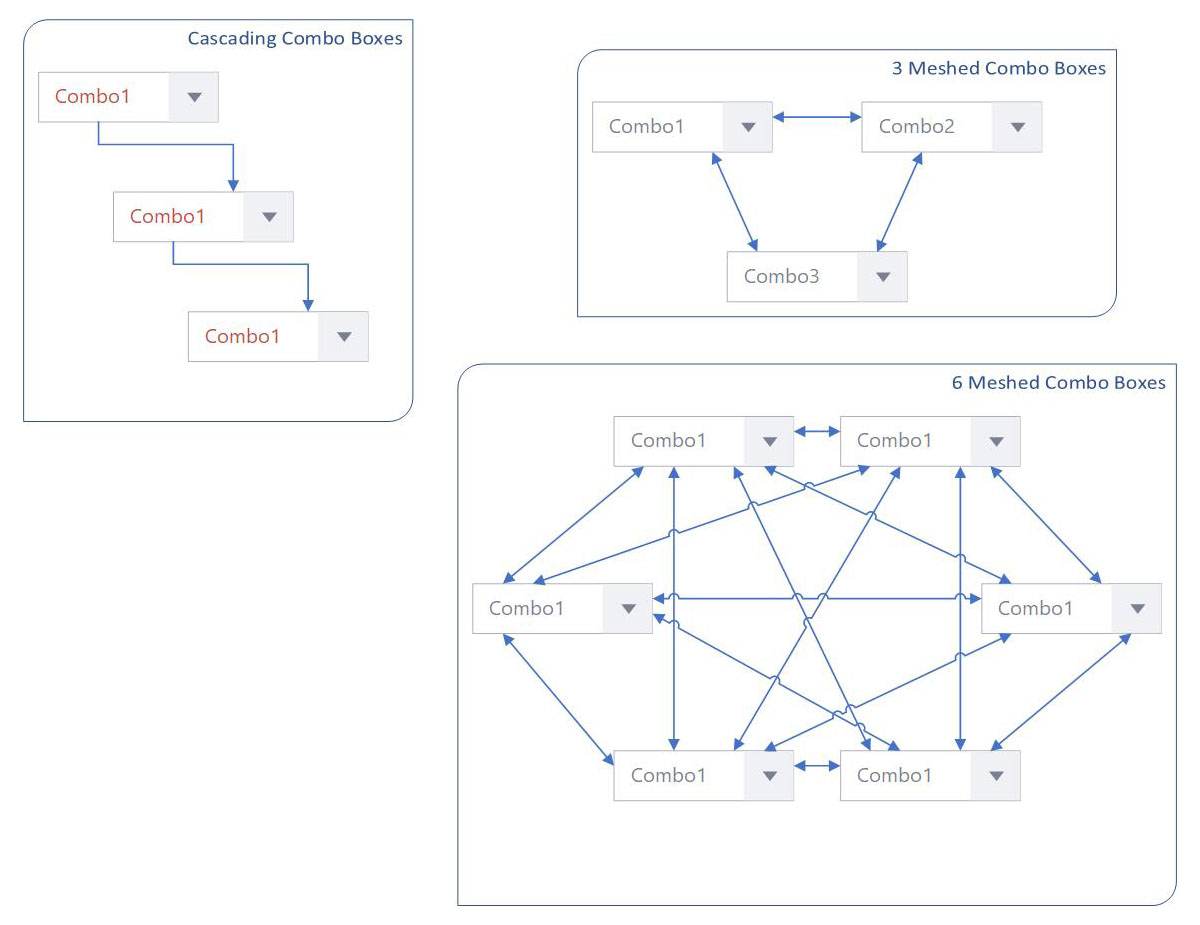
But the key is that any one or two of the boxes could be selected and all the others adjust based on it.  Not just cascaded, but fully-meshed.
Adam Schwanz  @Reply  
           
2 years ago
It's the same concept, except you change two (or three or however many) combo boxes at once in the after update. If you have more then 3, I would make a function to do all the work, save you a lot of coding.
Bryan Gravely OP  @Reply  
    
2 years ago

Bryan Gravely OP  @Reply  
    
2 years ago
Quick Visio Low of what I'm talking about.
Adam Schwanz  @Reply  
           
2 years ago
Yea so I'd just make a function/sub then

You just need to build a where condition and share it with all the combos. I know the Access Search Seminar covers building a where condition for searching, same concept. I'm not sure what method is used in the Search Form 2.0 and Search As You Type. It might be covered in there.

Like
Public Sub DoCombo
Dim Wh As String
Wh=""

If Not IsNull(Combo1) Then
Wh=Wh & " AND Something=" & Combo1
End If
If Not IsNull(Combo2) Then
Wh=Wh & " AND Something=" & Combo2
End If
'etc

Combo1.Rowsource="Select Something From Sometable Where " & Wh
Combo2.Rowsource="Select Something From Sometable Where " & Wh
'etc
End Sub


Then just DoCombo on your combo box events
Adam Schwanz  @Reply  
           
2 years ago
You'd also want some error catching not to set row sources if Wh="" etc
Kevin Yip  @Reply  
     
2 years ago
If you have cascading combo boxes in this order: combo1 -> combo2 -> combo3 -> combo4, then:

(1) When the user changes combo1, it will require the user to re-enter combo2, 3, and 4.
(2) When the user changes combo2, it will require the user to re-enter combo3 and 4.
(3) When the user changes combo3, it will require the user to re-enter combo4.
(4) When the user changes combo4, nothing else needs to be done.

You can set up a BeforeUpdate event or a validation rule to do this, so that the user won't be able to leave the record until all 4 combos are properly related to one another.
Juan Rivera  @Reply  
            
2 years ago
I think set up a query for every combo to after updat requery the current continues list.  this way if combo1 is empty you can requuery from combo2 showing only what is populated in the combo.  I did this some time ago I can help out if you need help.  I think this might make a nice video to filter a conrinues form based on several combo choices based on just what is filled out.

This thread is now CLOSED. If you wish to comment, start a NEW discussion in Access Forum.
 

Next Unseen

 
New Feature: Comment Live View


The following is a paid advertisement
Computer Learning Zone is not responsible for any content shown or offers made by these ads.
 

Learn
 
Access - index
Excel - index
Word - index
Windows - index
PowerPoint - index
Photoshop - index
Visual Basic - index
ASP - index
Seminars
More...
Customers
 
Login
My Account
My Courses
Lost Password
Memberships
Student Databases
Change Email
Info
 
Latest News
New Releases
User Forums
Topic Glossary
Tips & Tricks
Search The Site
Code Vault
Collapse Menus
Help
 
Customer Support
Web Site Tour
FAQs
TechHelp
Consulting Services
About
 
Background
Testimonials
Jobs
Affiliate Program
Richard Rost
Free Lessons
Mailing List
PCResale.NET
Order
 
Video Tutorials
Handbooks
Memberships
Learning Connection
Idiot's Guide to Excel
Volume Discounts
Payment Info
Shipping
Terms of Sale
Contact
 
Contact Info
Support Policy
Mailing Address
Phone Number
Fax Number
Course Survey
Email Richard
[email protected]
Blog RSS Feed    YouTube Channel

LinkedIn
Copyright 2026 by Computer Learning Zone, Amicron, and Richard Rost. All Rights Reserved. Current Time: 5/6/2026 2:01:54 AM. PLT: 0s