Free Lessons
Courses
Seminars
TechHelp
Fast Tips
Templates
Topic Index
Forum
ABCD
 
Home   Courses   TechHelp   Forums   Help   Contact   Merch   Join   Order   Logon  
 
Back to Access Forum    Comments List
Upload Images   @Reply   Bookmark    Link   Email   Next Unseen 
Identify clicked image control
Chris Bezant 
      
2 years ago
I have 36 image controls on a form.
When I click an image control I want to find out which control was clicked.
Clicking an image control does not set the active control so I am looking for a solution.
I was looking for a simple way of calling a common routine for all image controls without having any specific code in each image control's on click event.
Any suggestions most welcome.

Alex Hedley  @Reply  
           
2 years ago
Simplest but most time consuming - add a click event to each control.

Throwing ideas - loop each control in the form controls array, check for type and do something. Not sure that would work.
Kevin Robertson  @Reply  
           
2 years ago
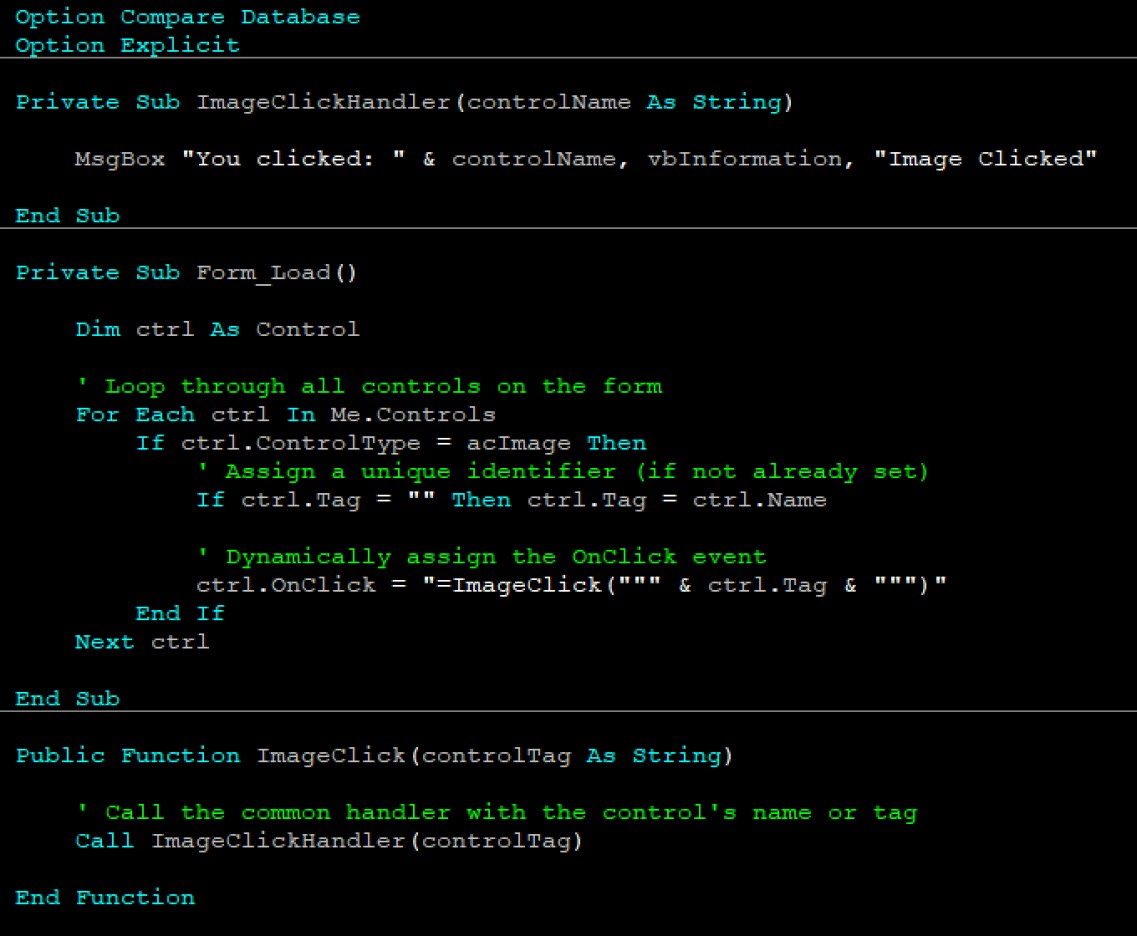
You can dynamically set the Click event in the Load event of the Form.
I tested the code in my image below and it works. Just modify for your situation.
Kevin Robertson  @Reply  
           
2 years ago

Alex Hedley  @Reply  
           
2 years ago
Beautifully done!
Chris Bezant OP  @Reply  
      
2 years ago
How can I copy this code, please?
Sorry if it is obvious but I am partially sighted.
Kevin Robertson  @Reply  
           
2 years ago
Here is the code. Just click the Copy button

DetailsPrivate Sub ImageClickHandler(controlName As String)

    MsgBox "You clicked: " & controlName, vbInformation, "Image Clicked"
    
End Sub

Private Sub Form_Load()

    Dim ctrl As Control

    ' Loop through all controls on the form
    For Each ctrl In Me.Controls
        If ctrl.ControlType = acImage Then
            ' Assign a unique identifier (if not already set)
            If ctrl.Tag = "" Then ctrl.Tag = ctrl.Name

            ' Dynamically assign the OnClick event
            ctrl.OnClick = "=ImageClick(""" & ctrl.Tag & """)"
        End If
    Next ctrl
    
End Sub

Public Function ImageClick(controlTag As String)

    ' Call the common handler with the control's name or tag
    Call ImageClickHandler(controlTag)
    
End Function
Richard Rost  @Reply  
           
2 years ago
Very elegant solution!
Chris Bezant OP  @Reply  
      
2 years ago
Kevin you are a star. That works perfectly.
Thank you so much. That is exactly the sort of thing I was after.
Sami Shamma  @Reply  
             
2 years ago
When I grow up, I want to be able to program just like you guys.
Richard Rost  @Reply  
           
2 years ago
Don't ever grow up. :)
Kevin Yip  @Reply  
     
2 years ago
Very good solution indeed.  If this site had an "Expert Tech Tips" series, this would belong to it.  Additionally, you can assign ordinal numbers to your controls to make them easier to access in the code.  For instance, name the controls MyPic1, MyPic2, ... MyPic36 in design view, then in code view, write something like:

Private Sub Form_Load()
     Dim i As Integer
     For i = 1 to 36
          Me("MyPic" & i).OnClick = "=ImageClick(" & i & ")"
     Next i
     ...
End Sub


Public Function ImageClick(i as Integer)
     Me("MyPic" & i).Picture = ....
     ...
End Function
Sami Shamma  @Reply  
             
2 years ago
Hi Kevin Y,

I have seen Richard use this method in his Calander Seminar. Very clever.
Kevin Robertson  @Reply  
           
2 years ago
I don't like hardcoding the numbers in a situation like this. If an image control is added or deleted it will cause problems and you will probably get an 'index out of bounds' error.
Kevin Robertson  @Reply  
           
2 years ago
I made a copy of the Form I was working on (so I didn't lose the previous code) and made some changes. Now when an image is clicked on it opens up a Form or Report. The Name of the Form/Report is in the Tag property (set at design time).

This thread is now CLOSED. If you wish to comment, start a NEW discussion in Access Forum.
 

Next Unseen

 
New Feature: Comment Live View


The following is a paid advertisement
Computer Learning Zone is not responsible for any content shown or offers made by these ads.
 

Learn
 
Access - index
Excel - index
Word - index
Windows - index
PowerPoint - index
Photoshop - index
Visual Basic - index
ASP - index
Seminars
More...
Customers
 
Login
My Account
My Courses
Lost Password
Memberships
Student Databases
Change Email
Info
 
Latest News
New Releases
User Forums
Topic Glossary
Tips & Tricks
Search The Site
Code Vault
Collapse Menus
Help
 
Customer Support
Web Site Tour
FAQs
TechHelp
Consulting Services
About
 
Background
Testimonials
Jobs
Affiliate Program
Richard Rost
Free Lessons
Mailing List
PCResale.NET
Order
 
Video Tutorials
Handbooks
Memberships
Learning Connection
Idiot's Guide to Excel
Volume Discounts
Payment Info
Shipping
Terms of Sale
Contact
 
Contact Info
Support Policy
Mailing Address
Phone Number
Fax Number
Course Survey
Email Richard
[email protected]
Blog RSS Feed    YouTube Channel

LinkedIn
Copyright 2026 by Computer Learning Zone, Amicron, and Richard Rost. All Rights Reserved. Current Time: 5/6/2026 1:12:38 PM. PLT: 0s