Free Lessons
Courses
Seminars
TechHelp
Fast Tips
Templates
Topic Index
Forum
ABCD
 
Home   Courses   TechHelp   Forums   Help   Contact   Merch   Join   Order   Logon  
 
Back to Access Developer Forum    Comments List
Upload Images   @Reply   Bookmark    Link   Email   Next Unseen 
Unable to Create DB in SSMS
Sami Shamma 
             
2 years ago
I have SQL Server Express installed on my work laptop as well as SSMS. I can connect to the SQL Server okay; however, I get the following error when I issue the following command.


create database MyDB;


Msg 262, Level 14, State 1, Line 1  
CREATE DATABASE permission denied in database 'master'.

I do not have that problem on my personal computer.
Gary Simpson  @Reply  
     
2 years ago
Has the Sequel Server Management system (SSMS) got a password or restriction? imposed, Or create a database "MyDB:" in SQL
Kevin Robertson  @Reply  
           
2 years ago
Have you checked that you have the necessary permissions on your work laptop to create a database in the master database?
Sami Shamma OP  @Reply  
             
2 years ago
Hi Gary

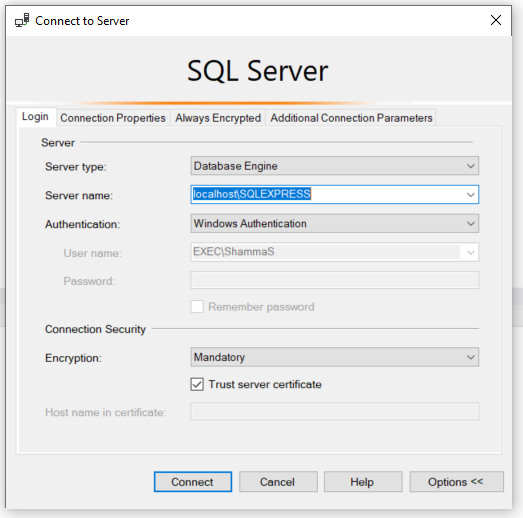
the image below is how I connect
Sami Shamma OP  @Reply  
             
2 years ago

Sami Shamma OP  @Reply  
             
2 years ago
Hi Kevin

Where do I check that?
Sami Shamma OP  @Reply  
             
2 years ago
And where can I change SQL Express default Folders location.

Boy, I need the seminar from Richard.
Kevin Robertson  @Reply  
           
2 years ago
Run the following query to check your server roles:

    SELECT IS_SRVROLEMEMBER('sysadmin') AS IsSysadmin,
                IS_SRVROLEMEMBER('dbcreator') AS IsDbcreator;


Grant Necessary Permissions (Requires Admin Privileges)

    ALTER SERVER ROLE dbcreator ADD MEMBER [YourUserName];

Replace [YourUserName] with your SQL login or Windows account.
Kevin Robertson  @Reply  
           
2 years ago
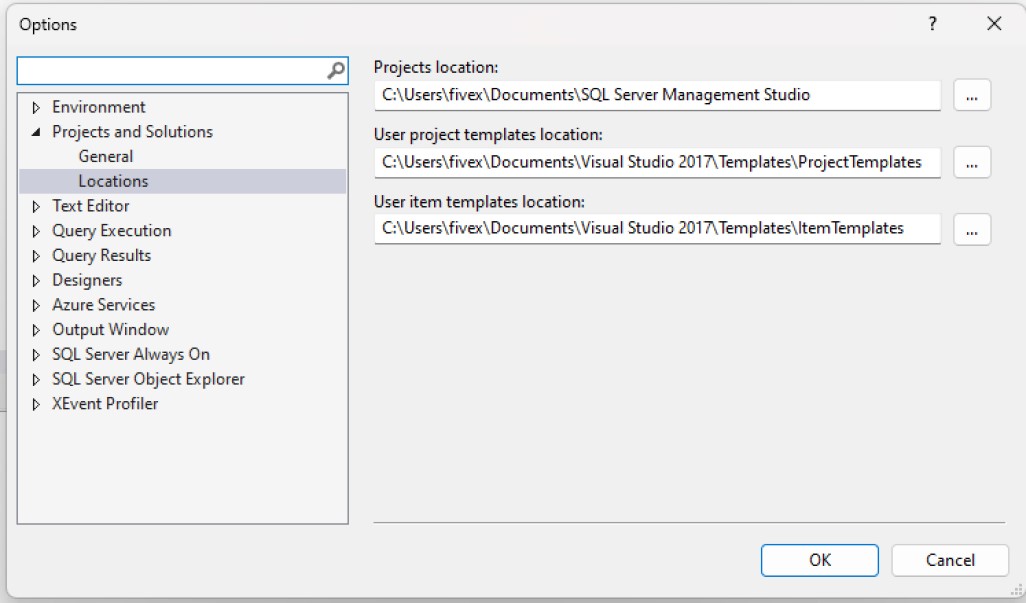
Go to Tools -- Options -- Projects and Solutions -- Locations
Kevin Robertson  @Reply  
           
2 years ago

Sami Shamma OP  @Reply  
             
2 years ago
Thanks Kevin

lol, this is my seminar on the installment plan.
Sami Shamma OP  @Reply  
             
2 years ago
Thanks Alex I will check that out.

Kevin this: Tools -- Options -- Projects and Solutions -- Locations

Gives me the folders for SSMS not SQL Server Express default folders.
Sami Shamma OP  @Reply  
             
2 years ago

Sami Shamma OP  @Reply  
             
2 years ago
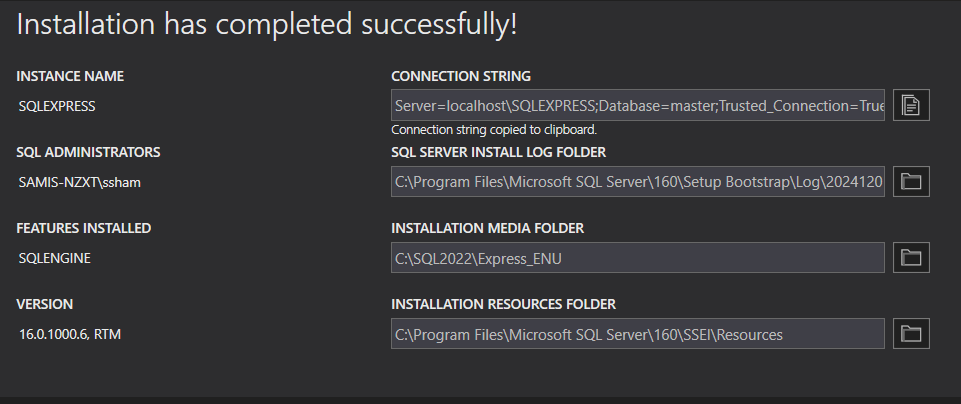
I think my problem has to do with the location of SQL Server default folders. the above is from my home computer. I know for a fact that I do not have write permission to C:\Program Files\ on my work computer.

I will try Chat GPT next
Kevin Robertson  @Reply  
           
2 years ago
- Right-click the SQL Server instance in Object Explorer and select Properties.
- Go to the Database Settings page
- Database default location

To list the path of any existing databases:

SELECT
    name AS DatabaseName,
    physical_name AS FilePath,
    type_desc AS FileType
FROM
    sys.master_files
ORDER BY
    DatabaseName, FileType;
Sami Shamma OP  @Reply  
             
2 years ago
Kevin, thank you so much this is very helpful
Kevin Robertson  @Reply  
           
2 years ago
You're welcome.
Save any queries you think you may need on a regular basis.
It will save a lot of typing - you can just modify the Query for your current needs (database name, table name, field name(s)).
Sami Shamma OP  @Reply  
             
2 years ago
Hi Kevin,

When I ran the code you gave me, it returned no values. It executed correctly. I guess this is because I do not have a database created yet. which is my original problem.


DetailsSELECT
    name AS DatabaseName,
    physical_name AS FilePath,
    type_desc AS FileType
FROM
    sys.master_files
ORDER BY
    DatabaseName, FileType;

Kevin Robertson  @Reply  
           
2 years ago
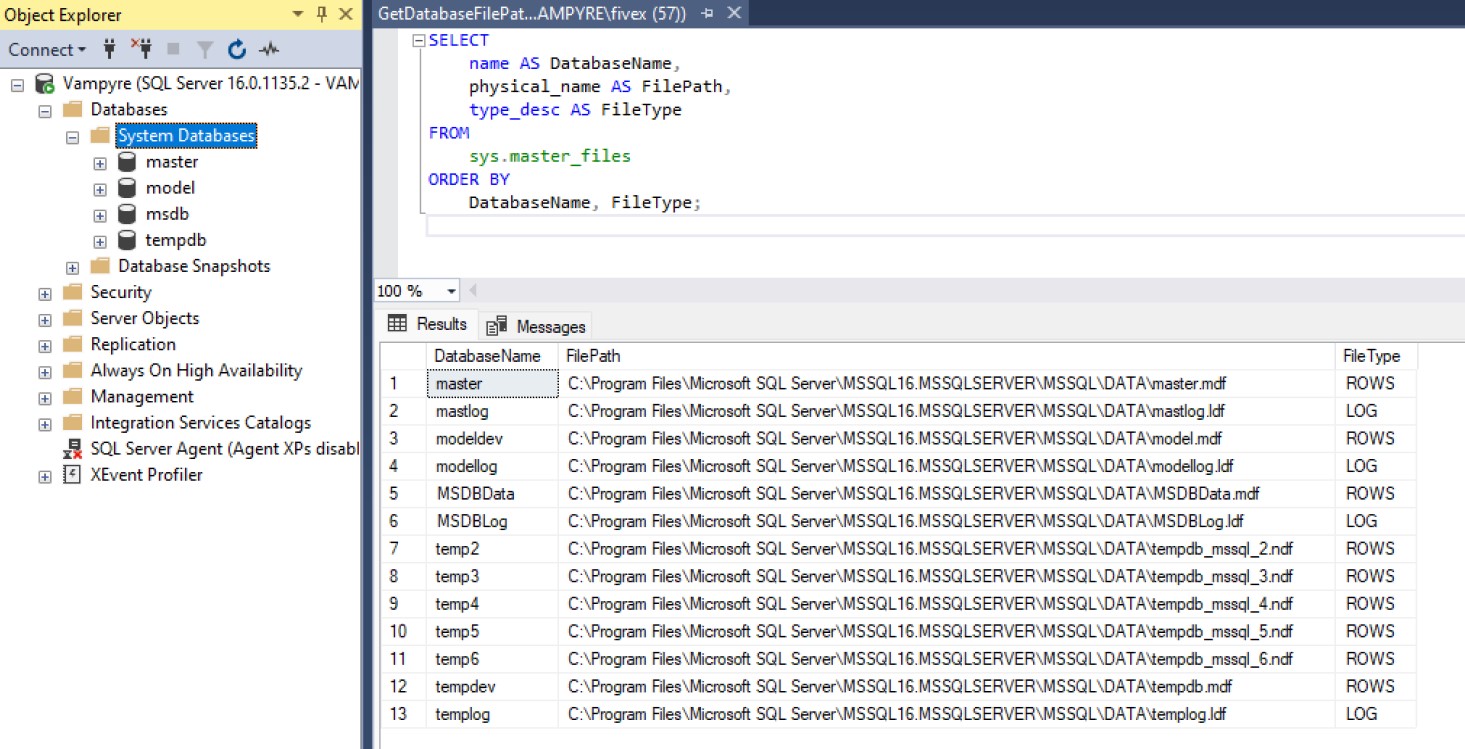
Don't you have any System Databases? Not sure if the permissions would affect them being listed or not.
This is what is listed for me.
Kevin Robertson  @Reply  
           
2 years ago

Sami Shamma OP  @Reply  
             
2 years ago
Poking around, I found that the owner of "master" is the system administrator, which I am not. So I'm going to have IT reinstall my SQL Server Express and change two things: one, the owner of the database to me, and two, not to put any folders in the Program Files folder as I do not have write permissions to those either.
Sami Shamma OP  @Reply  
             
2 years ago
Thank you for your help on this
Kevin Robertson  @Reply  
           
2 years ago
You're welcome. Hopefully Richard will cover things like this early in his SQL Server classes.

Dropping a database is also an issue if that database is in use. I asked ChatGPT about this and now I have a saved Query that disconnects the connection to the database before deleting it. All I have to do is change the database name.

This thread is now CLOSED. If you wish to comment, start a NEW discussion in Access Developer Forum.
 

Next Unseen

 
New Feature: Comment Live View


The following is a paid advertisement
Computer Learning Zone is not responsible for any content shown or offers made by these ads.
 

Learn
 
Access - index
Excel - index
Word - index
Windows - index
PowerPoint - index
Photoshop - index
Visual Basic - index
ASP - index
Seminars
More...
Customers
 
Login
My Account
My Courses
Lost Password
Memberships
Student Databases
Change Email
Info
 
Latest News
New Releases
User Forums
Topic Glossary
Tips & Tricks
Search The Site
Code Vault
Collapse Menus
Help
 
Customer Support
Web Site Tour
FAQs
TechHelp
Consulting Services
About
 
Background
Testimonials
Jobs
Affiliate Program
Richard Rost
Free Lessons
Mailing List
PCResale.NET
Order
 
Video Tutorials
Handbooks
Memberships
Learning Connection
Idiot's Guide to Excel
Volume Discounts
Payment Info
Shipping
Terms of Sale
Contact
 
Contact Info
Support Policy
Mailing Address
Phone Number
Fax Number
Course Survey
Email Richard
[email protected]
Blog RSS Feed    YouTube Channel

LinkedIn
Copyright 2026 by Computer Learning Zone, Amicron, and Richard Rost. All Rights Reserved. Current Time: 5/6/2026 1:14:25 PM. PLT: 1s