Free Lessons
Courses
Seminars
TechHelp
Fast Tips
Templates
Topic Index
Forum
ABCD
 
Home   Courses   TechHelp   Help   Contact   Merch   Join   Order   Logon   Forums   
 
Back to Access Forum    Comments List
Upload Images   @Reply   Bookmark    Link   Email   Next Unseen 
Date formatting
Richard Van Wagoner 
      
2 years ago
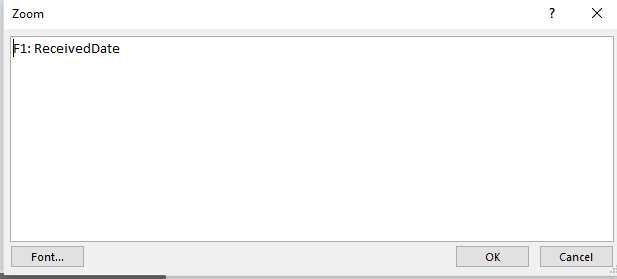
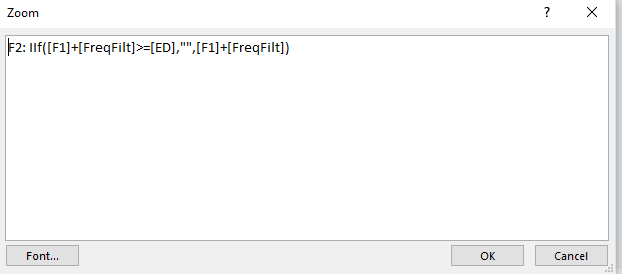
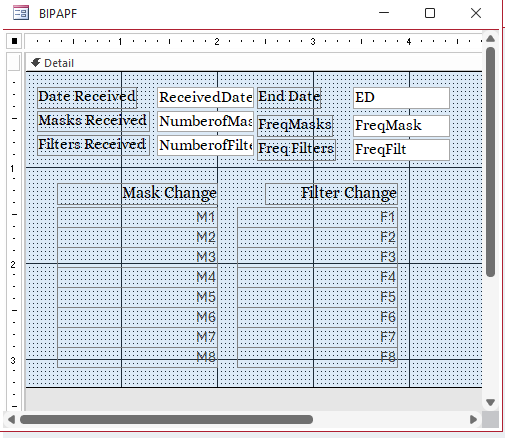
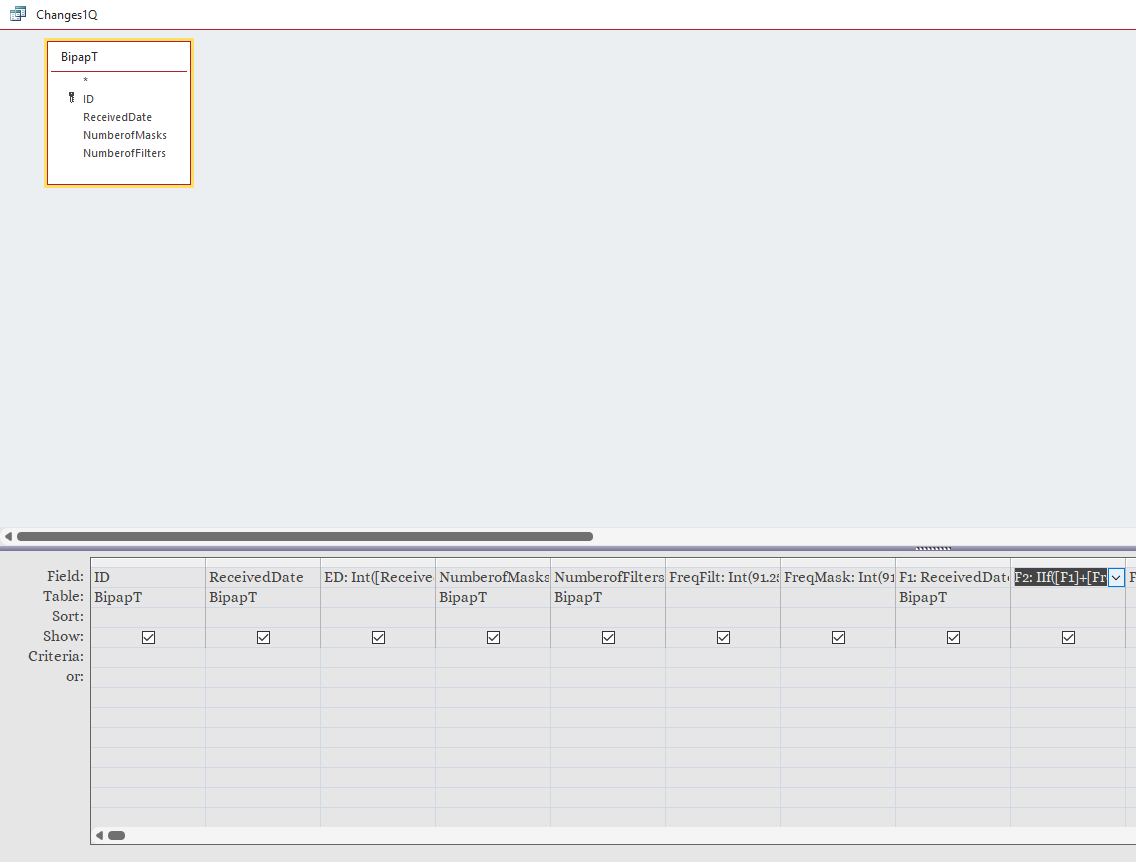
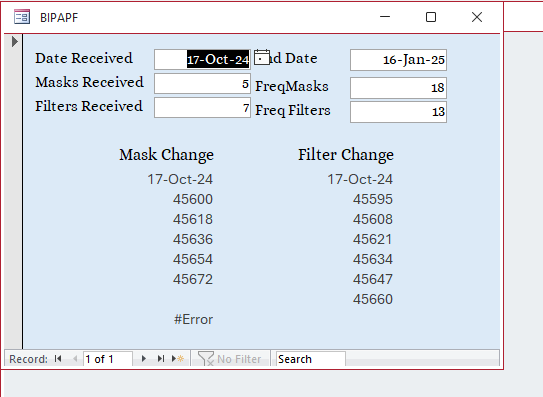
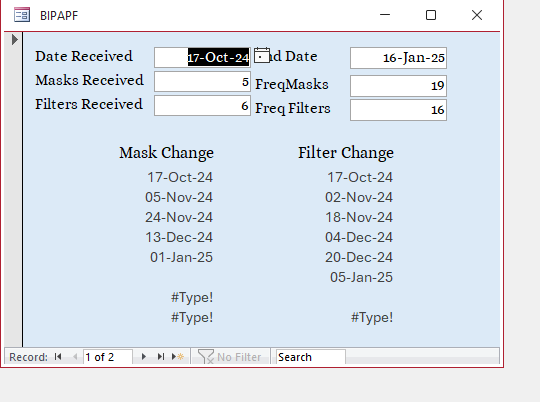
I have a small database that contains one Table and two Queries with one form. What I am doing is generating dates of when things should happen. Two events actually. They are based on a start date Frequency times and end date. When entering start date the query calculates all the events and when they happen. I have it working pretty well except I cannot show the calculated dates in anything other than Number format. This is true for the queries and the forms. I have tried one or the other and both. I don't know what I am missing. I will include screenshots of the queries and form setup that I have.
Richard Van Wagoner OP  @Reply  
      
2 years ago

Richard Van Wagoner OP  @Reply  
      
2 years ago

Richard Van Wagoner OP  @Reply  
      
2 years ago

Richard Van Wagoner OP  @Reply  
      
2 years ago

Sami Shamma  @Reply  
             
2 years ago
Where do you define received date?
Richard Van Wagoner OP  @Reply  
      
2 years ago

Richard Van Wagoner OP  @Reply  
      
2 years ago
The received date is input on the form and goes to the Table also Mask Number and Filter Number are input on the form and put into the table. All other fields are derived in the Query.
Richard Van Wagoner OP  @Reply  
      
2 years ago
Also if you can tell me how to get the #Error off on the last Calculated Field it would be nice.
Sami Shamma  @Reply  
             
2 years ago
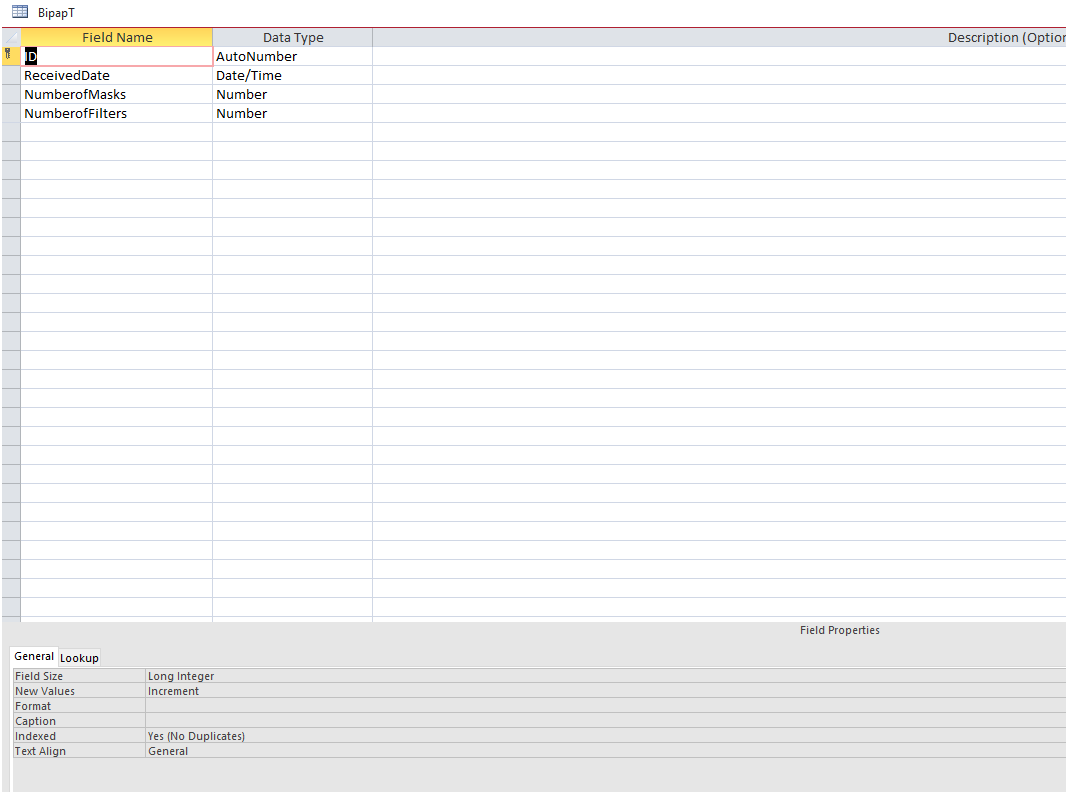
Show the design view of  BipapT
Sami Shamma  @Reply  
             
2 years ago
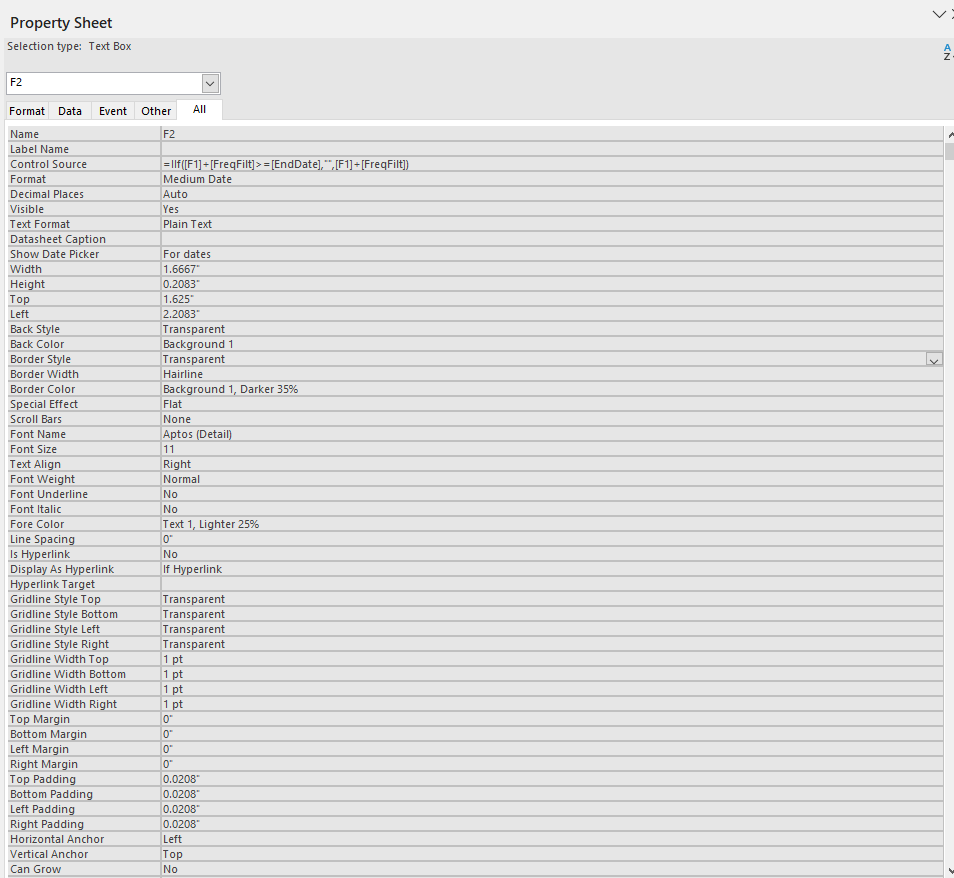
Also show the properties of M8
Richard Van Wagoner OP  @Reply  
      
2 years ago

Sami Shamma  @Reply  
             
2 years ago
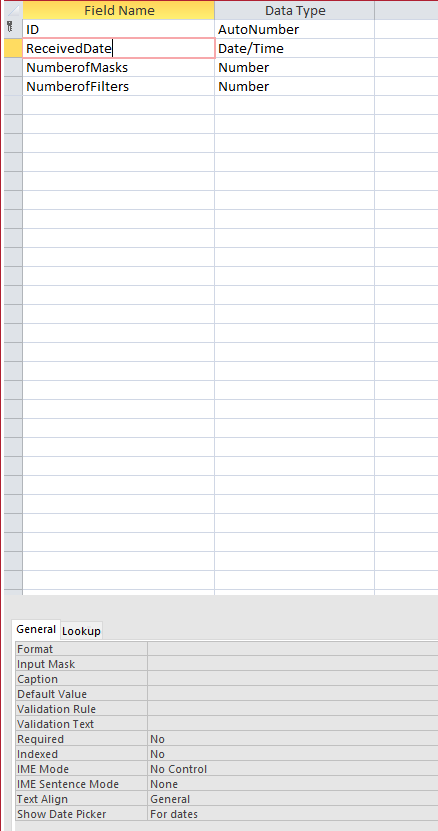
Not the ID the received date!!
Richard Van Wagoner OP  @Reply  
      
2 years ago
I have tried removing the IIf statement in the query then I can format the field, but I need it to make sure I don't go over the end time.
Richard Van Wagoner OP  @Reply  
      
2 years ago

Sami Shamma  @Reply  
             
2 years ago
Have you tried to give the date of format here in the table as well as in the query under properties?
Richard Van Wagoner OP  @Reply  
      
2 years ago
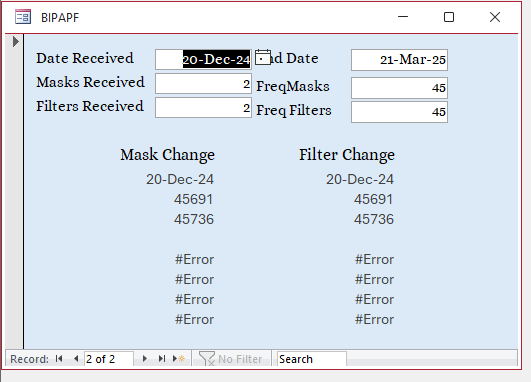
The error does not just Happen in M8, it will happen in any field that is two below a date. (In any F1-F8 or M1-M8 that has a blank above it.
Richard Van Wagoner OP  @Reply  
      
2 years ago
Like I have said the Dates from the form can be formatted on the Query and also the form it is the calculated dates from the query that I cannot Format.
Richard Van Wagoner OP  @Reply  
      
2 years ago

Richard Van Wagoner OP  @Reply  
      
2 years ago
I have also tried to type in a custom format on the Format line dd-mmm-yyyy, and still no formatting.
Kevin Robertson  @Reply  
          
2 years ago
Check the Format property of the fields on the Form.
Richard Van Wagoner OP  @Reply  
      
2 years ago
I have checked the field properties on the forms I have to type in Medium Date Completely because the dropdown has no options for formatting.
Richard Van Wagoner OP  @Reply  
      
2 years ago
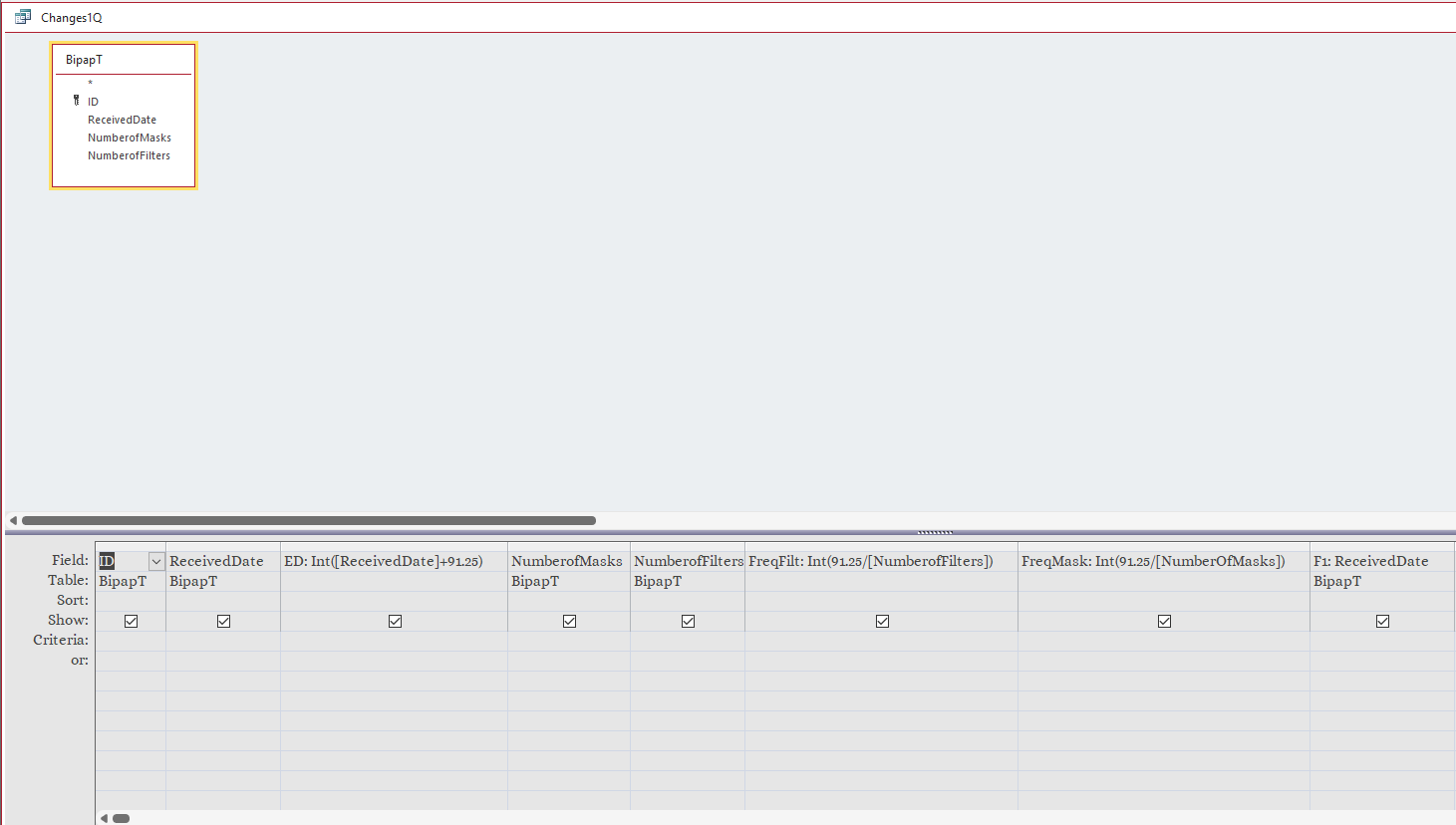
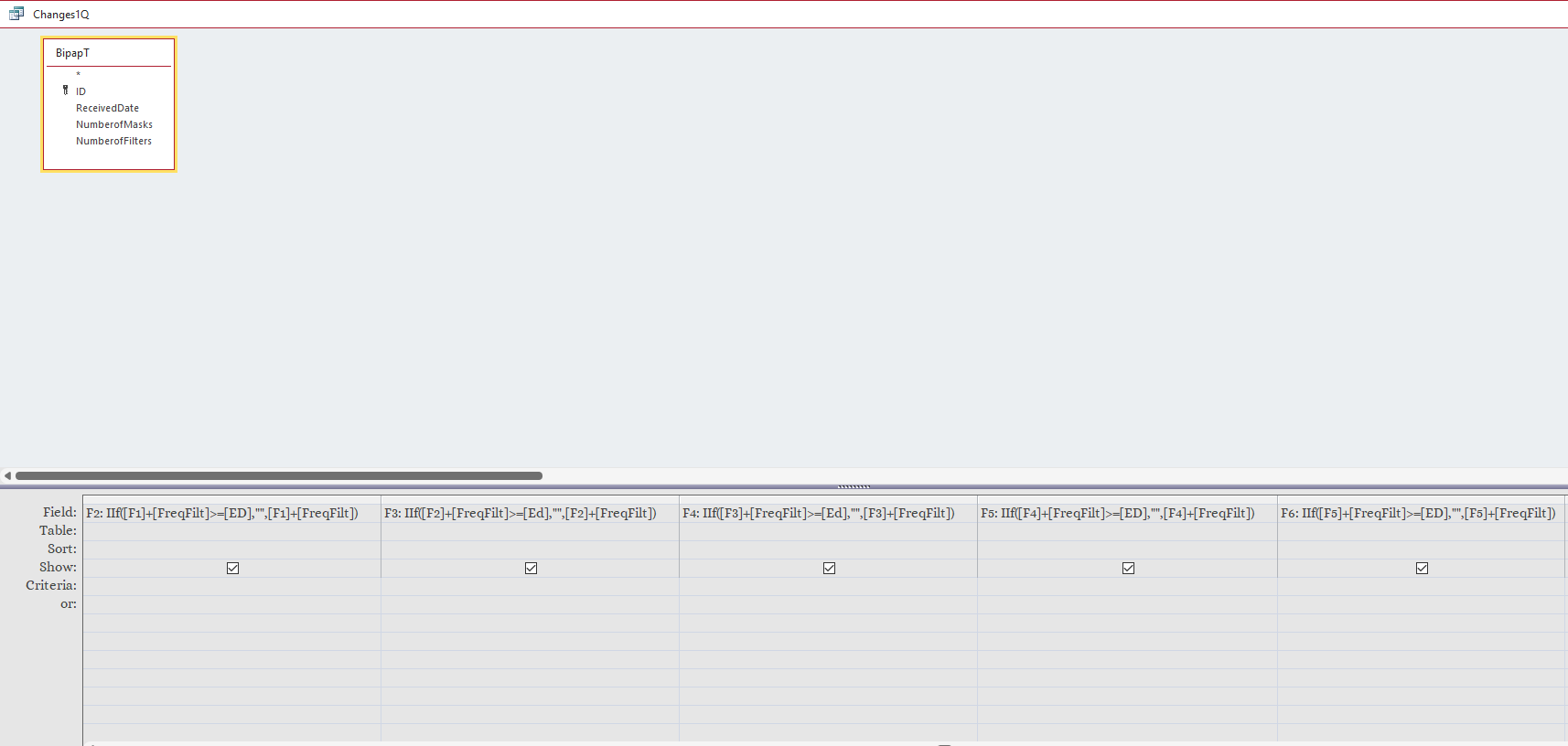
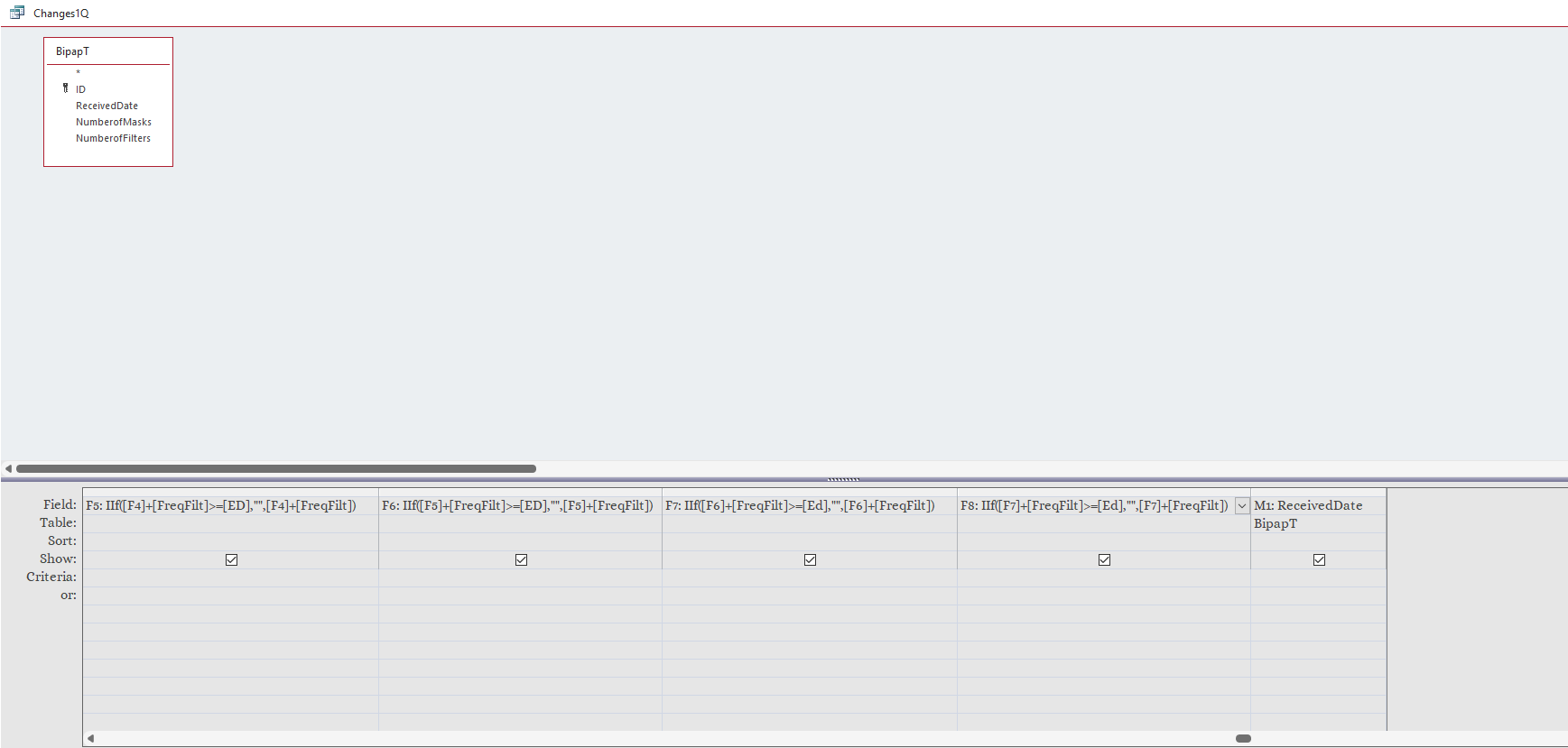
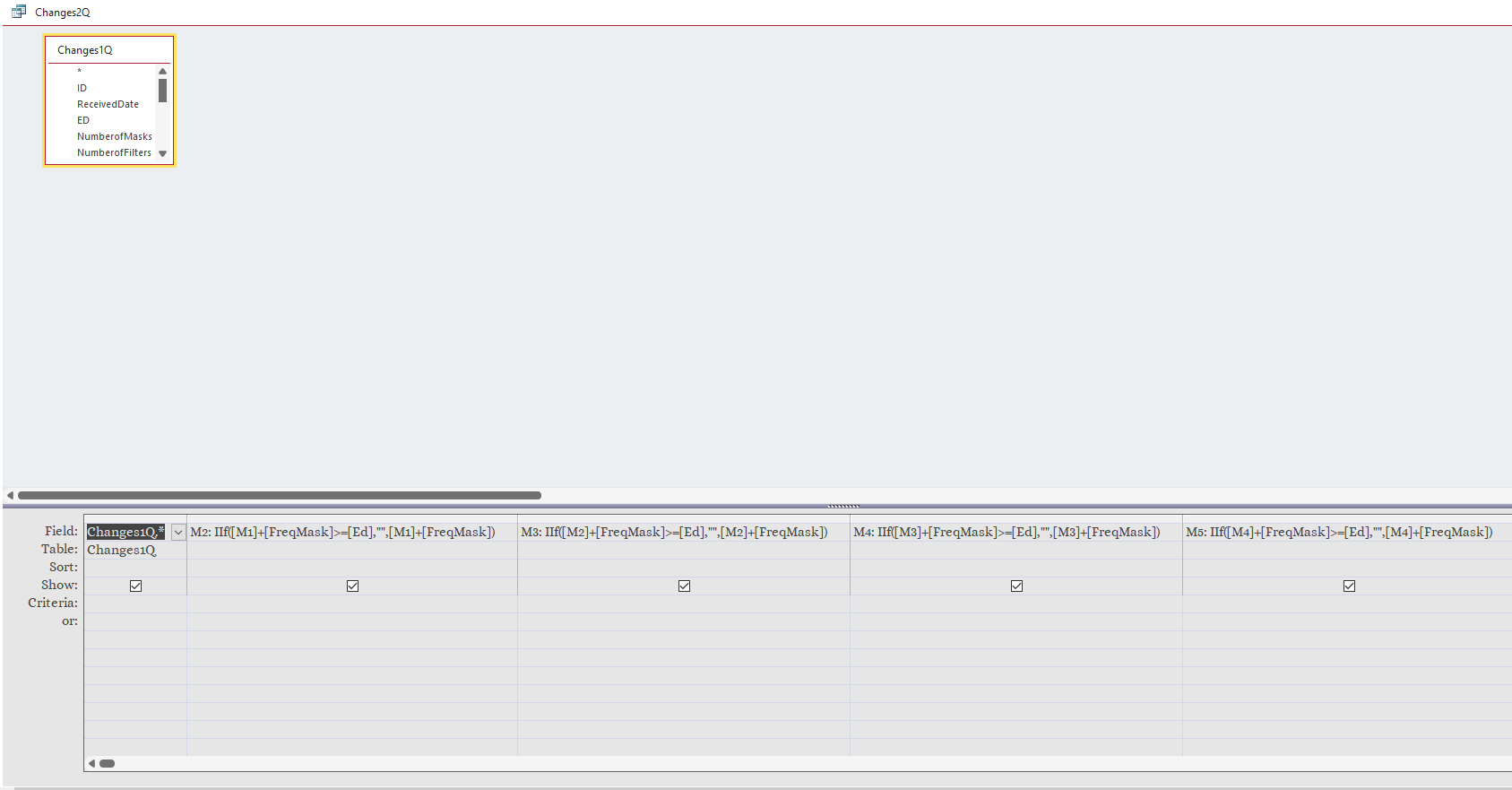
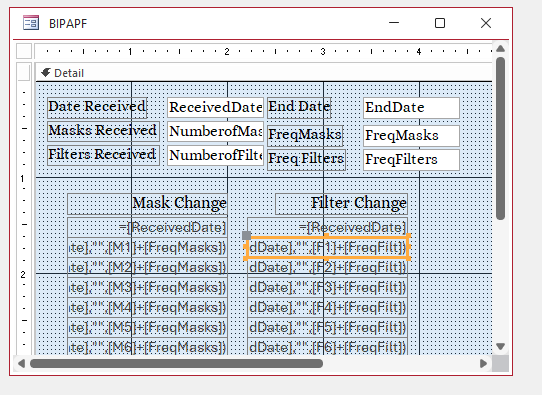
Basically all this database is supposed to do is help me with the dates of which I use to change my CPAP accessories. I get a number of Filters and what I call masks every three months hench the 91.25 days that I use to calculate the frequency of the changes. I divide the 91.25 days by the number of each item to get a number of days between changes. I use Frequency:Int(91.25/Num) to get the days between. The I use F2:IIF(F1+Frequency>=ED,"",F1+Frequency). ED = End Date. This continues for a total of 8 times for each item (mask and filter) Changing F1 to F2 and so on. That is basically all this program does.
Kevin Robertson  @Reply  
          
2 years ago
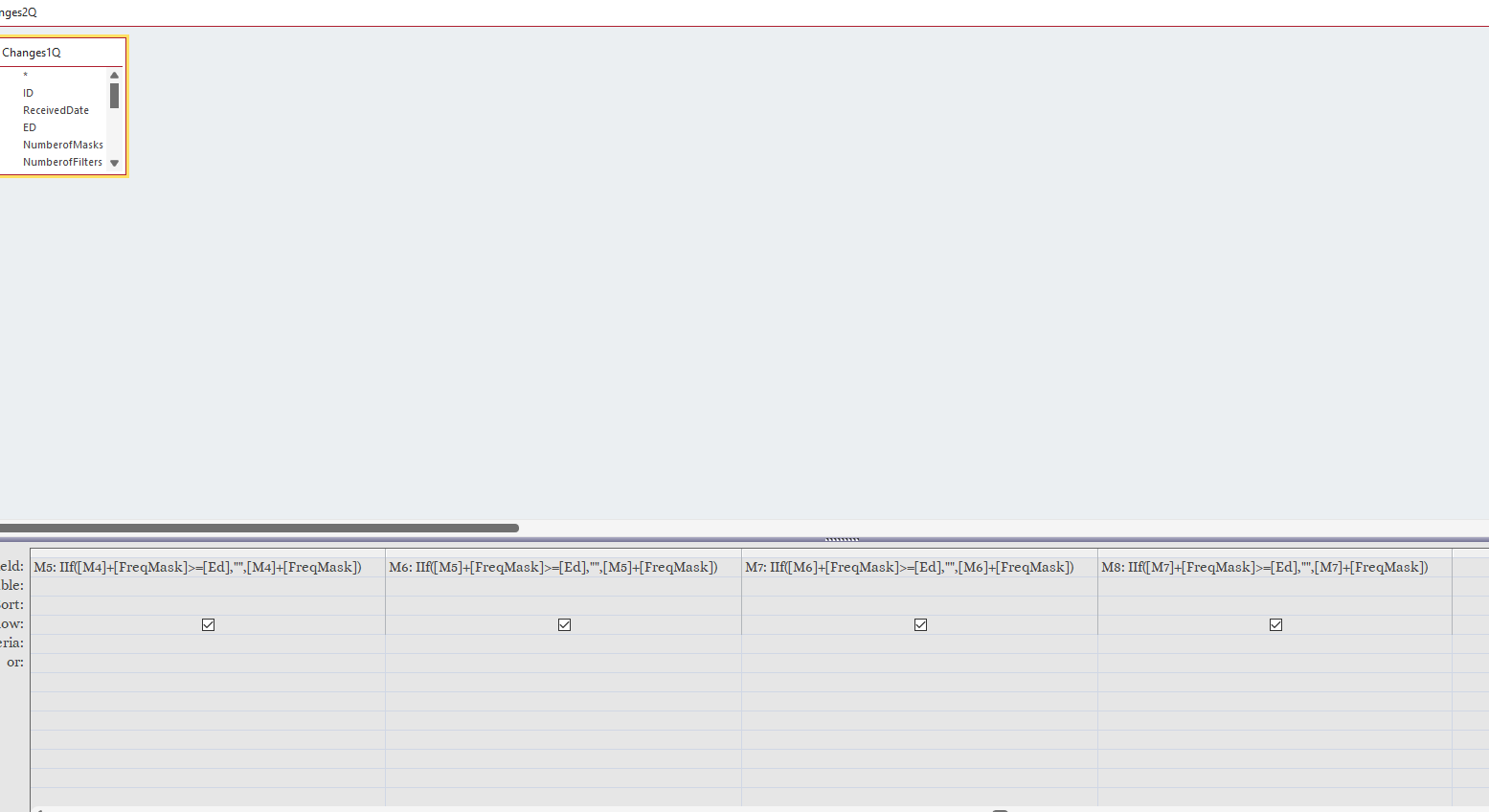
We need to see everything in your Query. The image above shows the calculated fields truncated - widen your column so we see everything. If there are many columns then post several images of the Query showing each calculated field in full.

Also, if possible, show the Query in datasheet view so we can see the data. I'm fairly certain the problem is at the Query level.
I'll try to recreate the issue if I can and work on a resolution.
Richard Van Wagoner OP  @Reply  
      
2 years ago
I have the screenshots I was going to try and put this into one query but It got to long so I have two Queries.
Richard Van Wagoner OP  @Reply  
      
2 years ago

Richard Van Wagoner OP  @Reply  
      
2 years ago

Richard Van Wagoner OP  @Reply  
      
2 years ago

Richard Van Wagoner OP  @Reply  
      
2 years ago

Richard Van Wagoner OP  @Reply  
      
2 years ago

Richard Van Wagoner OP  @Reply  
      
2 years ago

Richard Van Wagoner OP  @Reply  
      
2 years ago

Kevin Robertson  @Reply  
          
2 years ago
OK. I recreated your issue. It looks like you will need to use the Format function inside each of your calculated fields.

    F2: IIf([F1]+[FreqFilt]>=[ED],"",Format([F1]+[FreqFilt],"Medium Date"))

Let us know if this works for you.
Richard Rost  @Reply  
          
2 years ago
I'm not getting involved. It's not ISO dates. LOL. :)
Richard Rost  @Reply  
          
2 years ago
But seriously... I strongly recommend keeping everything in the default date format for your system (which SHOULD be ISO dates, but it's OK if not) and then ONLY format the FINAL visible result. Don't rely on formats in your queries. Don't try to get year with the Left or Right functions. Use the Year function. That kind of stuff.
Richard Van Wagoner OP  @Reply  
      
2 years ago
Kevin your solution only worked for F2 and M2. So I moved the calculations to the form and then I could set the formatting for the dates. But now if you look at the form, if I don't have enough data to fill the last entries I get #Type! errors is there a way to hide these errors?
Richard Van Wagoner OP  @Reply  
      
2 years ago

Richard Van Wagoner OP  @Reply  
      
2 years ago

Richard Van Wagoner OP  @Reply  
      
2 years ago

Kevin Robertson  @Reply  
          
2 years ago
Use the IsDate() function to determine if the field you are referring to has a valid date.

    =IIf(IsDate([F2]),IIf([F2]+[FreqFilt]>=[ED],"",[F2]+[FreqFilt]),"")
Richard Van Wagoner OP  @Reply  
      
2 years ago
Thanks Kevin

This thread is now CLOSED. If you wish to comment, start a NEW discussion in Access Forum.
 

Next Unseen

 
New Feature: Comment Live View


The following is a paid advertisement
Computer Learning Zone is not responsible for any content shown or offers made by these ads.
 

Learn
 
Access - index
Excel - index
Word - index
Windows - index
PowerPoint - index
Photoshop - index
Visual Basic - index
ASP - index
Seminars
More...
Customers
 
Login
My Account
My Courses
Lost Password
Memberships
Student Databases
Change Email
Info
 
Latest News
New Releases
User Forums
Topic Glossary
Tips & Tricks
Search The Site
Code Vault
Collapse Menus
Help
 
Customer Support
Web Site Tour
FAQs
TechHelp
Consulting Services
About
 
Background
Testimonials
Jobs
Affiliate Program
Richard Rost
Free Lessons
Mailing List
PCResale.NET
Order
 
Video Tutorials
Handbooks
Memberships
Learning Connection
Idiot's Guide to Excel
Volume Discounts
Payment Info
Shipping
Terms of Sale
Contact
 
Contact Info
Support Policy
Mailing Address
Phone Number
Fax Number
Course Survey
Email Richard
[email protected]
Blog RSS Feed    YouTube Channel

LinkedIn
Copyright 2026 by Computer Learning Zone, Amicron, and Richard Rost. All Rights Reserved. Current Time: 8/1/2026 1:16:22 AM. PLT: 1s