Free Lessons
Courses
Seminars
TechHelp
Fast Tips
Templates
Topic Index
Forum
ABCD
 
Home   Courses   TechHelp   Forums   Help   Contact   Merch   Join   Order   Logon  
 
Back to Access Template Marketplace    Comments List
Upload Images   @Reply   Bookmark    Link   Email   Next Unseen 
New level to Custom Message Boxes
Fred Stetson 
    
2 years ago
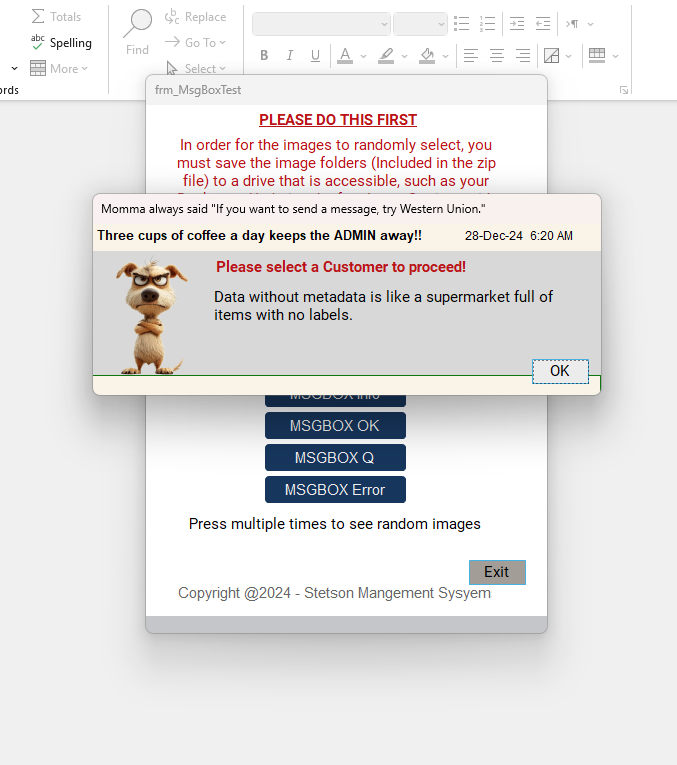
I tossed this together and am actually quite pleased with results.  I am sharing this with you for comments and feedback for even more improvements.  You are free to use for your personal use, not for redistribution. Not sure where this will end up...but I think you will like it.  Download the zipped file from my Google Drive:

https://drive.google.com/file/d/1EPX41p6JCySqjlu4GxdeUsozKRxu8Ykz/view?usp=drive_link

You do have to do a little housekeeping to make it work 100% by updating the Image Settings form with your path where the DB_Images folder was extracted.   I could not figure outr how to make that automatic.
Fred Stetson OP  @Reply  
    
2 years ago

Fred Stetson OP  @Reply  
    
2 years ago
My apologies for the bloated size of the ZIP file (Images were too big). I am resizing and will update the file on my Google Drive.
Fred Stetson OP  @Reply  
    
2 years ago
Done, reduced by 50%
Sami Shamma  @Reply  
             
2 years ago
Very Cute
Alex Hedley  @Reply  
           
2 years ago
Is it an accdb or an accde?

Might be worth adding to GitHub.
Either as just an uploaded Release, or you could VCS / GitHub it, if you want to share the source code too.
Fred Stetson OP  @Reply  
    
2 years ago
Accdb
Fred Stetson OP  @Reply  
    
2 years ago
Downloaded the VCS Add-on and exported source files, now what....LOL
Alex Hedley  @Reply  
           
2 years ago
Did Part 2 of the video above miss any steps?

(I've also made git Beginner Level 1 if that's of any use too.)
Kevin Robertson  @Reply  
          
2 years ago
This is really cool.
A couple of things:

Most of the Message Box forms look pretty much the same and there is a lot of duplicate code.
I would have one Form for the Birthday MsgBox and another Form for all the others.
This will make them much easier to maintain.

Also, a button is needed to open the Image Settings Form. A button next to each Text Box would be useful so the user could select a folder on their system or network instead of having to type it in.
Fred Stetson OP  @Reply  
    
16 months ago
@kevin - agreed, but I am just having too much fun.
Fred Stetson OP  @Reply  
    
12 months ago
Kevin yes, the msgbox forms are individually designed.

This thread is now CLOSED. If you wish to comment, start a NEW discussion in Access Template Marketplace.
 

Next Unseen

 
New Feature: Comment Live View


The following is a paid advertisement
Computer Learning Zone is not responsible for any content shown or offers made by these ads.
 

Learn
 
Access - index
Excel - index
Word - index
Windows - index
PowerPoint - index
Photoshop - index
Visual Basic - index
ASP - index
Seminars
More...
Customers
 
Login
My Account
My Courses
Lost Password
Memberships
Student Databases
Change Email
Info
 
Latest News
New Releases
User Forums
Topic Glossary
Tips & Tricks
Search The Site
Code Vault
Collapse Menus
Help
 
Customer Support
Web Site Tour
FAQs
TechHelp
Consulting Services
About
 
Background
Testimonials
Jobs
Affiliate Program
Richard Rost
Free Lessons
Mailing List
PCResale.NET
Order
 
Video Tutorials
Handbooks
Memberships
Learning Connection
Idiot's Guide to Excel
Volume Discounts
Payment Info
Shipping
Terms of Sale
Contact
 
Contact Info
Support Policy
Mailing Address
Phone Number
Fax Number
Course Survey
Email Richard
[email protected]
Blog RSS Feed    YouTube Channel

LinkedIn
Copyright 2026 by Computer Learning Zone, Amicron, and Richard Rost. All Rights Reserved. Current Time: 5/31/2026 5:33:12 PM. PLT: 0s