Access Video Quiz X1.1
By Richard Rost

 3 months ago
Ready to Test Your Knowledge of Microsoft Access?
Joe Smith buys a second car. What's the best database design here? Welcome to Access Video Quiz #2. You will be asked five expert-level questions to test your knowledge of relational databases in Microsoft Access. Answer each question, check your score, and see how well you understand key relational concepts such as relationships, table design, and the use of junction tables.
Recommended Courses
Want More?
Keywords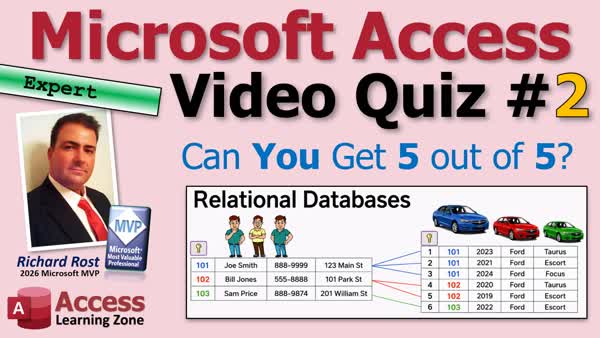
Access Video Quiz, relational database, relational database quiz, database relationships, foreign key, primary key, junction table, one-to-many relationship, many-to-many relationship, one-to-one relationship, self-join, linking tables, customer table, vehicle table, data modeling
More InformationTranscript It's time for another video quiz from Access Learning Zone. Today's quiz is for the expert users and it's all about relational databases. I'll ask you five questions, give you a few seconds to think about each one, then reveal the answer. Keep track of your score and we'll see how you did at the end.
Are you ready? Here we go.
Question one: What is a relational database?
A) Tables connected by relationships
B) A database with one table
C) A spreadsheet with worksheets
D) A database on the internet
The answer is A, tables connected by relationships. A relational database lets related tables work together. That's what makes Access so powerful.
Question two: What does the vehicle table use to identify the owner of the vehicle?
A) The customer name
B) The customer ID
C) The customer's address
D) The customer's phone number
That's going to be B, the customer ID. The vehicle table doesn't store the customer's name or phone number again. It just stores his customer ID because you can look up the other information.
Question three: Joe Smith buys a second car. What's the best design here?
A) Add another Joe Smith record
B) Store Joe once and link both cars
C) Create a new customer table
D) Put both cars in one field
That's going to be B, store Joe once and link both cars. Joe only belongs once in the customer table and then each vehicle points back to his customer ID in their own records in the vehicle table.
Question four: Customers and orders usually have what kind of a relationship?
A) One-to-one
B) One-to-many
C) Many-to-many
D) A self-join
That's going to be B, one-to-many. Each customer can place many orders, but each order belongs to just one customer. That's a one-to-many relationship.
And finally, question five: What relationship uses a junction table?
A) One-to-one
B) One-to-many
C) Many-to-many
D) Parent-to-child
C, many-to-many. A junction table connects records when each side can relate to many on the other side. For example, if each driver could drive multiple cars, then you'd have a junction table because each driver can relate to multiple cars and each car can be driven by multiple drivers.
All right, so how did you do? Did you get all five right? Are you a captain of the Enterprise or a red shirt in training?
If you missed any of these topics and a lot more, I'll cover it in my Microsoft Access Expert Level 1 class. It's all about relational database concepts.
All right, thanks for playing. Post your score down in the comments, and until next time, live long and prosper, my friends. Intro Joe Smith buys a second car. What's the best database design here? Welcome to Access Video Quiz #2. You will be asked five expert-level questions to test your knowledge of relational databases in Microsoft Access. Answer each question, check your score, and see how well you understand key relational concepts such as relationships, table design, and the use of junction tables. Quiz Q1. What is a relational database?
A. Tables connected by relationships
B. A database with one table
C. A spreadsheet with worksheets
D. A database on the internet
Q2. What does the vehicle table use to identify the owner of the vehicle?
A. The customer name
B. The customer ID
C. The customer's address
D. The customer's phone number
Q3. Joe Smith buys a second car. What is the best design in this scenario?
A. Add another Joe Smith record
B. Store Joe once and link both cars
C. Create a new customer table
D. Put both cars in one field
Q4. Customers and orders usually have what kind of relationship?
A. One-to-one
B. One-to-many
C. Many-to-many
D. A self-join
Q5. What relationship uses a junction table?
A. One-to-one
B. One-to-many
C. Many-to-many
D. Parent-to-child
Answers: 1-A; 2-B; 3-B; 4-B; 5-C
DISCLAIMER: Quiz questions are AI generated. If you find any that are wrong, don't make sense, or aren't related to the video topic at hand, then please post a comment and let me know. Thanks. Summary Today's video from Access Learning Zone is aimed at our expert users and focuses on understanding relational databases. I will ask you five challenging questions about the fundamentals of how relational databases work. As we go through each question, I will give you a chance to think about your answers before revealing the correct response and explaining the reasoning behind it. Make sure to keep track of your score, and see how you do at the end.
Let's get started.
First, what exactly is a relational database? The correct answer is that a relational database is made up of tables that are connected by relationships. This structure is what enables the tables to relate to each other and makes programs like Access so effective for managing information.
Next, when it comes to vehicles and their owners, how does the vehicle table indicate who owns which vehicle? The answer is that the vehicle table uses the customer ID. It does not duplicate information like the customer's name, phone number, or address. Instead, it stores the customer ID so you can easily reference back to the main customer table for full details.
Now, if Joe Smith purchases a second car, what is the most efficient way to design your tables? The ideal approach is to store Joe's record once in the customer table and then link both vehicles to his customer ID. This avoids unnecessary duplication and lets both vehicle records point to a single customer entry.
Moving on to relationships, what kind of relationship typically exists between customers and orders? In most scenarios, this is a one-to-many relationship. Each customer can place multiple orders, but each order will only belong to a single customer. Structuring your tables this way ensures accurate relational integrity.
Lastly, which type of relationship requires a junction table? The answer is a many-to-many relationship. A junction table is used when each side of the relationship can match with multiple records on the other side. For example, if drivers can drive multiple cars and each car can be driven by multiple drivers, a junction table would be necessary to organize those associations.
Take a moment to tally up your score. Did you manage to answer all five correctly? If you missed any, or if you want to learn more about these foundational concepts and others, I cover all of it in my Microsoft Access Expert Level 1 course, where we explore relational database principles in detail.
You can find a complete video tutorial with step-by-step instructions on everything discussed here on my website at the link below. Live long and prosper, my friends. Topic List Definition of a relational database
Using relationships to connect tables
Primary keys and foreign keys in related tables
Storing customer data and vehicle ownership
Designing tables for customers with multiple vehicles
One-to-many relationships between customers and orders
Using a junction table for many-to-many relationships Article This is a video quiz. No article needed. Primary Topics relational databases, primary keys, foreign keys, one-to-many relationships, many-to-many relationships, junction tables, table normalization, data modeling Secondary Topics parent-child relationships, self-join, database design best practices |





