|
||||||

|
|
||||||
|
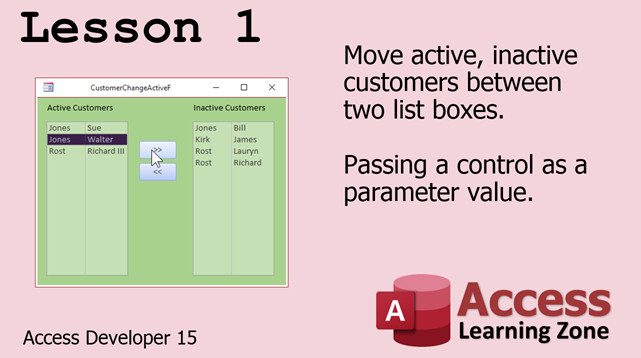
Access Developer 15Access Developer 15 covers Multi-Select List Boxes and Debugging. WelcomeIn Developer 14 we started building the Easy Access POS, a complete Point of Sale system built in Microsoft Access. In order to continue, however, we have to take some time learning List Boxes, especially Multi-Select List Boxes. So, that's where Developer 15 is going to start. We'll also spend some time covering more advanced Debugging. ResourcesTopics CoveredIn Lesson 1 we will begin by reviewing some things about list boxes, see how to move items between two different list boxes, and learn how to pass a control as a parameter to a subroutine or function. Instead of just passing values, we can pass entire controls.
Enroll TodayEnroll now so that you can watch these lessons, learn with us, post questions, and more.
Questions?Please feel free to post your questions or comments below. If you are not sure as to whether or not this product will meet your needs, I'd rather help you before you buy it. Remember, all sales are final. Thank you.
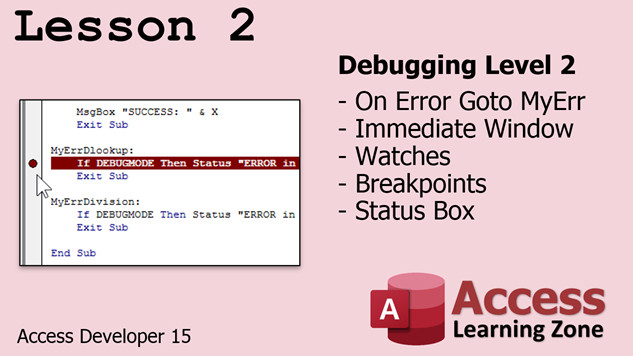
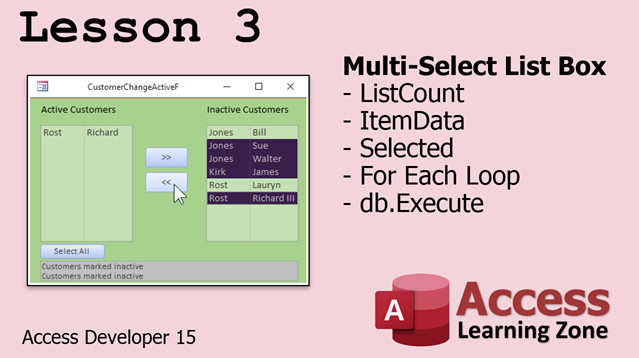
More InformationTranscriptWelcome to Microsoft Access Developer Level 15 brought to you by AccessLearningZone.com. I am your instructor, Richard Rost. Developer 15 is going to focus primarily on multi-select list boxes and debugging. We have spent a good amount of time covering list boxes in past classes. In Beginner Level 8, we built static list boxes which just have a single list of values in them. In Expert Level 4, we built relational list boxes where you can base the data in the box off of a table or query. In Advanced Level 5, we learned how to move values from one box to another using macros. In Developer 10, we learned how to use VBA and SQL to populate our list boxes. Then, in Developer 10, we used list boxes in our test taker database. Today, we are going to improve on that and build a similar example to Advanced 5, but it's going to be more advanced. We are going to see how to move active and inactive customers between two different list boxes. This time, I am going to teach you how to pass a control as a parameter value. We are going to learn about multi-select list boxes, where you can select multiple options from the box and then do something with them, or you can use code to select options in the box. We will learn about list count, item data, selected, and we will learn about for each loops. I will also teach you about DBExecute. Yes, I know I went backwards since I wanted to do the list box stuff first. Lesson 2 is going to cover debugging. We have done some debugging before with On Error Resume Next, but a lot of you have been asking for more lessons on debugging. Here, I am going to teach you how to set up your own error handling, display error messages, use the Immediate window, set up watches and breakpoints, and lots more. I am using Access 2019, the Office 365 edition. I should probably change that slide since they recently renamed Office 365 to Microsoft 365, their subscription option. It's the same thing, just a different name. I would recommend for prerequisites that you at least have those top five classes there. The Test Taker (Developer 10) is necessary. I do recommend you take all my classes in order, but if you are skipping around, you should know list boxes before you get to the multi-select stuff. These four classes on top here would be handy at least. Of course, I also recommend the class before this one, Access Developer 14. One of the major reasons I decided to go into multi-select list boxes is because we are going to use them a lot for developing our Easy Access POS, the Point of Sale system. Even if you are not building the POS with me, there are lessons in Developer 14 that everyone can benefit from. I suggest you take Developer 14 before Developer 15. If you have questions pertaining to the material covered in today's class, you can post them on the page for this class. If you scroll down to the bottom of the page under the video, you will see all the other questions and comments that other users have posted. You should see a form something like this. I change it every time, but it basically looks like this. Type in a subject, then your comments, hit Submit, and it will go right on the course page. I try to answer questions online as often as I can, and Alex and a bunch of other people do a great job of helping me out. That is where I recommend you submit any questions you have. You can also hit the Subscribe button and get notified anytime anyone else posts a question about this class. That is great for updates or if I post any addendums or extra files. If you have a general question about Access or any other topic, you can go to the forums and post it there. I try to keep stuff on the course pages relevant to that class. That is what the forums are for. There is Word, Excel, Outlook, all that stuff. There is also my TechHelp page. If you need help right now with a project you are stuck on and you do not want to wait for a forum reply, you can send it to my TechHelp page if you need consulting advice or any of that kind of stuff. Here is my email address, but again, I prefer you use one of the previous methods. Sit back, relax, and click on the link below to start Lesson One. IntroIn lesson 15 of the Microsoft Access Developer series, we will focus on working with multi-select list boxes, including moving items between lists, passing controls as parameter values, and using VBA to manage selections. We will cover key properties like list count, item data, and selected, as well as techniques such as using for each loops and the DBExecute method. The lesson also introduces debugging in Microsoft Access, showing you how to set up error handling, use the Immediate window, and work with watches and breakpoints to troubleshoot your code. QuizQ1. What are the two main topics covered in Microsoft Access Developer Level 15? A. Multi-select list boxes and debugging B. Query building and report generation C. Forms design and data validation D. SQL basics and relationships Q2. Which previous Developer level class is highlighted as a prerequisite for Level 15? A. Developer 5 B. Developer 12 C. Developer 10 D. Developer 2 Q3. What is a significant improvement in this course compared to Advanced Level 5 regarding list boxes? A. Building only static list boxes B. Moving values between text boxes C. Moving active and inactive customers between two list boxes D. Creating a combo box lookup Q4. What new list box feature is introduced in Developer 15? A. Nested subforms B. Multi-select functionality C. Pivot tables D. Data export Q5. Which technique is taught regarding VBA and list boxes in this class? A. Passing a control as a parameter value B. Creating basic macros only C. Renaming fields in VBA D. Using only table-based data Q6. Which of the following is NOT mentioned as a prerequisite class for understanding the material in Developer 15? A. Test Taker (Developer 10) B. Advanced 5 C. Excel Beginner D. Developer 14 Q7. What is one of the main future uses for multi-select list boxes, as suggested in the video? A. To design navigation menus B. For the Easy Access POS system C. To enhance report design D. For exporting data to Word Q8. When encountering questions about material covered in the class, where does the instructor recommend posting them? A. On the class's course page under the video B. Directly to Microsoft C. On unrelated social media pages D. Only in personal email Q9. What tool is mentioned for immediate assistance if you are stuck on a project? A. TechHelp page B. YouTube comments C. Print manual D. Facebook group Q10. What does the instructor mention you should do to get notified about new questions or updates for the class? A. Subscribe to the course page B. Refresh the video C. Email the instructor daily D. Use the Excel forum Answers: 1-A; 2-C; 3-C; 4-B; 5-A; 6-C; 7-B; 8-A; 9-A; 10-A DISCLAIMER: Quiz questions are AI generated. If you find any that are wrong, don't make sense, or aren't related to the video topic at hand, then please post a comment and let me know. Thanks. SummaryToday's video from Access Learning Zone covers Microsoft Access Developer Level 15, and I will be walking you through everything you can expect in this class. The main focus of Developer 15 is on multi-select list boxes and debugging. We have already looked at list boxes in depth in previous classes. For a quick recap, in Beginner Level 8 we worked with static list boxes that contain a single list of values. In Expert Level 4, the topic was relational list boxes, where we used a table or query to provide the list values. Advanced Level 5 took things further by showing you how to move values from one list box to another using macros. In Developer 10, we explored how to fill list boxes with VBA and SQL, and we used list boxes in our Test Taker database example. This time, you'll see how to take those concepts even further. We are going to build an advanced version of the exercise from Advanced 5, this time focusing on managing active and inactive customers by moving them between two different list boxes. A key concept in this class will be learning to pass a control as a parameter value and working with multi-select list boxes. These allow you to select more than one item at a time and then use code to process those selections or even programmatically select items. We'll explore important properties and methods including list count, item data, selected, and for each loops. I will also introduce DbExecute and demonstrate how to use it. You might have noticed that the order of lessons is a bit different this time because I wanted to address list boxes before diving into debugging. Lesson 2 will be all about debugging, which many of you have asked for. While we have briefly covered On Error Resume Next in the past, this time I'll go into more depth. You'll learn how to set up customized error handling, show error messages, use the Immediate window, create watches and breakpoints, and more. I am working with Access 2019, specifically the Microsoft 365 subscription version, which was previously known as Office 365. The features we'll discuss should be largely the same regardless of whether you are using Office 365 or what is now called Microsoft 365. As far as prerequisites, I recommend that you've completed at least the top five classes listed in my series, especially Test Taker from Developer 10. It's best to take the classes in sequence, but if you are jumping around, make sure you are comfortable with single-selection list boxes before tackling multi-select features. The classes immediately preceding this one, especially Access Developer 14, will be particularly helpful. A big reason I am covering multi-select list boxes now is because we will be using them extensively in building our Easy Access POS (Point of Sale) system. Even if you aren't following along with the POS lessons, Developer 14 has valuable content for all Access developers, so I strongly recommend completing it first. If you have any questions about the material in today's class, feel free to post them on the class page. You will find a section beneath the video where you can see and contribute to discussions, post your questions, and read answers that others have given. Simply enter a subject and your comments, then submit. I do my best to answer questions as often as possible, and there is a great community of people who help out there too. If you want to get notified whenever a new question or comment is posted for this particular class, you can subscribe to the page. That way, you'll be instantly updated about addendums or extra files I may upload later. For general questions about Access or any other application, please use the forums, which are organized by topic to keep class-specific questions separate. There are dedicated sections for Word, Excel, Outlook, and more. If you ever need immediate assistance or customized help on a project, you can reach out to me through the TechHelp page. That's designed for cases when you can't wait for a forum response and need quick consulting or advice. My email is available too, but I encourage you to use the class page or forums whenever possible. Now, get comfortable and proceed below to start Lesson One. You can find a complete video tutorial with step-by-step instructions on everything discussed here on my website at the link below. Live long and prosper, my friends. Topic ListMoving active and inactive customers between list boxes Passing a control as a parameter value Using multi-select list boxes in Access Selecting multiple options with multi-select list boxes Using code to select options in a list box Working with list count, item data, and selected properties Using For Each loops with list boxes Using DBExecute for list box operations Setting up custom error handling in VBA Displaying error messages in Access VBA Using the Immediate window for debugging Setting up watches and breakpoints in VBA debugging Primary Topicsmulti-select list boxes, moving items between list boxes, passing controls as parameters, list box properties, for each loops, DBExecute, debugging techniques Secondary Topicserror handling, Immediate window, watches, breakpoints, Access 2019 interface |
||
|
| |||
| Keywords: access developer 15 multi select list boxes debugging Active Inactive Customer List Boxes Move Between Boxes UPDATE SQL Docmd.RunSQL SetWarnings On Error Resume Next Invalid Use of Null Immediate Window Show Debug.Print Multi-Select List Boxes .ListCount Page Tag: whatsnew PermaLink Microsoft Access Developer 15 |