|
||||||
|
||||||
|
||||||
|
||||||
Access Expert 30PMT, FV, PV, RATE, NPER, IPMT, PPMT CalculatorsWelcome to Access Expert 30. In this course you will learn how to use key financial functions in Access, including PV, FV, RATE, NPER, and PMT, to build various calculators for monthly loan payments, investment future value, required initial deposits, and house affordability. We'll discuss how to calculate loan amortization, break out principal and interest components, and explore the use of these functions for savings and investment planning. You will see how these calculations can help with financial decision-making in Access and learn the fundamentals of managing financial data within your database. Lessons
Resources
Lesson SummaryWelcome! PV, FV, RATE, NPER, PMT & Loan Tools - Welcome to Microsoft Access Expert Level 30. In this course we will continue the Comprehensive Function Guide to Microsoft Access by focusing on financial functions such as PV, FV, RATE, NPER, PMT, principal payment, and interest payment. We will discuss how to calculate monthly loan payments, future value of investments, rate of return, time to reach savings goals, required initial deposits, and house affordability. We will also talk about loan amortization and the difference between principal and interest in payments. This course builds on prior beginner and expert levels and uses Microsoft Access 2013 for demonstrations.
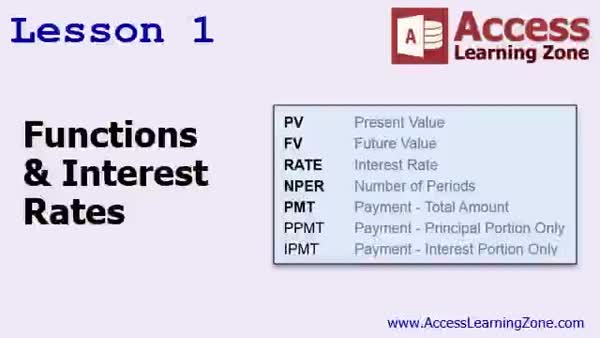
Lesson 1: Financial Functions & Interest Rates - In Lesson 1, we will have a brief overview of the different financial functions in Access and discuss interest rates, including the difference between simple and compound interest. I will explain the five basic financial functions - present value, future value, interest rate, number of periods, and the payment function - and mention related advanced functions you might see in Access. We will cover how these functions help calculate payments, future values, and periods, and talk about when and why these financial calculations matter in loans and investments.
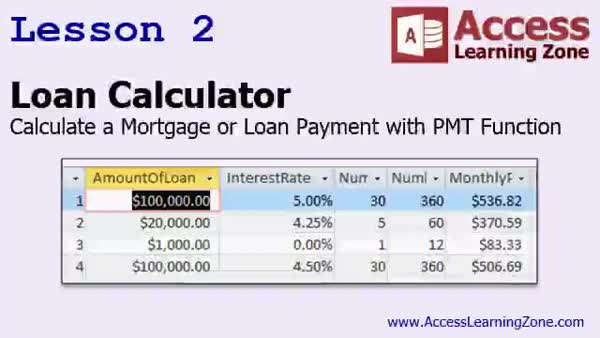
Lesson 2: Loan & Mortgage PMT Formula - In Lesson 2, we will build a loan calculator in Access and learn how to calculate monthly loan or mortgage payments using the PMT function. I will show you how to set up a new table for storing loan data, create a query to perform the calculations, and format the results as currency. We will discuss potential rounding issues, how to calculate the total amount paid and interest paid, and how changing loan terms or rates affects your total costs. We will also talk about handling multiple loans and addressing minor differences due to fractional pennies.
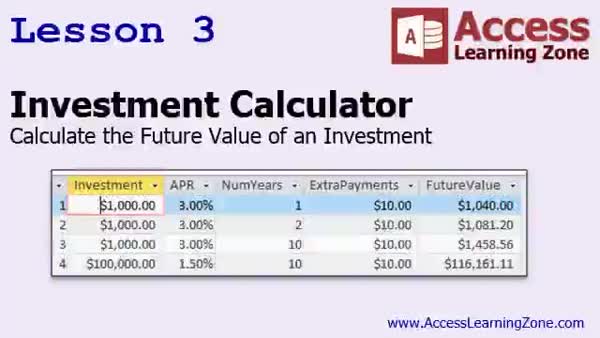
Lesson 3: Investment Calculator with FV Function - In Lesson 3, we will build an investment calculator in Access that uses the future value (FV) function to estimate how much an investment will be worth after a set number of years. I will show you how to create a table for tracking the investment amount, APR, number of years, and optional extra payments, as well as how to set up a query to calculate the future value of your investment. We will also discuss formatting options and how to adjust the calculator for annual or monthly periods using the FV function parameters.
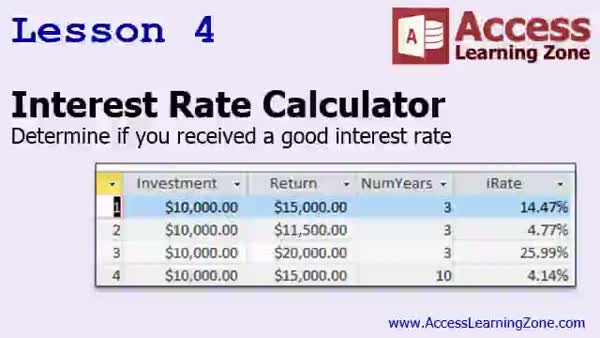
Lesson 4: APR and Interest Rate Calculation - In Lesson 4, we will walk through building an interest rate calculator to determine the annual percentage rate (APR) of an investment when you know the initial investment, the final return, and the time period. We will discuss how to use the rate function to calculate the interest rate, set up the necessary table and query, and address important details such as entering negative values for outgoing money. We will also talk about when to use years versus months in these calculations, and briefly compare how monthly and annual compounding affect your results.
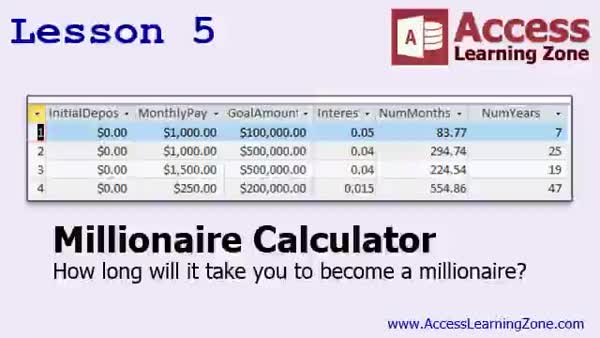
Lesson 5: Calculate Million Savings Time - In Lesson 5, we will build the millionaire calculator to determine how long it will take to reach a financial goal, such as becoming a millionaire, based on monthly savings, an initial deposit, a set interest rate, and a specific target amount. We will use the NPER function to calculate the number of months needed, walk through designing a table for the necessary variables, and create a query to determine the time required to reach your goal. We will also discuss formatting results in years, rounding methods, and some common formatting quirks you may encounter in Access.
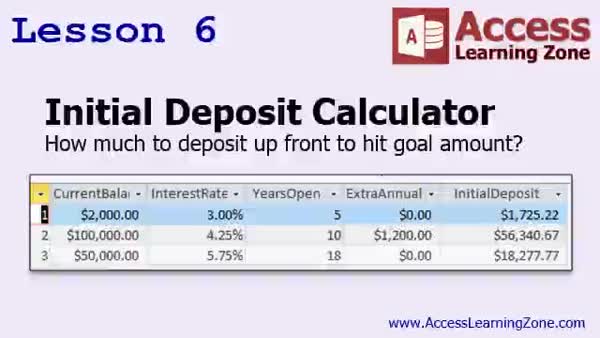
Lesson 6: Calculate Initial Deposit Needed - In Lesson 6 we will walk through building an initial deposit calculator to determine how much you need to deposit upfront to reach a financial goal, given a target balance, interest rate, and time period. We will discuss setting up a table to track values such as current balance, interest rate, years or periods open, and optional extra annual payments. I will show you how to use the present value (PV) function to solve for the initial deposit amount. We'll also cover formatting and a few examples, such as planning for a child's college fund or forecasting other savings goals.
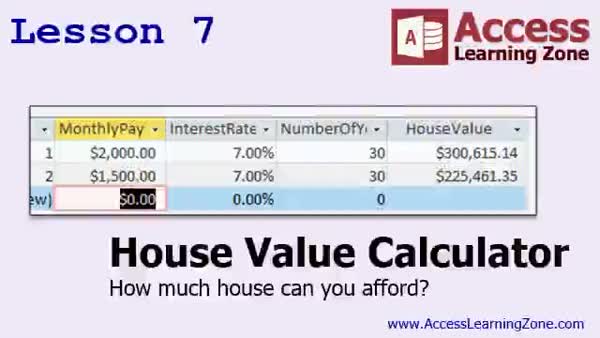
Lesson 7: Calculate House Affordability with PV - In Lesson 7, we will build a house value calculator to determine how much house you can afford based on your monthly payment, the bank's interest rate, and a 30-year mortgage. We will walk through designing a table for inputting payment details, setting up a query using the PV function to calculate the house value, and discuss optional parameters for the PV function. We will also discuss adjusting for taxes and insurance, formatting the results as currency, and how changing different variables impacts the amount of house you can afford.
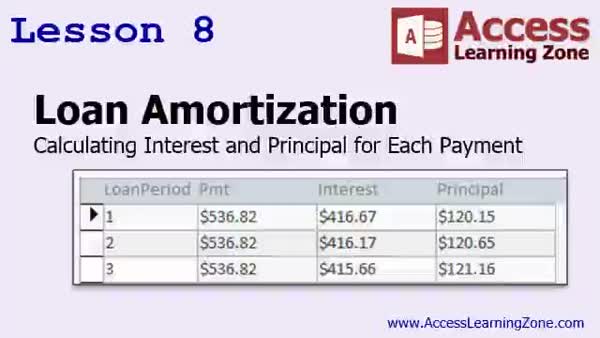
Lesson 8: Loan Amortization: Interest & Principal - In Lesson 8, we will build a simple loan amortization schedule using Access, focusing on how to break down a fixed monthly payment into its interest and principal components for each period. I will show you how banks calculate loan amortization, why your interest payments decrease and your principal payments increase over time, and how to set up tables and forms to display this data. We will walk through using functions like IPMT to calculate monthly interest and discuss rounding issues, as well as how to handle errors for invalid periods in your amortization schedule.
Lesson 9: PMT, FV, RATE, NPER, PV, IPMT, PPMT - In this course we learned about key financial functions in Access, including how interest rates work and how to use the PMT, FV, RATE, NPER, and PV functions to build loan, investment, rate of return, millionaire, and initial deposit calculators. We also covered constructing a house value calculator and discussed loan amortization, breaking down interest and principal with IPMT and PPMT functions. Advanced financial functions related to depreciation were mentioned but not covered. We discussed next steps, including formatting and custom functions, and where to ask questions or get further help with Access or related topics.
NavigationKeywordsfinancial functions, PV, FV, RATE, NPER, PMT, loan calculator, investment calculator, future value, present value, interest rate, APR, loan amortization, principal payment, interest payment, IPMT, PPMT, mortgage payments
More InformationTranscriptWelcome to Microsoft Access Expert Level 30 brought to you by AccessLearningZone.com. I am your instructor, Richard Rost. Today's class is part 6 of my Comprehensive Function Guide to Microsoft Access. Part 1 covered the string and logical functions. That was Access Expert Level 25. Part 2 was the math and type conversion functions. Parts 3 and 4 covered the date and time functions. Part 6 - that's today's class - covers the financial functions: PV, FV, RATE, NPER, PMT, principal payment, and interest payment. In today's class we are going to use these different financial functions to answer all kinds of questions that people commonly have about their finances. For example, the most popular one: What is my monthly loan payment? If you have a mortgage or a car loan, you know you have to pay a certain amount of dollars over so many years at this percent interest rate. What is my monthly payment going to be? You can calculate the future value of an investment. If you are going to invest so much money each month at a certain interest rate, how much money will you have in your account after 5 years, 10 years, and so on? What was my investment's rate of return? Say you put $10,000 into a business and 5 years later you sold it for $20,000. How much of a rate of return did you get? How long until I am a millionaire? That is one of my favorite calculations. I know how much money I am putting into an investment, whether it is a savings account, stock, or bond. I know what my rate of return is going to be. How long until that turns into a million dollars or whatever other dollar amount you want? How much of a deposit do I have to make now to reach a goal amount in the future? This is useful if you are saving for your kids for their college fund. You know you need $50,000 for school 15 years from now. How much money do you have to invest now and then pay each month to reach that goal? How much house can you afford? You know how much you can afford each month for a monthly payment. You know the current bank interest rate. You want a 30-year mortgage. When you go house shopping, how much of a house can you afford? Can you afford a $300,000 house? Finally, we will look at something called loan amortization, which is knowing what your monthly payment is and how much of that payment is interest versus principal. That is sometimes very handy to know. Before taking this class, I strongly recommend that you have finished my beginner series one through nine and the expert series classes, Expert Levels 1 through 29. This class was recorded using Microsoft Access 2013, although most of the functions should work just fine in 2007 and 2010. I do not know if they all work in 2003, although I suspect they will. I believe all of these financial functions have been in Access for a very long time. Unfortunately, I do not still have a copy of 2003 running on any of my machines. I know I probably should keep it, but I do not. So if any of you discover something that does not work in 2003, let me know. In Lesson 1, we are going to have a brief overview of the different financial functions in Access and we are going to learn about interest rates. We will learn about compound and simple interest rates. In Lesson 2, we are going to build a loan calculator. We are going to learn how to calculate a mortgage or other loan payment with the PMT function, where we specify the amount of the loan, the interest rate, the number of years, and then Access will calculate our monthly payment. In Lesson 3, we are going to build an investment calculator. This is where you can specify an amount you are willing to invest, the APR percentage rate you are getting, the number of years you are going to leave that money in the bank, and then Access will calculate the future value. You can see what it is going to be worth in 2 years, 10 years, 20 years, and so on. In Lesson 4, we are going to build an interest rate calculator. This is handy if you have an investment and you know what you have gotten back out of the investment, how long you had the investment for, and you want to figure out what your rate of return was. What was your annual percentage rate? In Lesson 5, we are going to build a millionaire calculator. In other words, how long will it take you to become a millionaire? We know how much money we are going to put into our savings account every month. We know what our goal amount is, whether it is $500,000 or a million or whatever. We know what our interest rate is going to be. We will use the NPER function to calculate how many years it is going to take for us to reach our goal. In Lesson 6, we are going to build an initial deposit calculator. In other words, I know my current balance, how much is in the account, or how much I want to end up with. We will look at the interest rate received, how many years I want to have the investment account open, and figure out how much of an initial deposit I need to hit that goal. For example, a child's college fund. You know you want $50,000 at the end of 18 years and you know you are going to be getting a 5 and 3 quarters percent interest rate. According to our calculations, we need to put about $18,000 into an account up front. That is what we will do in this lesson. In Lesson 7, we are going to build a house value calculator. You know how much you can afford for your monthly payment, you know the interest rate the bank will give you, and you want a 30-year mortgage. When you go house shopping, how much of a house can you afford? In Lesson 8, we are going to build a simple loan amortization schedule. This is where you know your monthly payment, which we derived from the PMT function. Now you want to know out of that monthly payment, how much of it each month is interest versus principal. IntroIn lesson 30 of my Microsoft Access Expert series, we will learn how to use key financial functions like PV, FV, RATE, NPER, PMT, PPMT, and IPMT in Microsoft Access to answer common financial questions. I will show you how to build calculators for loan payments, investment future values, rate of return, becoming a millionaire, initial deposits for savings goals, how much house you can afford, and create a loan amortization schedule. This lesson covers practical examples to help you work with financial calculations in your Access databases. QuizQ1. Which of the following financial functions can be used in Access to calculate the monthly payment on a loan? A. PMT B. SUM C. AVG D. LEN Q2. What function in Access can help you determine how long it will take to reach a specific financial goal, such as becoming a millionaire? A. NPER B. NOW C. COUNT D. FORMAT Q3. If you want to determine how much money you will have in your account after investing a certain amount at a fixed interest rate for a set number of years, which function should you use? A. FV B. MIN C. LCASE D. VLOOKUP Q4. Which function would you use to figure out the initial investment required today to meet a goal amount in the future? A. PV B. MAX C. UCASE D. CURRENCY Q5. What can the RATE function in Access help you determine in financial calculations? A. The rate of return of an investment over a specified period B. The total word count in a document C. The maximum value in a list D. The uppercase version of a string Q6. In lesson 8, what aspect of a loan does the amortization schedule help you understand? A. The breakdown of each monthly payment into principal and interest B. Your total tax liability C. The number of characters in your last name D. The format of your date fields Q7. When calculating the future value of monthly investments, which factor is NOT necessary? A. The interest rate B. The number of investment periods C. The color of your bank's logo D. The amount invested each period Q8. For which of these uses are the Access financial functions NOT suitable? A. Calculating character count in strings B. Loan amortization analysis C. Initial deposit requirements for college savings D. Monthly mortgage payment calculation Q9. What prerequisite knowledge does the instructor recommend before taking this class? A. Beginner series 1-9 and Expert Levels 1-29 B. Only knowing how to open Access C. Graduating from college D. Knowing how to play chess Q10. In Access, if you know your loan amount, interest rate, and number of yearly payments, which function lets you determine the monthly payment? A. PMT B. LEN C. SUM D. VALUE Answers: 1-A; 2-A; 3-A; 4-A; 5-A; 6-A; 7-C; 8-A; 9-A; 10-A DISCLAIMER: Quiz questions are AI generated. If you find any that are wrong, don't make sense, or aren't related to the video topic at hand, then please post a comment and let me know. Thanks. SummaryToday's video from Access Learning Zone covers Microsoft Access Expert Level 30, where I continue my comprehensive guide to using functions in Microsoft Access. I am Richard Rost, your instructor. This session is part 6 in the Function Guide series. In earlier parts, I covered various categories of functions. Part 1 focused on string and logical functions (that was Access Expert Level 25). Part 2 explored math and type conversion functions. Parts 3 and 4 addressed date and time functions. Expert Level 30, which is today's class, centers around the financial functions provided in Access. These include PV (present value), FV (future value), RATE (interest rate), NPER (number of periods), PMT (payment for a loan or investment), as well as functions that break down principal and interest payments. We will look at practical situations where these functions help answer common financial questions. For example, a frequent concern is figuring out your monthly loan payment. With a set loan amount, term, and interest rate, you want to know how much you have to pay each month on your mortgage or car loan. We will also see how to use Access to estimate the future value of an investment. If you commit a certain amount of money each month at a particular interest rate, you can find out how much your investment will grow over several years. Determining your investment's rate of return is another useful application. Say you invest $10,000 and sell your investment five years later for $20,000. Using financial functions, you can easily calculate your annual rate of return. Another interesting calculation is how long it would take for your investments to reach a specific target, such as becoming a millionaire. By defining your regular investment amount and expected interest rate, you can figure out how many years it will take to reach any financial milestone. We will also cover strategies for achieving future savings goals. If you are saving for a child's college fund and know the amount needed at a future date, you can determine either the regular payment you need to make or how much you have to deposit up front in order to reach that goal. You will see how to assess how much house you can afford based on your monthly budget, typical banking interest rates, and a standard 30-year mortgage. Access can help you figure out the price range you should be shopping in. Finally, I will introduce you to loan amortization. This helps you see how each monthly payment gets split between interest and principal, giving you a clearer picture of your loan over time. Before starting this class, you should have worked through my beginner series (levels one through nine), as well as Expert Levels 1 through 29. This course was recorded using Access 2013, but nearly all these financial functions are available in Access 2007 and 2010, and they should work, for the most part, in Access 2003 as well. If you run into any compatibility issues with earlier versions, be sure to let me know, as I no longer have Access 2003 available to test. The course is structured across eight lessons: In Lesson 1, I will provide you with an overview of the financial functions offered in Access and explain different types of interest rates, including simple and compound interest. Lesson 2 is all about building a loan calculator. You will learn to calculate monthly mortgage or loan payments using the PMT function. This requires the loan amount, interest rate, and term, and then Access calculates your payment. Lesson 3 focuses on creating an investment calculator. Here, if you supply your starting amount, the annual percentage rate, and time, Access will predict your investment's future value over 2, 10, or 20 years. In Lesson 4, we will construct an interest rate calculator. This lets you work out your investment's annual percentage rate, based on the amount you invested, the return you received, and the length of time you held the investment. Lesson 5 explains how to build a millionaire calculator. You can use this to figure out how long it will take regular investments at a fixed interest rate to reach a certain target amount, such as one million dollars, using the NPER function. Lesson 6 deals with calculating the required initial deposit to meet a future financial target over a specific time period. For example, if you need $50,000 for a college fund in 18 years at an annual interest rate just above 5 percent, you can use these functions to estimate your required starting deposit. In Lesson 7, I will show you how to build a house value calculator. Based on what you can afford each month, the bank's interest rate, and a 30-year mortgage term, Access will help determine what price home is within your reach. Lesson 8 will introduce a simple loan amortization schedule. With this, you will not only see your total monthly payment, but also how much is going toward principal and how much is going toward interest each month. You can find a complete video tutorial with step-by-step instructions on everything discussed here on my website at the link below. Live long and prosper, my friends. Topic ListOverview of financial functions in Access Understanding simple and compound interest rates Building a loan calculator with the PMT function Calculating monthly mortgage or loan payments Building an investment calculator with the FV function Calculating future value of investments Building an interest rate calculator with the RATE function Determining rate of return on investments Building a millionaire calculator using the NPER function Calculating years needed to reach financial goals Building an initial deposit calculator with the PV function Calculating initial deposit needed for future goals Building a house value calculator to determine affordability Calculating maximum house price based on payment and rate Building a basic loan amortization schedule Calculating principal and interest portions of loan payments Primary Topicsfinancial functions in Access, PV, FV, PMT, RATE, NPER, principal payment, interest payment, compound vs simple interest, loan calculators, investment calculators, amortization schedules Secondary TopicsAccess version compatibility, prerequisite courses |
||||||||||||||||||||||||||||||||||||||||||||||
|
| |||
| Keywords: financial functions, PV, FV, RATE, NPER, PMT, loan calculator, investment calculator, future value, present value, interest rate, APR, loan amortization, principal payment, interest payment, IPMT, PPMT, mortgage payments PermaLink Microsoft Access Expert 30 |