Free Lessons
Courses
Seminars
TechHelp
Fast Tips
Templates
Topic Index
Forum
ABCD
 
Home   Courses   TechHelp   Forums   Help   Contact   Merch   Join   Order   Logon  
 
Back to Access Developer Forum    Comments List
Upload Images   @Reply   Bookmark    Link   Email   Next Unseen 
Opening a Hyperlinked Word Document with a Button
Daniel Golden 
     
16 months ago
I have a form in my database which has two buttons for opening hyperlinked word documents. I recently went through and created a UserForm for the word document. In the Document_Open VBA code I placed the UserForm.Show code. This works when opening the file from its location on my computer, but not when I click the button on my database form. I went in search of code to add to the Document_Open code in word and came up with the following which I added to the beginning of the Document_Open sub:
    Dim CurrentTimer As Variant
    CurrentTimer = Timer
    Do While Timer < CurrentTimer + Seconds
    Loop
End Sub


I know I could just go to the location on my computer and open the file but I'd rather do so from my Access DB file as I have been. Is there some sort of VBA code I could put there? I apologize if this should have gone in the Word Forums instead.
Thomas Gonder  @Reply  
      
16 months ago
Hi Daniel, Do you mean something like this?
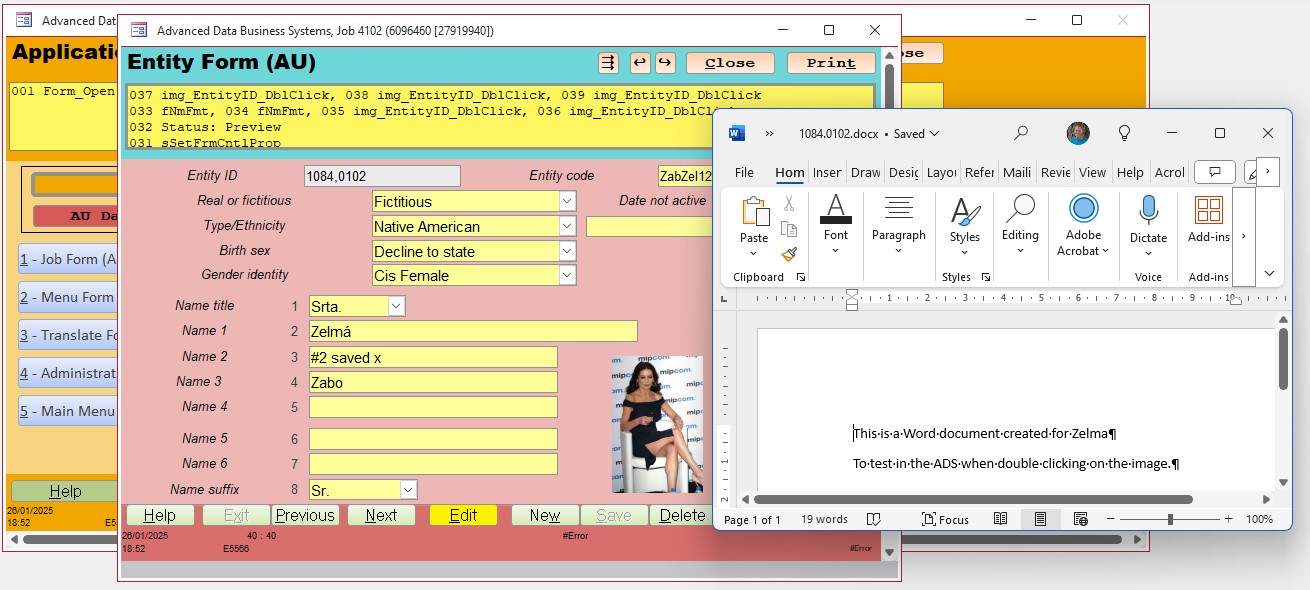
In my Entity form, I have an image of the Entity. It could be any control, like a text box.
If I double click on the image, I get a Word document to appear by just changing the file type suffix.
I think I got this trick from a Richard video (don't remember which one).
It will open any kind of file in Windows, not just .jpg or .docx as the suffix calls any kind of application if a Window's default is configured for that type of file.

See image below. If I'm close, I'll post the code for you to modify for your needs.
Thomas Gonder  @Reply  
      
16 months ago

Daniel Golden OP  @Reply  
     
16 months ago
Thomas, I do think that is something at least close to what I am looking for. I would greatly appreciate your sharing the code with me!
Thomas Gonder  @Reply  
      
16 months ago
Private Sub img_EntityID_DblClick(Cancel As Integer)
  Dim FileName As String
  If Not IsNull([tbxn_4_EntityID]) Then
    FileName = TempVars!PathBe & "\EntityImg\" & LTrim(Str([tbxn_4_EntityID])) & ".docx"
    If Dir(FileName) <> "" Then
      Call sDoOpenLink(FileName)
    End If
  End If

End Sub

Alex Hedley  @Reply  
           
16 months ago
Thomas Gonder  @Reply  
      
16 months ago
@Daniel, ooops , in reviewing this I see I missed adding my called subroutine code:

Details'**Opens link in the default application
Public Sub sDoOpenLink(ByVal aLink As String)
  Dim oShell As Object
  Set oShell = CreateObject("Shell.Application")
  oShell.ShellExecute aLink, "", "", "open", 1
  If Not oShell Is Nothing Then Set oShell = Nothing
End Sub
Daniel Golden OP  @Reply  
     
16 months ago
@Thomas, I found a much simpler solution for my needs in a TechHelp video using the Shell command/function…  shell “win word.exe name of the file path and file name including extension, vbNormalFocus

The only issue I have with it is that part of the file path contains spaces as named by my IT guys at work so I need to figure out a workaround for that and I’ll should be good to go.
Alex Hedley  @Reply  
           
16 months ago
Wrap the path in quotes.
Thomas Gonder  @Reply  
      
16 months ago
@Daniel There is always a simple way. Building more generic software to get things done for a variety of situations (as in building a RAD) has been my goal for 40+ years. It takes a lot more work upfront, it's harder to figure out for a new programmer, but it cuts down on later work and conflicting code.

I probably started with Richard's TechHelp that you mentioned. In fact, since Richard and I are both old timer developers, and consequently have run up against the same issues over-and-over again, I often start with his solutions to the same common need that I had in my old, non-Access applications.

He deals with them all one at a time, the best way for training. The ADS wraps up all the individual solutions into one big package that's cohesive. As such, my contributions here are often more complex, but as I said, more generic.

This thread is now CLOSED. If you wish to comment, start a NEW discussion in Access Developer Forum.
 

Next Unseen

 
New Feature: Comment Live View


The following is a paid advertisement
Computer Learning Zone is not responsible for any content shown or offers made by these ads.
 

Learn
 
Access - index
Excel - index
Word - index
Windows - index
PowerPoint - index
Photoshop - index
Visual Basic - index
ASP - index
Seminars
More...
Customers
 
Login
My Account
My Courses
Lost Password
Memberships
Student Databases
Change Email
Info
 
Latest News
New Releases
User Forums
Topic Glossary
Tips & Tricks
Search The Site
Code Vault
Collapse Menus
Help
 
Customer Support
Web Site Tour
FAQs
TechHelp
Consulting Services
About
 
Background
Testimonials
Jobs
Affiliate Program
Richard Rost
Free Lessons
Mailing List
PCResale.NET
Order
 
Video Tutorials
Handbooks
Memberships
Learning Connection
Idiot's Guide to Excel
Volume Discounts
Payment Info
Shipping
Terms of Sale
Contact
 
Contact Info
Support Policy
Mailing Address
Phone Number
Fax Number
Course Survey
Email Richard
[email protected]
Blog RSS Feed    YouTube Channel

LinkedIn
Copyright 2026 by Computer Learning Zone, Amicron, and Richard Rost. All Rights Reserved. Current Time: 5/1/2026 10:34:11 PM. PLT: 1s