Free Lessons
Courses
Seminars
TechHelp
Fast Tips
Templates
Topic Index
Forum
ABCD
 
Home   Courses   TechHelp   Forums   Help   Contact   Merch   Join   Order   Logon  
 
Back to Access Developer Forum    Comments List
Upload Images   @Reply   Bookmark    Link   Email   Next Unseen 
Search Name in Two Different Tables
Cynthia Almond 
     
15 months ago
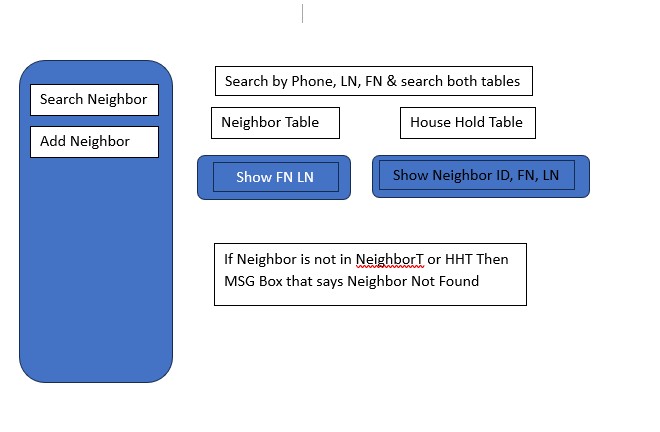
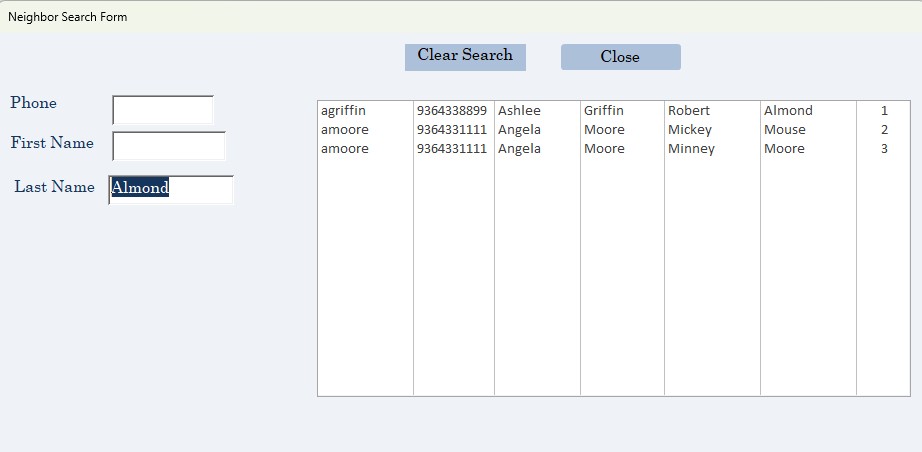
I have a Neighbor table and a House Hold table and I want to do a search using one name Last Name and first Name to see if neighbor is in any of the tables. Not sure how to do this.  I've tried combining the two table in same source row but did not work.  Ive been googling but did not find exactly what I wanted to do.
Cynthia Almond OP  @Reply  
     
15 months ago

Cynthia Almond OP  @Reply  
     
15 months ago

John Davy  @Reply  
         
15 months ago
Hi Cynthia, I know this is not an answer to your question but long range you might look toward managing one table and add a field such as category. Then make a lookup table with Neighbor, HH etc. Use a combo box in your form to identify whether this person is a neighbor by choosing it from the combo box.
John Davy  @Reply  
         
15 months ago
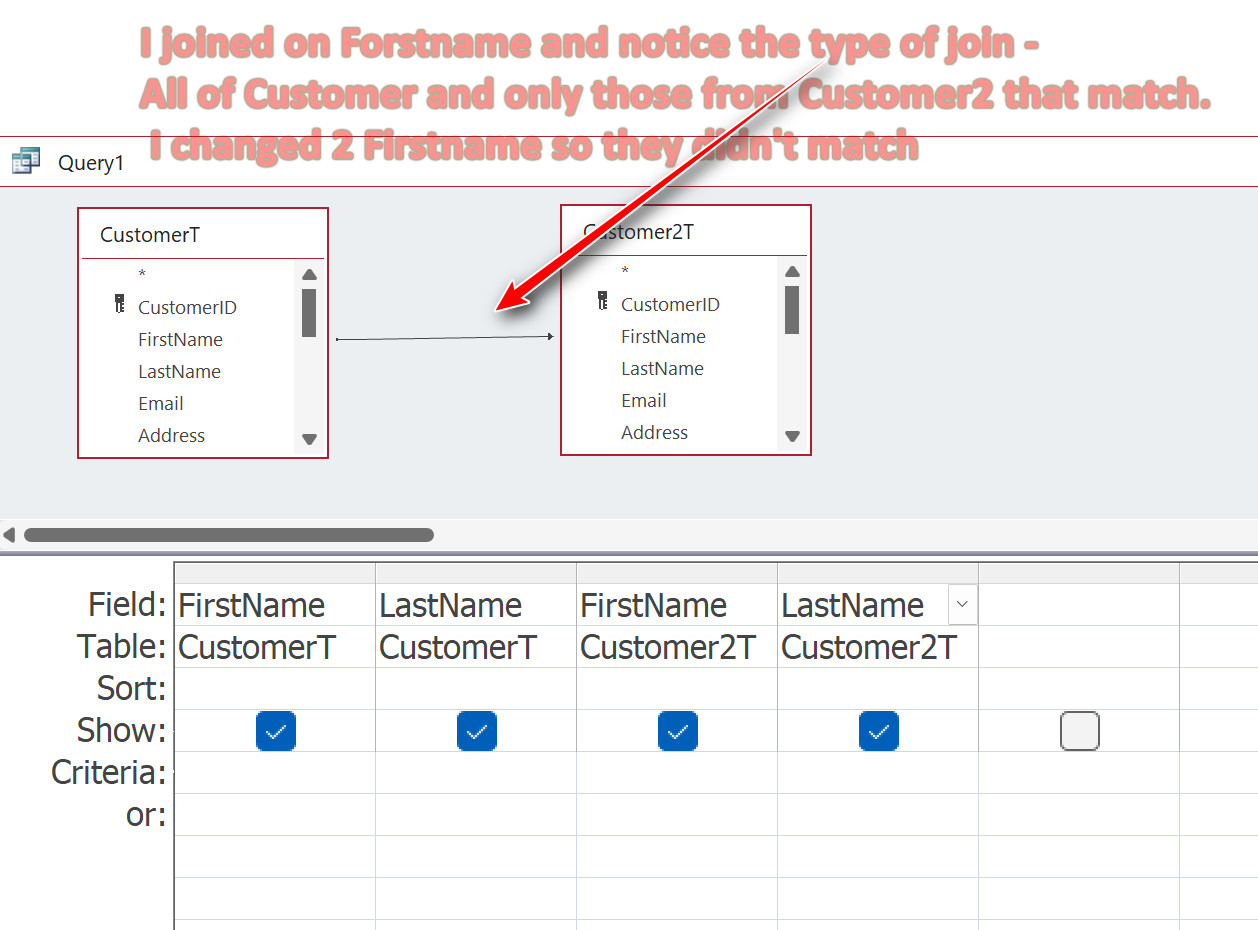
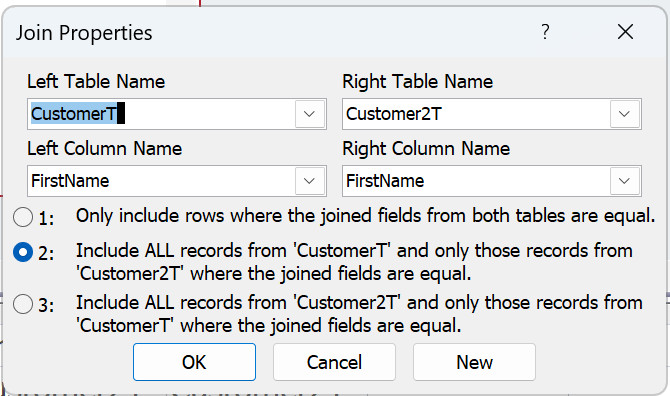
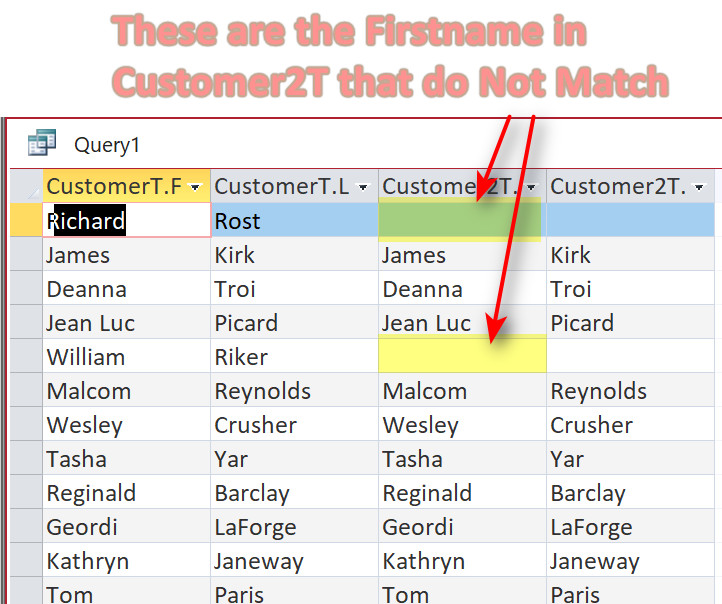
Hi Cythia, here are 3 screen clips that might help with your issue.  HTH  John
John Davy  @Reply  
         
15 months ago

John Davy  @Reply  
         
15 months ago

John Davy  @Reply  
         
15 months ago

John Davy  @Reply  
         
15 months ago
Hi Cythia, You may change the link anyway you want Firstname or Lastname of Customer2T to CustomerT. Experiment and see what results you get.  John
John Davy  @Reply  
         
15 months ago
Sorry about my typo in the clip. I meant Firstname  John
Cynthia Almond OP  @Reply  
     
15 months ago
I thought about the combo box but we have over 6000 neighbors and House Hold members.  The query might be a way to go I will play around with it.  Thank You so much!
Thomas Gonder  @Reply  
      
15 months ago
@Cynthia I'm curious, what is in a Household and a Neighbor table? How are they different?
How is a person in both tables?
Cynthia Almond OP  @Reply  
     
14 months ago
We are no longer aloud to use Client so we call them neighbors.  We are a food bank and each neighbor is a list of members of their house hold that lives in the house with them.  When we sign the neighbors in we do a search to make sure they are not in a household if so we take them out of that house hold and give them their on form (Neighbor).  I would like to have one screen for the signin people to look up both neighbors and house hold.  If not a neighbor are they in a house hold.  if neither then we add a new Neighbor.
Cynthia Almond OP  @Reply  
     
14 months ago
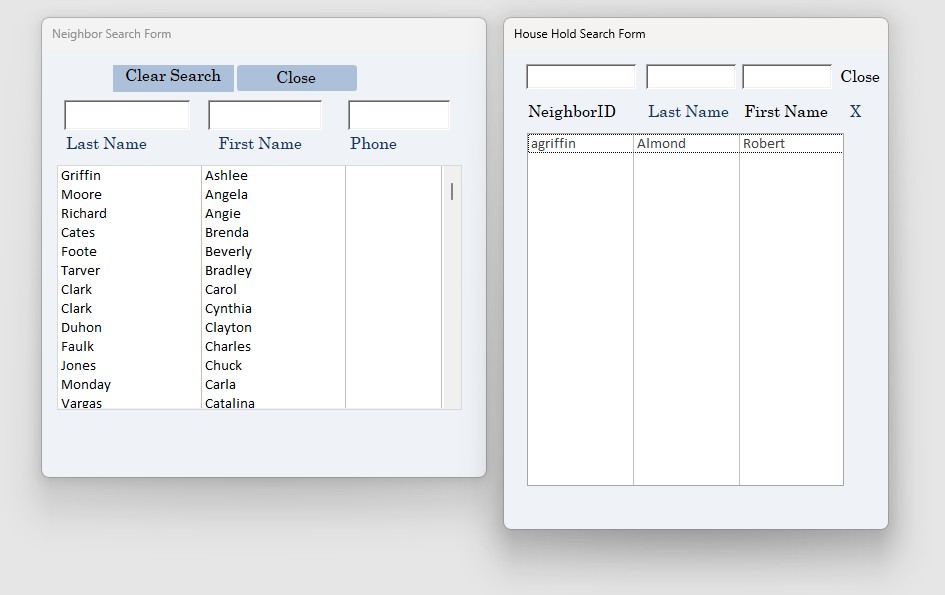
Hi, John,  I tried the Query which works good but it does not search the name in the house hold table.  So if I put in John Doe if he is not in the Neighbors table He does not come up even If he is listed in the House Hold table.
Cynthia Almond OP  @Reply  
     
14 months ago

Cynthia Almond OP  @Reply  
     
14 months ago

Thomas Gonder  @Reply  
      
14 months ago
@Cynthia Curious again. Does the NeighborT have a list of names that are in the household (not the table) all in one record?
If so, when you do a signin, are you only looking for the primary name in the NeighborT record?
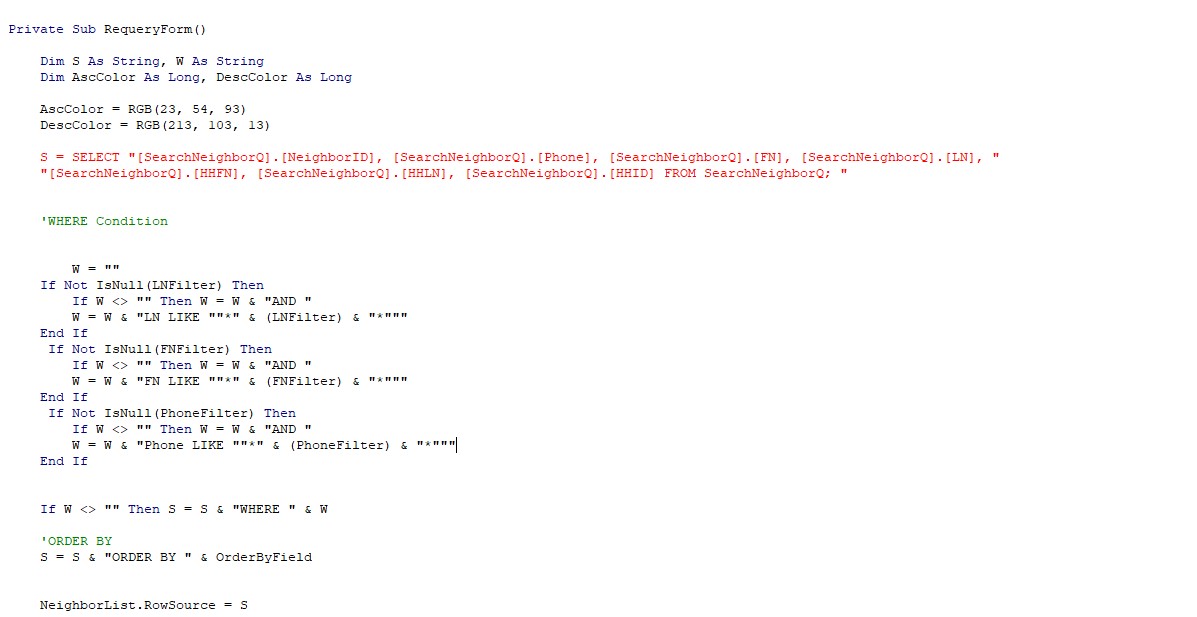
I ask, because you might want a Union query to make rows from each table, but since you didn't show your original query, it's hard to tell what you're using in the VBA with SearchNeighborQ.
I'm not sure in a Union query how to show which table the row is from, as I've never done that.
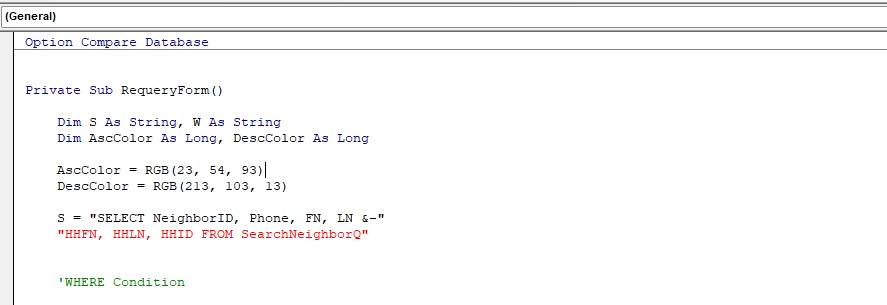
Your S assignment in the VBA code looks weird to me.
John Davy  @Reply  
         
14 months ago
Hi Cythia, exactly what do you want to match on? Firstname only, Lastname only, First & Lastname? Do you want to see people in the House Hold table that Match or do you want to see the ones that Do Not Match? You have to answer those questions and then create a query that gives you the results that you are after. Let us know the answers and we will help you with the query.  John
Kevin Robertson  @Reply  
          
14 months ago
Thomas is right. The S string is in red because you are missing an ampersand and line continuation character at the end of the first line. The SQL statement can also be simplified - since the fields are coming from only one data source you can remove the QueryName. from in front of the field names. You can also remove the brackets since you don't have spaces in your field names. This will make the SQL a lot easier to read (and update, if necessary).
Thomas Gonder  @Reply  
      
14 months ago
Also Cynthia, If I understand what you described, it seems you are slowly going to move everyone from the HouseholdT to the NeighborT. Is there a reason you can't make the migration now, instead of having confusing tables, queries, forms and more work for the users?
Cynthia Almond OP  @Reply  
     
14 months ago
The neighbor is the head of the House Hold and they might have 10 people living in the same House.  So when I search by last name and first name I want to see if the neighbor is already in the house hold and if they are we sign them in.  If the person who is signing in is not in the neighbor table we want to make sure they are not in the House hold before we create a new Neighbor.
so when I do a search on the house hold it may or may not find that person and both neighbor and House Hold might be blank or it might just show them in the houshold under Neighbor that he is listed in.   Neighbor table and House Hold table relationship is NeighborID
Cynthia Almond OP  @Reply  
     
14 months ago

Cynthia Almond OP  @Reply  
     
14 months ago
I think I said it wrong,  when I search by last name and first name I want to see if they are in the neighbors table (neighbors table is actually Client table that we can not use the word client anymore)  If not then we search to see if the person who is signing in is in the house hold table.  Hope this clarified my error above.

This thread is now CLOSED. If you wish to comment, start a NEW discussion in Access Developer Forum.
 

Next Unseen

 
New Feature: Comment Live View


The following is a paid advertisement
Computer Learning Zone is not responsible for any content shown or offers made by these ads.
 

Learn
 
Access - index
Excel - index
Word - index
Windows - index
PowerPoint - index
Photoshop - index
Visual Basic - index
ASP - index
Seminars
More...
Customers
 
Login
My Account
My Courses
Lost Password
Memberships
Student Databases
Change Email
Info
 
Latest News
New Releases
User Forums
Topic Glossary
Tips & Tricks
Search The Site
Code Vault
Collapse Menus
Help
 
Customer Support
Web Site Tour
FAQs
TechHelp
Consulting Services
About
 
Background
Testimonials
Jobs
Affiliate Program
Richard Rost
Free Lessons
Mailing List
PCResale.NET
Order
 
Video Tutorials
Handbooks
Memberships
Learning Connection
Idiot's Guide to Excel
Volume Discounts
Payment Info
Shipping
Terms of Sale
Contact
 
Contact Info
Support Policy
Mailing Address
Phone Number
Fax Number
Course Survey
Email Richard
[email protected]
Blog RSS Feed    YouTube Channel

LinkedIn
Copyright 2026 by Computer Learning Zone, Amicron, and Richard Rost. All Rights Reserved. Current Time: 6/16/2026 4:18:52 PM. PLT: 1s