Free Lessons
Courses
Seminars
TechHelp
Fast Tips
Templates
Topic Index
Forum
ABCD
 
Home   Courses   TechHelp   Help   Contact   Merch   Join   Order   Logon   Forums   
 
Back to Access Developers    Comments List
Upload Images   @Reply   Bookmark    Link   Email   Next Unseen 
How to Get Rid of Security Messages
Richard Garber 
     
15 months ago
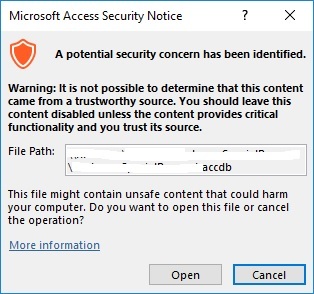
When I go to test my database on my laptop I'm getting this kind of warning that I prefer it doesn't appear.
Richard Garber OP  @Reply  
     
15 months ago

Richard Garber OP  @Reply  
     
15 months ago
I've looked into this and saw something about a Set Warnings macro, but I couldn't find it. I also saw info about trusted locations, but doesn't that only work on my location if I set that? Any help be appreciated.
Richard Garber OP  @Reply  
     
15 months ago
Also, and I didn't include this before but the purpose of this 'adventure' is to distribute a database I created for sale. But there's an option called package and sign. Is this an additional step to creating the accde file? And because the database is split, does this have to be done to both the front-end and back-end? Sorry for all the questions, I'm finding this security issue to be confusing.
Sami Shamma  @Reply  
             
15 months ago

Sami Shamma  @Reply  
             
15 months ago
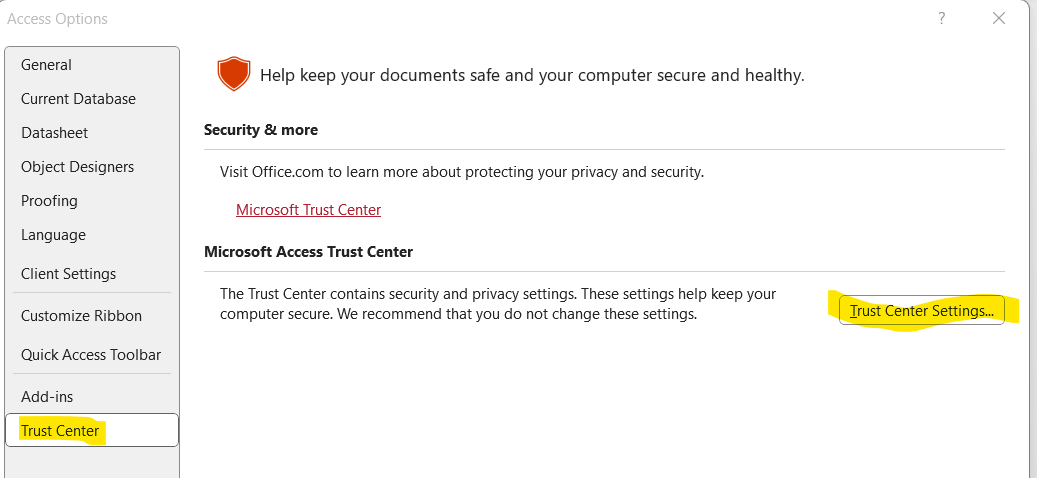
Go to File > Options, then select Trust Center on the left and Trust Center settings on the right.
Sami Shamma  @Reply  
             
15 months ago

Sami Shamma  @Reply  
             
15 months ago
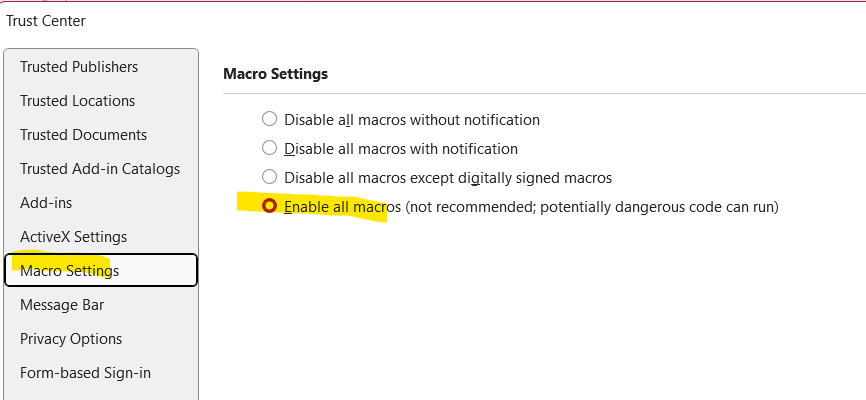
In the Trust Center setting, go to Macro settings and choose the fourth one from the bottom, enabling all macros.
Sami Shamma  @Reply  
             
15 months ago

Sami Shamma  @Reply  
             
15 months ago
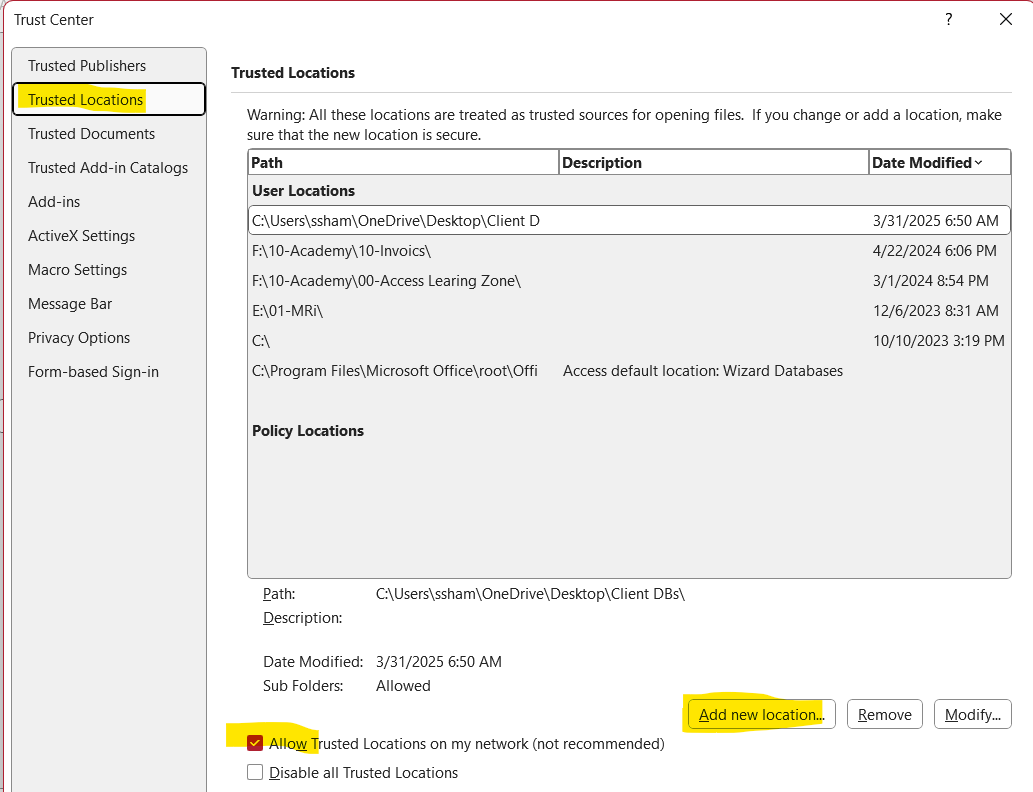
Then return to the previous level and select trusted locations.
Go to Add New Location and add the folder that you have your accbe file in.
Sami Shamma  @Reply  
             
15 months ago
You have to hit OK a few times to get out of here.
Richard Garber OP  @Reply  
     
15 months ago
I can see where that would work for me, but the step with Adding trusted locations, since the end user can install the database anywhere ( I mean, why not? ), I wouldn't know what trusted locations they might come up with. Do I have to compel them to install the database to only one location?
Richard Garber OP  @Reply  
     
15 months ago
And thanks for your step by step tutorial, very much appreciated!
Sami Shamma  @Reply  
             
15 months ago
Unfortunately, each user will have to go through that process because that information is stored in the Access.exe that they have on their machine and not in the accde file you sent to them or the accdb file. That was the bad news. The good news is they only need to do that once. And whatever updates you send to them will not have to go through the same process again.
Richard Rost  @Reply  
          
15 months ago
Richard you can either instruct them on how to set up a Trusted Location or you can digitally sign your databases. The former is the easy method. The latter is a bit more involved and requires you to setup a digital signature. I have not yet covered this in any of my videos because it almost never comes up, but it's on my list.
Richard Rost  @Reply  
          
15 months ago
Here are my notes on it... it's been on the list for a video for a while:

Avoiding Security Warnings in Microsoft Access: Trusted Locations vs Digital Signatures

If you have ever tried to open a Microsoft Access database and received a warning about unsafe content, you are not alone. Access databases that contain VBA code, macros, or certain queries are often flagged by Access's built-in security system. Fortunately, there are a few ways to prevent these warnings and ensure that your database runs smoothly for both yourself and your users.

There are two main ways to prevent security prompts:

1. Use a Trusted Location
2. Digitally Sign the Database

Let's look at both options.

1. Trusted Locations

This is the easiest and most common solution for internal databases. A trusted location is simply a folder on your local computer or network that you tell Access to trust. When you open a database from a trusted location, Access will not display any macro warnings, and all your code will run normally.

To set a trusted location, go to:
File > Options > Trust Center > Trust Center Settings > Trusted Locations

You can add a folder here where you store your databases. This is the recommended method if you are distributing a database to users within your organization and you can control their environment.

Pros:
- Simple and free
- Works well in internal setups
- No need for certificates or code signing

Cons:
- Requires setup on every user's machine
- Not ideal for distribution to the general public

2. Digital Signatures

Another option is to sign your Access database with a digital certificate. This tells Access that the file came from a trusted source and has not been tampered with.

You have two options here: self-certify or purchase a real certificate.

a) Self-Certification

Microsoft provides a tool called SelfCert.exe that lets you create your own digital certificate. You can use this to sign your database.

However, this only works on your own PC. If you send that signed file to another user, they will still see security warnings unless they manually install your certificate into their trusted root certificate store. Most users will not want to do this.

Self-certification is best used for testing or personal use only.

b) Purchased Certificate

If you are distributing your database to others and want to avoid warnings completely, you need to buy a digital code-signing certificate from a trusted Certificate Authority (like DigiCert, Sectigo, or GlobalSign). These certificates are recognized by Windows and will allow your signed database to open without warnings.

The downside is that certificates can be expensive, often ranging from $100 to $500 per year, and they usually require some technical setup.

Pros:
- Prevents security warnings on other users' machines
- Adds professional credibility to your application

Cons:
- Costs money
- Requires some setup
- Certificate must be renewed periodically

Summary

If you are working in a small team or internal network, using a trusted location is the easiest and most effective way to avoid security warnings in Access. If you are distributing your database to outside users or want to add a layer of professional trust, then a digital signature with a real certificate is the way to go.

You do not need both. It's either one or the other:
- Trusted location
- Valid digital certificate

Hope this clears things up.
Richard Garber OP  @Reply  
     
15 months ago
Thanks Sami and Rich! Regarding digitally signing the app that means the database will end up with an accdc extenstion. Will that be less beneficial than staying with the accde?
Richard Rost  @Reply  
          
15 months ago
I did a quick search, and the cheapest one I could find is at SSL.com for $65/year. Remember you need a CODE SIGNING certificate, not an SSL certificate. Those are for websites. This site just happens to be named, SSL.com.
Richard Rost  @Reply  
          
15 months ago
ACCDC is just how it's packaged and deployed - it's a file that contains your ACCDE file and the certificate file. Your ACCDE (or DB) file isn't modified in any way. So yes, the ACCDC is the signed version, but you don't work from it directly. Think of it as a delivery envelope for your signed database.
Richard Rost  @Reply  
          
15 months ago
Now, with that all being said, I have not done this myself in probably 10 or 15 years. I used to have a code signing certificate years and years ago when I distributed some software that I wrote. But I was also using a packaging utility called InstallShield, which I don't think they make anymore. And it handled bundling everything together for you. So I haven't done this in over a decade. I'm going off of the knowledge that I had from then. But it may have changed. I would probably have to run through this again to be able to confirm all of this. But provided it hasn't changed, which it probably hasn't, this should work.
Richard Garber OP  @Reply  
     
15 months ago
Question on trusted locations. So what if the end user database but it's split is in two locations? I mean, like the front-end is in one folder on the C drive and the back-end is in a whole different folder, whole different partition, like D:\xxxx. Does that mean the end user has to make 2 trusted locations? And along that same line of thinking, what about a studio with three front-ends on different computers and the data (back-end) on a computer acting like a server?

Or maybe it's just safer to suggest that each copy of the database whatever it is, needs someone to go into it and make that location a trusted location?

And in the runtime there's a place to make it a trusted location?
Adam Schwanz  @Reply  
           
15 months ago
Runtime needs registry edit for trusted locations Trusted Location
Richard Rost  @Reply  
          
15 months ago
You don't have to put the backend file in a trusted location, but it's a good idea. The code is running in the frontend, so that's really the only spot that needs to be trusted.
Richard Garber OP  @Reply  
     
15 months ago
I'm barely following all of this but I did try the accdc method but when I clicked Save As and chose that option with the accde opened, I got back two messages saying I didn't meet the criteria and something else about something missing. But then Adam's message about the runtime, and frankly, that's where most of my trouble has been so I watched that video immediately and then the sequel? And I'm thinking that's what I need to do. I just think that letting end users mess with their own registry is not a good idea. So if it's okay with you all, that's what I'm gonna do. But in lieu of what Rich wrote about the back-end should be a trusted location as well, Rich, are you saying I need to create that registry key button in a form for the backend as well?
Richard Garber OP  @Reply  
     
15 months ago
Geez, could there be an edit feature added to these posts? What I meant to say is "But then Adam's message" edit: came in "about the runtime..."
Richard Rost  @Reply  
          
15 months ago
Yeah, I've been meaning to add an edit feature for a while, but it hasn't really been an issue because you can always just copy, delete, and repaste. But you don't have to put the backend in a trusted location. As long as all it's doing is reading table data, you don't need that. You only really need to have a trusted location for a database where code is being run. I generally make the server folder a trusted location, but you don't have to do that on the server. You do that on the workstation. So if the server drive is z:\database, then you make that a trusted folder as well on the front end. Because you're not actually running Access on the server, unless you are, in which case then you need to do it there as well.

This thread is now CLOSED. If you wish to comment, start a NEW discussion in Access Developers.
 

Next Unseen

 
New Feature: Comment Live View


The following is a paid advertisement
Computer Learning Zone is not responsible for any content shown or offers made by these ads.
 

Learn
 
Access - index
Excel - index
Word - index
Windows - index
PowerPoint - index
Photoshop - index
Visual Basic - index
ASP - index
Seminars
More...
Customers
 
Login
My Account
My Courses
Lost Password
Memberships
Student Databases
Change Email
Info
 
Latest News
New Releases
User Forums
Topic Glossary
Tips & Tricks
Search The Site
Code Vault
Collapse Menus
Help
 
Customer Support
Web Site Tour
FAQs
TechHelp
Consulting Services
About
 
Background
Testimonials
Jobs
Affiliate Program
Richard Rost
Free Lessons
Mailing List
PCResale.NET
Order
 
Video Tutorials
Handbooks
Memberships
Learning Connection
Idiot's Guide to Excel
Volume Discounts
Payment Info
Shipping
Terms of Sale
Contact
 
Contact Info
Support Policy
Mailing Address
Phone Number
Fax Number
Course Survey
Email Richard
[email protected]
Blog RSS Feed    YouTube Channel

LinkedIn
Copyright 2026 by Computer Learning Zone, Amicron, and Richard Rost. All Rights Reserved. Current Time: 8/17/2026 8:03:51 AM. PLT: 1s