Free Lessons
Courses
Seminars
TechHelp
Fast Tips
Templates
Topic Index
Forum
ABCD
 
Home   Courses   TechHelp   Forums   Help   Contact   Merch   Join   Order   Logon  
 
Back to Access Forum    Comments List
Upload Images   @Reply   Bookmark    Link   Email   Next Unseen 
Entering Data in a Field in a Form
Lee Shastid 
    
13 months ago
Is it possible that when you enter data in a form that it will automatically add it to the table? If so where can I find how to do it? Must not be wording it correctly to get a video results.
Richard Rost  @Reply  
           
13 months ago
Yes, this is how Microsoft Access normally behaves, provided the form is bound to a table. Open up the form's properties and check the control source to make sure you have a table in there. Furthermore, each control has to be bound to a field in the table. Again, open up the properties for each control (like first name or last name) and make sure that it's bound to a field in the table. This is covered extensively in Access beginner level 1 where I show you how to make the CustomerF form.
Lee Shastid OP  @Reply  
    
13 months ago
Thank you
Lee Shastid OP  @Reply  
    
13 months ago
Hope I explain this right.
I created a Item Entry Form to enter the complete item and description on one form. Used Combo boxes to get some drop down selections from that particular field on the tables I created. Each one of these fields by themselves on their respective form adds to the table. But when I try to enter an item on the Item Entry Form it will add to the table of the field as long as it dont have the drop down option. Ex" Category field may be Electronics, if I type that in the field it i get a message that it is not on the list if I dont go that form and it before because it has a comb box. Ex Size field I can type 13 inches and it adds to the table.
Adam Schwanz  @Reply  
           
13 months ago
Did you watch Beginner 1? The combo box problem I believe is covered in Beginner 2 with relational combo boxes, which it looks like you have as well.

Go watch those 2 videos, should get you a good start.
Access Beginner 1
Access Beginner 2
Lee Shastid OP  @Reply  
    
13 months ago
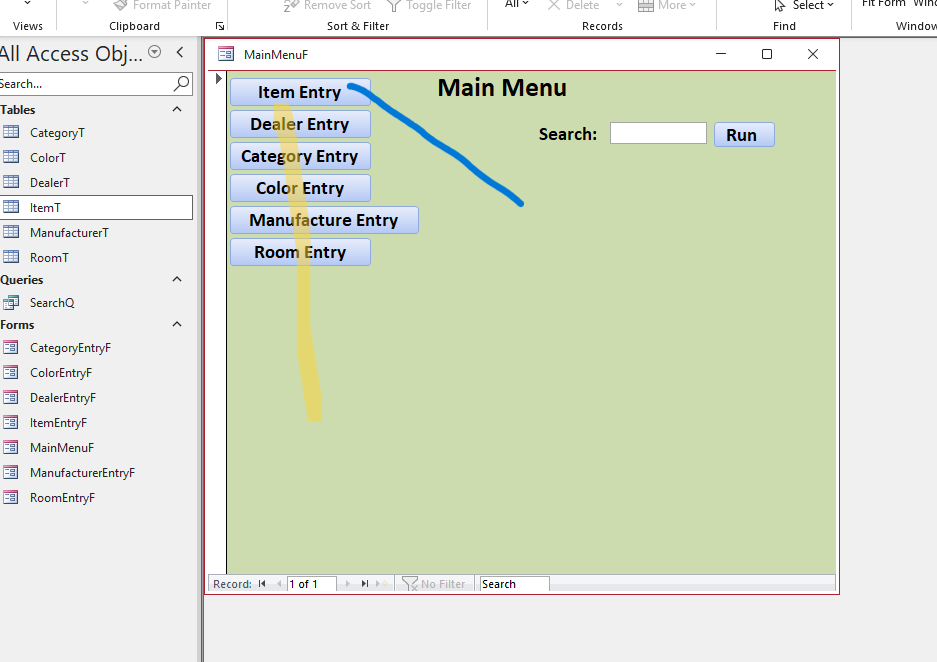
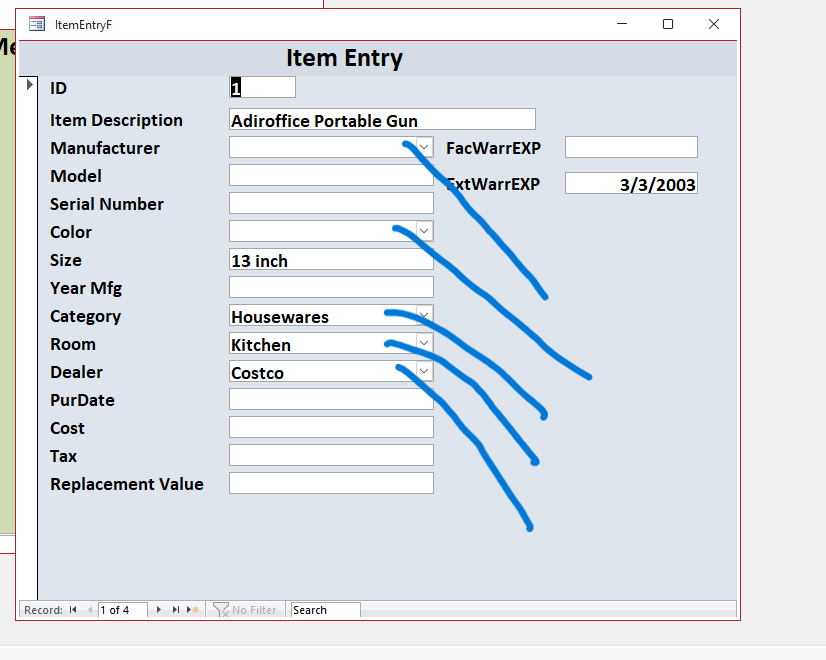
I have watched it twice and I am just missing something.I will load 2 screenshots and maybe that will show better. Main Menu screen shot,  all the ones in yellow will add to the table just fine. On the Item Entry Form the ones in blue will not add to the tables and yes they are relational combo boxes.
Lee Shastid OP  @Reply  
    
13 months ago

Lee Shastid OP  @Reply  
    
13 months ago

Sami Shamma  @Reply  
             
13 months ago
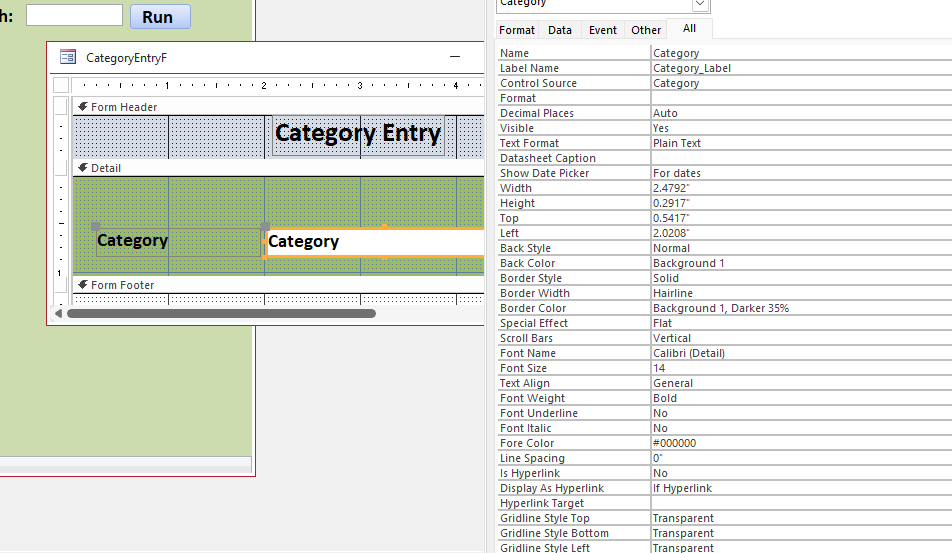
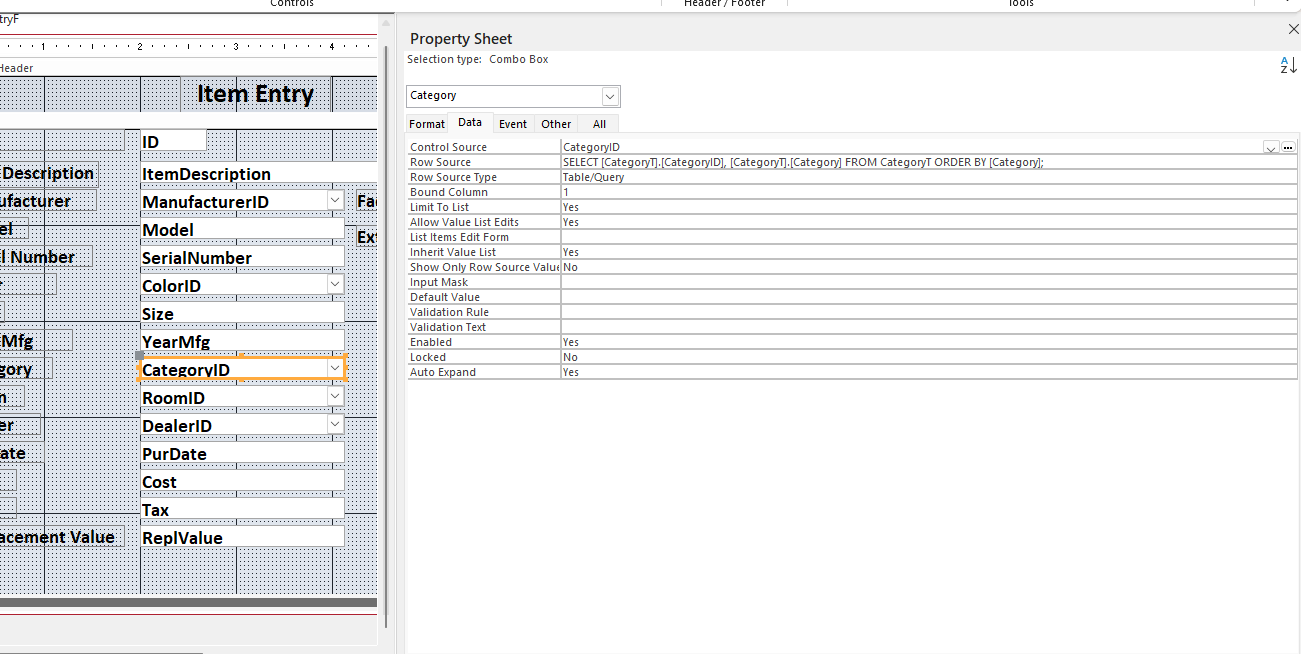
Please send a screenshot of one of those combo boxes in Design View showing the "All" tab from the top.
Lee Shastid OP  @Reply  
    
13 months ago

Sami Shamma  @Reply  
             
13 months ago
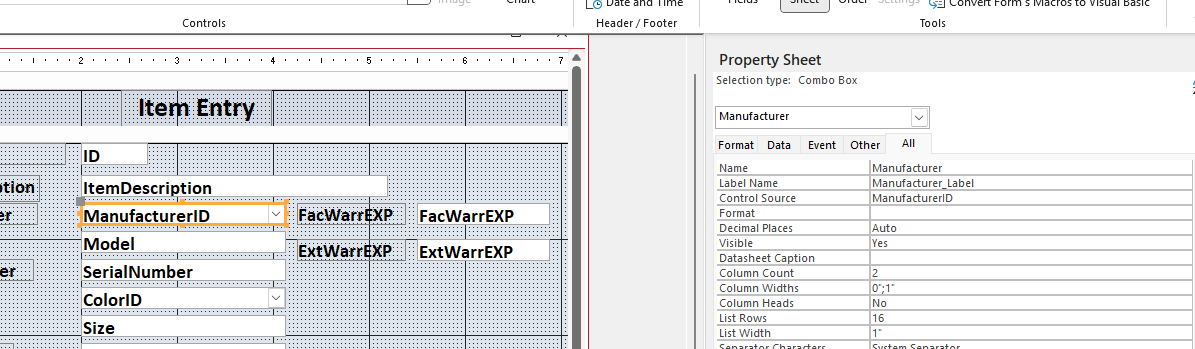
I wanted to see this not from the categoryentryF, but from the itementryf.
Lee Shastid OP  @Reply  
    
13 months ago
Sorry Sami..here it is
Lee Shastid OP  @Reply  
    
13 months ago

Sami Shamma  @Reply  
             
13 months ago
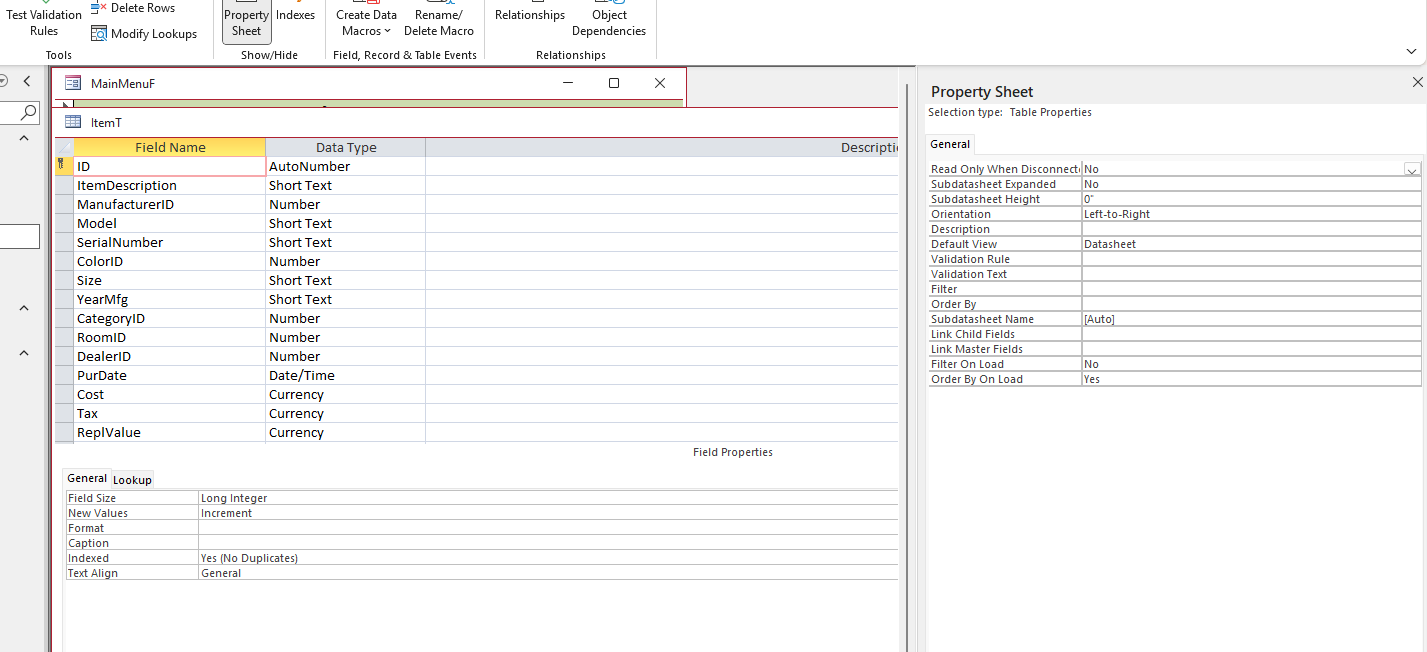
Highly this looks okay. What is this form bound to? You can find that in the data tab of the form itself. Also, can you show the item table in design view?
Lee Shastid OP  @Reply  
    
13 months ago

Sami Shamma  @Reply  
             
13 months ago
I see no reason why this should not work. Compact, prepare, and try again.
Adam Schwanz  @Reply  
           
13 months ago
To verify, on your item entry form, other fields like Model do save in the table, only combo boxes are not?

Can you upload an image of the Row Source for one of those combo boxes?

Can you also upload the "Bound Column" which should be under the data tab as well.
Lee Shastid OP  @Reply  
    
13 months ago
Sami what do you want from the Data tab?
Lee Shastid OP  @Reply  
    
13 months ago
Adam yes the rows that do not have comb boxes save to their respective table
Lee Shastid OP  @Reply  
    
13 months ago

Lee Shastid OP  @Reply  
    
13 months ago
Adam for clarification. Anything that is typed in the NON combo box fields saves to the Item Table like it should
Lee Shastid OP  @Reply  
    
13 months ago
I dont know anything about this area but I recall somewhere hearing in a video about column widths, and limit to list. Would that have anything to do with it?
Adam Schwanz  @Reply  
           
13 months ago
To verify, are you typing in/selecting something that is in your list? Or is this something that is not in your list that won't save?
Adam Schwanz  @Reply  
           
13 months ago
If that is the case, I think what you may need is actually from  Access Beginner 8. Most notably from Lesson 1 and Lesson 2.

Limit to List
Edit List Items
Adding Items to the List
Default Value
Allow Value List Edits
List Items Edit Form
Lee Shastid OP  @Reply  
    
13 months ago
It is not saved in my list. Basically I want to know if i type something that is not on the list that it will accept it and add it to the list (table). What are seeing, that I may be doing wrong
Adam Schwanz  @Reply  
           
13 months ago
OK. yea there was a mis-understanding. So if you want it to accept what you put in there, without it actually being in a list, you would set the "Limit to List" value to No.

This will not work in this case because it's a relational combo box, it's storing a numerical ID, not the string that you type in. So you can't just type in "My New Category".

You need to add the value to the list so it gets the number ID as well. You can do this with the Allow Value List Edits and/or with List Item Edit Form. Which isn't so simply explained on the forum, but is in Beginner 8.
Lee Shastid OP  @Reply  
    
13 months ago
The limit to list is set to Yes and it wont change to yes unless you do something with the column widths was the dialog box that came up. This may be too complicated for me. I will just have to go through 400+ files and put the data in the correct tables and then enter the items. Thank you to all that helped on this.
Lee Shastid OP  @Reply  
    
13 months ago
Sounds like I will be busy..
Lee Shastid OP  @Reply  
    
13 months ago
Here's a follow up question. I know this is over my head, but if this is a valid idea I will see if i can find someone that is familiar with it to fix my problem. I have only read about this but would something called Not in List event work? I can even find someone to pay to do it. Just checking before I dive into my big endeavor.
Adam Schwanz  @Reply  
           
13 months ago
This is really simple. Once you see what it is, youll have a light bulb moment. Not in list event is trying to make this way more complicated then it needs to be. If you decide you want to pay someone to do it, you can go here on the devnet. I would recommend you pay for a tutor session rather then having someone do it for you, i think youll catch on to this pretty quick. I know  Sami with Shamma Consultancy does tutoring.
Lee Shastid OP  @Reply  
    
13 months ago
what is simple? List Item Edit Form. I watched a video on it I think can do it. I tried to use a form that I already had created for the tables to use on the Item Entry Form. Couldn't get it to work. So I will just make some new forms and try that.
Adam Schwanz  @Reply  
           
13 months ago
The simple wasn't meant to be degrading so i hope you didnt take it that way. Just that once you seen it you would understand.

With this stuff the best way to learn is exposure though. Make lots of forms and try different things. The more hands on experience you gain the better. Try to keep learning, if you can watch up to the early expert levels at least, you would have a strong grasp of the basics of access. and feel free to ask questions, we'll try to answer them.
Lee Shastid OP  @Reply  
    
13 months ago
Not taken as degrading at all. I think what has happened what I have watched has gotten me off track from the basics. All of the troubleshooting videos I have watched has I think moved me away from the basics. I get focused on solving the issue and sidetracked from the basics. I do agree if you are talking about the List Item Entry Form is simple. I think what I would call the overlapping parts like controls inside of other controls is the hard part for m to understand right now. I d appreciate all the help and nothing is taken degrading unless its someone just down right rude. LOL
Lee Shastid OP  @Reply  
    
13 months ago
So here is a learning question? Did I do these combo boxes correct and leave this step out or is this Edit List Item Form a patch to fix what I did wrong?

This thread is now CLOSED. If you wish to comment, start a NEW discussion in Access Forum.
 

Next Unseen

 
New Feature: Comment Live View


The following is a paid advertisement
Computer Learning Zone is not responsible for any content shown or offers made by these ads.
 

Learn
 
Access - index
Excel - index
Word - index
Windows - index
PowerPoint - index
Photoshop - index
Visual Basic - index
ASP - index
Seminars
More...
Customers
 
Login
My Account
My Courses
Lost Password
Memberships
Student Databases
Change Email
Info
 
Latest News
New Releases
User Forums
Topic Glossary
Tips & Tricks
Search The Site
Code Vault
Collapse Menus
Help
 
Customer Support
Web Site Tour
FAQs
TechHelp
Consulting Services
About
 
Background
Testimonials
Jobs
Affiliate Program
Richard Rost
Free Lessons
Mailing List
PCResale.NET
Order
 
Video Tutorials
Handbooks
Memberships
Learning Connection
Idiot's Guide to Excel
Volume Discounts
Payment Info
Shipping
Terms of Sale
Contact
 
Contact Info
Support Policy
Mailing Address
Phone Number
Fax Number
Course Survey
Email Richard
[email protected]
Blog RSS Feed    YouTube Channel

LinkedIn
Copyright 2026 by Computer Learning Zone, Amicron, and Richard Rost. All Rights Reserved. Current Time: 6/21/2026 6:48:09 PM. PLT: 0s