Free Lessons
Courses
Seminars
TechHelp
Fast Tips
Templates
Topic Index
Forum
ABCD
 
Home   Courses   TechHelp   Help   Contact   Merch   Join   Order   Logon   Forums   
 
Back to Access Developers    Comments List
Upload Images | @Reply | Bookmark | Link | Email | Next Unseen |
Update Query Not Working
Chris Tyson 
      
17 months ago
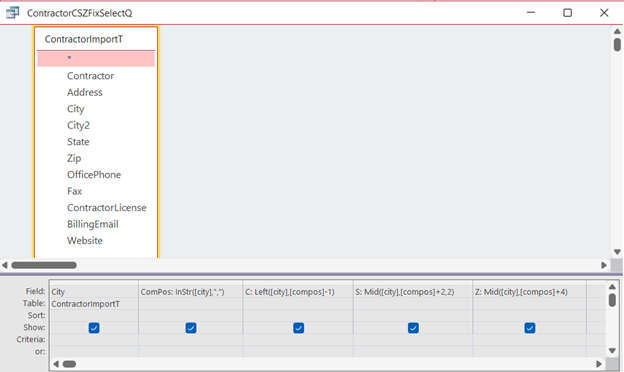
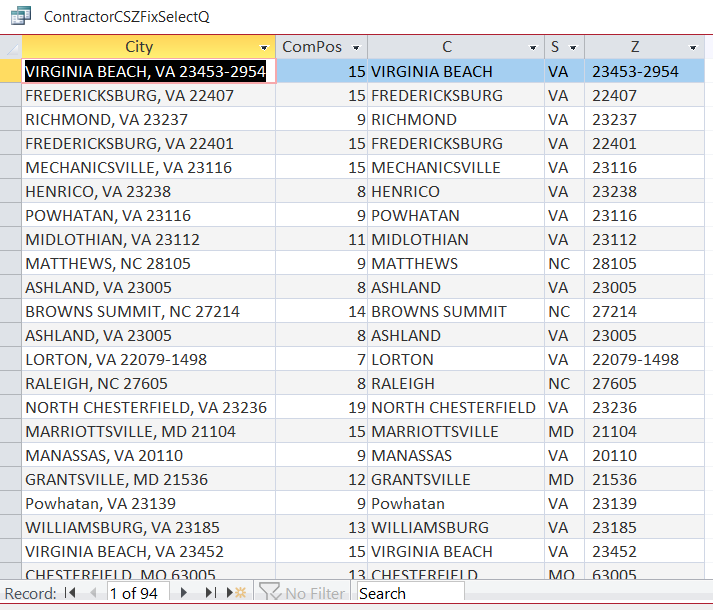
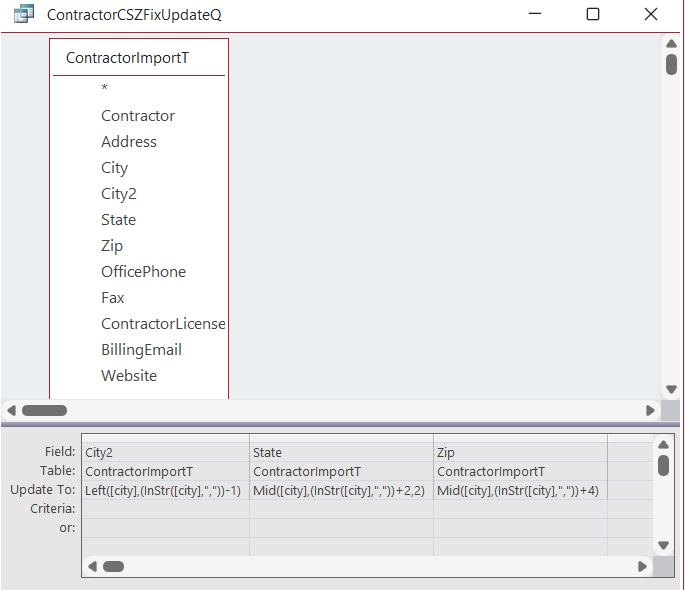
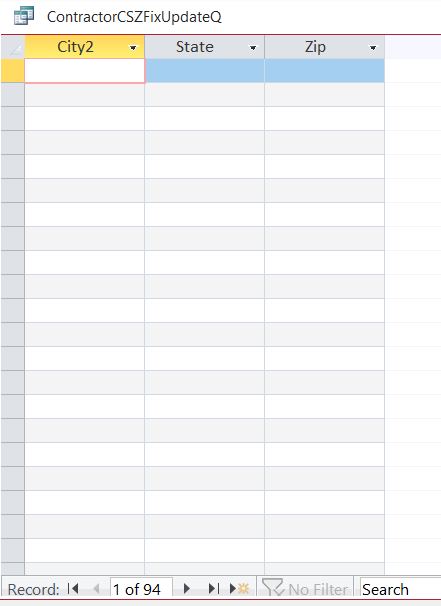
I import data from our Google Drive Sheet.  I can import and append for new records no problem.  I run into a problem when I try to break out the "City, State, Zip" from the imported records.  I did this with another set of data (for Owners, this one is for Contractors).  Richard explains in Access Expert 14 class how to split apart names.  This is the process I am using.  I start with a Select Query and find the Instr value of the comma (,), then use that position to get the city using the left string function, and use the Mid function to find the State and finally the Zip, which works perfectly.  Then I change it to an Update Query and replace the formulas/expression from the SelectQ, how Richard shows in X14 lesson 3 (Seperate First and Last Names).  I get no results.  The one I created earlier for my Owner contacts worked perfectly.  Not sure what I'm doing wrong.  Screenshots to follow.
Chris Tyson OP  @Reply  
      
17 months ago

Chris Tyson OP  @Reply  
      
17 months ago

Chris Tyson OP  @Reply  
      
17 months ago

Chris Tyson OP  @Reply  
      
17 months ago

Donald Blackwell  @Reply  
        
17 months ago
Are you actually "Running" the update query or are your clicking the "View" button.

That has tripped me up more times than I'd care to admit. The view button just shows you the data that is "selected" from your tables and if you've never "Run" the update query, there is nothing in those fields to select.

To see your updates you have to actually click the "Run" icon that looks like a red exclamation point next to the view button (or double click the query in the navigation pane), then click the view button to see if it updated the table or just open the table to see your changes.

When you "Run" an action query, it doesn't actually show you any output usually other than the warnings about making changes to the tables.
Chris Tyson OP  @Reply  
      
17 months ago
Donald Thanks man!  That worked.  I was going to try that but wanted to wait until I heard from someone since I already posted!

This thread is now CLOSED. If you wish to comment, start a NEW discussion in Access Developers.
 

Next Unseen


What's This?


The following is a paid advertisement
Computer Learning Zone is not responsible for any content shown or offers made by these ads.
 

Learn
 
Access - index
Excel - index
Word - index
Windows - index
PowerPoint - index
Photoshop - index
Visual Basic - index
ASP - index
Seminars
More...
Customers
 
Login
My Account
My Courses
Lost Password
Memberships
Student Databases
Change Email
Info
 
Latest News
New Releases
User Forums
Topic Glossary
Tips & Tricks
Search The Site
Code Vault
Collapse Menus
Help
 
Customer Support
Web Site Tour
FAQs
TechHelp
Consulting Services
About
 
Background
Testimonials
Jobs
Affiliate Program
Richard Rost
Free Lessons
Mailing List
PCResale.NET
Order
 
Video Tutorials
Handbooks
Memberships
Learning Connection
Idiot's Guide to Excel
Volume Discounts
Payment Info
Shipping
Terms of Sale
Contact
 
Contact Info
Support Policy
Mailing Address
Phone Number
Fax Number
Course Survey
Email Richard
[email protected]
Blog RSS Feed    YouTube Channel

LinkedIn
Copyright 2026 by Computer Learning Zone, Amicron, and Richard Rost. All Rights Reserved. Current Time: 10/28/2026 4:42:07 PM. PLT: 1s