Free Lessons
Courses
Seminars
TechHelp
Fast Tips
Templates
Topic Index
Forum
ABCD
 
Home   Courses   TechHelp   Forums   Help   Contact   Merch   Join   Order   Logon  
 
Back to Membership Database    Comments List
Upload Images   @Reply   Bookmark    Link   Email   Next Unseen 
Table Not Updating After Date Updates
Wendy Hamrick 
      
12 months ago
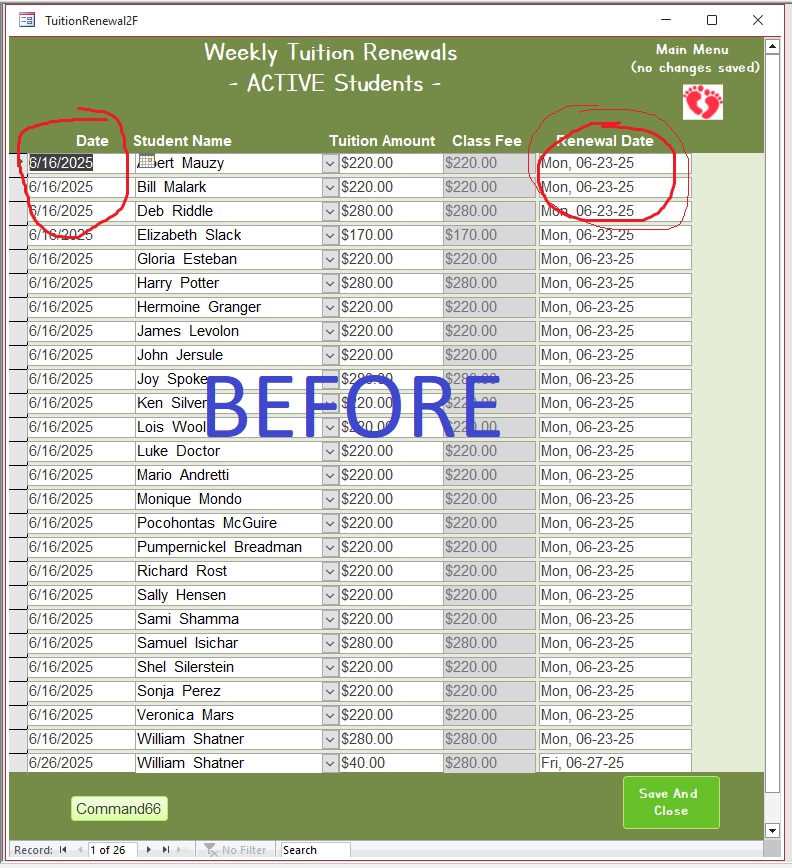
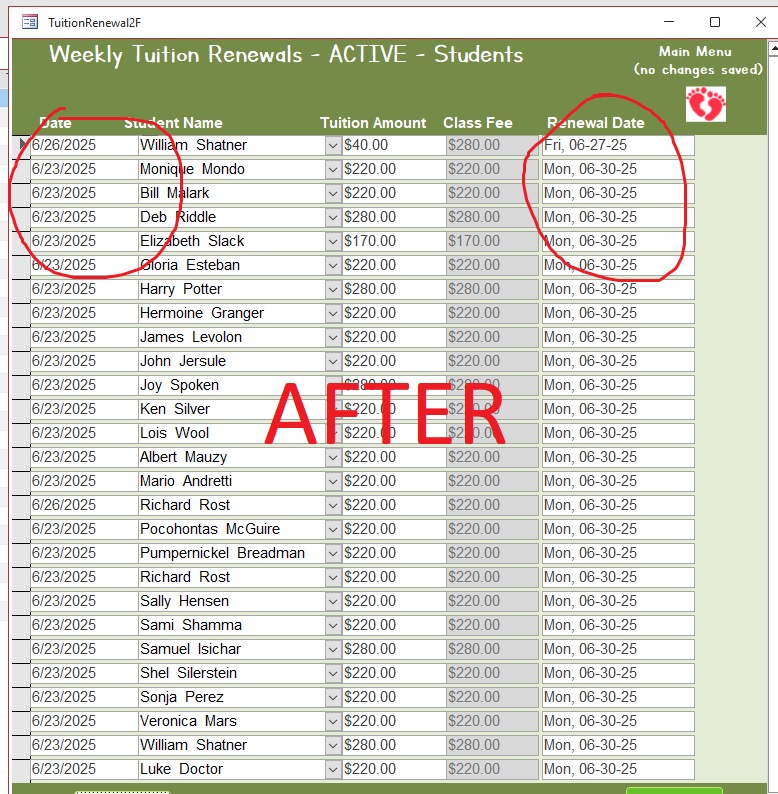
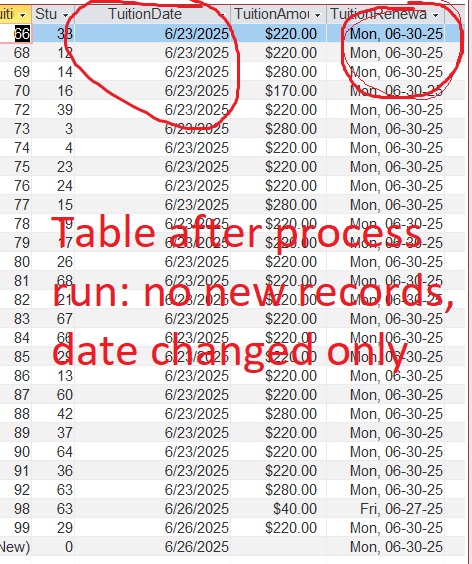
New records are not added to the table for billing purposes; the dates in the table are just changed to new dates instead.

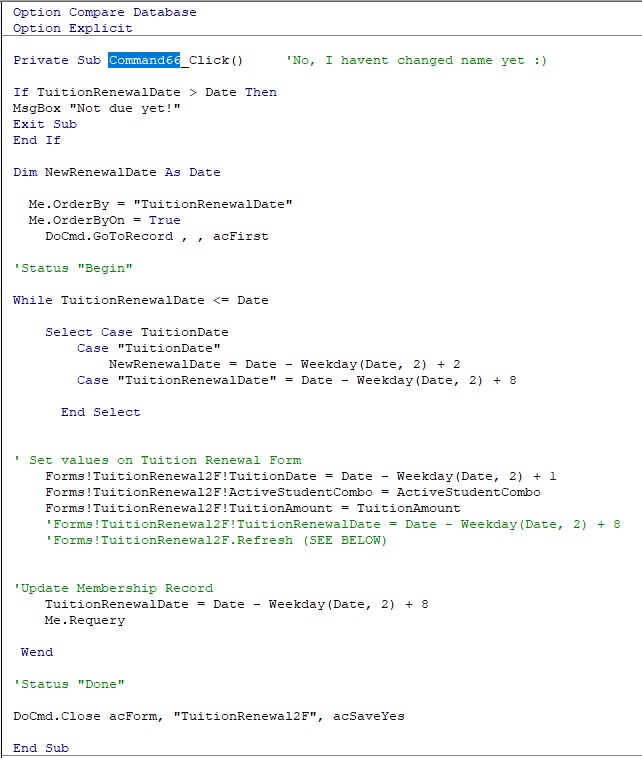
Note:I keep getting an error on the Status "Begin" and "Done" so I had to remove them. This is why they are not in the coding, yet the process is still running.

I cannot figure out what is causing the table to not update. Everything works and processes except the part of adding the new records to the table.
What I have is a conversion of the membership training with only (1) table and (1) form. (For Tuitions)
Wendy Hamrick OP  @Reply  
      
12 months ago

Wendy Hamrick OP  @Reply  
      
12 months ago

Wendy Hamrick OP  @Reply  
      
12 months ago

Wendy Hamrick OP  @Reply  
      
12 months ago

Raymond Spornhauer  @Reply  
          
12 months ago
It's hard to understand what you're saying the issue is.

Can you add new records to the table directly?

Is the Form you're using based on a Query?  (You could have a problem with a relationship, or Primary Key not defined)

You could also open the Table in Design view and see if there are any validation requirements.

Could you post some screen shots so we can see what you're trying to do?
Raymond Spornhauer  @Reply  
          
12 months ago
Also... do you have a BACKUP that works?

You could also try a Compact and Repair.

Make sure you're not exceeding the 2 GB Limit.
Kevin Robertson  @Reply  
           
12 months ago
There is nothing in your code telling Access to move to a new record.
Raymond Spornhauer  @Reply  
          
12 months ago
What Kevin in saying is correct... your code tells it to Order by the TuitionRenewalDate, then go to the first record.

Change:

"DoCmd.GoToRecord , , acFirst"
to
"DoCmd.GoToRecord , , acNewRec"

Not sure if this is what you're wanting it to do....
Wendy Hamrick OP  @Reply  
      
12 months ago
Raymond
Thanks Raymond - fair questions

Unless I am mistaken, the table that the form is set up to populate should populate with new records after every renewal update.  **  If this is not the case - there is my brain error #1 and maybe part of my issue. lol

- The records in the table seen in the 'before pic' are the same records in the after pic just with changed dates.
- The 6/16 memberships with a renewal date of 6/23 have been replaced by the 6/23 records with a renewal date of 6/30
- instead of being added to (make sense?)  

Yes I can still add to the table directly as well as the form

If I understand your question, no, the form is not based on a query.
- The form is an exact match to Richards design for Memberships (*using a copy of his continuous form)

There are no validation requirements in the table. Only default date values

Yes, I can post screen shots, please elaborate of what you would like :)
Wendy Hamrick OP  @Reply  
      
12 months ago
Raymond

No back up that works, I just built it

I compact and repair all the time :)

the database is only 39,936 KB (its a baby)
Wendy Hamrick OP  @Reply  
      
12 months ago
Kevin

Ok, I see what you are saying, I was wondering also but - Move to new record or create one?
I ask this way because it does move to the next, it just doesn't create the new - or is that what you are saying/meaning?
Wendy Hamrick OP  @Reply  
      
12 months ago
If it helps, there are no other customer order items, details etc.
this is a Very basic renewal - 1 charge (membership fee/tuition), due weekly
Raymond Spornhauer  @Reply  
          
12 months ago
What do you want 'Command66' to do?

Are you trying to create new records for renewals?  Or change the dates of existing records?

I would not use While-Wend with a requery or refresh either... it's going to eventually get stuck in a loop.

To set this up properly... you should have more than 1 table:
Student Table
Tuition Table (needs the Student ID)

Then I would create a loop to run thru your Student Table and create an Tuition Renewal for each Student.  You might also want an "Active" field to keep track of active students.  This would work better using SQL too....
Kevin Robertson  @Reply  
           
12 months ago
Wendy Hamrick OP  @Reply  
      
12 months ago
Kevin

Thank you Kevin!
I heard Richard say in the tutorial "this way works,  . . but the 'proper way' is with a record set"
I will work on it :)
Wendy Hamrick OP  @Reply  
      
12 months ago
Raymond

Raymond, my apologies, I do have all the other tables needed for this, I was trying not to give an over-abundance of info.
The Student Table (w/IsActive), Tuition Table, Payment Table etc all exist.

The desire is for new records to be created.
That said, your comment . . . "I would create a loop to run thru your Student Table and create an Tuition Renewal for each Student."  . . . shows me that I removed the part of where the tutorial "opened the CustomerF" but I did not replace it with the "Open the StudentT"  

I was trying to conquer the knowledge of the Loop aspect before tying to tackle anything further :)

Thank you! Let me fix the code

Thank you ! :)

This thread is now CLOSED. If you wish to comment, start a NEW discussion in Membership Database.
 

Next Unseen

 
New Feature: Comment Live View


The following is a paid advertisement
Computer Learning Zone is not responsible for any content shown or offers made by these ads.
 

Learn
 
Access - index
Excel - index
Word - index
Windows - index
PowerPoint - index
Photoshop - index
Visual Basic - index
ASP - index
Seminars
More...
Customers
 
Login
My Account
My Courses
Lost Password
Memberships
Student Databases
Change Email
Info
 
Latest News
New Releases
User Forums
Topic Glossary
Tips & Tricks
Search The Site
Code Vault
Collapse Menus
Help
 
Customer Support
Web Site Tour
FAQs
TechHelp
Consulting Services
About
 
Background
Testimonials
Jobs
Affiliate Program
Richard Rost
Free Lessons
Mailing List
PCResale.NET
Order
 
Video Tutorials
Handbooks
Memberships
Learning Connection
Idiot's Guide to Excel
Volume Discounts
Payment Info
Shipping
Terms of Sale
Contact
 
Contact Info
Support Policy
Mailing Address
Phone Number
Fax Number
Course Survey
Email Richard
[email protected]
Blog RSS Feed    YouTube Channel

LinkedIn
Copyright 2026 by Computer Learning Zone, Amicron, and Richard Rost. All Rights Reserved. Current Time: 6/16/2026 4:24:12 PM. PLT: 0s