Free Lessons
Courses
Seminars
TechHelp
Fast Tips
Templates
Topic Index
Forum
ABCD
 
Home   Courses   TechHelp   Forums   Help   Contact   Merch   Join   Order   Logon  
 
Back to Access Developer Forum    Comments List
Upload Images   @Reply   Bookmark    Link   Email   Next Unseen 
Bullet List in a Report Textbox
Jennifer Neighbors 
     
10 months ago
I am trying to format a report's unbound text box with text that includes a bullet list. I don't see this kind of text formatting option in the ribbon in reports. Has anyone been able to accomplish this? If so, what is your method?

I appreciate any help.
Kevin Robertson  @Reply  
           
10 months ago
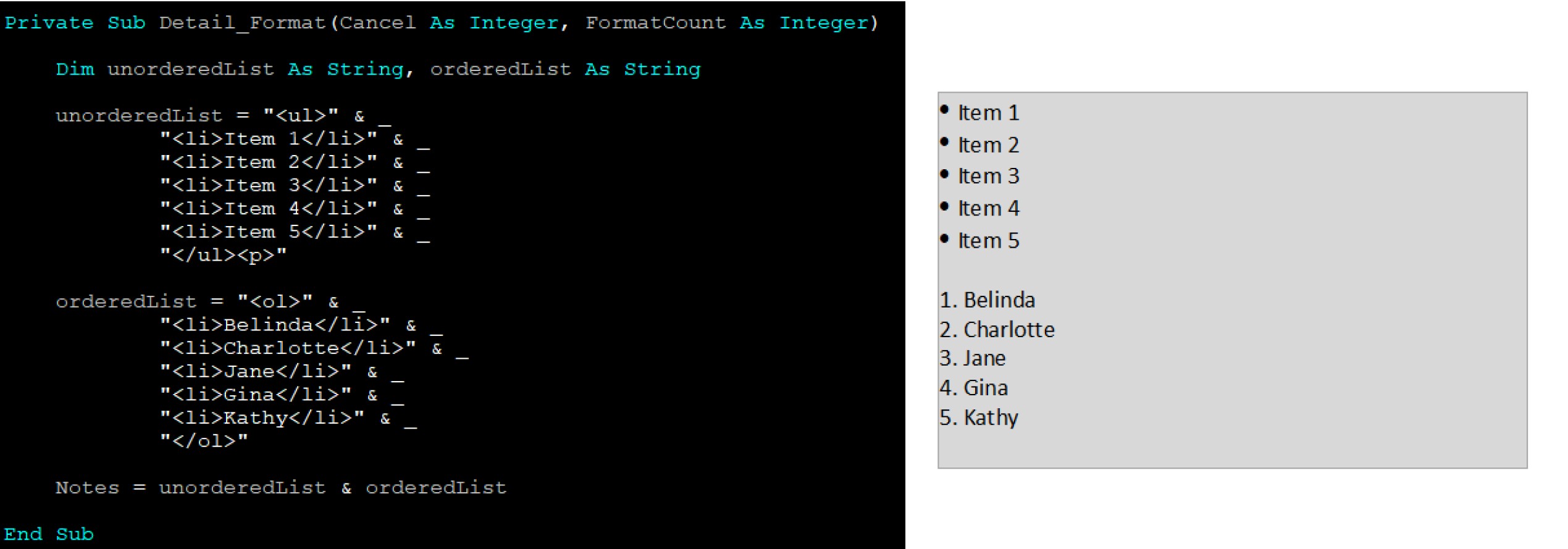
To do this in an unbound text box you will first need to set the Text Format property to Rich Text and set your items in code.


I'll post an image.
Kevin Robertson  @Reply  
           
10 months ago

Jennifer Neighbors OP  @Reply  
     
10 months ago
Sounds good. Thanks for posting the answer. I'll try it!
Kevin Robertson  @Reply  
           
10 months ago
I added more context in the image below showing both an unordered list (bullets) and an ordered list (numbers).
Kevin Robertson  @Reply  
           
10 months ago

John Schreiber  @Reply  
      
10 months ago
Kevin,
Could you please explain what each part of your code is doing? I think I understand the "<li> Item 1 is naming the list items. But is the </li> at the end enclosing the Item Items or something else? And is the & _ calling the dot.  Are there other codes to call other leading stuff like # or * etc.? Thanks in advance
Kevin Robertson  @Reply  
           
10 months ago
It's basic HTML.

HTML 101

& _ is simply concatenating the string which is separated on to different lines for clarity.
    &  is used for concatenation
    _ is used for line continuation
Richard covers this in several of his classes.
John Schreiber  @Reply  
      
10 months ago
Thank you. So, is it the commands under Private Sub? And thank you very much for your help.
Jennifer Neighbors OP  @Reply  
     
10 months ago
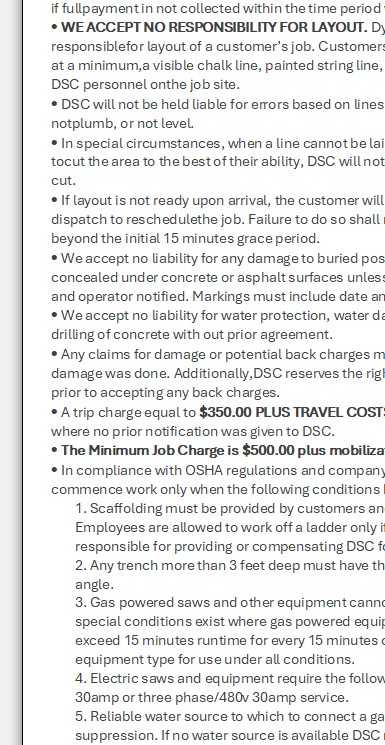
Kevin This works very well, and I appreciate your input. However, the result with long text strings presents a minor issue. Long text strings wrap around to underneath the bullet points. As a result, the bullets don't stand out on the page on the left side in a single line. Is there a fix for that?
Kevin Robertson  @Reply  
           
10 months ago
Not sure. There is probably a solution involving counting the number of characters in the line and adding spaces to lines after the bulleted line using the String() function (a mono type font like Courier New would be better for this). I've never done this so I am only guessing. This would probably be a question for Richard to answer.
Alex Hedley  @Reply  
           
10 months ago
Can you share a screenshot of your example of it wrapping?
Jennifer Neighbors OP  @Reply  
     
10 months ago
I've posted a screenshot. Both the bullets and the numbers wrap long text under them.
Jennifer Neighbors OP  @Reply  
     
10 months ago

Alex Hedley  @Reply  
           
10 months ago
https://developer.mozilla.org/en-US/docs/Web/CSS/list-style-position

ul { list-style-position: outside; }

Can't remember what css will work, if any
You might need to swap to a Browser control if you want more control.
Richard Rost  @Reply  
          
10 months ago
Unfortunately, Access has a very limited set of HTML tags that it actually supports, and I know Microsoft Word and even regular web browsers will support that, but I don't think Access will do that. I'd have to test it. You could probably rig something up yourself if you used a mono-spaced font, but in this particular case, you might be better off just using a web browser control inside your Access database. The Edge control can display stuff like this more faithfully.

This thread is now CLOSED. If you wish to comment, start a NEW discussion in Access Developer Forum.
 

Next Unseen

 
New Feature: Comment Live View


The following is a paid advertisement
Computer Learning Zone is not responsible for any content shown or offers made by these ads.
 

Learn
 
Access - index
Excel - index
Word - index
Windows - index
PowerPoint - index
Photoshop - index
Visual Basic - index
ASP - index
Seminars
More...
Customers
 
Login
My Account
My Courses
Lost Password
Memberships
Student Databases
Change Email
Info
 
Latest News
New Releases
User Forums
Topic Glossary
Tips & Tricks
Search The Site
Code Vault
Collapse Menus
Help
 
Customer Support
Web Site Tour
FAQs
TechHelp
Consulting Services
About
 
Background
Testimonials
Jobs
Affiliate Program
Richard Rost
Free Lessons
Mailing List
PCResale.NET
Order
 
Video Tutorials
Handbooks
Memberships
Learning Connection
Idiot's Guide to Excel
Volume Discounts
Payment Info
Shipping
Terms of Sale
Contact
 
Contact Info
Support Policy
Mailing Address
Phone Number
Fax Number
Course Survey
Email Richard
[email protected]
Blog RSS Feed    YouTube Channel

LinkedIn
Copyright 2026 by Computer Learning Zone, Amicron, and Richard Rost. All Rights Reserved. Current Time: 5/6/2026 8:33:06 AM. PLT: 0s