Free Lessons
Courses
Seminars
TechHelp
Fast Tips
Templates
Topic Index
Forum
ABCD
 
Home   Courses   TechHelp   Forums   Help   Contact   Merch   Join   Order   Logon  
 
Back to Access Developer Forum    Comments List
Upload Images   @Reply   Bookmark    Link   Email   Next Unseen 
Type of Relationship
David Torrey de Frescheville 
     
10 months ago
Hi- I’m developing a database for Archaeological Survey Reports which will be the primary key, that have to be conducted on construction projects. Each construction project has a project number. There’s a many to many relationship because each archaeological survey can have “other” projects affiliated with it and each project can be affiliated with multiple surveys. But each survey can also relate to other surveys in the same table and each project to other projects. I’m not sure how to do this. Is each survey than a self join with other surveys? Or use a junction table?  And I’d have to use a sub form for the “other” surveys since each survey can be affiliated with none or several.  And if it’s not in the combo box list they’d have to be able to add it. I’m just not sure how to do this. And each survey can also have multiple locations and each location its own project number. It’s complicated. Any suggestions? I just bought the relationship seminar. Thanks!
Richard Rost  @Reply  
          
10 months ago
Yes, that does sound complicated, but I think you have the right idea. What you described is exactly what you need. Every many-to-many relationship and every self-join where there are multiple joins will require a junction table. I would just lay it all out maybe in Excel, and that would be the best place to start. Go with that first, and then if you want to post a screenshot, I'll look it over, and we'll see if you're on the right track. But it sounds like you know what you're doing.
David Torrey de Frescheville OP  @Reply  
     
10 months ago
Thank you! I will try the Excel Spreadsheet idea. When i speak to the guy I am doing this for, and when I look at the data - each ITEM has multiple ITEMS its related to and each of those items (like an address, or project or other surveys) can have more than one. And the addresses can have different surveys and/or projects related to those.  It's basically a web. I am really glad I purchased your relationship seminar.  Its already helping! Ill post the spreadsheet after I complete it.  People at my work are seeing what I can do and now Im being asked to do special projects like this. I am SO glad I found your website. THANK YOU!
Richard Rost  @Reply  
          
10 months ago
I'm just glad to be of service. Yeah, that can be pretty crazy, but just think of it this way: everything that has to be attached to multiple other things - even things of the same type, like people to people - each many-to-many relationship needs a junction table. Once you know that, then it's pretty easy to put together.

I had a crazy database that I built for a lawyer once. He had clients that could be attached to cases that were attached to multiple other law firms. All of those things had to be many-to-many relationships because:

- Customers could be attached to multiple cases
- Cases could be attached to multiple customers
- Both of those could be attached to different law firms

So it was a crazy web like you're talking about, but I managed to get it done. It's all just many-to-many relationships and lots of subforms.

And then don't get me started on tracking billable hours for all of those! LOL
Thomas Gonder  @Reply  
      
10 months ago
Self joins can be tricky. Inherently they only allow a one-to-one relationship. To get around that, you have to start adding multiple fields with a specific purpose super-imposed upon the fields. Think of a family, each son and daughter can have only one biological father. But the father may have multiple sons and multiple daughters (do we really want to add son1, son2, son3, etc. to the father record? No!). This is when you need to get into the many-to-many scenario, especially when you add a mother for the child.

In my demos of the ADS, I show how Marilyn Monroe had two previous names, each with a self-join going to a previous Entity. Fred Flintstone however has many relationships, and each of those entities can have their own relationships. So, this is doing a "self-join" through a many-to-many table. Likewise, for two different tables, a user can belong to many user groups while each user group can have many users. An example that isn't a self-join, but is many-to-many.

It sounds like you have both scenarios happening at the same time with your tables. At its simplest, you have a project and survey tables, as well as three many-to many tables for project<->project, survey<->survey, project <-> survey.
David Torrey de Frescheville OP  @Reply  
     
10 months ago

David Torrey de Frescheville OP  @Reply  
     
10 months ago

David Torrey de Frescheville OP  @Reply  
     
10 months ago
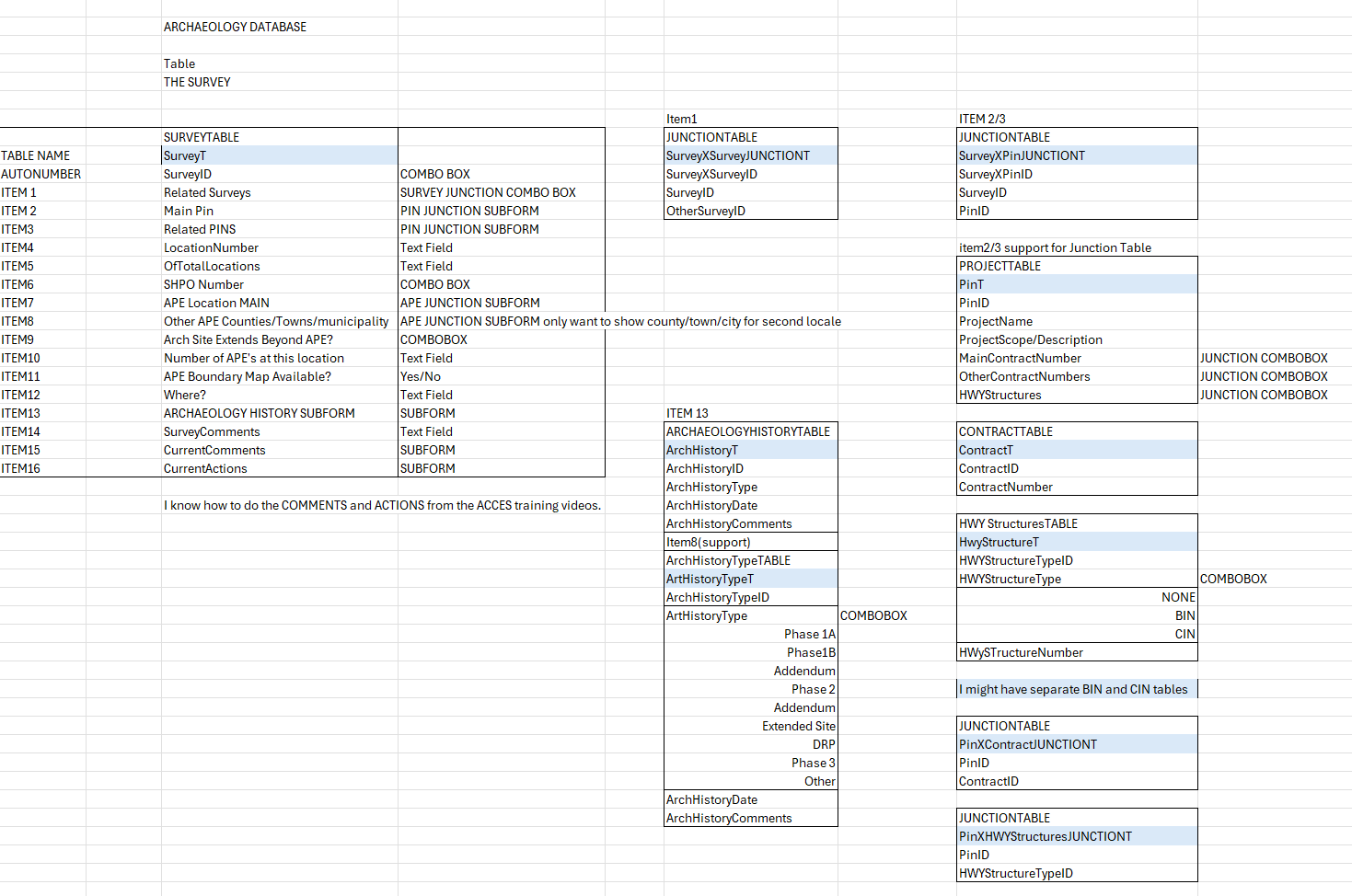
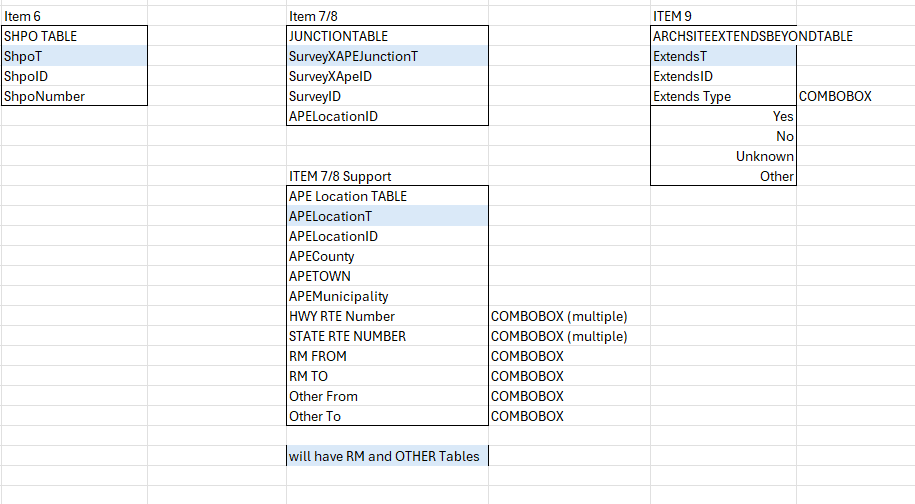
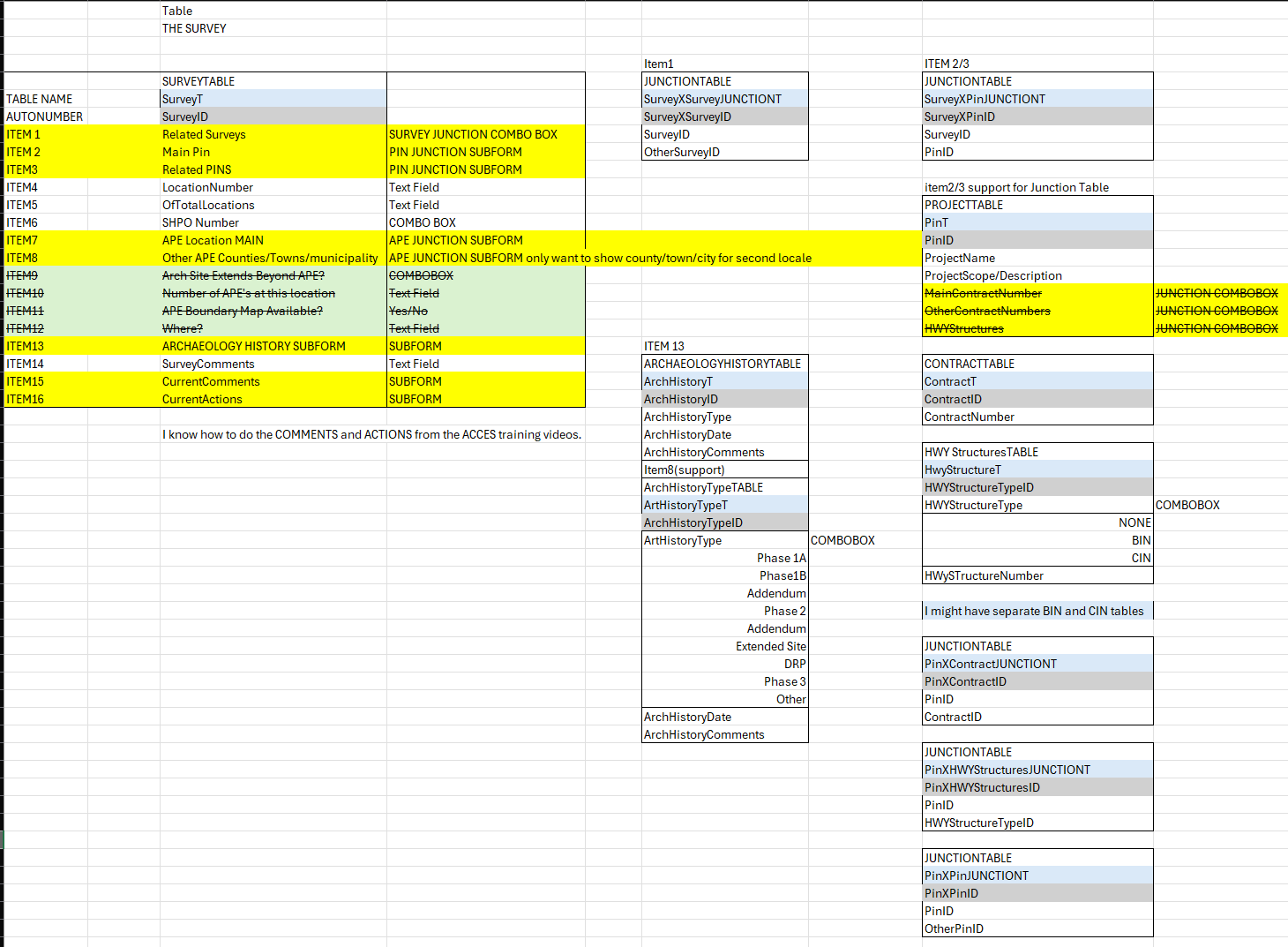
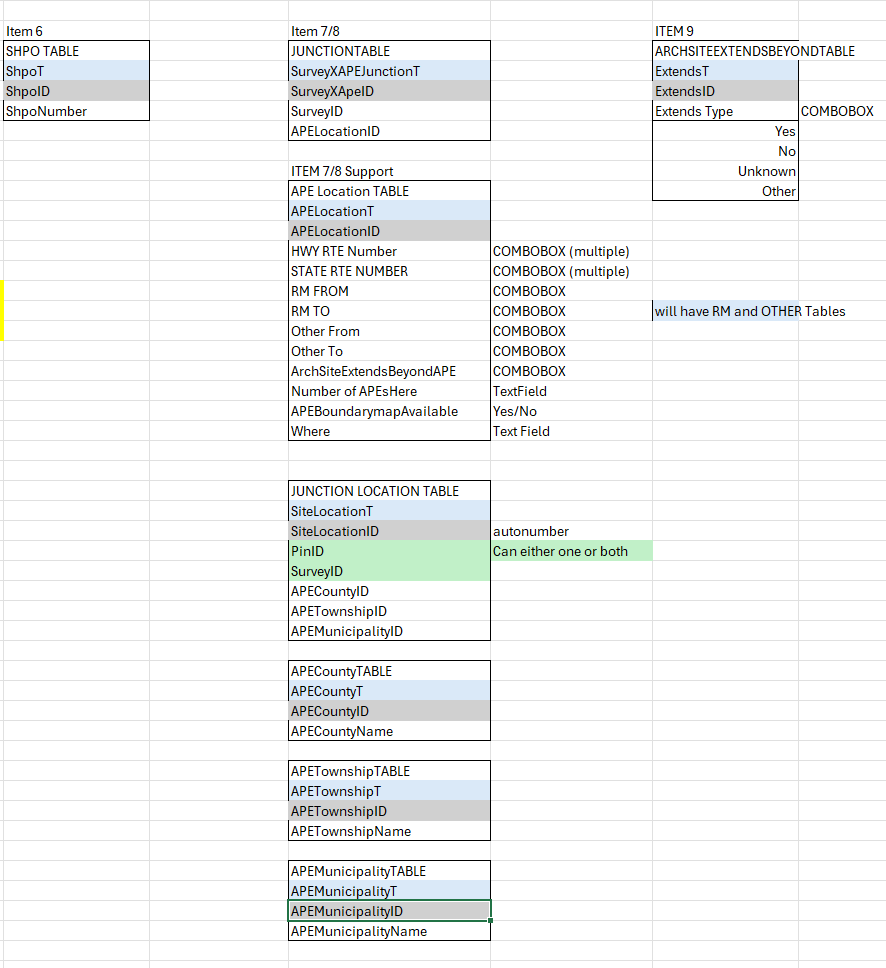
Thomas Thanks for reminding me about the Project-Project self-join. I made an Excel Spreadsheet laying it all out but forgot that one part. I posted screenshots above.
David Torrey de Frescheville OP  @Reply  
     
10 months ago
Richard Thank you for this. You are so right.  Once I started laying it all out in the Spreadsheet - and listened to you r relationship seminar where you said "If anything has two or more of it you need a separate table for that - it started making more sense and got a whole lot easier. I've posted my screenshots of the spreadsheet above.
David Torrey de Frescheville OP  @Reply  
     
10 months ago

David Torrey de Frescheville OP  @Reply  
     
10 months ago

David Torrey de Frescheville OP  @Reply  
     
10 months ago
I realized I had to make a JUNCTION Table for the Actual Location (County, Township, Municipality) so I added all those tables. I also moved a few of the items around. Blue highlights are table names and green are auto numbers. I am also making a query for the SiteLocation so that when a county is chosen, the township will autofill, etc. And that info will be saved in the SiteLocationT Junction Table with the PinID or the SiteID or both. (This is from the multi-combobox drop down tutorials).
Richard Rost  @Reply  
          
10 months ago
Well, I don't necessarily understand all your terms because I know very little about archaeology (aside from the documentaries I've watched - oh and Raiders of the Lost Ark). But as far as I can tell, everything looks good.

I might blow your mind by suggesting some of these things could be put into helper tables. For example, your county, township, and municipality could technically all be in the same table, but that might add unnecessary complication to what you've got going on there. So if you're more comfortable just leaving it as is now until you get it built, and then later on if you decide you want to do that, then that might streamline things for you.

But as far as I can see, everything looks good. See... laying stuff out in spreadsheets is definitely a great first step.

This thread is now CLOSED. If you wish to comment, start a NEW discussion in Access Developer Forum.
 

Next Unseen

 
New Feature: Comment Live View


The following is a paid advertisement
Computer Learning Zone is not responsible for any content shown or offers made by these ads.
 

Learn
 
Access - index
Excel - index
Word - index
Windows - index
PowerPoint - index
Photoshop - index
Visual Basic - index
ASP - index
Seminars
More...
Customers
 
Login
My Account
My Courses
Lost Password
Memberships
Student Databases
Change Email
Info
 
Latest News
New Releases
User Forums
Topic Glossary
Tips & Tricks
Search The Site
Code Vault
Collapse Menus
Help
 
Customer Support
Web Site Tour
FAQs
TechHelp
Consulting Services
About
 
Background
Testimonials
Jobs
Affiliate Program
Richard Rost
Free Lessons
Mailing List
PCResale.NET
Order
 
Video Tutorials
Handbooks
Memberships
Learning Connection
Idiot's Guide to Excel
Volume Discounts
Payment Info
Shipping
Terms of Sale
Contact
 
Contact Info
Support Policy
Mailing Address
Phone Number
Fax Number
Course Survey
Email Richard
[email protected]
Blog RSS Feed    YouTube Channel

LinkedIn
Copyright 2026 by Computer Learning Zone, Amicron, and Richard Rost. All Rights Reserved. Current Time: 6/16/2026 11:21:33 AM. PLT: 1s