Free Lessons
Courses
Seminars
TechHelp
Fast Tips
Templates
Topic Index
Forum
ABCD
 
Home   Courses   TechHelp   Forums   Help   Contact   Merch   Join   Order   Logon  
 
Back to Access Developer Forum    Comments List
Upload Images   @Reply   Bookmark    Link   Email   Next Unseen 
Prevent Duplicating Value on Combobox
Liem Khen 
   
8 months ago
I have a combobox on a form ,creating in the lookup property of a table.

I have a bedding home industry.
The task order is
A Cutting worker (some time) provides his result to seamsters
If his results ,once in a while,are simply given to ONE seamster,i do not need
The CODE NUMBER of cutting work doubled
For example

HASAN A cut worker

Duvett (code number:A310725HS01) =9 given to HIANHWIE all

As HASAN gives another Duvett to PUTRI i want to prevent the CODE NUMBER written twice

Also if a cutwork provided to several seamsters I need to show WHETER to add

And a report to make sure wheter to add or not
Kevin Robertson  @Reply  
          
8 months ago
Liem Khen OP  @Reply  
   
8 months ago
I will fix the transaction table
Thanks
Liem Khen OP  @Reply  
   
8 months ago
In my case , if duvett is already sewed all but there come up again the same CODENUMBER , how to tell user not to add
John Davy  @Reply  
         
8 months ago
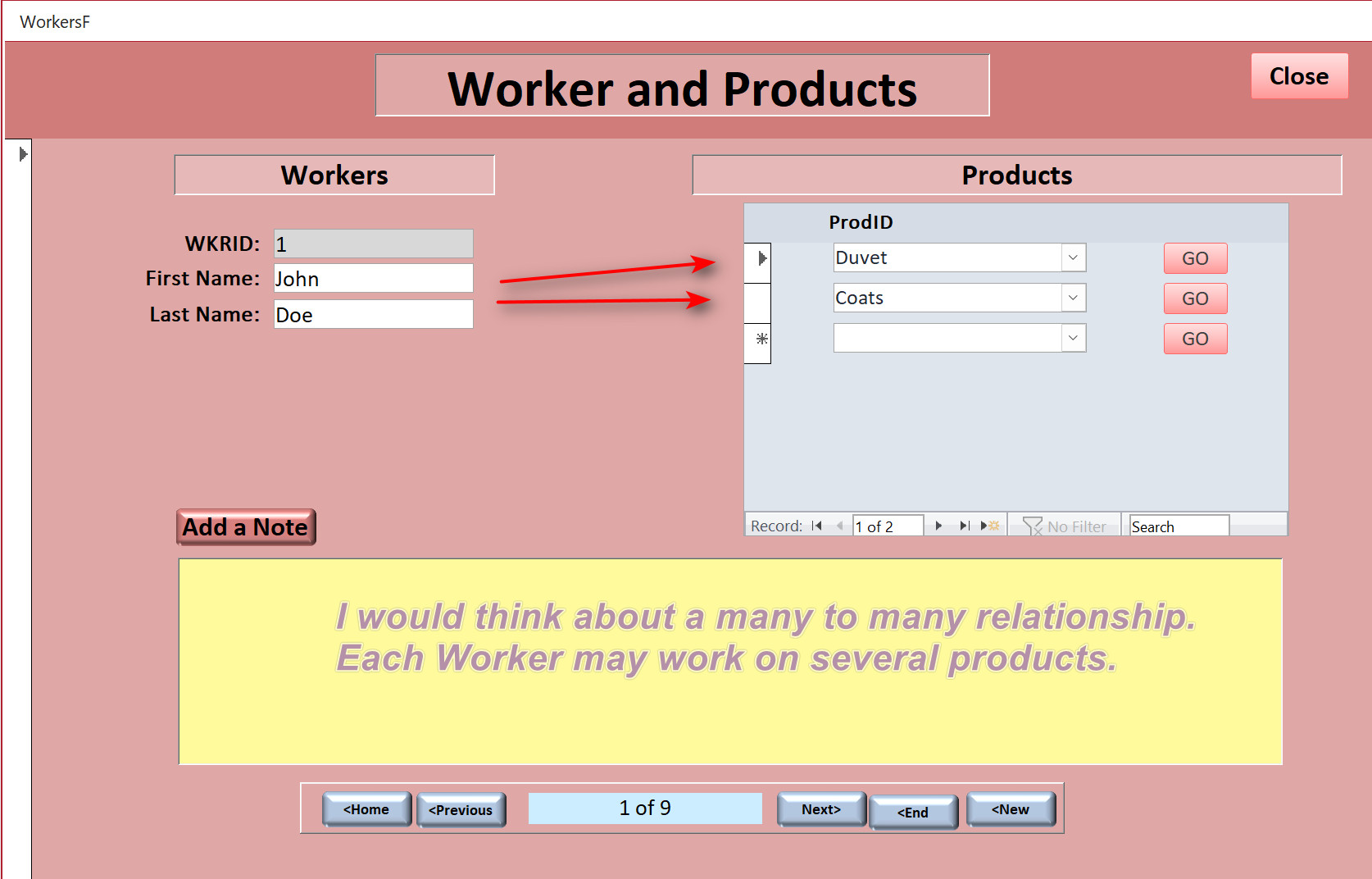
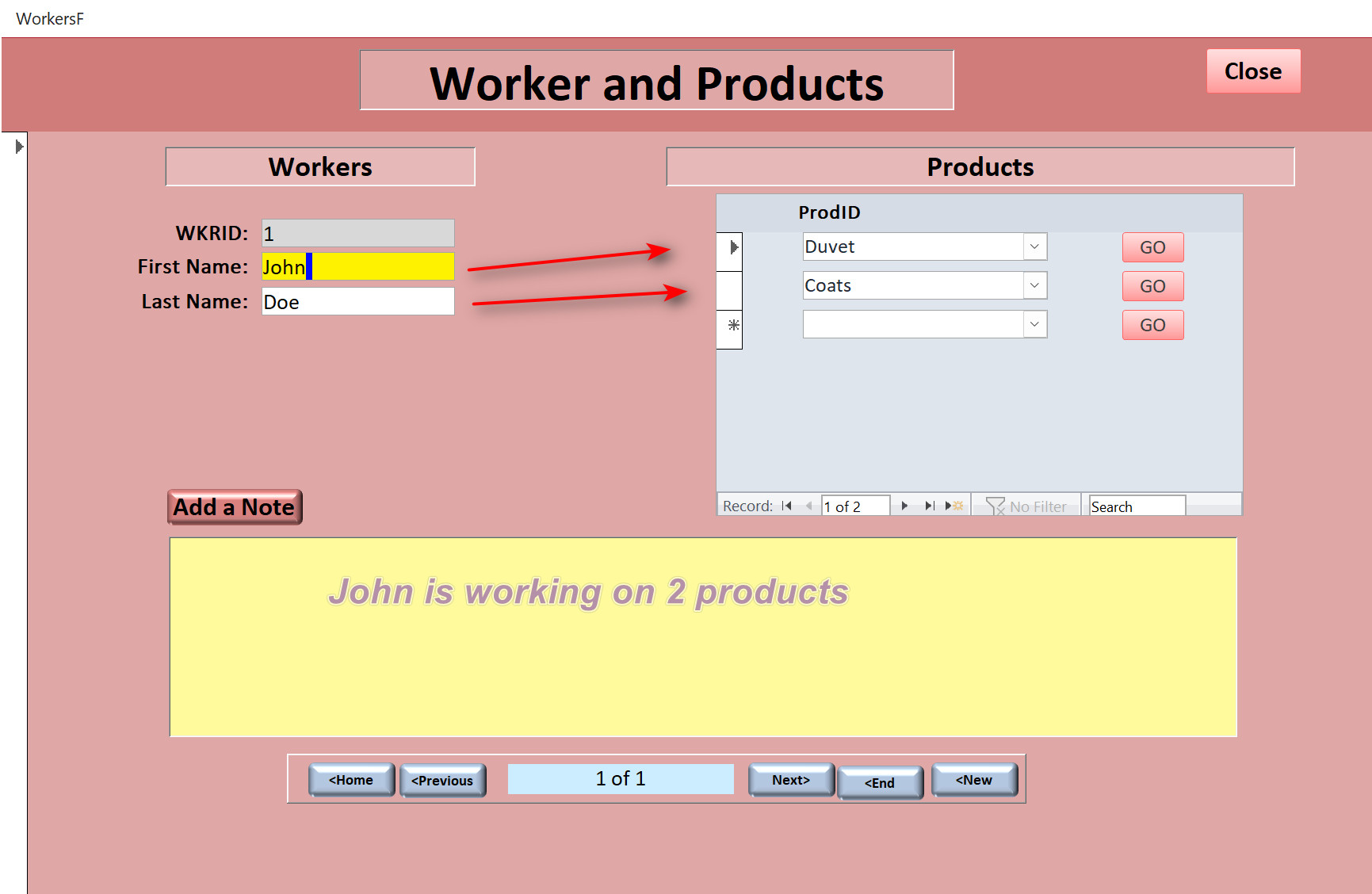
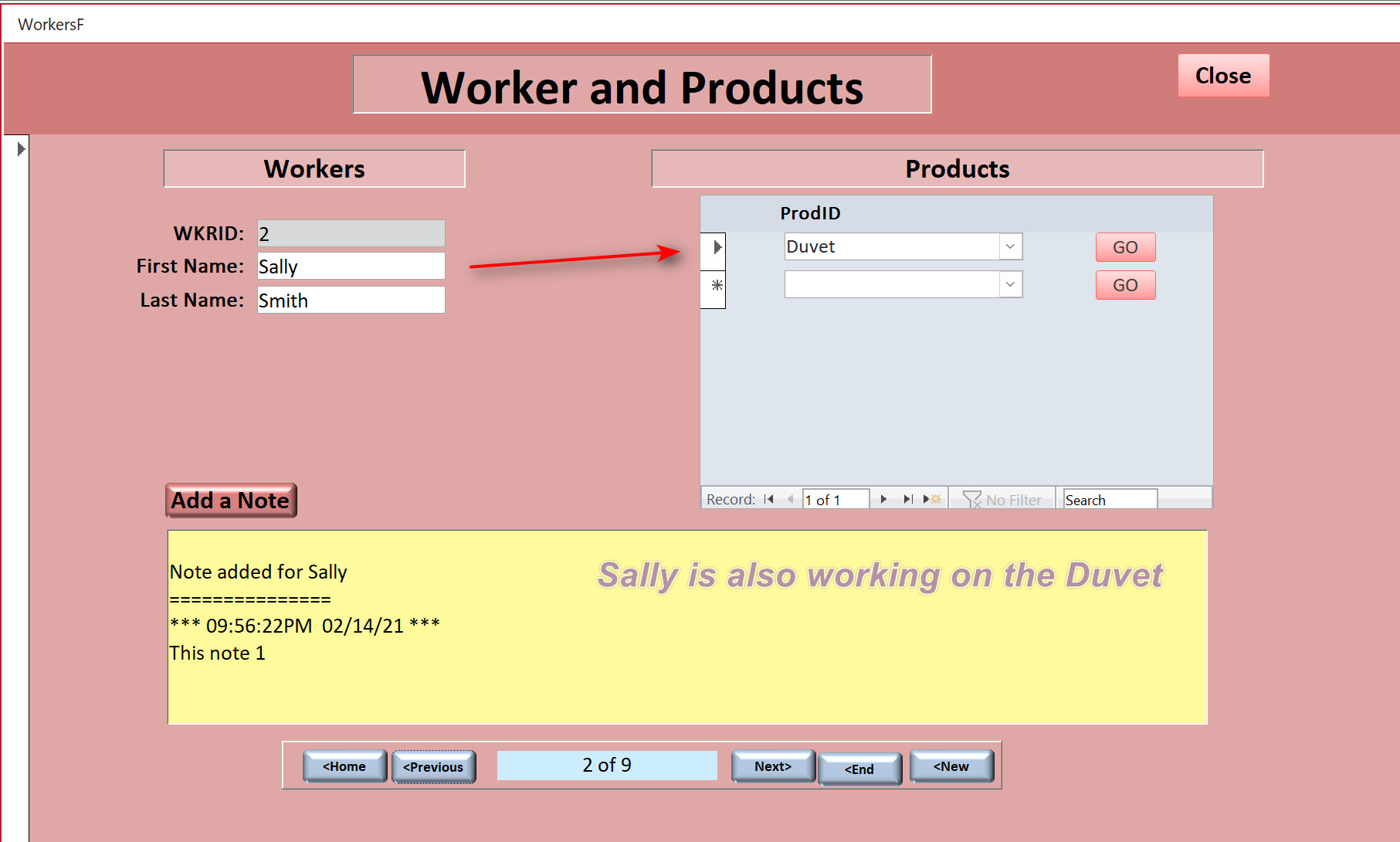
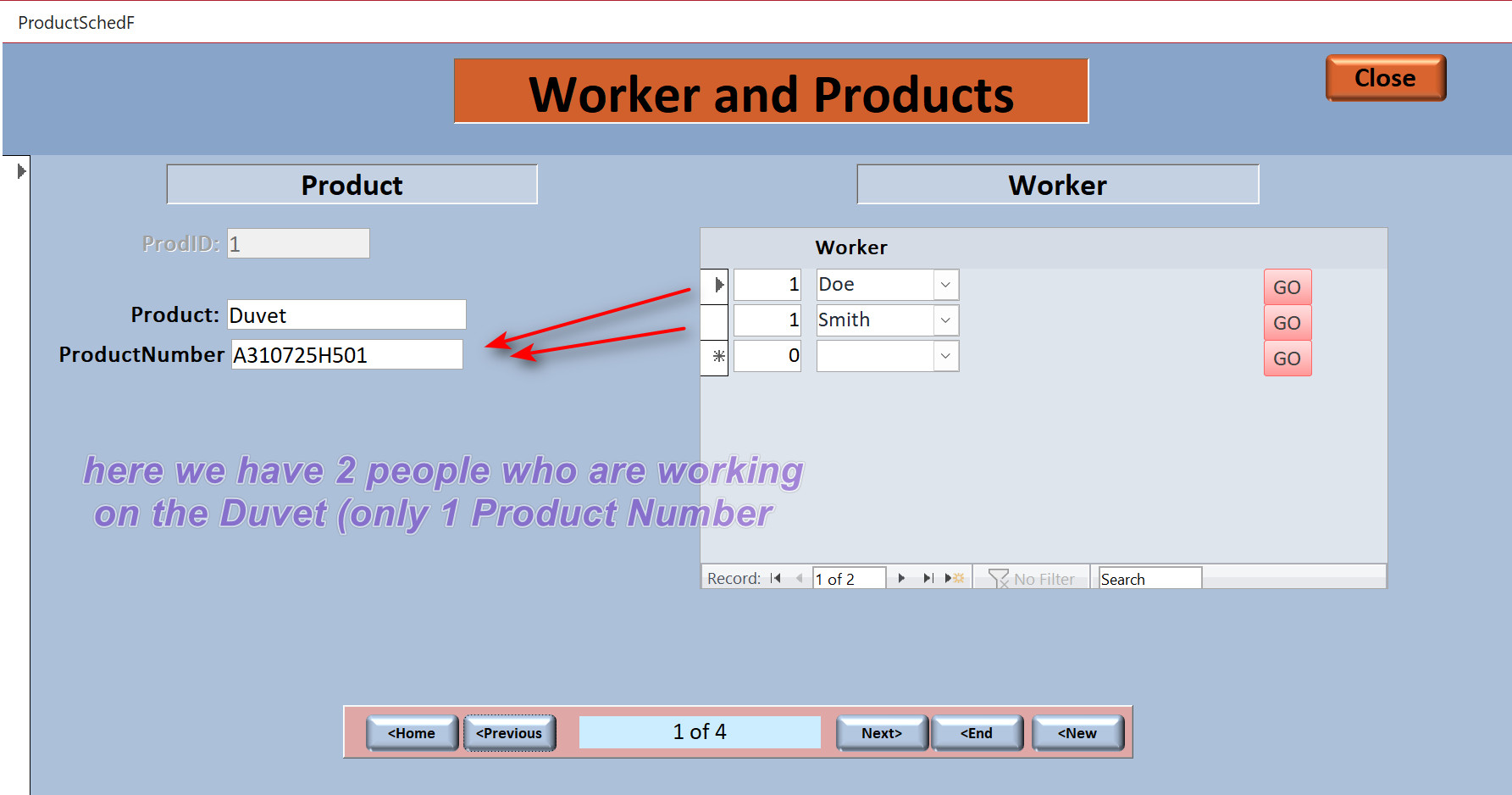
Hi Liem, Kevin's advice is always to be listened to. He knows what he is doing. I am going to upload 3 screen clips that demonstrate a many to many relationship. Take a look. HTH John
John Davy  @Reply  
         
8 months ago

John Davy  @Reply  
         
8 months ago

John Davy  @Reply  
         
8 months ago

John Davy  @Reply  
         
8 months ago

Liem Khen OP  @Reply  
   
8 months ago
How to tell the INPUTTING DATA if DUVETT ,for instance, has been sewed all so NO INPUTTING THE SAME CODENUMBER any more.
How to create a warning I mean

Liem Khen OP  @Reply  
   
8 months ago
If Doe has done all the duvett and the inputting data should know that the CODENUMBER could not be added to Smith any more.

So we have to give a warning

Liem Khen OP  @Reply  
   
8 months ago
Oooo...I am sorry PRODUCTNUMBER YA not CODENUMBER
Liem Khen OP  @Reply  
   
8 months ago
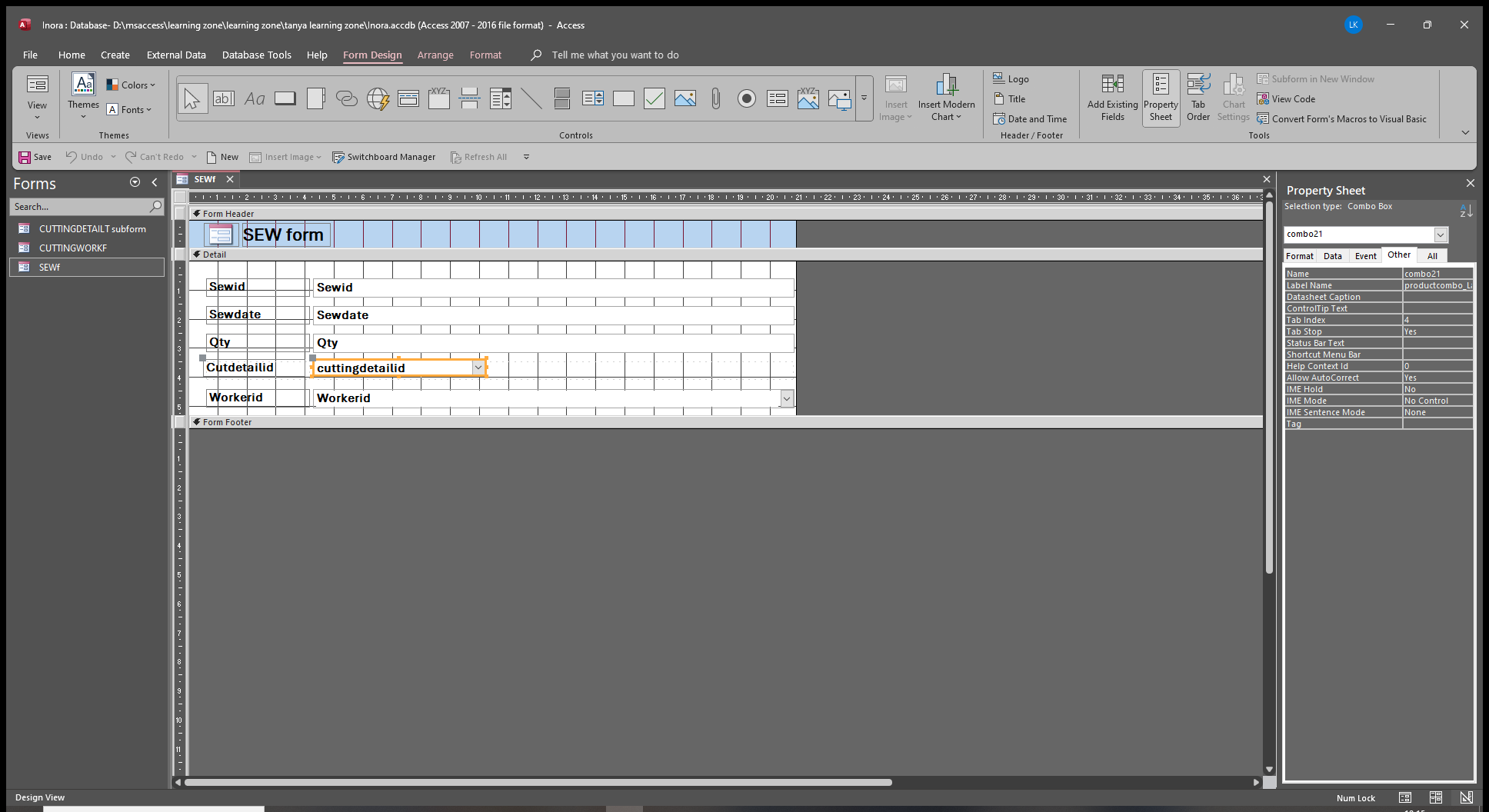
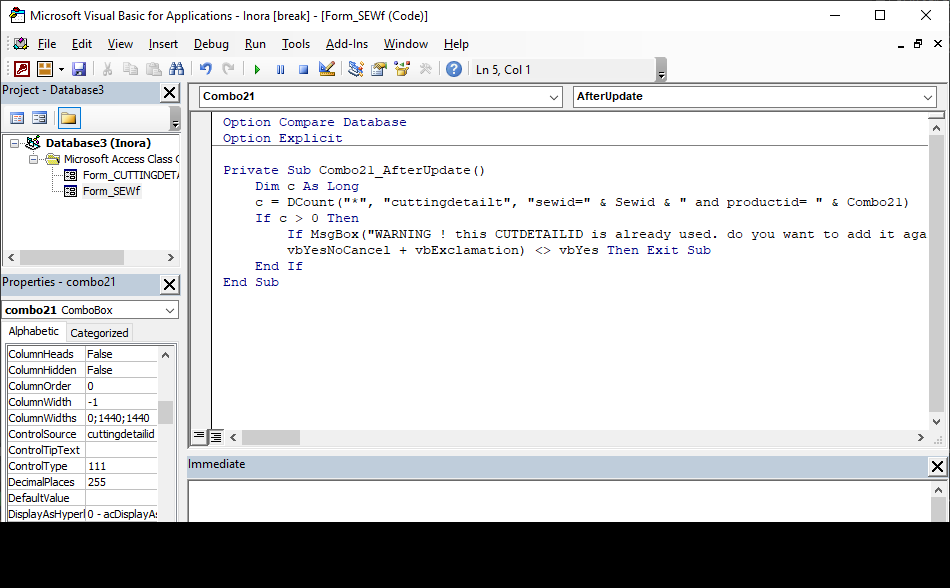
RICHARDS' vba on preventing to duplicate works very well but I have to push ESC button first to delete the record and property name of the combobox can not be changed to productcombo ( still combo21)
Liem Khen OP  @Reply  
   
8 months ago

Liem Khen OP  @Reply  
   
8 months ago

Liem Khen OP  @Reply  
   
8 months ago

Matt Hall  @Reply  
          
8 months ago
For a different approach, you might check out Prevent Duplicates.
Liem Khen OP  @Reply  
   
8 months ago
yes mr MATT HALL ,I used mr RICHARDS' prosedure

but I want to display a report telling that the product has been done all or still can be added
Liem Khen OP  @Reply  
   
8 months ago
Thanks
I used RICHARDS' procedure...
Dim c as long...etc , it works
Thank you for the attention

But I use a button to open a report to see wheter I CAN STILL ADD A RECORD OR NOT
Richard Rost  @Reply  
          
8 months ago
If you add a record to your form and then you have a button on that form that opens the record, and you're still not seeing the new record. That means you have to refresh or save the data in the form before you open the report. You can do it with either a Me.Refresh or a Me.Dirty = False command. Just put that line in the button before you open the report. I cover this in the invoicing video.
Liem Khen OP  @Reply  
   
8 months ago
I am sorry to all LEARNING ZONE TUTORS,I have made you all HEADACHE

I want to start describing what I need to know

I have tables ... cuttingworkt-sewingworkt-productt

                      Cutid - CUTTINGCODE - Datecut - cutqty - productid (foreignkey) - workerid  
                                 cuttingcode denotes who cuts in a certain day (SB010925HS =SB in 01-09-2025 cut by HS-the cutworker  ....sb stands for single bedsheet)
                      
                      sewid - sewdate - sewqty - productid(foreignkey) - workerid

                       productid - sewingcost

in the SEWINGWORK FORM
      Sewid - datesewed - sewqty -  cuttingwork (relational combo) - sewworkerid

in this relationalcombo ,I want the CUTTINGCODE prevent to duplicate
IF THE CUTTINGCODE HAS BEEN USED TO SALLY , IT CAN NOT BE USED TWICE (to another sewworker)

I used RICHARDS' procedure dim c as long...etc but THE WARNING always COMES UP wheter the CUTTINGCODE duplicate or NOT.

I wonder why ...thanks
Kevin Robertson  @Reply  
          
8 months ago
You're using the wrong event.

Before Update

Remember to name your controls. Combo21 is NOT very descriptive.
Liem Khen OP  @Reply  
   
8 months ago
I used before update event,there still came up the warning wheter the CUTTING CODE duplicate or NOT

the relational combo is composed of CUTTINGWORT and PRODUCTT ,hence

         CUTID-CUTTINGCODE-PRODUCTNAME-CUTTINGQTY-SEWINGCOST (in format property CUTID is ZERO ;CUTTINGQTY is to show in the report wheter the CUTTINGCODE can still be ADDED to another SEWER or NOT;SEWINGCOST is to determine when the FARES CHANGE)

I really hope that you can help me
Liem Khen OP  @Reply  
   
8 months ago
I am sorry...

is it okay to prevent duplicating on COMBO BOX of a FORM in ms access
I mean can we do it
THANKS
Liem Khen OP  @Reply  
   
8 months ago
ALSO I want to find a record on my form based on 2 combo boxes

My form composed of 2 RELATIONAL COMBOBOXES
                                 Customercode (from CUSTOMERT : Customerid (autonumber) - Customercode (shortext) - ...etc)
                                  Productcode {from PRODUCTT : Productid(autonumber - Productcode (shorttext) - ...etc        
                          and
                                     Unitprice                  

I want to know the price of a PRODUCT of a CUSTOMER

How to solve this
thank you
              
Liem Khen OP  @Reply  
   
8 months ago
the tables are

CUSTOMERT :Customerid (autonumber) -Customercode (short text) - Customername (short text)...etc
PRODUCTT :Productid(autonumber) - Productcode(short text) - Productname (shrt text) ...etc

CUSTPRIORPRICET :Custpriorpriceid(autonumber) - Custcode (hide Custid) - productcode ( hide productid) - Unitprice (I USED THIS TABLE for the FORM)

This thread is now CLOSED. If you wish to comment, start a NEW discussion in Access Developer Forum.
 

Next Unseen

 
New Feature: Comment Live View


The following is a paid advertisement
Computer Learning Zone is not responsible for any content shown or offers made by these ads.
 

Learn
 
Access - index
Excel - index
Word - index
Windows - index
PowerPoint - index
Photoshop - index
Visual Basic - index
ASP - index
Seminars
More...
Customers
 
Login
My Account
My Courses
Lost Password
Memberships
Student Databases
Change Email
Info
 
Latest News
New Releases
User Forums
Topic Glossary
Tips & Tricks
Search The Site
Code Vault
Collapse Menus
Help
 
Customer Support
Web Site Tour
FAQs
TechHelp
Consulting Services
About
 
Background
Testimonials
Jobs
Affiliate Program
Richard Rost
Free Lessons
Mailing List
PCResale.NET
Order
 
Video Tutorials
Handbooks
Memberships
Learning Connection
Idiot's Guide to Excel
Volume Discounts
Payment Info
Shipping
Terms of Sale
Contact
 
Contact Info
Support Policy
Mailing Address
Phone Number
Fax Number
Course Survey
Email Richard
[email protected]
Blog RSS Feed    YouTube Channel

LinkedIn
Copyright 2026 by Computer Learning Zone, Amicron, and Richard Rost. All Rights Reserved. Current Time: 5/7/2026 1:17:07 AM. PLT: 0s