Free Lessons
Courses
Seminars
TechHelp
Fast Tips
Templates
Topic Index
Forum
ABCD
 
Home   Courses   TechHelp   Help   Contact   Merch   Join   Order   Logon   Forums   
 
Back to Access Developers    Comments List
Upload Images   @Reply   Bookmark    Link   Email   Next Unseen 
VBA for if Then Ifelse for Multiple Records
Jeff Hunker 
     
12 months ago
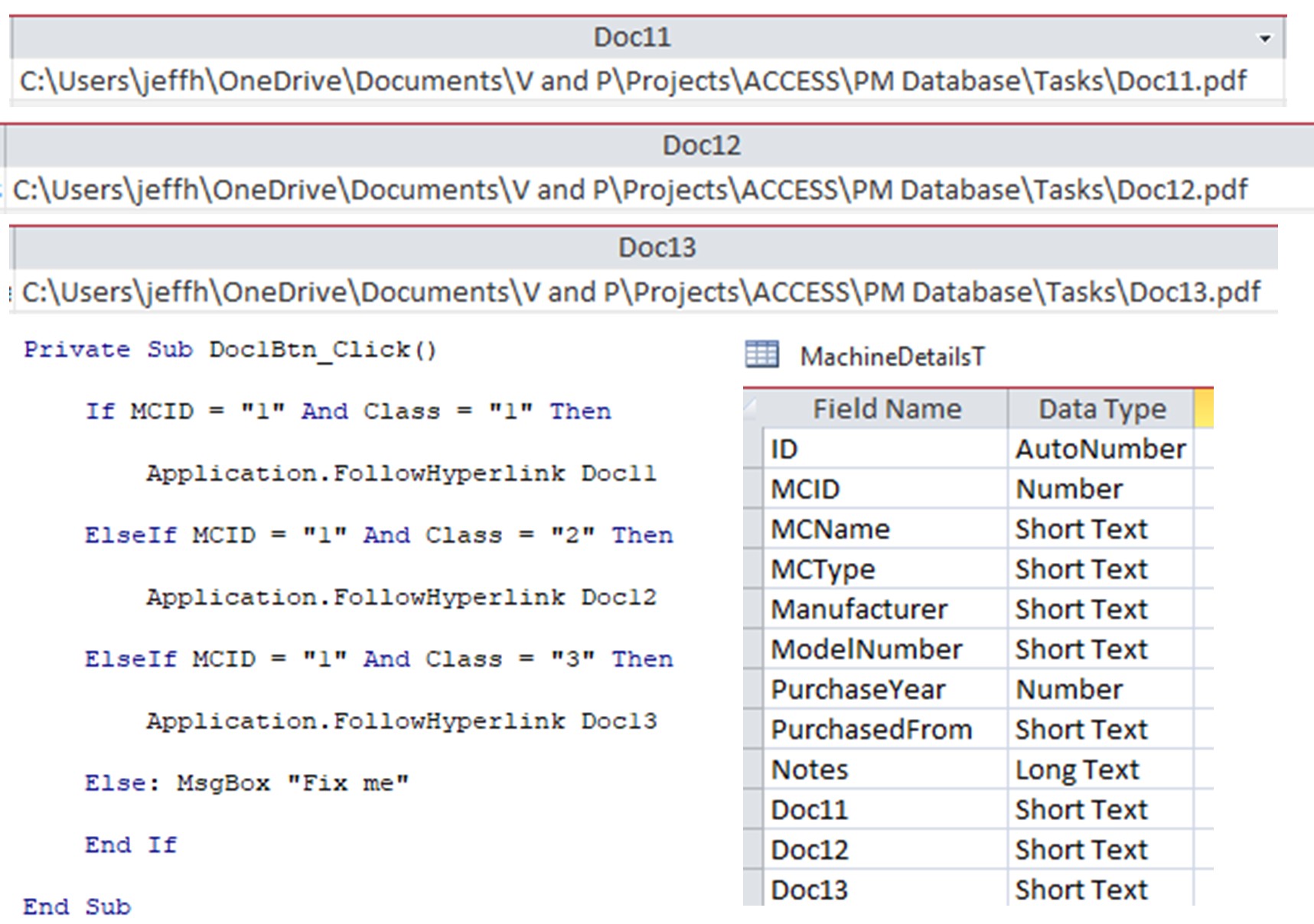
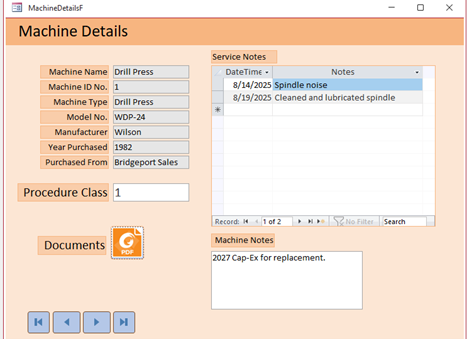
I am creating a PM database for 12 machines (MCID 1-12) and 5 (Class 1-5) different procedures for each machine.  All data driven by MachineDetailsT

The Form shows the lone input text box ‘class’ and a Doc1Btn button, which opens a corresponding PDF doc.  I copied the same link to the other columns and changed the Class to 2 and 3, changing doc numbers, accordingly.

When running, only Class 1 & Class 2 opens corresponding PDF docs.  With Class 3, there is no action after clicking the button.

Q.  What would I need to change in VBA to open PDF files for Classes 3-5?
My plan is to use MCID 2 for the next machine with Docs 21, 22, 23, 24 & 25, MCID 3 and Docs 31, 32, etc.  

Q.  Would there be a better method than IFELSE nesting as shown?  
I thought about SELECT CASE but I have 2 criteria for each document.
Any and all suggestions are much appreciated.
Jeff Hunker OP  @Reply  
     
12 months ago

Jeff Hunker OP  @Reply  
     
12 months ago

Kevin Robertson  @Reply  
          
12 months ago
MCID is a Number, not Short Text so you don't need quotes around the numbers in your code.
Jeff Hunker OP  @Reply  
     
12 months ago
Kevin Thank you!
Jeff Hunker OP  @Reply  
     
12 months ago
Jeff
This remains unresolved in case anyone can please help with the multiple condition VBA or maybe point me in the right direction.
Thank you!
Kevin Yip  @Reply  
     
12 months ago
Jeff  If you have lots of criteria, use a lookup table.  Create a table that looks like:

MCID    Ckass   DocFile
1       1       Doc1
1       2       Doc2
1       3       Doc3
...
10       5       Doc21
11       10      Doc35
12       50      Doc99
...

Then you only need one line of code, a DLookup() function, to look up what doc to be used for which MCID and Class.
Donald Blackwell  @Reply  
       
12 months ago
Hi Jeff,

One problem might be that you have a field or control named "Class". While it's not specifically a reserved word, Access may confuse that as part of a VBA Class. Just to be sure I would suggest renaming it something like "ProcedureClass" or "ProcClass" just to prevent ambiguity.
Jeff Hunker OP  @Reply  
     
12 months ago
Kevin Thank you, Kevin!  Yes, I would have 60 combinations.  I will give this a try.  Thank you.
Jeff Hunker OP  @Reply  
     
12 months ago
Donald Thank you Donald!  There certainly isn't any harm in renaming them.  Great tip!
Matt Hall  @Reply  
           
12 months ago
What if you did something like this:

DocumentPath = CommonPath & "doc" & Format(MCID, "00") & Format(CLASS, "00") & ".pdf"

application.followhyperlink DocumentPath

The idea is to build the document path/name by concatenating the parts together.   This would make the following:

MCID    CLASS        DocumentPath
   2           4            c:\users\jeffh\...\tasks\doc0204.pdf
  11          3            c:\users\jeffh\...\tasks\doc1103.pdf
Jeff Hunker OP  @Reply  
     
12 months ago
Matt Great Idea, Matt!  Thank you.  I will try that and see how that goes.  I'll post the fix.  Thank you!

This thread is now CLOSED. If you wish to comment, start a NEW discussion in Access Developers.
 

Next Unseen


What's This?


The following is a paid advertisement
Computer Learning Zone is not responsible for any content shown or offers made by these ads.
 

Learn
 
Access - index
Excel - index
Word - index
Windows - index
PowerPoint - index
Photoshop - index
Visual Basic - index
ASP - index
Seminars
More...
Customers
 
Login
My Account
My Courses
Lost Password
Memberships
Student Databases
Change Email
Info
 
Latest News
New Releases
User Forums
Topic Glossary
Tips & Tricks
Search The Site
Code Vault
Collapse Menus
Help
 
Customer Support
Web Site Tour
FAQs
TechHelp
Consulting Services
About
 
Background
Testimonials
Jobs
Affiliate Program
Richard Rost
Free Lessons
Mailing List
PCResale.NET
Order
 
Video Tutorials
Handbooks
Memberships
Learning Connection
Idiot's Guide to Excel
Volume Discounts
Payment Info
Shipping
Terms of Sale
Contact
 
Contact Info
Support Policy
Mailing Address
Phone Number
Fax Number
Course Survey
Email Richard
[email protected]
Blog RSS Feed    YouTube Channel

LinkedIn
Copyright 2026 by Computer Learning Zone, Amicron, and Richard Rost. All Rights Reserved. Current Time: 9/6/2026 8:49:42 AM. PLT: 1s