Free Lessons
Courses
Seminars
TechHelp
Fast Tips
Templates
Topic Index
Forum
ABCD
 
Home   Courses   TechHelp   Forums   Help   Contact   Merch   Join   Order   Logon  
 
Back to Access Forum    Comments List
Upload Images   @Reply   Bookmark    Link   Email   Next Unseen 
Question About a Query
Lee Shastid 
    
8 months ago
I struggle with relationships in access and have created a very simple Db to play with to try and learn but I am stumped. I have created a DB for lets say my firearm collection. I have a table called for my firearms called FirearmT, and then a table for my Magazines called MagazinesT. I added a third table for Model Number of Firearm and its called ModelT. The ModelT only has 2 fields. ModelID and Model Name.
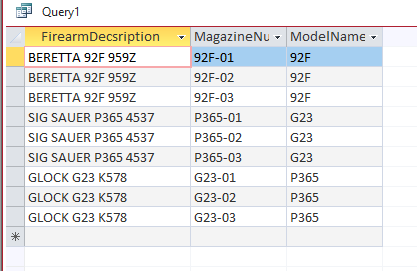
If I run a query just using FirearmT and MagazineT it returns the data just fine. If I add the Model table field modelName I get the model number but not in the correct place. I have played with all the joins in the relationships but cant get it solved. Any help would be appreciated. This is not for a working DB for now just playing with ot to learn. Thank you for any help.
Sami Shamma  @Reply  
             
8 months ago
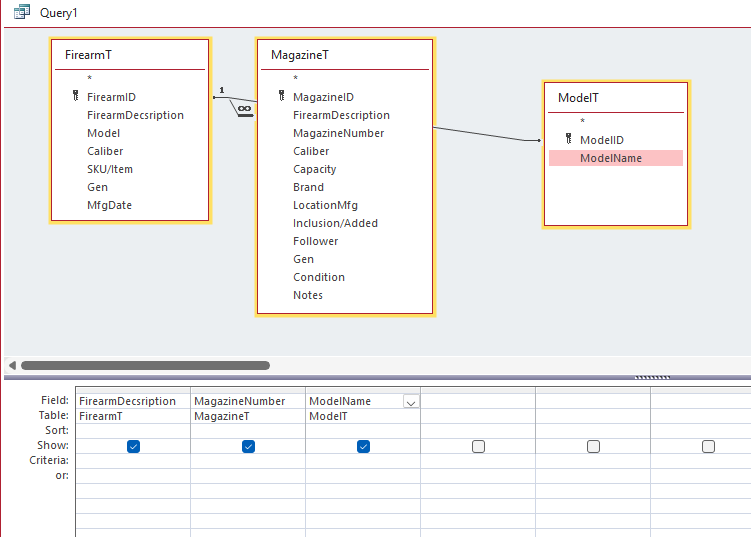
Show your query that is giving you trouble in design view.
Sami Shamma  @Reply  
             
8 months ago
From your description, may I ask why the firearm model is not stored in the firearm table?
Juan Rivera  @Reply  
            
8 months ago

Relationships
Lee try this maybe it will spark the mind try it and if still having problems let us know we can kick up some more and get you going on this.

V/r
Juan
Lee Shastid OP  @Reply  
    
8 months ago
Sami will show it momentarily. There are two reasons I created the Model Table. 1. Is there are so many different models, and also it can be used for other tables also so I dont have to put model in the other table. Such as there may one model for firearm and one model for magazine. So I dont have a model field in both tables and I can use the combo box elsewhere when needed. Be back shortly with the screenshot
Lee Shastid OP  @Reply  
    
8 months ago
Juan thank you am I about relationshiped out on the video. LOL
Lee Shastid OP  @Reply  
    
8 months ago

Lee Shastid OP  @Reply  
    
8 months ago

Kevin Robertson  @Reply  
          
8 months ago
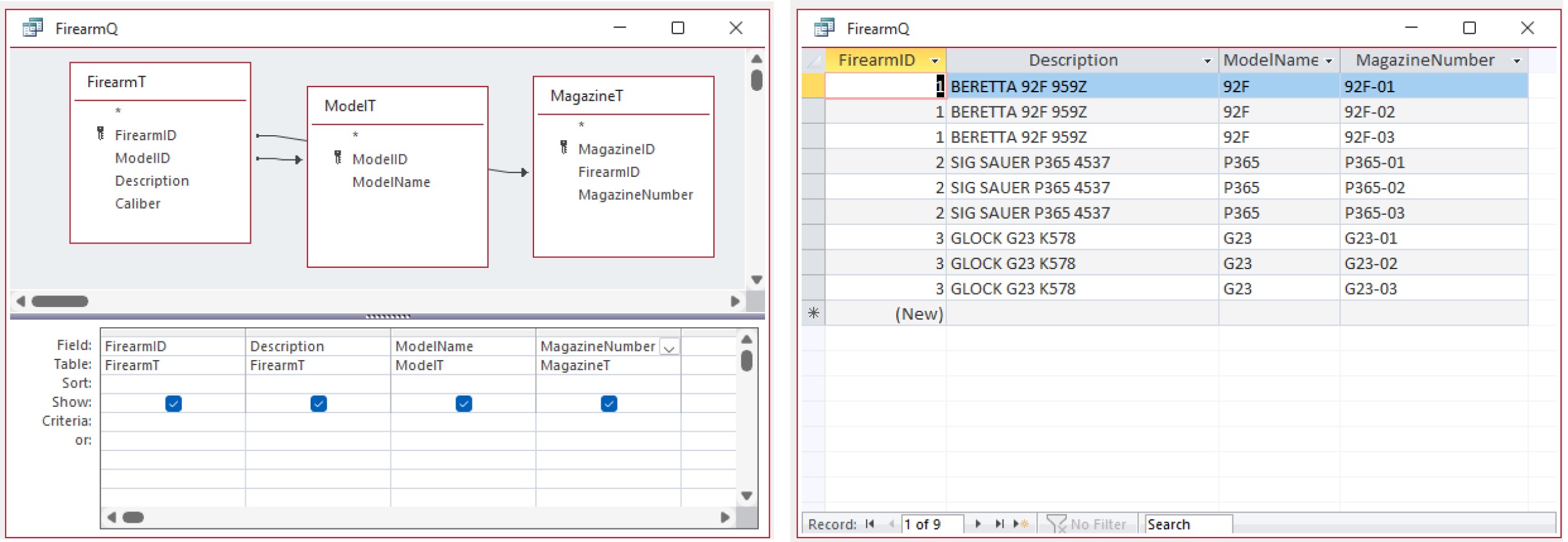
Your tables are missing the Foreign Keys.
Lee Shastid OP  @Reply  
    
8 months ago
Well maybe that is what I am not getting. Kevin, can you give me an example how to fix that on these tables? Maybe I will understand that then.
Kevin Robertson  @Reply  
          
8 months ago


Your Query (with simplified Tables)

Lee Shastid OP  @Reply  
    
8 months ago
I think I see what's going on. I will play with it somewhere. I plan on adding fields to different tables but just one at a time to try and learn how things are working. Am I correct in the ModelID in the FirearmT should be NUMBER instead of SHORT TEXT? Thank you Kevin
Kevin Robertson  @Reply  
          
8 months ago
Yes. You are correct. Related fields should be of the same Data Type.
Lee Shastid OP  @Reply  
    
8 months ago
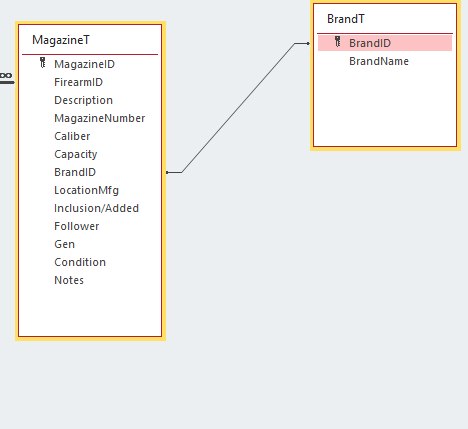
Okay. Now I added this table and get no results when running a query. Added BrandT with BrandID BrandName and added a field in the MagazzineT as Brand ID. Snip will be here attached
Lee Shastid OP  @Reply  
    
8 months ago

Richard Rost  @Reply  
          
8 months ago
See Missing Values. Check your join type.
Lee Shastid OP  @Reply  
    
8 months ago
Richard Thank you. I just watched that video after you stated to do it. I cant connect it to what's up with mine. That's why I am trying this stuff one step at time. I have watched so many videos and all and I just cant get it. I did the same thing that Kevin did to show me, and I chose all 3 Joins and still query comes blank blank. I guess I am going to have to take a physical class to understand it maybe. I dunno, I am confused for sure. Looks like back to excel. LOL
Richard Rost  @Reply  
          
8 months ago
Lee, dont give up. You are very close. Blank results almost always mean an inner join is filtering everything out or the related IDs do not match.

Do this in order:

Make sure each lookup table has a Primary Key: ModelT.ModelID and BrandT.BrandID. Data Type = AutoNumber.

In the child tables, store the matching Foreign Keys as Number - Long Integer: FirearmT.ModelID and MagazineT.BrandID. The data types on both sides must match.

Put a couple of real rows in ModelT and BrandT, then set FirearmT.ModelID and MagazineT.BrandID to those IDs so we know there are matches.

Build the query starting from the table you want to keep all rows from. If you want all firearms, start with FirearmT. Use LEFT joins from FirearmT to ModelT, and from MagazineT to BrandT. LEFT join keeps rows even when the lookup is missing. Inner join will drop them.

In Relationships, join FirearmT.ModelID to ModelT.ModelID and MagazineT.BrandID to BrandT.BrandID, enforce referential integrity, then reopen the query and check the join arrows show LEFT joins where needed.

If it is still blank, remove one related table at a time until it returns data. The last table you added is the problem.

One design note: sharing a single Model table for both firearms and magazines can mix unrelated models. Either add a ModelType field (Firearm or Magazine) and make the combo boxes filter on type, or keep separate Model tables per thing. Both approaches work, but mixing types in one table without filtering will cause confusion.
Lee Shastid OP  @Reply  
    
8 months ago
Richard I will work with these instructions. Thank you very much. I can separate the model tables no problem. Actually I can do away with one for Magazines. Once again Thank you and I appreciate all who have helped and been patient with me.
Lee Shastid OP  @Reply  
    
8 months ago
Richard followed every step of your instructions and still can not get it to do anything. I can add Firearm, Model#, Magazine to the query and get results. When I add the Brand Table and choose the Brand Name field, I get a blank query. So I deleted the Brand Table in case it was corrupted and made a new one. BrandID and BrandName are the 2 fields. The ID is AutoNumber (Long Integer) and I set the BrandId in the MagazineT to Number(Long Integer).
Donald Blackwell  @Reply  
       
8 months ago
Lee Not to be repetitive of what everyone else has said, but, when you re-added your Brand table and added it back to the query, did you make sure it was a left join (i.e. when you click on the adhoc relationship line to view the relationship properties, it should say something like "Show all records from MagazineT and only those records from BrandT that match")

Like in Kevin's image above, it will show the arrowhead pointing at the BrandT in the QBE Editor screen. Other than that, again, make sure that relationship line is going from the BrandID in the MagazineT box to the BrandID in the BrandT box. Sometimes that little line looks like it's going where it's supposed to but just in case make sure it didn't actually drop on the BrandName field.

Other than that, you'll need to provide an updated screen shot of your query window.
Lee Shastid OP  @Reply  
    
8 months ago
Donald Thank you for the fine pinpoint details. I need that sometimes. Here are the screen snips.
Lee Shastid OP  @Reply  
    
8 months ago
Scratch that idea Donald. I think I may have solved with yalls help. I will play with it some more over the weekend to make sure.
Lee Shastid OP  @Reply  
    
8 months ago
Thank you to all that has helped. I think I MAY have it now.
Richard Rost  @Reply  
          
8 months ago
If not, we're here.
Lee Shastid OP  @Reply  
    
8 months ago
Yes thank you very much

This thread is now CLOSED. If you wish to comment, start a NEW discussion in Access Forum.
 

Next Unseen

 
New Feature: Comment Live View


The following is a paid advertisement
Computer Learning Zone is not responsible for any content shown or offers made by these ads.
 

Learn
 
Access - index
Excel - index
Word - index
Windows - index
PowerPoint - index
Photoshop - index
Visual Basic - index
ASP - index
Seminars
More...
Customers
 
Login
My Account
My Courses
Lost Password
Memberships
Student Databases
Change Email
Info
 
Latest News
New Releases
User Forums
Topic Glossary
Tips & Tricks
Search The Site
Code Vault
Collapse Menus
Help
 
Customer Support
Web Site Tour
FAQs
TechHelp
Consulting Services
About
 
Background
Testimonials
Jobs
Affiliate Program
Richard Rost
Free Lessons
Mailing List
PCResale.NET
Order
 
Video Tutorials
Handbooks
Memberships
Learning Connection
Idiot's Guide to Excel
Volume Discounts
Payment Info
Shipping
Terms of Sale
Contact
 
Contact Info
Support Policy
Mailing Address
Phone Number
Fax Number
Course Survey
Email Richard
[email protected]
Blog RSS Feed    YouTube Channel

LinkedIn
Copyright 2026 by Computer Learning Zone, Amicron, and Richard Rost. All Rights Reserved. Current Time: 6/16/2026 11:26:02 AM. PLT: 1s