Catherine like Donald said, just posting a bunch of code doesn't tell us anything. Help us help you. Specifics. Thanks! :)
Catherine WartgowOP
@Reply 11 months ago
Catherine WartgowOP
@Reply 11 months ago
Donald Blackwell
@Reply 11 months ago
OK, we'll need to see the structure of the underlying table(s) to be sure. However, there must some sort of relationship and/or referential integrity requiring an injury id before you can add an expense or a supply. If there is one, it apparently is reaching the expense detail subform.
Catherine WartgowOP
@Reply 11 months ago
Catherine WartgowOP
@Reply 11 months ago
Cam you help on the relationships or what can I send you. I have been working on this for two weeks. Should I just remove injury from my expense form?
Donald Blackwell
@Reply 11 months ago
I don't know enough about how you're using the form to say definitively. Is every expense related to an injury, or are just some?
If every expense is the result of an injury, then injury needs to stay and probably be required. However, if some expenses are just routine maintenance/supplies that aren't tied to an injury, then you could leave the injuryid in the table but don't make it required.
I'm guessing that is probably your easiest fix in this circumstance is to make sure that the injuryid in the expensedetailt is not required. Then for things are injury related you could use code to ensure that a related injury is provided.
Hope that makes sense.
Catherine WartgowOP
@Reply 11 months ago
Catherine WartgowOP
@Reply 11 months ago
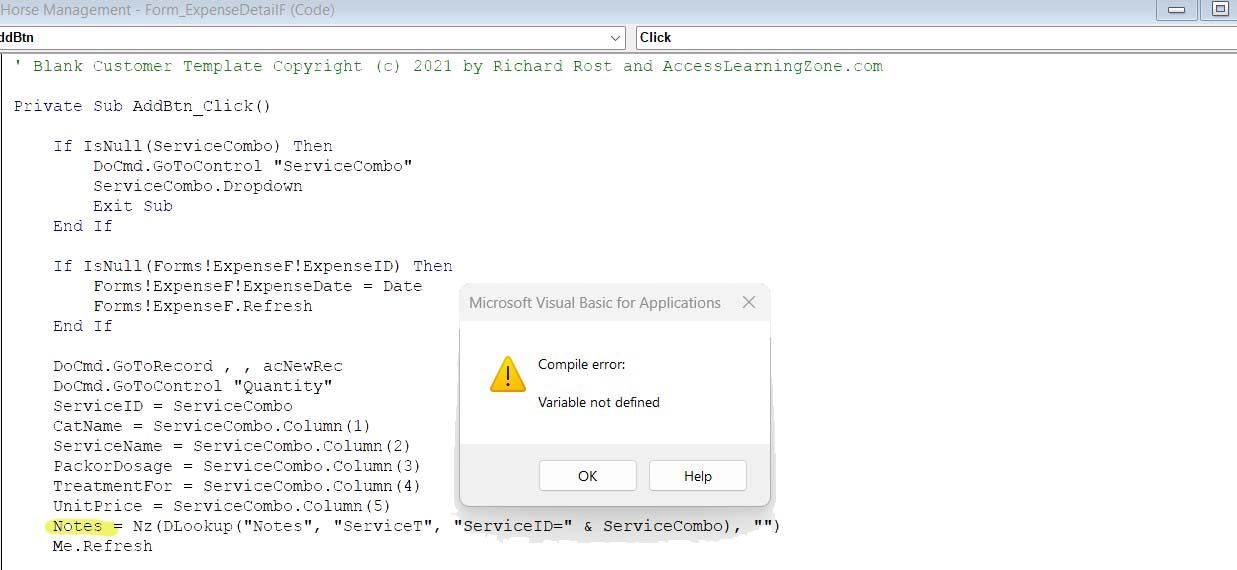
Ok I deleted Injury and took off relationship but now it says it has a compile error, but I never changed the code. Why?
Donald Blackwell
@Reply 11 months ago
Now that you've taken InjuryID off, it's getting further down your code before running into an error. It's basically saying that it can't find a control on the ExpenseDetailF named "Notes" and/or it can't find a field in the table named "Notes"
I would start by checking the field name of your yellow "Notes" control in the detail form
Donald Blackwell
@Reply 11 months ago
And, if there is not a "Notes" field in the ExpenseDetailT table, the reason it didn't throw an error before may have been that it was pulling from the relationship to InjuryT and now that's gone it can't find it.
Catherine WartgowOP
@Reply 11 months ago
Donald Blackwell
@Reply 11 months ago
You'll likely run into that for every relationship linked in the ExpenseDetailT that is identified as Required - Yes.
You should review that table and verify the fields that truly MUST be completed. In most cases, the only fields that are absolutely necessary are the primary key (ExpenseDetailID) and the foreign key linking back to the parent table (ExpenseID) and then usually only fields that are in that table.
The other lookup fields should be evaluated to determine if they are absolutely critical to the table or if they are just supplementary information that you'd really like to have but won't break the database without. And if the field is something you absolutely need, you have to make sure it gets set in the form or has a default value.
Catherine WartgowOP
@Reply 11 months ago
Catherine WartgowOP
@Reply 11 months ago
OK Thanks for all your help. My Expense form is now working, but the Combo Box I am using to add the items is now adding a new Category. See #37 Deworming was added but my combo box was taking from #5 Deworming. How do I change this from happening?
Catherine WartgowOP
@Reply 11 months ago
Catherine WartgowOP
@Reply 11 months ago
I have my combo box Row source as a Distinct row and Limit to list as Yes. Why isn't it just selecting instead of adding to category?
Catherine WartgowOP
@Reply 11 months ago
Catherine WartgowOP
@Reply 11 months ago
I have the relationship from one to many correctly. Please help.
Donald Blackwell
@Reply 11 months ago
You've done a lot of work :)
I'm looking through all of your images now to see if I can find anything out of sorts. So the problem you're now having is that when you click on the "AddBtn" in the footer of the "ExpenseDetailF" it is adding the text to the detail but also adding a new record to CategoryT, did I get that correct?
Whatever is doing it is somewhere either in the "AddBtn_Click" event or as a result of something in the expense detail form itself.. Can you show an updated view of the record source of the form (i.e. the table or query it is built on) and an updated view of the relationships in the form. If it's a query, a full shot of the query in design view in the QBE should work. Also a full view of your form in design view.
Just need a full view of everything to be able to try to pinpoint what is going on.
Sorry for slow responses. I'm currently off work since my 78-year old mother recently got out of the hospital getting a pace maker installed and her health isn't improving like it should. So responses that would normally take a few minutes end up taking an hour.
Don
Sorry, only students may add comments.
Click here for more
information on how you can set up an account.
If you are a Visitor, go ahead and post your reply as a
new comment, and we'll move it here for you
once it's approved. Be sure to use the same name and email address.
This thread is now CLOSED. If you wish to comment, start a NEW discussion in
Access Developer 28.