Free Lessons
Courses
Seminars
TechHelp
Fast Tips
Templates
Topic Index
Forum
ABCD
 
Home   Courses   TechHelp   Help   Contact   Merch   Join   Order   Logon   Forums   
 
Back to Access Developers    Comments List
Upload Images   @Reply   Bookmark    Link   Email   Next Unseen 
Surpress Error
Alan Higgins 
     
10 months ago
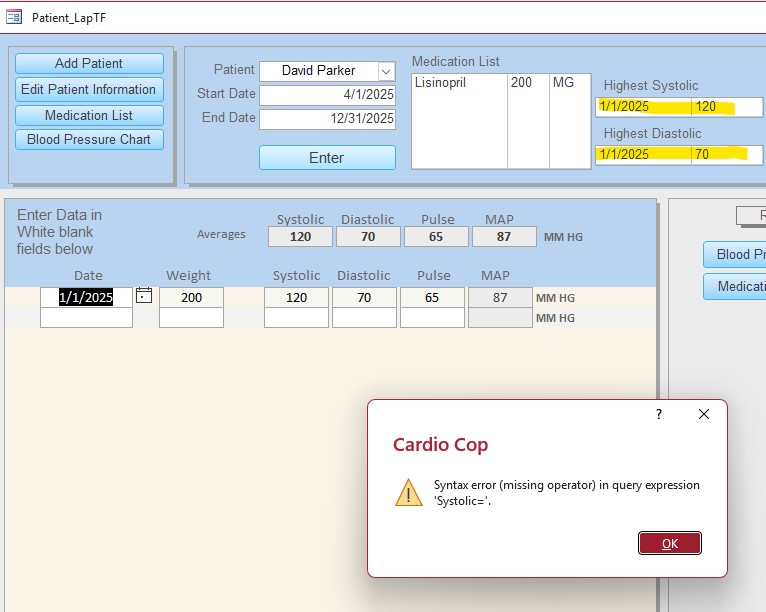
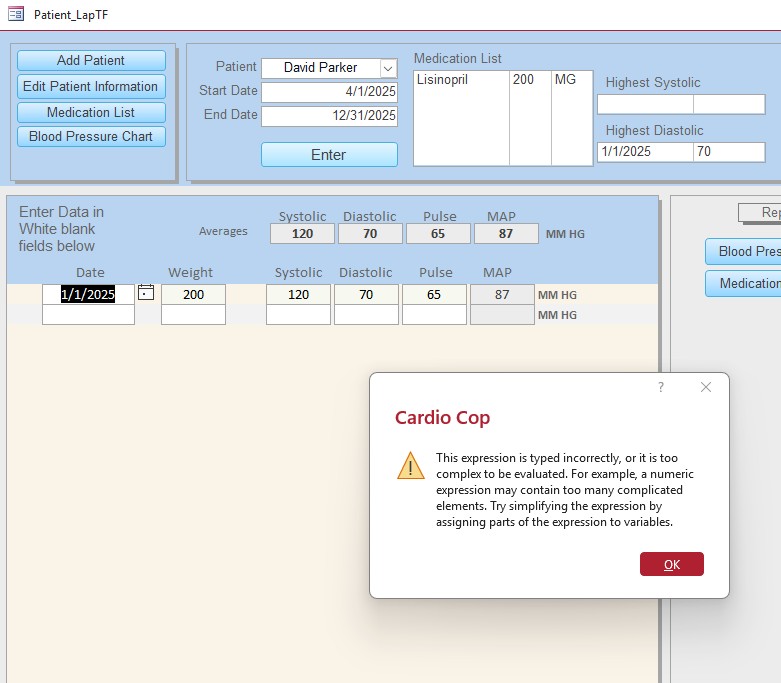
I have 2 list boxes that are bound to a query for results when the form is opened. If the database has a record all is good however if its an empty database I get multiple errors when I open the form ( Syntax Error ( Missing Operator) In query BPreading=')
Once I ok the error all is fine to begin using the blank database. I know the error is because no data I present. Is there a way to suppress the errors?

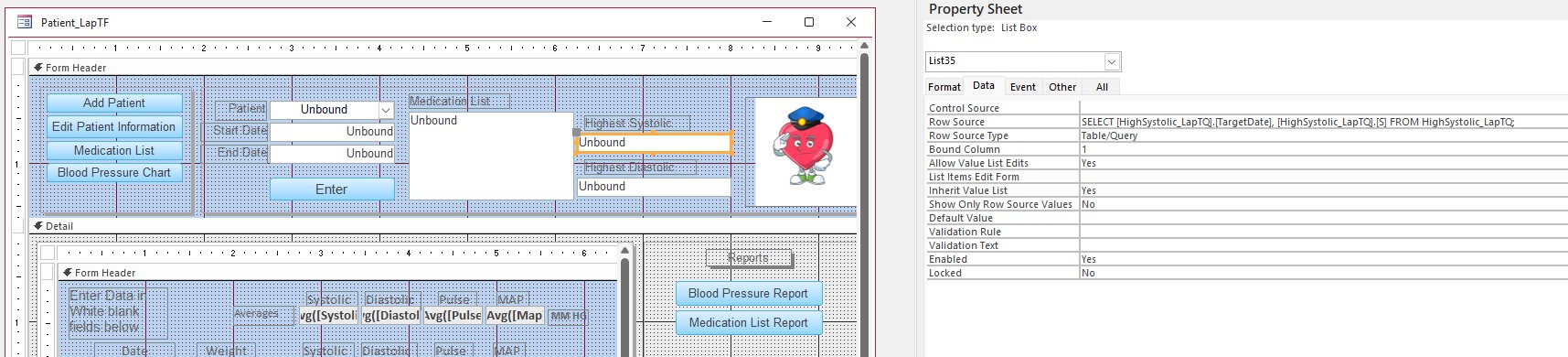
Row source: SELECT [HighSystolic_LapTQ].[TargetDate], [HighSystolic_LapTQ].[S] FROM HighSystolic_LapTQ;
Raymond Spornhauer  @Reply  
          
10 months ago
Alan

Remove the RowSource from the control source and place this code in your Form OnLoad Event.

Method 1:

Dim strSQL As String
strSQL = "SELECT [HighSystolic_LapTQ].[TargetDate], [HighSystolic_LapTQ].[S] FROM HighSystolic_LapTQ;"

If =DCount("[HighSystolic_LapTQ]", , strSQL) < 1 Then
     Exit Sub
Else If
     ListBox.RowSource = strSQL
End If

__________________________________________________________________________________________

Method 2:

On Error Resume Next

Dim strSQL As String
strSQL = "SELECT [HighSystolic_LapTQ].[TargetDate], [HighSystolic_LapTQ].[S] FROM HighSystolic_LapTQ;"

ListBox.RowSource = strSQL
__________________________________________________________________________________________

Hope this Helps,

-Raymond
Alan Higgins OP  @Reply  
     
10 months ago
Thanks Raymond however neither worked, i still get the same error. I have 2 lines of code i need to run. The calculation works however if no data is present i am getting the Syntax error. Thank you i really appreciate the help. I can make it work just by adding a record but i would like to figure this out if possible.

SELECT [HighDiastolic_LapTQ].[TargetDate], [HighDiastolic_LapTQ].[D] FROM HighDiastolic_LapTQ;
SELECT [HighSystolic_LapTQ].[TargetDate], [HighSystolic_LapTQ].[S] FROM HighSystolic_LapTQ
Kevin Yip  @Reply  
     
10 months ago
Alan  The error shows a field name called "BPreading" but where is it?  None of the SQLs you've posted has "BPreading" in it.
Alan Higgins OP  @Reply  
     
10 months ago
Sorry that should have been  "systolic " not  BPreading
Kevin Yip  @Reply  
     
10 months ago
Alan  The error message says the query that causes the error has an "=" sign, which means it has a criteria.  None of the SQLs you've posted has criteria.  Please post the one that has it.
Alan Higgins OP  @Reply  
     
10 months ago

Alan Higgins OP  @Reply  
     
10 months ago

Alan Higgins OP  @Reply  
     
10 months ago

Alan Higgins OP  @Reply  
     
10 months ago
I have queries that provide the date and highest BP number in the date range selected.
Alan Higgins OP  @Reply  
     
10 months ago
No worries this data is fake only test
Raymond Spornhauer  @Reply  
          
10 months ago
Alan

Your query refers to a field [S]..... is this correct?  Should this be [Systolic]?

                                                                                               \/
SELECT [HighSystolic_LapTQ].[TargetDate], [HighSystolic_LapTQ].[S] FROM HighSystolic_LapTQ;

============================================================

BTW... you can also change this to:

SELECT TargetDate, S FROM HighSystolic_LapTQ;

-Raymond
Raymond Spornhauer  @Reply  
          
10 months ago
Alan

Kevin is on the right track here.  The error is tell you that one of your fields has 'Systolic='

You need to find this field and correct this:

Either remove the '='... or add the field or reference you intended.

-Raymond
Alan Higgins OP  @Reply  
     
10 months ago

Alan Higgins OP  @Reply  
     
10 months ago
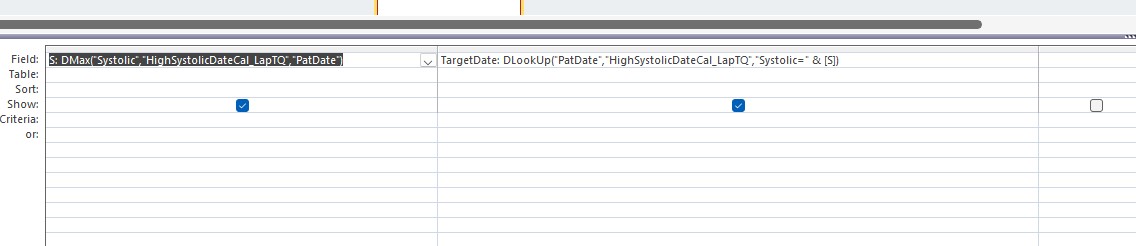
Its part of the query for the ListBox
Kevin Yip  @Reply  
     
10 months ago
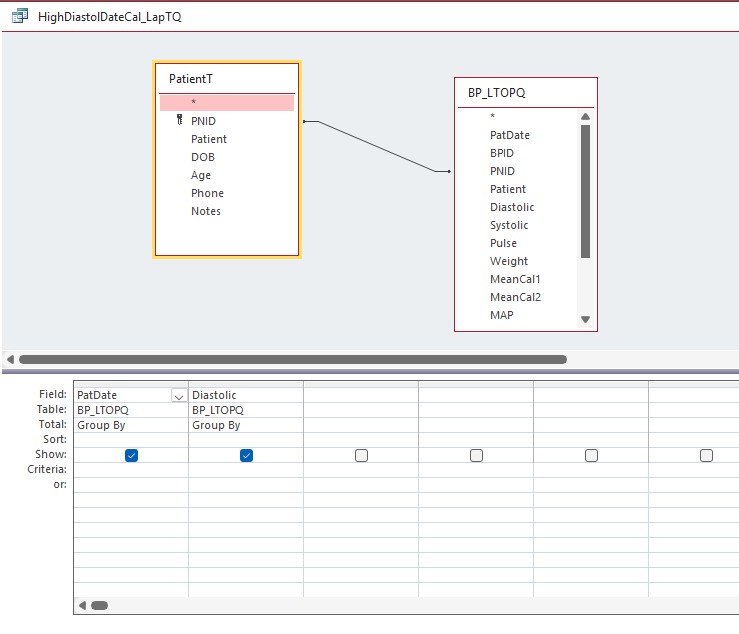
Alan  DMax() needs a criteria for the third argument.  Is "PatDate" a criteria?  Any non-zero value (doesn't have to be -1) equals true.  More importantly, if DMax() doesn't find any record, it returns null.  That makes [S] null, and causes an error in Systolic=.
Alan Higgins OP  @Reply  
     
10 months ago
PatDate is the date for record entered into the BP table. I've attached a screen shot of the query.
Alan Higgins OP  @Reply  
     
10 months ago

Alan Higgins OP  @Reply  
     
10 months ago
Thanks Kevin i understand what you are saying however i am not sure how to give S a value if there are not records.
Alan Higgins OP  @Reply  
     
10 months ago
I am a novice with access, i am retired and work with access to challenge myself.  i took most of the classes up to access expert level however to become proficient you have to work with it every day on a professional level which i am not.
Kevin Yip  @Reply  
     
10 months ago
Alan  We are ALL novices in something: I am, Richard is, everyone is, because no one knows everything about anything, and everyone knows little about certain subjects.  The point is we can all relate.

The first thing is to fix your DMax, because "PatDate" is not a valid criteria.  A criteria should have an "=" sign, just like your other criteria: Systolic=

If [S] is null, you can use the Nz() function to assign it a value when it is null.
Alan Higgins OP  @Reply  
     
10 months ago
So i deleted the queries and code took a few SQL beginner courses  and came up with one query and the code below and all is well, i get the result i am looking for and no errors. Thank you both for helping get to where i needed to be.

SELECT
    BPT.PatDate,
    BPT.Systolic
FROM
    BPT
WHERE
    ( ((BPT.Systolic) = (SELECT Max(Systolic) FROM BPT )));

This thread is now CLOSED. If you wish to comment, start a NEW discussion in Access Developers.
 

Next Unseen

 
New Feature: Comment Live View


The following is a paid advertisement
Computer Learning Zone is not responsible for any content shown or offers made by these ads.
 

Learn
 
Access - index
Excel - index
Word - index
Windows - index
PowerPoint - index
Photoshop - index
Visual Basic - index
ASP - index
Seminars
More...
Customers
 
Login
My Account
My Courses
Lost Password
Memberships
Student Databases
Change Email
Info
 
Latest News
New Releases
User Forums
Topic Glossary
Tips & Tricks
Search The Site
Code Vault
Collapse Menus
Help
 
Customer Support
Web Site Tour
FAQs
TechHelp
Consulting Services
About
 
Background
Testimonials
Jobs
Affiliate Program
Richard Rost
Free Lessons
Mailing List
PCResale.NET
Order
 
Video Tutorials
Handbooks
Memberships
Learning Connection
Idiot's Guide to Excel
Volume Discounts
Payment Info
Shipping
Terms of Sale
Contact
 
Contact Info
Support Policy
Mailing Address
Phone Number
Fax Number
Course Survey
Email Richard
[email protected]
Blog RSS Feed    YouTube Channel

LinkedIn
Copyright 2026 by Computer Learning Zone, Amicron, and Richard Rost. All Rights Reserved. Current Time: 8/8/2026 1:21:53 PM. PLT: 1s