Free Lessons
Courses
Seminars
TechHelp
Fast Tips
Templates
Topic Index
Forum
ABCD
 
Home   Courses   TechHelp   Help   Contact   Merch   Join   Order   Logon   Forums   
 
Back to Access Developers    Comments List
Upload Images | @Reply | Bookmark | Link | Email | Next Unseen |
Local Access Query Criteria Issue with SQL Backend
Halkawt Qadir 
   
13 months ago
I moved my tables to SQL server everything works fine in local front-end except my queries are running slow, after double checking i found out that is use Wildcard Like and Nz in my query criteria which does not read well in SQL server, i figure how to fix the Wildcard Like but could not figure how to fix Nz criteria !!, my query criteria's are base on some combo box selections in my MainMenuF Form.

below are two criteria example is use in my query in access local front end,

1-  Like "*" & [Forms]![MainMenuF]![JobStatusCbo] & "*"                                ( short text field )
2- Nz([Forms]![MainMenuF]![SalesIDCbo],[SuccessfuljobsT].[SalesID])         (number field)

when i moved my tables to SQL i changed first criteria to below

1- Like "%" & [Forms]![MainMenuF]![JobStatusCbo] & "%"  (Nvarchar field) it worked perfect

2- could not fix ! (Int field)

i couldn't fix second criteria which is for the int field SalesID!

My main problem is when use those Access local Wildcard like and Nz it download all record and then apply filtering which make my query run very slow, i like to pass the filtering to SQL server instead

of course i tried for a week asking chatGPT but it could not fix it for me and last update from ChatGPT, it gave me this code instead {  (SuccessfuljobsT.SalesID = Forms!MainMenuF!SalesIDCbo OR Forms!MainMenuF!SalesIDCbo IS NULL)  } it worked but it made my query Crazy by duplicating to many rows !!

In conclusion is there any way like first code to fix it in place without involving storing procedure in SQL server or VBA or Querydefs ?

it will be so help if there is a way to adjust his Criteria like first one to read well in SQL server due to i change me query frequently
Halkawt Qadir OP  @Reply  
   
13 months ago

Kevin Yip  @Reply  
     
13 months ago
Halkawt  You need to use pass-through queries (click "Pass through" on the ribbon) in order to run queries on SQL Server and take advantage of SQL Server's power.  Right now you are just running queries in Access.  Also, if you run pass-through queries, you cannot use form references like [Forms]![Form1]![Field1].

The equivalent of Nz in SQL Server is COALESCE.  E.g.: COALESCE(Field1, 0) is the same as Nz(Field1,0).
Halkawt Qadir OP  @Reply  
   
13 months ago
Thanks Kevin but i dont get what i am looking for !
Alex Hedley  @Reply  
           
13 months ago
Raymond Spornhauer  @Reply  
          
13 months ago
Halkawt

When you link to an external Table, Access will pull all the data over your network and process it using your query.  You are limited here based the size of your tables, the complexity of your query and the bandwidth of your network.  Main point here is Access is doing all the work.

When you use a Pass-Thru Query, you send the query to the server, the server processes the query then sends back only the data requested.  Servers are can typically process queries much faster and because you're not sending all the data back and forth, it is much faster.

When creating Pass-Thru queries, Access will require using the SQL.  You can also use a SQL Developer to help write the SQL, then copy it into Access.

============================================

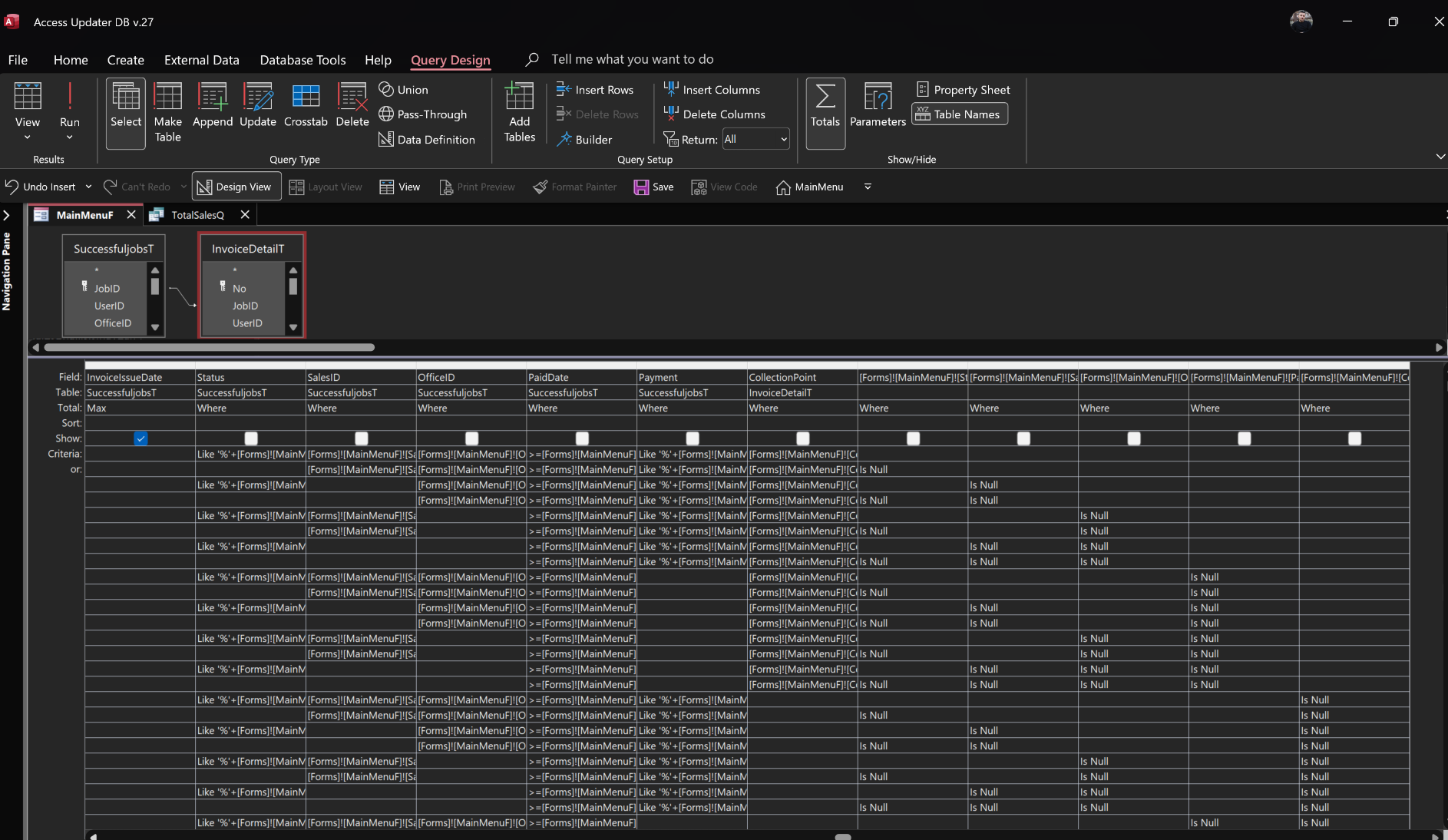
The query shown in your picture looks fairly complex... I'm not sure if it really needs to be this complex, but this will take some work to convert into a pass-thru query.

Another technique that is more involved, but can make things faster is to use VBA to determine the exact query you need, modify the pass-thru query with VBA, then run it.  This allows your computer to determine the query, the server process the data... this is much faster.

-Raymond
Raymond Spornhauer  @Reply  
          
13 months ago

Raymond Spornhauer  @Reply  
          
13 months ago
BTW... do not click the Pass-Thru button on the query you have that's working... make a copy of this query and use the copy.

I usually name my Pass-Thru Queries... ptQryName.

It looks like you're putting Q at the end of your Query names... to maybe put "pt" at the end.  Just something to make it clear that this is a Pass-Thru Query.

-Raymond
Halkawt Qadir OP  @Reply  
   
13 months ago
Dear Alex i watched the SQL online twice but i could not find any part the mentions my problem !
Halkawt Qadir OP  @Reply  
   
13 months ago
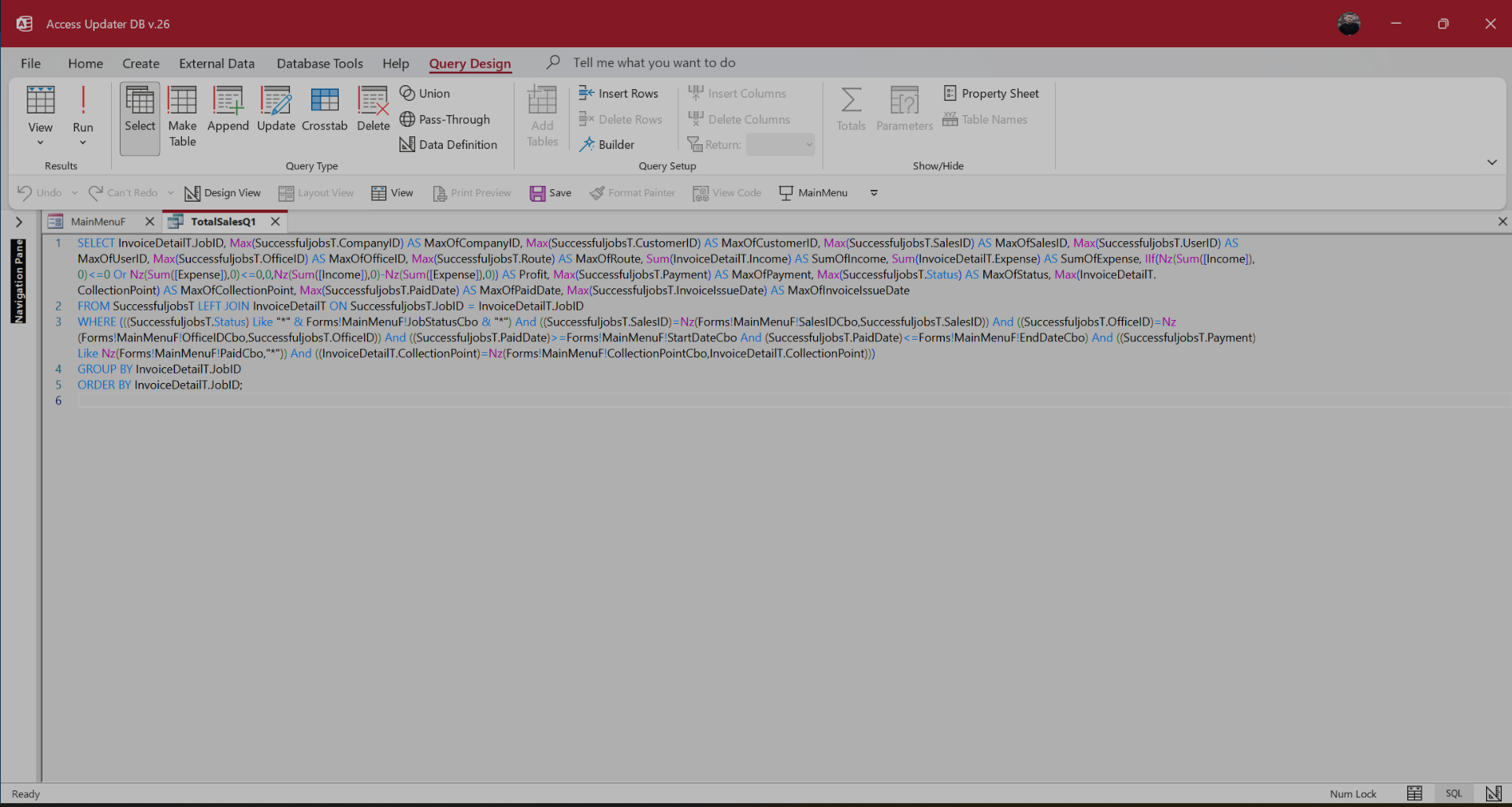
Raymond Mr. Raymond thanks for your suggestion, the problem with Pass-throughQ is i can not control it with my Main Menu combo boxes i use them to filter my query let me give you the local access query i use which runs slow due to it dwonload the records and filter them locally as i mention and tell you suggestion what is best solotion i can use to fix this

Halkawt Qadir OP  @Reply  
   
13 months ago

Raymond Spornhauer  @Reply  
          
13 months ago
Halkawt

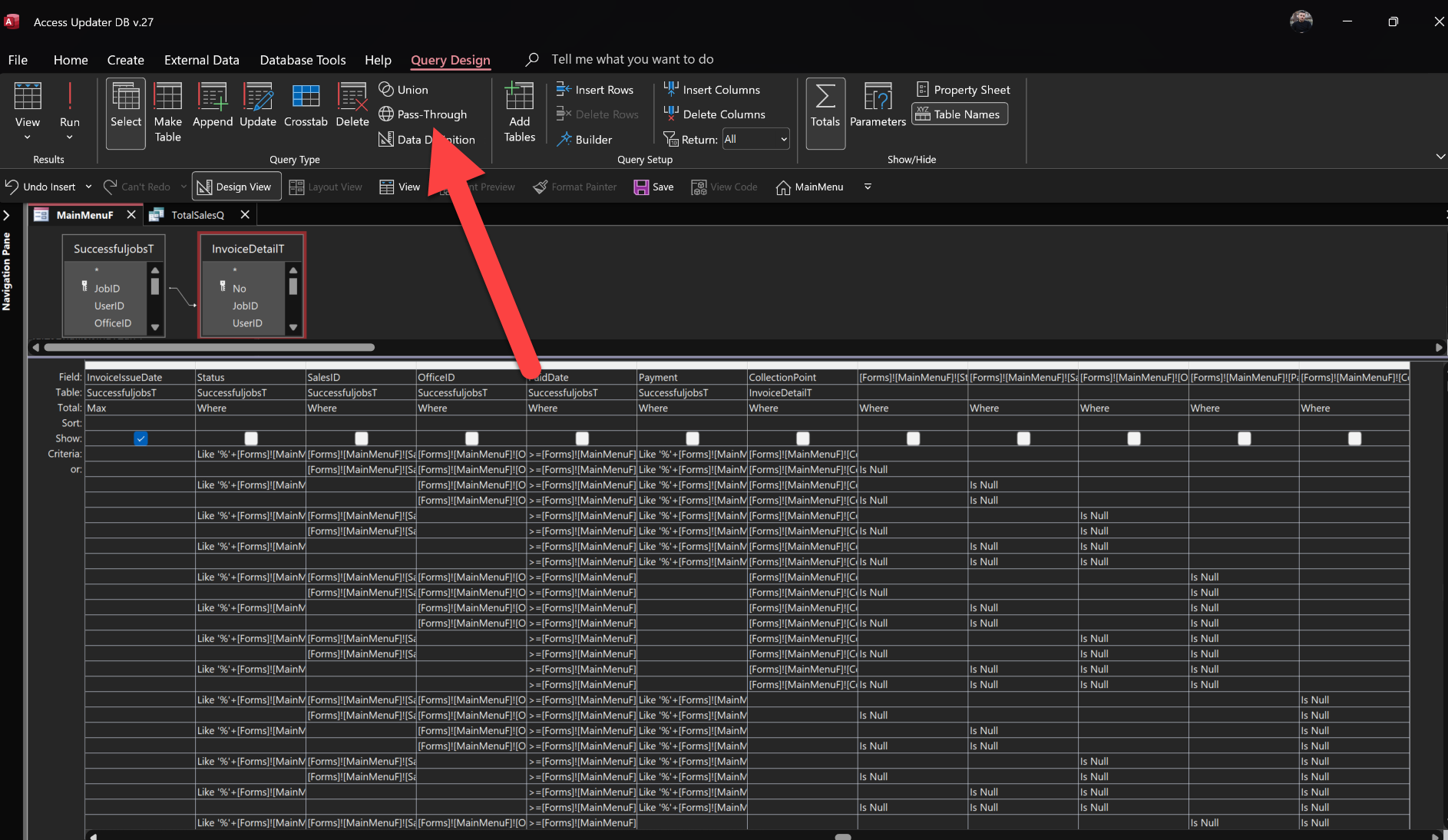
On the picture you posted, you do not have it set as a Pass-Thru... there is the button in the ribbon I pointed to in the picture i post you have to depress.

-Raymond
Raymond Spornhauer  @Reply  
          
13 months ago
Halkawt

"the problem with Pass-throughQ is i can not control it with my Main Menu combo boxes i use them to filter my query" -- this is not true.  You can use VBA to modify queries and pass-thru queries.

-Raymond
Raymond Spornhauer  @Reply  
          
13 months ago

Raymond Spornhauer  @Reply  
          
13 months ago
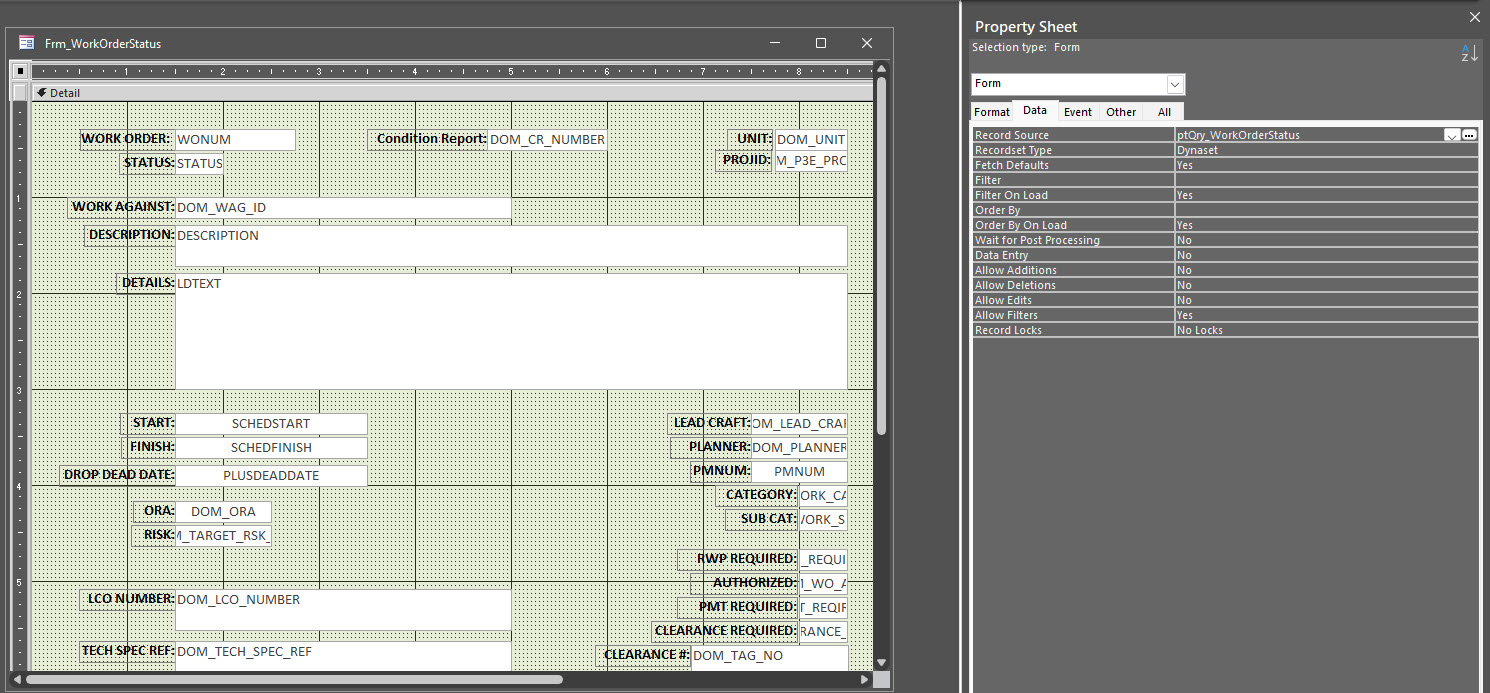
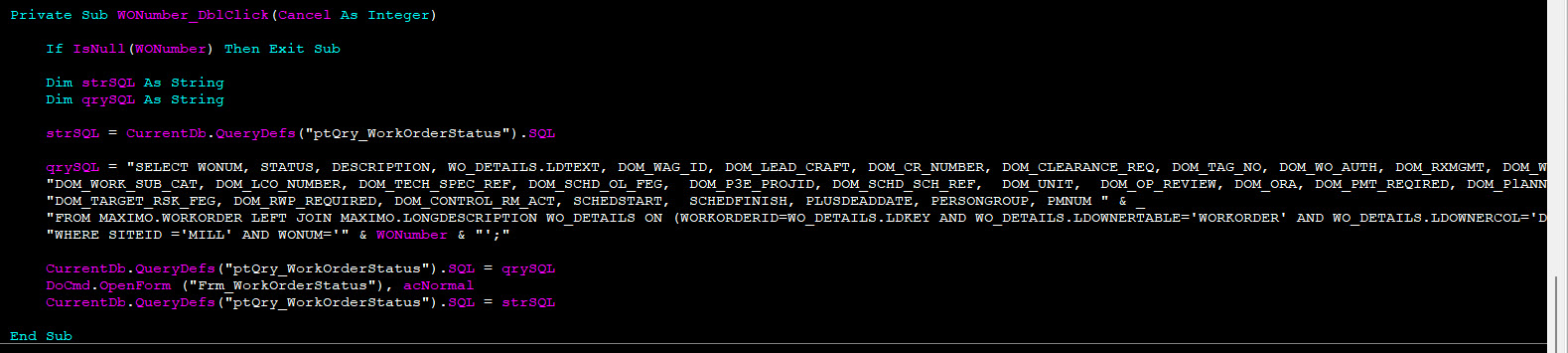
On this form.. you can see that I am using 'ptQry_WorkOrderStatus'

I can open this form from anywhere in my database that a work order.   When the user goes to open this form, I use VBA to modify the Work Order number in the Pass-Thru Query.
Raymond Spornhauer  @Reply  
          
13 months ago

Raymond Spornhauer  @Reply  
          
13 months ago
The method I use...

1. I set the original query to the variable (strSQL)
2. Set (qrySQL) to the query I want.
3. Set the Pass-Thru query to (qrySQL)
4. Open the Form with the updated Pass-Thru Query
5. Change the Pass-Thru Query back to what it was before I made changes.

===========================================

You can incorporate as many fields or combo boxes in VBA to do this.  I just chose this one because it was a simpler example.

-Raymond
Halkawt Qadir OP  @Reply  
   
13 months ago
Raymond thank so much Mr Raymond i followed you instructions by switching my query to Pass-through query and applying the filters by VBA it work fantastic
Kevin Yip  @Reply  
     
13 months ago
Halkawt  If your SQL Server database is stored online, such as on Winhost, then you need to optimize your queries due to Internet speed being slower than local speed.  Even with today's fast Internet, its speed is still about 10 times slower than your hard drive's speed on your PC.  Your queries need to minimize the number of rows retrieved from and inserted into tables.  And you need to minimize the number of queries too.
Raymond Spornhauer  @Reply  
          
13 months ago
Halkawt

Awesome.  I'm glad this helped.

I would follow Kevin's suggestion as well... as your database gets bigger, having a better query will improve your future performance.

-Raymond
Halkawt Qadir OP  @Reply  
   
13 months ago
Kevin Dear Kevin i will do that thank you

This thread is now CLOSED. If you wish to comment, start a NEW discussion in Access Developers.
 

Next Unseen


What's This?


The following is a paid advertisement
Computer Learning Zone is not responsible for any content shown or offers made by these ads.
 

Learn
 
Access - index
Excel - index
Word - index
Windows - index
PowerPoint - index
Photoshop - index
Visual Basic - index
ASP - index
Seminars
More...
Customers
 
Login
My Account
My Courses
Lost Password
Memberships
Student Databases
Change Email
Info
 
Latest News
New Releases
User Forums
Topic Glossary
Tips & Tricks
Search The Site
Code Vault
Collapse Menus
Help
 
Customer Support
Web Site Tour
FAQs
TechHelp
Consulting Services
About
 
Background
Testimonials
Jobs
Affiliate Program
Richard Rost
Free Lessons
Mailing List
PCResale.NET
Order
 
Video Tutorials
Handbooks
Memberships
Learning Connection
Idiot's Guide to Excel
Volume Discounts
Payment Info
Shipping
Terms of Sale
Contact
 
Contact Info
Support Policy
Mailing Address
Phone Number
Fax Number
Course Survey
Email Richard
[email protected]
Blog RSS Feed    YouTube Channel

LinkedIn
Copyright 2026 by Computer Learning Zone, Amicron, and Richard Rost. All Rights Reserved. Current Time: 11/15/2026 4:17:29 AM. PLT: 0s