Free Lessons
Courses
Seminars
TechHelp
Fast Tips
Templates
Topic Index
Forum
ABCD
 
Home   Courses   TechHelp   Forums   Help   Contact   Merch   Join   Order   Logon  
 
Back to SQL 2 Seminar Lessons    Comments List
Upload Images   @Reply   Bookmark    Link   Email   Next Unseen 
SQL Seminar 2 Lesson 10
Ken Wykoff 
       
5 months ago
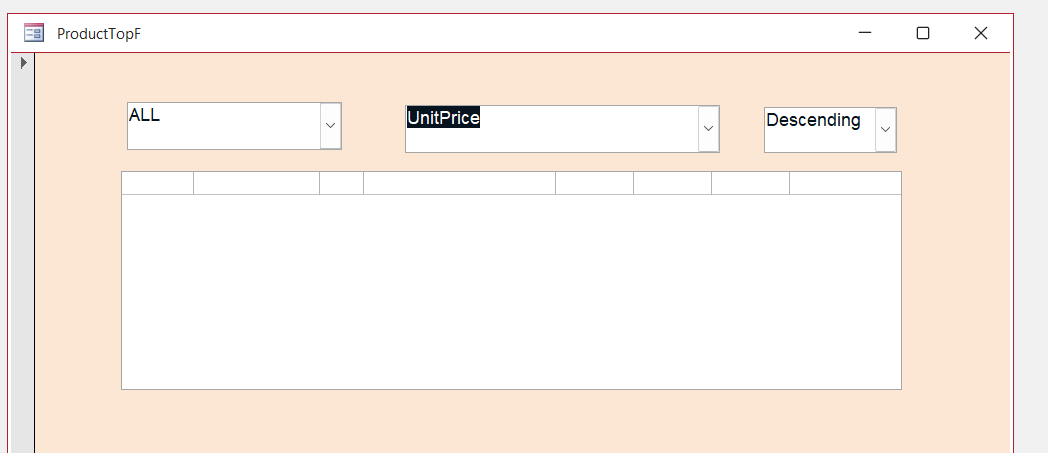
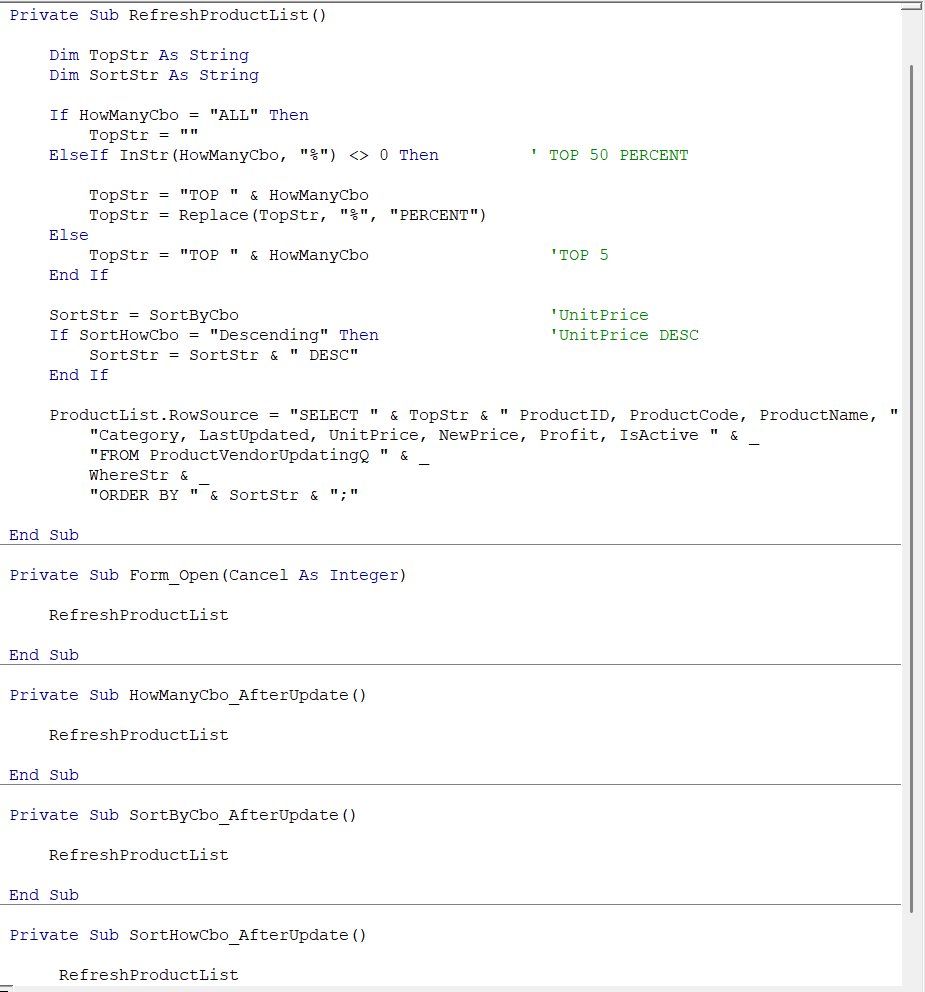
Well this was all going well and I made the last change in code and I saved and opened. Now the entire ProductList is no showing up. Also I noticed the the SortByCbo box is showing the first column that is hidden instead of the separation from the second column. Any ideas?
Ken Wykoff OP  @Reply  
       
5 months ago

Ken Wykoff OP  @Reply  
       
5 months ago

Kevin Robertson  @Reply  
          
5 months ago
Do you have a space between WhereStr and ORDER BY?
Raymond Spornhauer  @Reply  
          
5 months ago
Your 'WhereStr' is not defined anywhere.  (No Dim WhereStr)

Then for your combobox... in Design Mode, Go to the Format Tab, set the spacing in the column width property.  Should be something like: 0"; 1.5"

-Raymond
Ken Wykoff OP  @Reply  
       
5 months ago
Kevin Kevin, I checked by retyping it in there and I guess there was a space because this time I made sure I placed a space in there after the _ and still nothing.
Ken Wykoff OP  @Reply  
       
5 months ago
Raymond Raymond, I watched the video over once again and  there was no mention of a Dim WhereStr or even in the handbook. Funny thing is it all worked before I placed in all the RefreshProductList items. I even went back and removed them and nothing still appeared in the ProductList box.
Donald Blackwell  @Reply  
        
5 months ago
Ken
Just went through that video, and you are right, the WhereStr wasn't mentioned. Since it's not used, you could probably delete that line but I don't think it would matter.

The only things I noticed different were that in the video, Richard had the rowsource pointed to "ProductVendorNewPricingQ" until the 10:42 point where he switched it to ProductT. You have VendorProductUpdatingQ.

If that's not the issue, then I would recommend putting your SQL into a string and either msgbox it or, if you use Richard's Status function, status it, so you can see what is going on.

DetailsDim S as String
S = "SELECT " & TopStr & " ProductID, ProductCode, ProductName, " & _
     "Category, LastUpdated, UnitPrice, NewPrice, Profit, IsActive " & _
     "FROM ProductT" &
     WhereStr &
     "ORDER BY " & SortStr & ";"

MsgBox S

ProductList. RowSource = S

Ken Wykoff OP  @Reply  
       
5 months ago

Ken Wykoff OP  @Reply  
       
5 months ago

Ken Wykoff OP  @Reply  
       
5 months ago
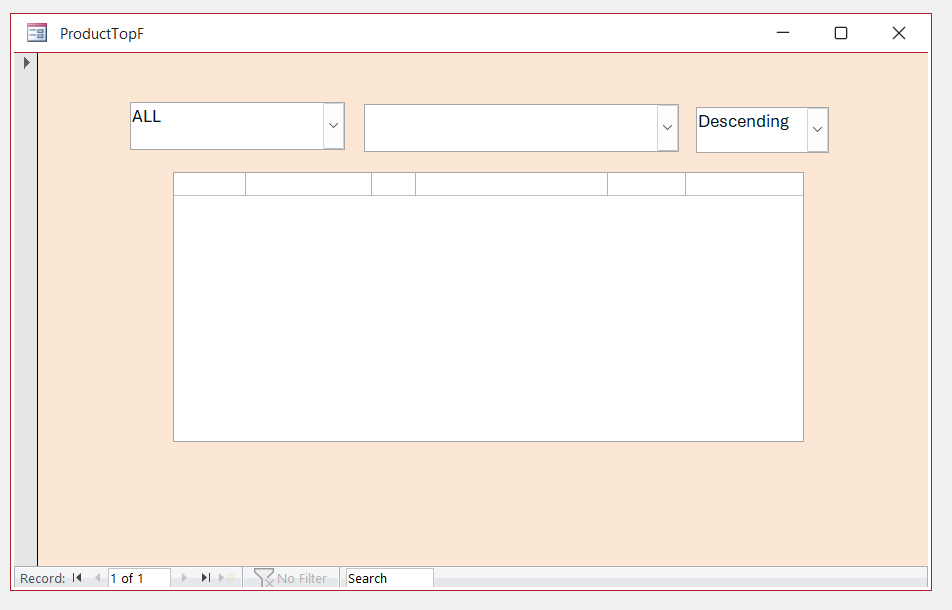
Guys, I changed around the SQL to match pretty much what I saw on the video for Lesson 10.  I had to guess that the name was ProductName on the video as well because it never completely showed itself. I got the ProductList filled again by starting over from scratch, and then, after putting in the last bit of code for the Sortby area, it vanished again. Donald, I saw what you shared as code to place in, but I was not sure what truly had to be replaced or where. There has to be something in this coding that I am missing or have wrong, even though I am not getting any kind of area message. When I did have it all there, none of the top 3 buttons works even when I placed the RefreshProductList the AfterUpdate areas.
Kevin Robertson  @Reply  
          
5 months ago
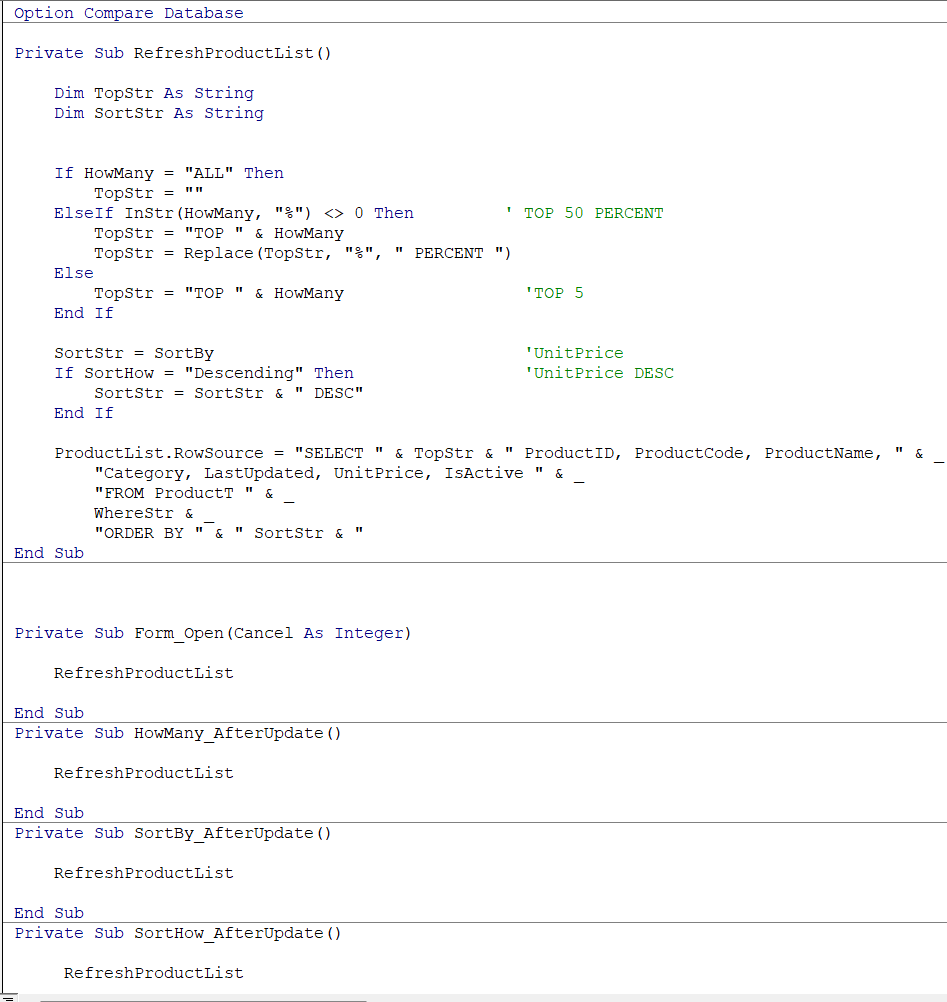
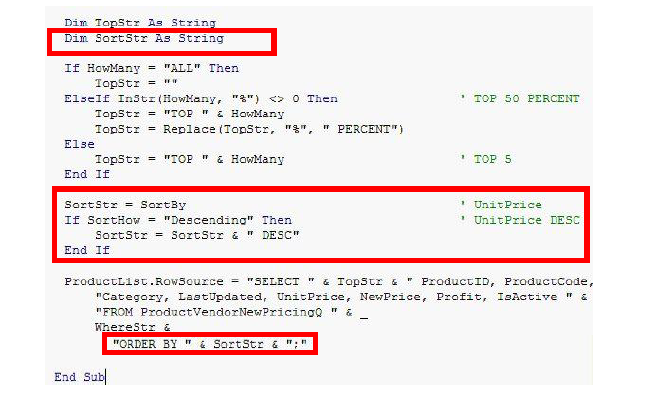
Have a look at the ORDER BY line. You have extra quotes.

    "ORDER BY " & SortStr & ";"
Donald Blackwell  @Reply  
        
5 months ago
Ken, sorry, I should have been more concise. Guilty of "seeing it in my head" and not putting it all in the post.

I think Kevin's last post should get your code straightened around.

As for the top 3 selectors not working, did you change the control names in the form to match the names Richard used in the VBA. In your previous screen shot, you had renamed them to names more like what Richard now uses:

Previous: HowManyCbo
Now: HowMany

Previous: SortByCbo
Now: SortBy

Previous: SortHowCbo
Now: SortHow

Again, either change those names back to what you had in your original code, or make sure that you've renamed the comboboxes in the form.
Ken Wykoff OP  @Reply  
       
5 months ago
Kevin Hi Kevin, I just followed what Richard had in the video and in the handbook. I tried to remove one of the quote marks on either side of the semi-colon, and it instantly went to red and an error message. I have attached a screenshot from the handbook for you to see.
Ken Wykoff OP  @Reply  
       
5 months ago

Ken Wykoff OP  @Reply  
       
5 months ago
Donald Hi Donald, I did go back and check, and I did change the original names to not have the cbo behind any of them. I was trying to type it exactly like Richard had in the video to see if that was why, but it had no effect. I really feel that this entire mess has something to do with this sorting box. Before I added that part, everything was in there. Going to try to see if my hunch is correct, and then if it is, I will know where the real problem is coming from. I think Richard is right. I have gremlins in the machine.
Alex Hedley  @Reply  
           
5 months ago

This thread is now CLOSED. If you wish to comment, start a NEW discussion in SQL 2 Seminar Lessons.
 

Next Unseen

 
New Feature: Comment Live View


The following is a paid advertisement
Computer Learning Zone is not responsible for any content shown or offers made by these ads.
 

Learn
 
Access - index
Excel - index
Word - index
Windows - index
PowerPoint - index
Photoshop - index
Visual Basic - index
ASP - index
Seminars
More...
Customers
 
Login
My Account
My Courses
Lost Password
Memberships
Student Databases
Change Email
Info
 
Latest News
New Releases
User Forums
Topic Glossary
Tips & Tricks
Search The Site
Code Vault
Collapse Menus
Help
 
Customer Support
Web Site Tour
FAQs
TechHelp
Consulting Services
About
 
Background
Testimonials
Jobs
Affiliate Program
Richard Rost
Free Lessons
Mailing List
PCResale.NET
Order
 
Video Tutorials
Handbooks
Memberships
Learning Connection
Idiot's Guide to Excel
Volume Discounts
Payment Info
Shipping
Terms of Sale
Contact
 
Contact Info
Support Policy
Mailing Address
Phone Number
Fax Number
Course Survey
Email Richard
[email protected]
Blog RSS Feed    YouTube Channel

LinkedIn
Copyright 2026 by Computer Learning Zone, Amicron, and Richard Rost. All Rights Reserved. Current Time: 4/13/2026 6:53:56 AM. PLT: 1s