Free Lessons
Courses
Seminars
TechHelp
Fast Tips
Templates
Topic Index
Forum
ABCD
 
Home   Courses   TechHelp   Forums   Help   Contact   Merch   Join   Order   Logon  
 
Back to Access Forum    Comments List
Upload Images   @Reply   Bookmark    Link   Email   Next Unseen 
Auto-populating Combo Box
Marcelino Sanchez 
     
6 months ago
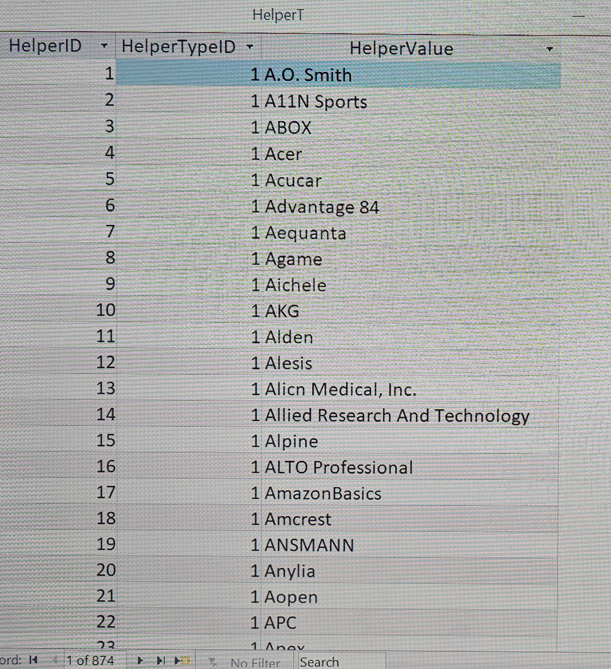
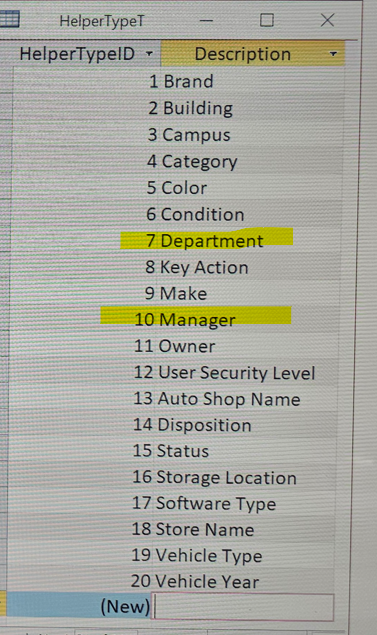
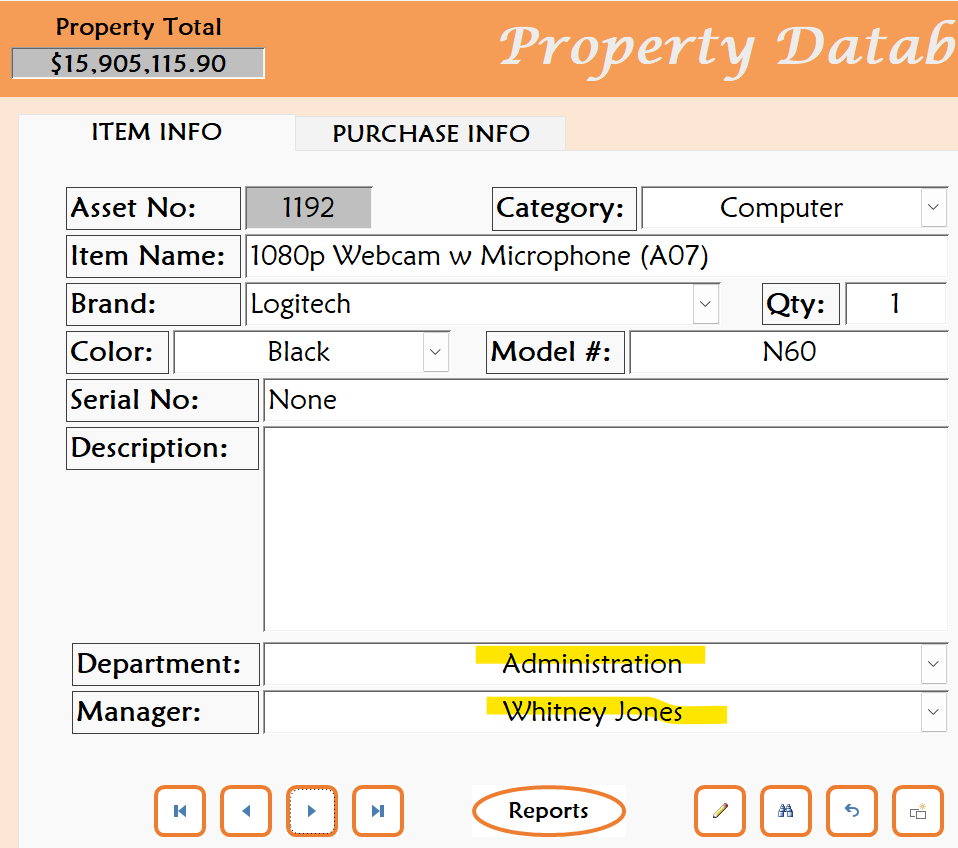
Guys I need your help and not sure if this is possible. I have streamlined one of my databases by replacing all the lookup tables with a Helper table. Everything is working great; however, I would like to auto-populate the Manager ComboBox with the name of the manager based on the Department selected in the Department ComboBox. I know how to do this using lookup tables, but somehow cannot figure this out using the Helper table. Can someone please help if this is even possible since the Helper table only has the following fields: HelperID (AutoNumber), HelperTypeID (Number), and HelperValue (Short Text).
Alex Hedley  @Reply  
           
6 months ago
Is Department a HelperTypeID?
Adam Schwanz  @Reply  
           
6 months ago
How are the departments linked to the managers? Is there another table or a junction table? If not, you'll need something to relate them. Can a department have more than one manager or is it 1:1?

I assumed you had a table structure like this, if not please share how it is
1 1(Department) Sports
2 1(Department) Medical
3 1(Department) Parts
4 2(Manager) Jim
5 2(Manager) John
5 2(Manager) Tim
Marcelino Sanchez OP  @Reply  
     
6 months ago
Alex

Alex, Department is a HelperTypeID.
Marcelino Sanchez OP  @Reply  
     
6 months ago
Adam

Adam, only one Manager per Department and since I am using the Helper table instead of lookup tables, that's why I posted since there is per say, nothing relating the two since they are both in the Helper table.
Alex Hedley  @Reply  
           
6 months ago
Junction Tables: Many-to-Many
Adam Schwanz  @Reply  
           
6 months ago
Ah yea you'll need something to relate them. One thing I've done in the past is add more helpervalue fields. HelperValue2 could be a short text and store the manager name. Or if you want to keep managers as their own helpertype then you could make it a number field and reference the helperID of the manager on the department. Just need something to say who belongs to what.
Marcelino Sanchez OP  @Reply  
     
6 months ago
Alex

Alex not sure that this will work for me since both the Departments and the Managers are a HelperTypeID in the HelperT table. Thank you for your quick response.
Marcelino Sanchez OP  @Reply  
     
6 months ago
Adam

Adam thank you so much for your quick replies. I will attempt with the HelperValue2 field added to the HelperT table and see if that helps me. Thank again.
Juan Rivera  @Reply  
            
6 months ago
requery after update.  you can use the helpr table set up that Richard did.  so if you pic a dept atfer update requery have all your managers listed    sort of like when he did prefix and all the prefix was related to the id then the combo box was showing Mr. Ms. Dr. ... hope im on the right track.  Let me know if this is not what your looking for?
Helper Data

Richard did a super job with the ABCD
Marcelino Sanchez OP  @Reply  
     
6 months ago
Juan
Thank you for junmping in Juan. You are certainly on the right track. I actually watched the class Richard gave about a year ago and been using Helper tables since in all my projects. I love it.  Unfortunately in the class Richard does not discuss how to auto-populate combo boxes when the types are in the same HelperT table. Both my Department and my Managers are a HelperTypeID entry in the table and I can't figure it out. Thanks again.
Matt Hall  @Reply  
           
6 months ago
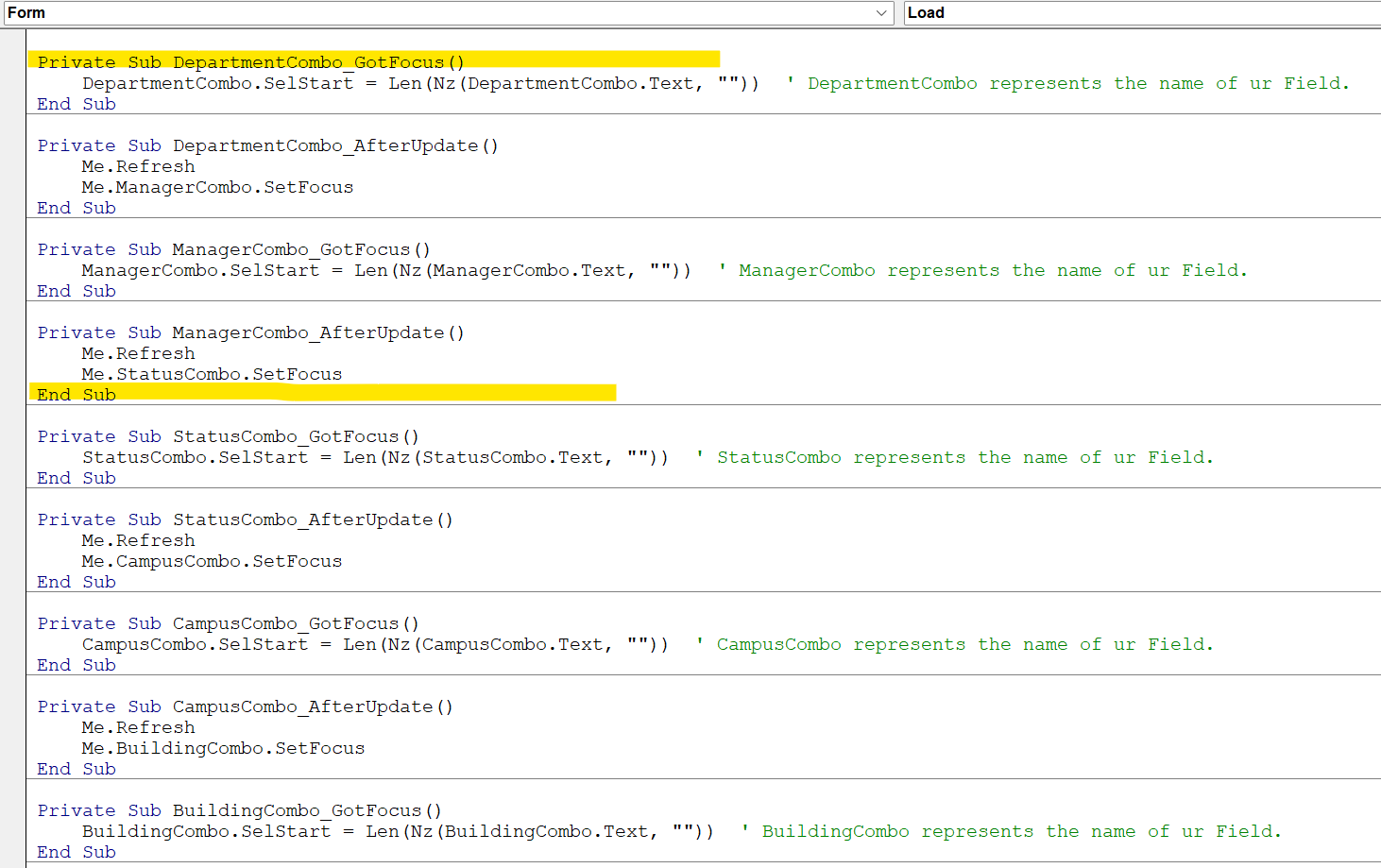
If you can post a picture of your helperT with some sample data it will help me understand what you are looking for.  Also, a design photo of your combo box, on the data tab.
Alex Hedley  @Reply  
           
6 months ago
Marcelino Sanchez OP  @Reply  
     
6 months ago
Alex

Thank you so much Alex for attempting to help. The Cascading Combo Boxes I am also familiar with, but this method requires two separate tables to draw from to establish a relationship. This unfortunately will not work in my case because the two types (DepartmentID & ManagerID) exist in one table (HelperT).
Alex Hedley  @Reply  
           
6 months ago
This is where the Junction Table or extra column will be needed.
Darrin Harris  @Reply  
     
6 months ago
Hello Marcelino

If you’re DepartmentID and your ManagerID is in the same table (HelperT), then you can do what Alex suggested with one table.

You don't need two tables you can use one Aggregate Query for your DepartmentID and the HelperT for the ManagerID.

I not sure if you want to use one combo box or two, if you’re using one combo then that is possible, but you would have to type into the combo box the Department you wouldn't be able to select it.

If you’re using two combo's then Cascading Combo Boxes will work, but I might be on the wrong track lol.

Hope this helps
Marcelino Sanchez OP  @Reply  
     
6 months ago

Marcelino Sanchez OP  @Reply  
     
6 months ago

Marcelino Sanchez OP  @Reply  
     
6 months ago

Marcelino Sanchez OP  @Reply  
     
6 months ago

Marcelino Sanchez OP  @Reply  
     
6 months ago
Guys I have attached some snips of the requested object so that you can get a better understanding of what I hav going on in the database we use at the Church to manage property. Thank you in advance for any insight you can provide. Thanking you all in advance for your assistance.
Adam Schwanz  @Reply  
           
6 months ago
If you've made the table like i said, here's an example if you're self referencing the managers inside the same table.
HelperID AutoNumber - HelperType Number - HelperValue Text - HelperValue2 Number
1 - 1(Department) - Medical - 4
2 - 1(Department) - Sports - 4
3 - 1(Department) - Parts - 5
4 - 2(Manager) - John - 0/Null
5 - 2(Manager) - Tim - 0/Null
6 - 2(Manager) - Jane - 0/Null

Make your combo box row source be like Select HelperID, HelperTypeID, HelperValue, HelperValue2 From HelperT Where HelperTypeID=1 (or whatever your department ID is)

Then just use the After Update of that field.
Private Sub DepartmentCombo_AfterUpdate()
    ManagerText = DLookup("HelperValue", "HelperT", "HelperID=" & DepartmentCombo.Column(3))
End Sub


That will set your Manager value to the TEXT when you change the department to whatever you've linked it to in the helpertable. This assumes like you said you only have one manager per department. If you would rather use a combo box, store it as the ID instead of the text, and show all of the managers and then set the default one when they pick a department. You can do that with a row source like Select HelperID, HelperTypeID, HelperValue, HelperValue2 From HelperT Where HelperTypeID=1 (or whatever your manager ID is) for the manager combo box, and then the afterupdate like

Private Sub DepartmentCombo_AfterUpdate()
    ManagerCombo = DepartmentCombo.Column(3)
End Sub


Marcelino Sanchez OP  @Reply  
     
6 months ago
I sorry Adam, I overlooked your reply as I scrolled through the list of replies. Thank you, I will certainly try using your approach and see what happen. Thank you very much. I will let you know how things went.
Marcelino Sanchez OP  @Reply  
     
6 months ago
Thank you all for your time and input in attempting to assist me, I have tried all of your suggestions with no success. I will stick to the two lookup tables (DepartmentT & ManagerT) and work from there. I works well, I am just working to streamline my databases using the Helper & HelperType table to reduce the number of tables in my database. Have a blessed afternoon and enjoy your holiday season.  Sincerely
Kim Boren  @Reply  
       
6 months ago
Hi, I think my question 35 days ago on the forum titled "Cascading Combo Box Same Table" may help. The answers I recieved were great and helped me a lot. You might find it helpful.
Kim
Donald Blackwell  @Reply  
       
6 months ago
Marcelino  Here is the link to Kim 's Topic Cascading Combo Box Same Table

This thread is now CLOSED. If you wish to comment, start a NEW discussion in Access Forum.
 

Next Unseen

 
New Feature: Comment Live View


The following is a paid advertisement
Computer Learning Zone is not responsible for any content shown or offers made by these ads.
 

Learn
 
Access - index
Excel - index
Word - index
Windows - index
PowerPoint - index
Photoshop - index
Visual Basic - index
ASP - index
Seminars
More...
Customers
 
Login
My Account
My Courses
Lost Password
Memberships
Student Databases
Change Email
Info
 
Latest News
New Releases
User Forums
Topic Glossary
Tips & Tricks
Search The Site
Code Vault
Collapse Menus
Help
 
Customer Support
Web Site Tour
FAQs
TechHelp
Consulting Services
About
 
Background
Testimonials
Jobs
Affiliate Program
Richard Rost
Free Lessons
Mailing List
PCResale.NET
Order
 
Video Tutorials
Handbooks
Memberships
Learning Connection
Idiot's Guide to Excel
Volume Discounts
Payment Info
Shipping
Terms of Sale
Contact
 
Contact Info
Support Policy
Mailing Address
Phone Number
Fax Number
Course Survey
Email Richard
[email protected]
Blog RSS Feed    YouTube Channel

LinkedIn
Copyright 2026 by Computer Learning Zone, Amicron, and Richard Rost. All Rights Reserved. Current Time: 6/20/2026 1:58:34 PM. PLT: 0s