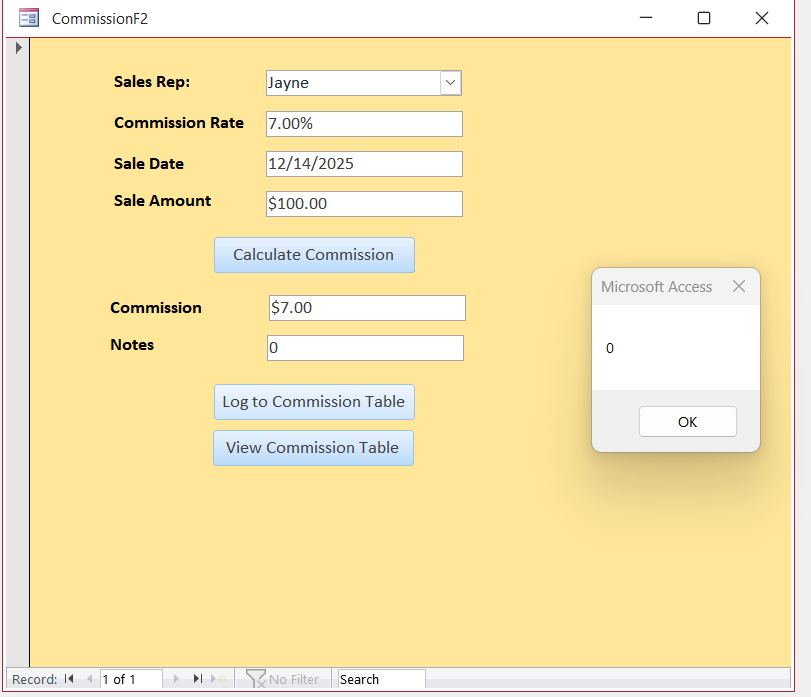
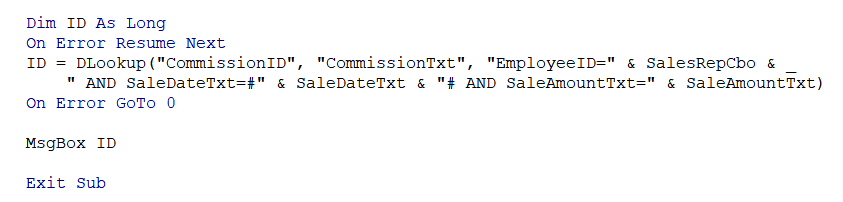
I am hoping that someone can show me if I have this right or how to correct it. I am not sure it is doing what it is supposed to do. In my code, when I hit the log button for CommissionT, the message box shows 0 and does not log the information to CommissionT. I did the error lines as well, so I'm not sure. In the line of coding where it shows: ID = DLookup("CommissionID", "CommissionTxt", "EmployeeID=" & SalesRepCbo & _ " AND SaleDateTxt=#" & SaleDateTxt & "# AND SaleAmountTxt=" & SaleAmountTxt), are both SaleDate and SaleAmount supposed to be referenced as txt since I have them named that in the Property Sheets?
Ken WykoffOP
@Reply 9 months ago
Ken WykoffOP
@Reply 9 months ago
Ken WykoffOP
@Reply 9 months ago
Kevin Robertson
@Reply 9 months ago
The second argument should be the name of your Table or Query.
Ken WykoffOP
@Reply 9 months ago
Ok I will change that now and try again. Thanks again
Ken WykoffOP
@Reply 9 months ago
Kevin Kevin if this is what you meant, it didn't work. Showed a 0 in the message box and still did not log into the CommissionT
Ken WykoffOP
@Reply 9 months ago
ID = DLookup("CommissionID", "CommissionTxt", "EmployeeID=" & SalesRepCbo & _
" AND SaleDate=#" & SaleDateTxt & "# AND SaleAmount=" & SaleAmountTxt)
Kevin Robertson
@Reply 9 months ago
I am assuming the name of your table is CommissionT, and not CommissionTxt.
ID = DLookup("CommissionID", "CommissionT", "EmployeeID=" & SalesRepCbo & _

        " AND SaleDate=#" & SaleDateTxt & "# AND SaleAmount=" & SaleAmountTxt)
If you comment out the On Error lines you will most probably get an error (can't find the Table).
Ken WykoffOP
@Reply 9 months ago
Kevin You are correct table is CommissionT. I just placed the code you shared and replaced what I had and it still shows up the 0 in a message box and does not log it into the table. I cannot figure out how things always work for Richard in the learning videos and even though I find no spelling issues, it still won't work for me. I wonder if I would just copy the entire coding on his AFTER video and place it into mine to see if it worked?
Ken WykoffOP
@Reply 9 months ago
Kevin, I looked at the code Richard had and I noticed a few things that were different and once I changed my code to match the extra things it all worked. Still at a loss as to why I had the troubles with it when his videos did not, but it is working now. Thanks again for your time and effort.
Sorry, only students may add comments.
Click here for more
information on how you can set up an account.
If you are a Visitor, go ahead and post your reply as a
new comment, and we'll move it here for you
once it's approved. Be sure to use the same name and email address.
This thread is now CLOSED. If you wish to comment, start a NEW discussion in
Access Developer 3.