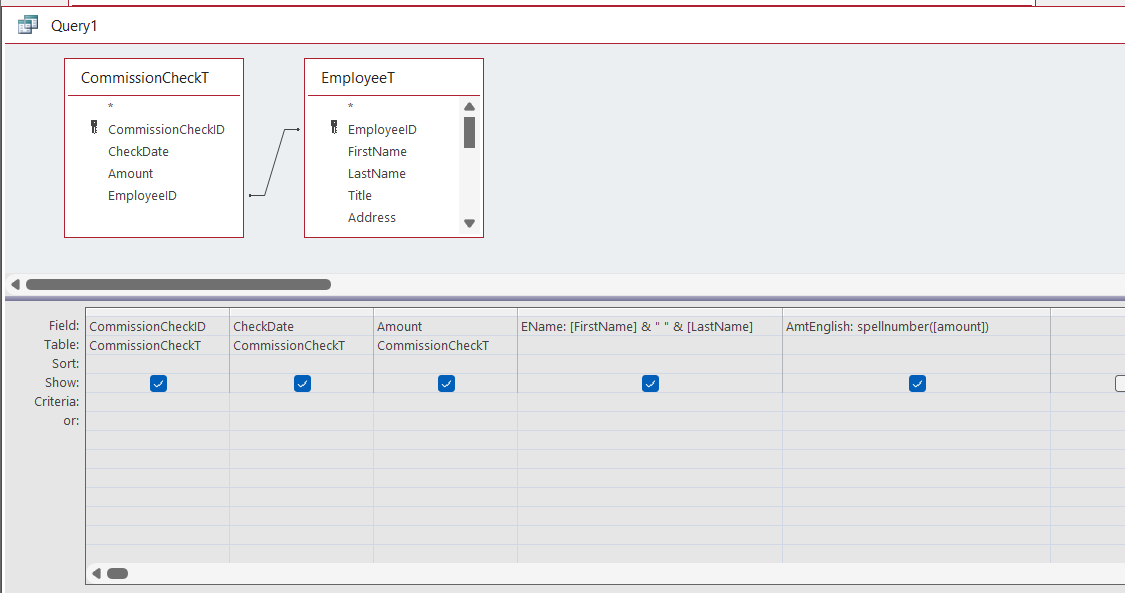
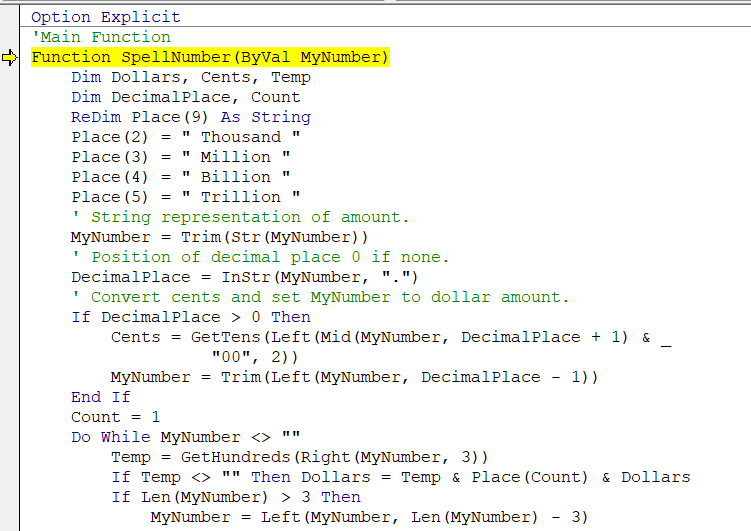
Just when I thought I was on the home stretch, another issue comes up. I was making the new query for the new module, and when I got the query ready and hit run, I immediately got an error message. I just don't get it because everything looks the same as the video, and it appears to me that the spelling is correct, etc. But I get the error I am attaching.
Ken WykoffOP
@Reply 9 months ago
Ken WykoffOP
@Reply 9 months ago
Ken WykoffOP
@Reply 9 months ago
It highlights in blue the word "GetTens" under If DecimalPlace > 0 Then
Donald Blackwell
@Reply 9 months ago
What specific error message does it give? Will help with trying to determine the problem
Ken WykoffOP
@Reply 9 months ago
Compile error: Sub or Function not defined
Donald Blackwell
@Reply 9 months ago
Ahh, that's what I thought... Did you type in or copy all of the functions that go with that code? After the main "SpellNumber" function, there are 3 additional functions that are necessary to make it work:
GetHundreds, GetTens, and GetDigits. Access is telling you that it can't find the "GetTens" function
Ken WykoffOP
@Reply 9 months ago
I got it from the Code Samples in the database for the Developer lessons and copied into a module like Richard said to do in the video. It's really long too. And then all he did in the video was name it what I did on the Query.
Donald Blackwell
@Reply 9 months ago
Sorry, just reviewed the video myself and saw that... It's not you, it's the code sample form... I just tried it in the download version from Dev 5 complete and it does the same thing....
There is a note next to the Select All Code Text button that says for some reason it isn't copying all the code. It will select all, but you have to hit -C then go paste it into your module for it to paste the whole thing
Donald Blackwell
@Reply 9 months ago
Ugh, that's CTRL-C. Forgot for safety and security reason's, the site kicks out some special characters
Ken WykoffOP
@Reply 9 months ago
Thank you Donald! I will redo the global module after I copy the sample and then paste the complete version into it. I'll get back to you.
Ken WykoffOP
@Reply 9 months ago
Donald, once again, you saved the day! I did have to go back to Richard's lesson for the database because the one that was in mine to copy was still wrong. Once I pasted the version from that database into mine, it worked perfectly. Again thank you for all your help, and Merry Christmas!
Donald Blackwell
@Reply 9 months ago
Happy to help, sorry I didn't catch the note sooner. Merry Christmas to you as well :)
Sorry, only students may add comments.
Click here for more
information on how you can set up an account.
If you are a Visitor, go ahead and post your reply as a
new comment, and we'll move it here for you
once it's approved. Be sure to use the same name and email address.
This thread is now CLOSED. If you wish to comment, start a NEW discussion in
Access Developer 5.