Free Lessons
Courses
Seminars
TechHelp
Fast Tips
Templates
Topic Index
Forum
ABCD
 
Home   Courses   TechHelp   Help   Contact   Merch   Join   Order   Logon   Forums   
 
Home > Courses > Access > Expert > X07 > Calculate Profit From Joined Product Query by Angela McCarthy >
Back to Access Expert 7    Comments List
Upload Images | @Reply | Bookmark | Link | Email | Next Unseen |
Calculate Profit From Joined Product Query
Angela McCarthy 
    
9 months ago
First, I am learning so much from all of the courses I've taken! Thank you.

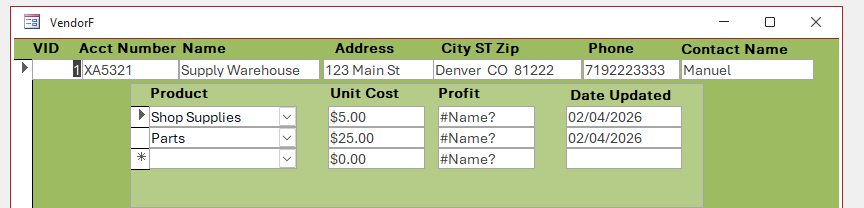
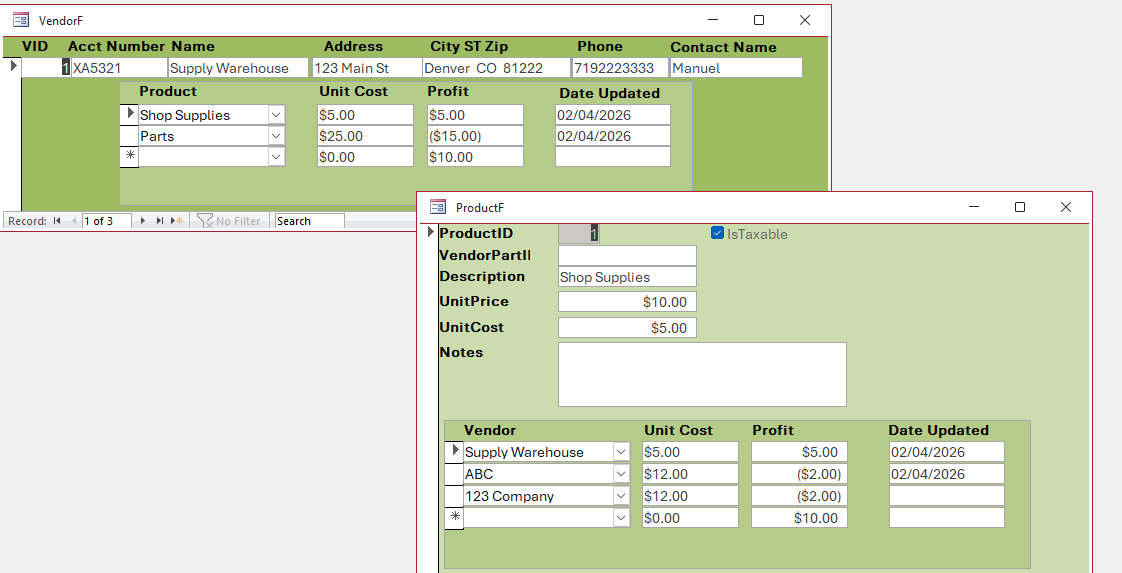
Now to my issue: I have created both the Vendor to Products and Products to Vendor forms and they work great. Except I have to have the Product Form open in order for the "Profit" field to properly calculate on the Vendor form. Any suggestions?

Should I post this to the E8 Forum also? I've looked on both and do not see where anyone has addressed this.
Angela McCarthy OP  @Reply  
    
9 months ago

Angela McCarthy OP  @Reply  
    
9 months ago

Alex Hedley  @Reply  
           
9 months ago
Is it supposed to ever be open on its own?
Angela McCarthy OP  @Reply  
    
9 months ago
Alex, Yes I want the Vendor Form open to show all details without the Product From having to be open.
Richard Rost  @Reply  
           
21 hours ago
Sorry it has taken me so long to see this. I missed this thread earlier. I'm glad the courses have been helping, and thanks, Alex, for asking about opening the form on its own.

Angela, you don't need to repost this in Expert 8. I cover this exact issue around 17:00 in Access Expert 8, Lesson 1 (Products to Vendors). The original Profit expression reads the current UnitPrice on ProductF. When that form is closed, you get #Name?. Opening it makes the calculation run, but it uses that one product's price for every row.

The fix is on the VendorF side: join VendorXProductT to ProductT on ProductID, keep the junction table fields, and bring in UnitPrice from ProductT. Add Profit: [UnitPrice]-[UnitCost] to the query. Set VendorProductSubF's Record Source to that query and the Profit text box's Control Source to Profit, replacing the old expression that refers to ProductF. Now each row uses its own product's price, even with ProductF closed.
Add a Reply Upload an Image
Next Unseen


What's This?


The following is a paid advertisement
Computer Learning Zone is not responsible for any content shown or offers made by these ads.
 

Learn
 
Access - index
Excel - index
Word - index
Windows - index
PowerPoint - index
Photoshop - index
Visual Basic - index
ASP - index
Seminars
More...
Customers
 
Login
My Account
My Courses
Lost Password
Memberships
Student Databases
Change Email
Info
 
Latest News
New Releases
User Forums
Topic Glossary
Tips & Tricks
Search The Site
Code Vault
Collapse Menus
Help
 
Customer Support
Web Site Tour
FAQs
TechHelp
Consulting Services
About
 
Background
Testimonials
Jobs
Affiliate Program
Richard Rost
Free Lessons
Mailing List
PCResale.NET
Order
 
Video Tutorials
Handbooks
Memberships
Learning Connection
Idiot's Guide to Excel
Volume Discounts
Payment Info
Shipping
Terms of Sale
Contact
 
Contact Info
Support Policy
Mailing Address
Phone Number
Fax Number
Course Survey
Email Richard
[email protected]
Blog RSS Feed    YouTube Channel

LinkedIn
Copyright 2026 by Computer Learning Zone, Amicron, and Richard Rost. All Rights Reserved. Current Time: 11/19/2026 6:11:34 PM. PLT: 1s