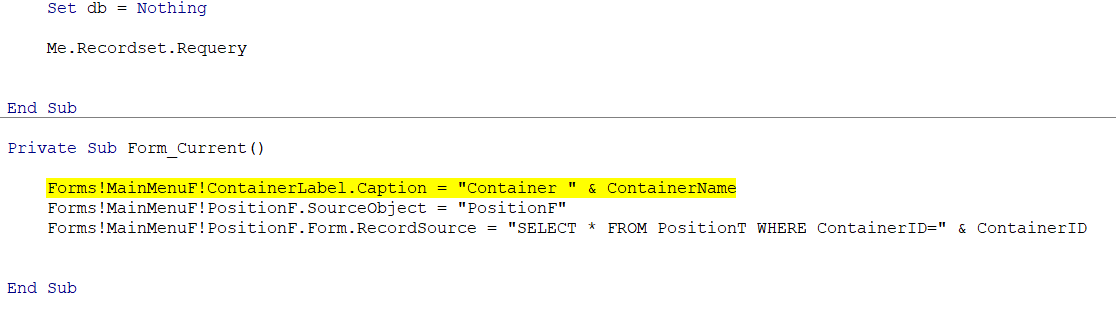
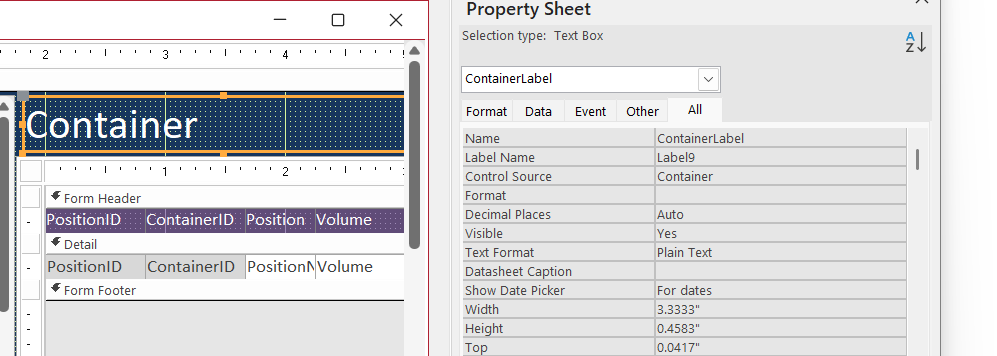
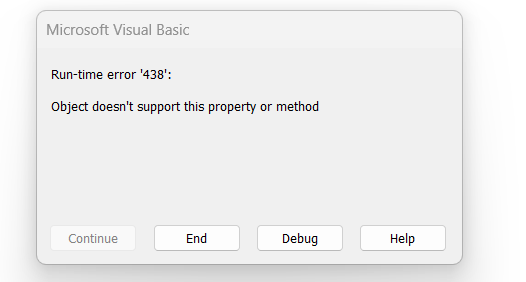
I've gotten nearly to the end of this lesson, and I cannot find the problem with this runtime error 438. I looked at the spelling of each word several times. Checked the property sheet to be sure the name was correct for ContainerLabel. I have screenshots of the code, error message, and video clip. I'm not sure what else I may need to look at.
Ken WykoffOP
@Reply 8 months ago
Ken WykoffOP
@Reply 8 months ago
Ken WykoffOP
@Reply 8 months ago
Kevin Robertson
@Reply 8 months ago
ContainerLabel is a Text Box and doesn't have a Caption property.
Ken WykoffOP
@Reply 8 months ago
Thanks Kevin, I was sure I used a label box but I will go back and check to be sure and let you know
Ken WykoffOP
@Reply 8 months ago
Kevin, you were right. How did you know that's what it was, so I can look for those things if it happens again?
Kevin Robertson
@Reply 8 months ago
With the control selected look at the top of the Property Sheet.
It tells you what type of control it is.
Ken WykoffOP
@Reply 8 months ago
Great and thank you.
Sorry, only students may add comments.
Click here for more
information on how you can set up an account.
If you are a Visitor, go ahead and post your reply as a
new comment, and we'll move it here for you
once it's approved. Be sure to use the same name and email address.
This thread is now CLOSED. If you wish to comment, start a NEW discussion in
Access Developer 21.