Free Lessons
Courses
Seminars
TechHelp
Fast Tips
Templates
Topic Index
Forum
ABCD
 
Home   Courses   TechHelp   Forums   Help   Contact   Merch   Join   Order   Logon  
 
Back to Access Email Seminar    Comments List
Upload Images   @Reply   Bookmark    Link   Email   Next Unseen 
Automatic Emails by User
Jorge Mendez 
    
53 days ago
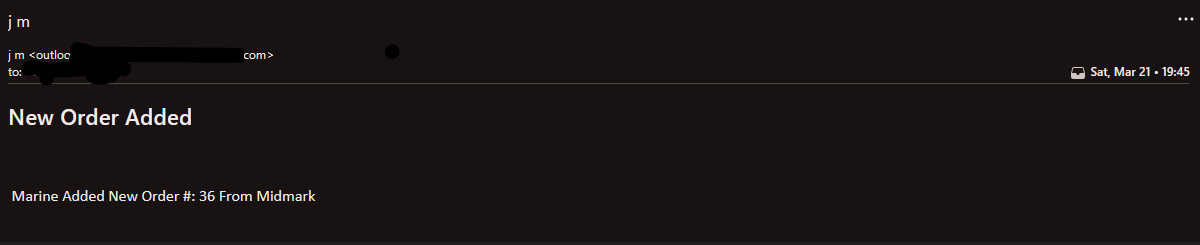
I would like to have an email automatically be sent from different Users individual email accounts when a task is completed. For example user 1 marks a shipment as being received and enters a received date.  As soon as received date is entered an Email automatically is sent from User 1 email account in outlook to Purchasing so that Purchasing can Pay for the shipment and know that it came from User 1.

User 2 enters a new order and after they enter the date of the order an Email is generated from User 2 email account in outlook to Purchasing so that they can Create a Purchase Order if the Order is approved and know it came from User 2.

All this happening without any other input from the users except for the entry of the specified dates on specific forms.

Sorry for long post, just wanted to be sure before purchasing.

Will this course allow me to achieve this?

Thanks!
Raymond Spornhauer  @Reply  
          
52 days ago
If each of your users have an active Outlook account on the computer they're using Access, then you should be able to do that, but it will require the Front End being installed on their computer, or having a login system built in to identify the user and which email account will be used.

I would ask why you want to use email... why not just build a set of forms for Purchasing to use and they can do it all in Access.

You can have one Front End the Users use with the Forms and Reports they need; and another Front end for Purchasing with different Forms and Reports for them.  These would all be connected to the same database Tables.

-Raymond
Jorge Mendez OP  @Reply  
    
51 days ago
HI,
Purchasing is using an accounting Program for payments that is connected to the bank and creating purchase orders. Also, they are in a different state and we don't have access to their networks.

The database is mainly used to track ordering part requests, equipment locations and preventative maintenance for the technicians.

The IT department won't allow the two to connect so i created the database so we could keep up with the info the techs need. We currently manually have to send purchasing a pdf form with the parts we need and related info and quote from the vendor.  Then when the parts arrive we have to manually scan the packing slip and email that to purchasing so that they will pay for the order.
Richard Rost  @Reply  
          
50 days ago
Jorge Yes, what you're describing is exactly the kind of thing the seminar covers.

If you're asking whether the database can automatically send an email when something happens, like a user entering a received date or marking a shipment as received, then yes. The key idea is that something in the database has to trigger the email. In most cases that trigger is an event in a form. For example, when a user enters the received date, clicks a button, or changes a status field, the database can run code at that moment that sends an email.

So in your example, when User 1 enters the received date, the form's event can trigger an email to Purchasing. Likewise, when User 2 enters a new order date, that event can trigger another email. The email can include whatever information you want from the record so Purchasing knows exactly what happened.

And no, the person receiving the email does not need to have the database installed. The database simply sends the message out like any other email, and they receive it normally in their inbox.

So yes, your scenario is definitely achievable with what is taught in the seminar. The important part is that some action in the database, such as entering a date or clicking a button, triggers the email to be sent.

Jorge Mendez OP  @Reply  
    
50 days ago
Thank You!
Jorge Mendez OP  @Reply  
    
50 days ago
Hi,

When i try to purchase the seminar it does not show the member discount prior to entering payment information.  I am logged in on my account.  Does the discount apply after payment entered?

Thank you
Donald Blackwell  @Reply  
       
50 days ago
Go to My Account -> Manage on the row with your Learning Connection Membership that will take you to the page with the link that gives you your discount.
Jorge Mendez OP  @Reply  
    
50 days ago
Thank you Mr. Blackwell it worked!  Discount received and Order Placed.
Jorge Mendez OP  @Reply  
    
40 days ago
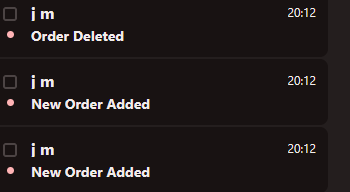
Richard I have started the Seminar and didn't even get half way through before I found EXACTLY what I was looking for!

I can now automatically send an email based on any trigger on a form.

Couldn't wait to let you know how happy I am with the course.

Now back to studying I go!

Jorge Mendez OP  @Reply  
    
40 days ago

Jorge Mendez OP  @Reply  
    
40 days ago

This thread is now CLOSED. If you wish to comment, start a NEW discussion in Access Email Seminar.
 

Next Unseen

 
New Feature: Comment Live View


The following is a paid advertisement
Computer Learning Zone is not responsible for any content shown or offers made by these ads.
 

Learn
 
Access - index
Excel - index
Word - index
Windows - index
PowerPoint - index
Photoshop - index
Visual Basic - index
ASP - index
Seminars
More...
Customers
 
Login
My Account
My Courses
Lost Password
Memberships
Student Databases
Change Email
Info
 
Latest News
New Releases
User Forums
Topic Glossary
Tips & Tricks
Search The Site
Code Vault
Collapse Menus
Help
 
Customer Support
Web Site Tour
FAQs
TechHelp
Consulting Services
About
 
Background
Testimonials
Jobs
Affiliate Program
Richard Rost
Free Lessons
Mailing List
PCResale.NET
Order
 
Video Tutorials
Handbooks
Memberships
Learning Connection
Idiot's Guide to Excel
Volume Discounts
Payment Info
Shipping
Terms of Sale
Contact
 
Contact Info
Support Policy
Mailing Address
Phone Number
Fax Number
Course Survey
Email Richard
[email protected]
Blog RSS Feed    YouTube Channel

LinkedIn
Copyright 2026 by Computer Learning Zone, Amicron, and Richard Rost. All Rights Reserved. Current Time: 4/30/2026 1:05:49 AM. PLT: 1s