Free Lessons
Courses
Seminars
TechHelp
Fast Tips
Templates
Topic Index
Forum
ABCD
 
Home   Courses   TechHelp   Forums   Help   Contact   Merch   Join   Order   Logon  
 
Back to User Level Security 2    Comments List
Upload Images   @Reply   Bookmark    Link   Email   Next Unseen 
Tempvars
Chuck Corvec 
    
13 days ago
Hello so I followed along on your video User Level Security Part 2 and the TempVars video. Great stuff by the way. Long and short of it is I got your code working perfectly. Using that as an example I wanted to take it another step further. I wanted to control what is visible using another TempVar UserType. My code is identical to the video, I added two lines and Changed one. I wish there was a way to add a screenshot

I changed this line to include UserType
    Dim ID As Long, UserType As Long, PW As String

And added this line right above the ID= line    
    UserType = Nz(DLookup("UserID", "User_tbl", "UserType=""" & UserType & """"), 0)

And this line right below the line that says TempVars("UserName") = UserName.Value
    TempVars("UserType") = UserType.Value

The value in UserYype is short text

Any assistance would be great

I plan to use this tempvar in if statements to control who sees what

Thanks a  bunch
Chuck Corvec OP  @Reply  
    
13 days ago
Oh I forgot ...
The error I get when I compile is Invalid Qualifier and the form is using Option Explicit.
Chuck Corvec OP  @Reply  
    
13 days ago
Oh and that is not UserYype it is UserType.
Spelling!!!
Darrin Harris  @Reply  
     
13 days ago
Hi Chuck

I would call the Dim UserType as long to Dim MyUserType as long? Maybe
Chuck Corvec OP  @Reply  
    
13 days ago
Darrin Would I then change other instances of UserType
Chuck Corvec OP  @Reply  
    
13 days ago
Darrin Ok, So I tried that but got the same result
Kevin Robertson  @Reply  
          
13 days ago
Chuck

You are looking up UserID and putting it in UserType. UserType is also your criterea.
You stated that UserType is Short Text, so the variable should be dim'd as a String.
Kevin Robertson  @Reply  
          
13 days ago
Just posting a couple of lines will not help us to help you.
Darrin Harris  @Reply  
     
13 days ago
Chuck

This is what I meant

    Dim ID As Long, MyUserType As Long, PW As String
  
    MyUserType = Nz(DLookup("UserID", "User_tbl", "UserType=""" & UserType & """"), 0)
    TempVars("UserName") = MyUserName.Value

    or

    TempVars("UserName") = Nz(DLookup("UserID", "User_tbl", "UserType=""" & UserType & """"), 0)

But as Kevin said need more to go on

And that's why I said Mayby, "UserType=" & UserType and you have Dim UserType why is UserType a Field in your Form?
Chuck Corvec OP  @Reply  
    
12 days ago
I was told not to post too much so hence the lines. Here is the entire Sub
UserName and Usertype are short text fields in the same table

DetailsPrivate Sub Logon_cmd_Click()

    Dim ID As Long, UserType As Long, PW As String
    
    UserType = Nz(DLookup("UserID", "User_tbl", "UserType=""" & UserType & """"), 0)
    ID = Nz(DLookup("UserID", "User_tbl", "Username=""" & UserName & """"), 0)
    
    If ID = 0 Then
        MsgBox "User Not Found!"
        Quit
    End If

    PW = Nz(DLookup("Password", "User_tbl", "Userid=" & ID), "")
    If PW <> Password Then
        MsgBox "Incorrect Password!"
        Quit
    End If
    
    TempVars("UserName") = UserName.Value
    TempVars("UserType") = UserType.Value
    DoCmd.OpenForm "MainMenu_frm"
    DoCmd.Close acForm, Me.Name, acSaveYes
    
End Sub

Chuck Corvec OP  @Reply  
    
12 days ago
Kevin

I posted the entire sub
From what I can tell I created it the same way Richard did in the User Level Security Part 2

The both look at User_tbl for a match to UserID
Both ID and UserType are Dim as long
The only difference is where they get the data from. Richard's gets it from UserName, Mine gets it from UserType
I am confused
That is the only thing Ingeshould have to change, right?
Chuck Corvec OP  @Reply  
    
12 days ago
Kevin I am new to this but it just does not make sense in my mushy brain
Kevin Robertson  @Reply  
          
12 days ago
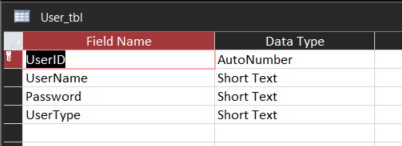
Please post a screenshot of the Table structure for User_tbl.
Chuck Corvec OP  @Reply  
    
12 days ago
ok I have taken this down to three lines of code
Why do I get variable not defined on the line marked does not work
Both go to the same table
both use the same field for the lookup
The ONLY difference is the field name they are pulling from
Neither field name is specified ANYWHERE else except after the user_tbl, and that should be different.

I do not get it

Private Sub Logon_cmd_Click()

    Dim ID As Long, ID1 As Long, PW As String
    
    ID = Nz(DLookup("UserID", "User_tbl", "Username=""" & UserName & """"), 0) 'works
    ID1 = Nz(DLookup("UserID", "User_tbl", "Usertype=""" & UserType & """"), 0) 'does not work
    
End Sub
Chuck Corvec OP  @Reply  
    
12 days ago

Kevin Robertson  @Reply  
          
12 days ago
What type of control is UserType on the Form?
Does it have a value?
Consider a related Table to store User Types.
Chuck Corvec OP  @Reply  
    
12 days ago
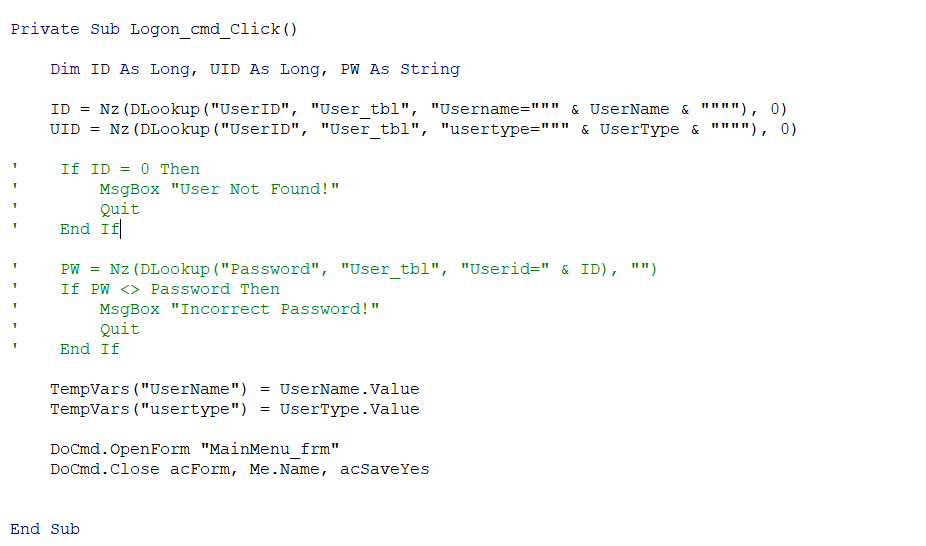
Update to my code
Please note i commented out anything not relevant to getting the value I want
Chuck Corvec OP  @Reply  
    
12 days ago

Chuck Corvec OP  @Reply  
    
12 days ago
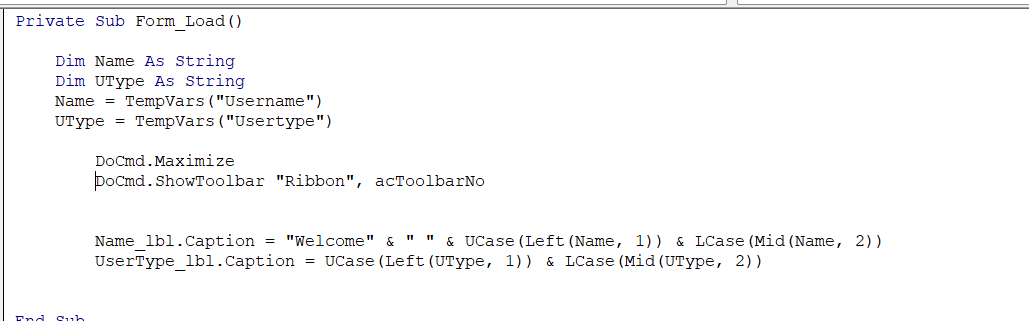
This will open  MainMenu_frm.
I added a two text boxes on MainMenu_frm so I could see the values and set their values in vba
No matter what user i enter on the logon form the value for the UserType does not change. To my way of thinking this should pull the UserType from the user_tbl for the name that was entered in th log on form
Chuck Corvec OP  @Reply  
    
12 days ago

Chuck Corvec OP  @Reply  
    
12 days ago
To be Clear
Regardless of what user I type in UserName on the log on form only Developer will show on the usertype text box on the MainMenu. I on the log on form i inpat a different user the username changes but usertype does noy
Chuck Corvec OP  @Reply  
    
12 days ago
Kevin I tried that in the beginning and really got screwed up
Kevin Robertson  @Reply  
          
12 days ago
Give this a go.

DetailsPrivate Sub Logon_cmd_Click()

    Dim ID As Long, uType As String, PW As String

    ID = Nz (DLookup ("UserID", "User tbl", "Username=""" & UserName & """") , 0)
    uType = Nz (DLookup ("UserType", "User_tbl", "UserID=" & ID) , "")

    If ID = 0 Then
        MsgBox "User Not Found!"
        Quit
    End If

    PW = Nz (DLookup ("Password", "User_tbl", "UserID=" & ID) , "")
    If PW <> Password Then
        MsgBox "Incorrect Password!"
        Quit
    End If

    TempVars ("UserName") = UserName. Value
    TempVars ("UserType") = uType

    DoCmd. OpenForm "MainMenu frm"
    DoCmd. Close acForm, Me. Name, acSaveYes

End Sub
Chuck Corvec OP  @Reply  
    
12 days ago
Kevin It is a text box the same as UserName is
Chuck Corvec OP  @Reply  
    
12 days ago
Kevin That worked and solved my other problem with the correct value not being passed to MainMenu_frm

So I can learn, what was actually wrong with my code
Kevin Robertson  @Reply  
          
12 days ago
You were looking up UserID twice.
You needed to look up UserType where UserID equals the ID you looked up in the first DLookup function.
Chuck Corvec OP  @Reply  
    
12 days ago
At this point I have seen the differences between

Dim ID As Long, UID As Long, PW As String - Mine
And
Dim ID As Long, uType As String, PW As String - Yours

as well as
UID = Nz(DLookup("UserID", "User_tbl", "usertype=""" & UserType & """"), 0) - mine
and
uType = Nz(DLookup("UserType", "User_tbl", "UserID=" & ID), "") - yours

Q1 I do not understand why one is Long and the other is string. They get their data from the same table, from fiels of the same data type. Only fifference is the name

Q2
The second line of code does not compute! LOL
Kevin Robertson  @Reply  
          
12 days ago
They aren't the same Data Type.

UserID is an AutoNumber (Long Integer)
UserType is Short Text (String)
Chuck Corvec OP  @Reply  
    
11 days ago
Kevin Ok now that makes sense. Thank You
Chuck Corvec OP  @Reply  
    
11 days ago
So earlier you mentioned that usertype should be in a related table. I know how to do that but how will that effect the code we just got working without it

Add a Reply Upload an Image
Next Unseen

 
New Feature: Comment Live View


The following is a paid advertisement
Computer Learning Zone is not responsible for any content shown or offers made by these ads.
 

Learn
 
Access - index
Excel - index
Word - index
Windows - index
PowerPoint - index
Photoshop - index
Visual Basic - index
ASP - index
Seminars
More...
Customers
 
Login
My Account
My Courses
Lost Password
Memberships
Student Databases
Change Email
Info
 
Latest News
New Releases
User Forums
Topic Glossary
Tips & Tricks
Search The Site
Code Vault
Collapse Menus
Help
 
Customer Support
Web Site Tour
FAQs
TechHelp
Consulting Services
About
 
Background
Testimonials
Jobs
Affiliate Program
Richard Rost
Free Lessons
Mailing List
PCResale.NET
Order
 
Video Tutorials
Handbooks
Memberships
Learning Connection
Idiot's Guide to Excel
Volume Discounts
Payment Info
Shipping
Terms of Sale
Contact
 
Contact Info
Support Policy
Mailing Address
Phone Number
Fax Number
Course Survey
Email Richard
[email protected]
Blog RSS Feed    YouTube Channel

LinkedIn
Copyright 2026 by Computer Learning Zone, Amicron, and Richard Rost. All Rights Reserved. Current Time: 5/1/2026 7:46:42 PM. PLT: 1s