Free Lessons
Courses
Seminars
TechHelp
Fast Tips
Templates
Topic Index
Forum
ABCD
 
Home   Courses   TechHelp   Help   Contact   Merch   Join   Order   Logon   Forums   
 
Back to Send Email with CDO 2    Comments List
Upload Images   @Reply   Bookmark    Link   Email   Next Unseen 
Run-time Error
Clay Boepple 
      
4 months ago
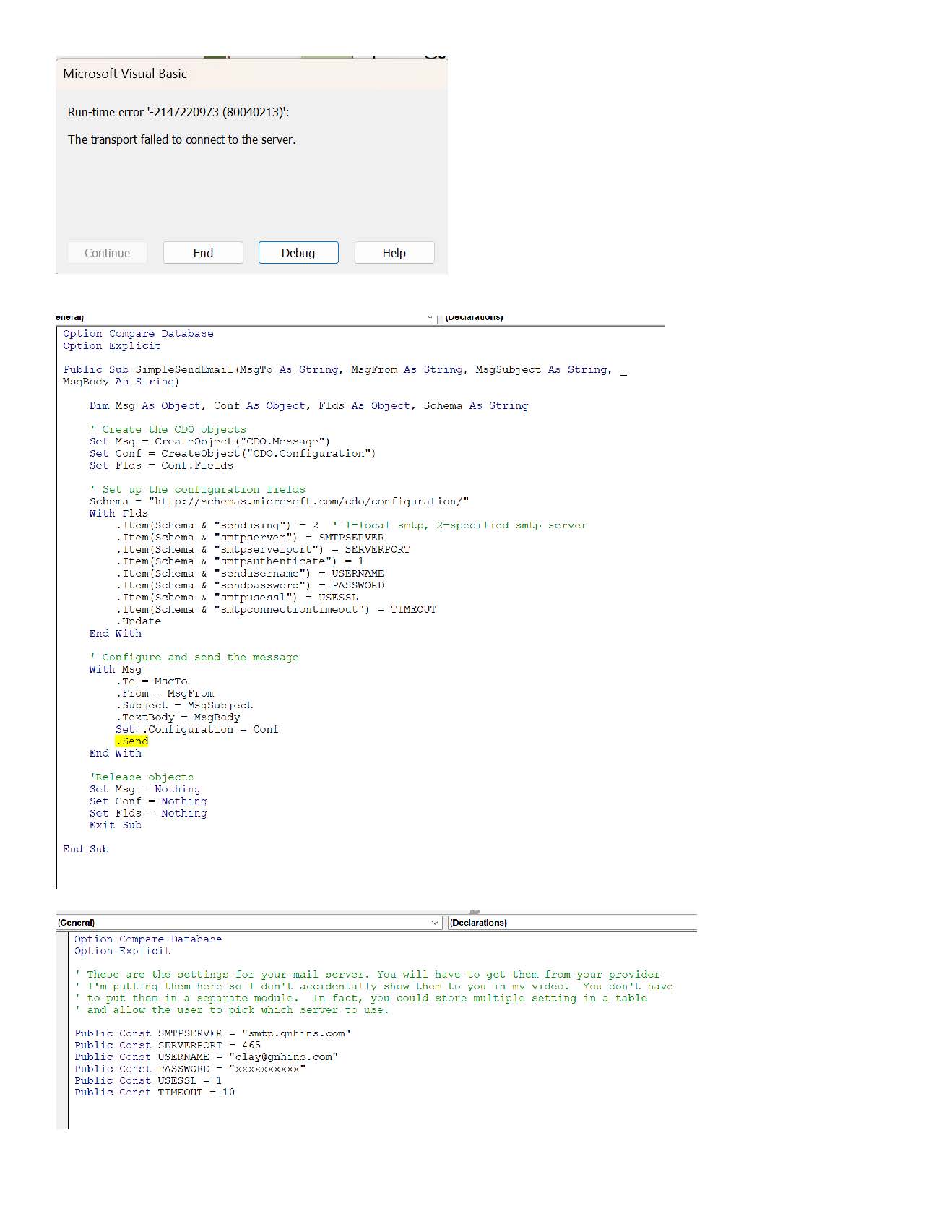
I'm getting this error when I click on "Send Email" on CDO 2.  When I click "debug" it highlights ".Send" in the SendMailSimpleMod.  Everything looks correct in the SendMailConfigMod


    ' Configure and send the message
    With Msg
        .To = MsgTo
        .From = MsgFrom
        .Subject = MsgSubject
        .TextBody = MsgBody
        Set .Configuration = Conf
        .Send
    End With
Kevin Robertson  @Reply  
          
4 months ago
What's the error message?
Richard Rost  @Reply  
          
4 months ago
And what's Conf look like? Hide your password of course, but even a single misplaced ; can cause errors.
Clay Boepple OP  @Reply  
      
4 months ago

Clay Boepple OP  @Reply  
      
4 months ago
Although it is a business domain it is through Google and Gmail and the email settings are correct.  Don't know if our firewall could be blocking it?  I just know enough to get me in trouble.
Clay Boepple OP  @Reply  
      
4 months ago
On the Google's App password there are spaces when I copy and pasted.  I did take those spaces out.  Do they need to be in the password?
Richard Rost  @Reply  
          
4 months ago
Yes, if this is a business domain but it's hosted through Google Workspace/Gmail, then Gmail is still the mail provider for this purpose.

For the Google app password, no, you do not need to keep the spaces. Google displays the app password in groups just to make it easier to read. When you paste it into your VBA constant, remove the spaces so it is just one continuous password string.

If the SMTP server is smtp.gmail.com, the port is 465, UseSSL is set to 1/True, the username is your full email address, and the password is the Google app password with no spaces, then the next thing I'd suspect is something blocking the connection.

A firewall, antivirus program, router, or business network policy could definitely block outbound SMTP traffic. The easiest test is to try the same database from a different computer or a different network, like a home connection or a phone hotspot. If it works there, then the code and Gmail settings are fine, and the problem is somewhere in the local network or security setup.

So I'd say: app password with no spaces first, then test from another network if it still fails.
Kevin Robertson  @Reply  
          
4 months ago
Does 2-Step Verification have to be enabled?

This thread is now CLOSED. If you wish to comment, start a NEW discussion in Send Email with CDO 2.
 

Next Unseen

 
New Feature: Comment Live View


The following is a paid advertisement
Computer Learning Zone is not responsible for any content shown or offers made by these ads.
 

Learn
 
Access - index
Excel - index
Word - index
Windows - index
PowerPoint - index
Photoshop - index
Visual Basic - index
ASP - index
Seminars
More...
Customers
 
Login
My Account
My Courses
Lost Password
Memberships
Student Databases
Change Email
Info
 
Latest News
New Releases
User Forums
Topic Glossary
Tips & Tricks
Search The Site
Code Vault
Collapse Menus
Help
 
Customer Support
Web Site Tour
FAQs
TechHelp
Consulting Services
About
 
Background
Testimonials
Jobs
Affiliate Program
Richard Rost
Free Lessons
Mailing List
PCResale.NET
Order
 
Video Tutorials
Handbooks
Memberships
Learning Connection
Idiot's Guide to Excel
Volume Discounts
Payment Info
Shipping
Terms of Sale
Contact
 
Contact Info
Support Policy
Mailing Address
Phone Number
Fax Number
Course Survey
Email Richard
[email protected]
Blog RSS Feed    YouTube Channel

LinkedIn
Copyright 2026 by Computer Learning Zone, Amicron, and Richard Rost. All Rights Reserved. Current Time: 8/13/2026 8:29:31 PM. PLT: 1s