Free Lessons
Courses
Seminars
TechHelp
Fast Tips
Templates
Topic Index
Forum
ABCD
 
Home   Courses   TechHelp   Help   Contact   Merch   Join   Order   Logon   Forums   
 
Back to Access Developers    Comments List
Upload Images   @Reply   Bookmark    Link   Email   Next Unseen 
Dropdown Menu Still Visible
Hank Megens 
      
39 days ago
Hi,

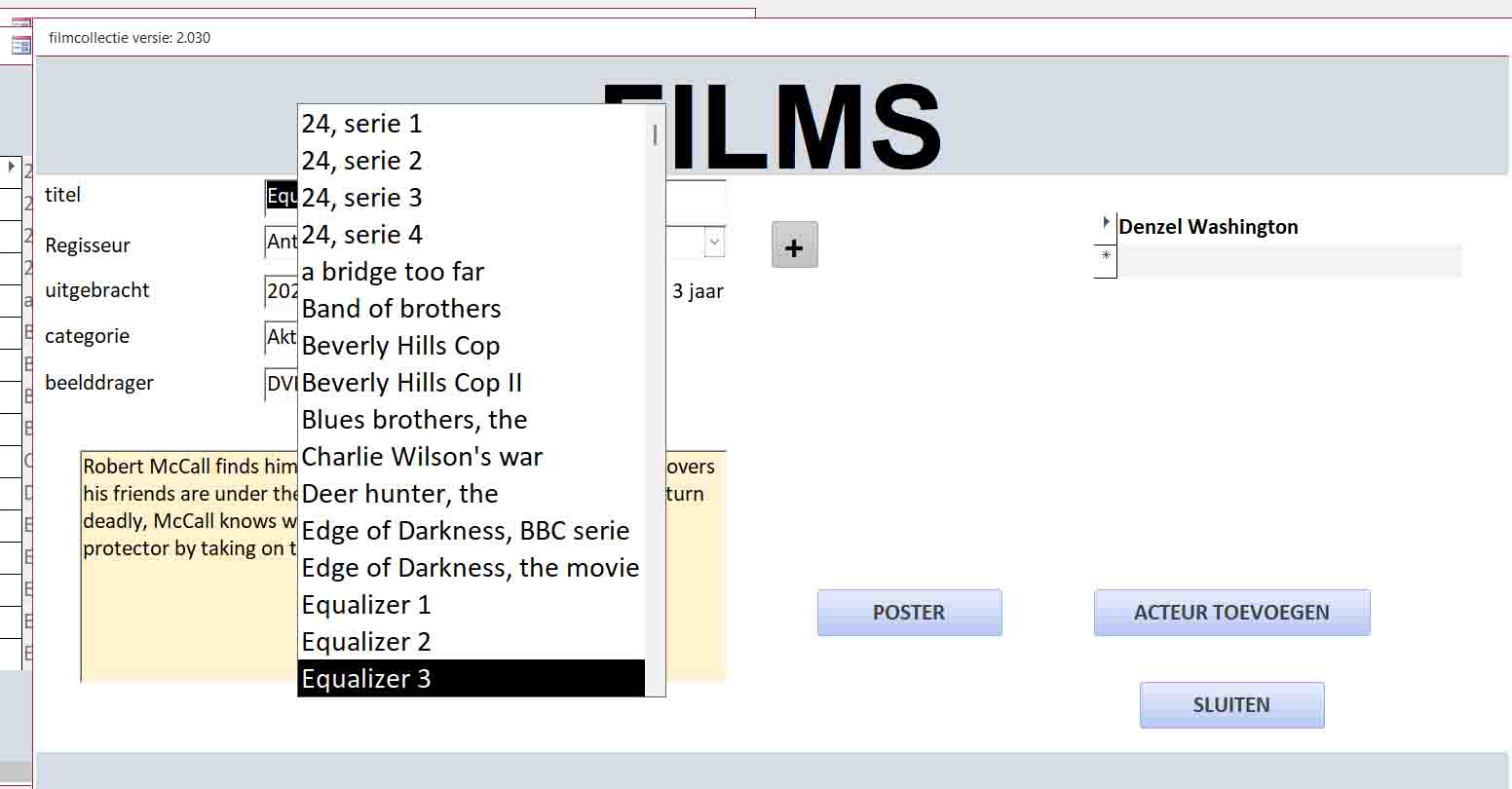
i have a form on which I have a dropdown list to select a movie. After the selection a nnew forms open with the details of that movie. No problem there.
But the open dropdown menu is still visible, over my new form.
How to solve this?

Hank Megens
Hank Megens OP  @Reply  
      
39 days ago

Donald Blackwell  @Reply  
        
39 days ago
In the event that changes the record, just make it hidden. If it's a popup form, it could be closed. If it's a control that is normally hidden, just hide it again after selected a film. How you do it depends if you are using Macros or VBA.

If it's a control:
     If it's a Macro, use SetProperty to set the visible property to False
     If it's VBA, after changing the record in the form, add the following:

Hide Control using VBA     ' take focus away from the control so you can hide it
     YOURCONTROLNAME.enabled = false

     ' hide the control
     YOURCONTROLNAME.visible = false
Donald Blackwell  @Reply  
        
39 days ago
However, using the VBA method shown, you'll need to add code to re-enable the control the next time you show it. Sorry forgot to include that.
Kevin Robertson  @Reply  
           
39 days ago
We are going to need additional information.
For example:
   How are you opening the Form?
   Macro or VBA?
   If VBA, what is your code?
   Which event are you using?
Sandra Truax  @Reply  
         
39 days ago
Richard was having the same issue in his fitness database and he shows how to fix it in Fitness 38.
Fitness 38
Hank Megens OP  @Reply  
      
38 days ago
The code I used (VBA) was taken form the fitness databse series (number 29 and 30). I'm currently revisiting that because of other issues. I will also take a look at fitness 38.
thanks for the replies.
If I don't figure it out myself I will return here.

Hank

This thread is now CLOSED. If you wish to comment, start a NEW discussion in Access Developers.
 

Next Unseen

 
New Feature: Comment Live View


The following is a paid advertisement
Computer Learning Zone is not responsible for any content shown or offers made by these ads.
 

Learn
 
Access - index
Excel - index
Word - index
Windows - index
PowerPoint - index
Photoshop - index
Visual Basic - index
ASP - index
Seminars
More...
Customers
 
Login
My Account
My Courses
Lost Password
Memberships
Student Databases
Change Email
Info
 
Latest News
New Releases
User Forums
Topic Glossary
Tips & Tricks
Search The Site
Code Vault
Collapse Menus
Help
 
Customer Support
Web Site Tour
FAQs
TechHelp
Consulting Services
About
 
Background
Testimonials
Jobs
Affiliate Program
Richard Rost
Free Lessons
Mailing List
PCResale.NET
Order
 
Video Tutorials
Handbooks
Memberships
Learning Connection
Idiot's Guide to Excel
Volume Discounts
Payment Info
Shipping
Terms of Sale
Contact
 
Contact Info
Support Policy
Mailing Address
Phone Number
Fax Number
Course Survey
Email Richard
[email protected]
Blog RSS Feed    YouTube Channel

LinkedIn
Copyright 2026 by Computer Learning Zone, Amicron, and Richard Rost. All Rights Reserved. Current Time: 7/25/2026 9:26:50 PM. PLT: 0s