Free Lessons
Courses
Seminars
TechHelp
Fast Tips
Templates
Topic Index
Forum
ABCD
 
Home   Courses   TechHelp   Forums   Help   Contact   Merch   Join   Order   Logon  
 
Back to Custom MsgBox 9    Comments List
Upload Images   @Reply   Bookmark    Link   Email   Next Unseen 
Resize Issue with Icons
Daniel de Koning 
      
12 days ago
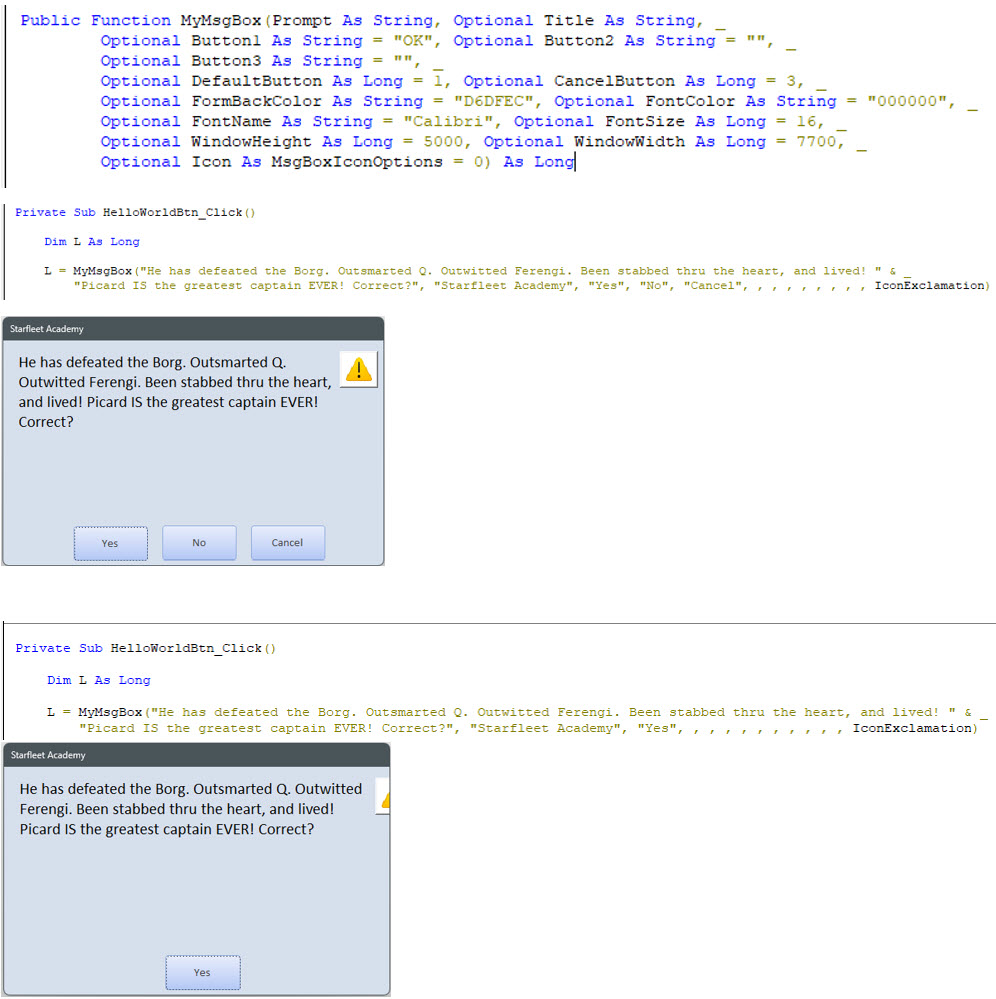
In my own database, I wanted to only use Button1 (OK), but noticed that the IconExclamation wasn't shown, when I increased the Width, it was visible again. When I add Button2 in the form, everything is working as expected. I tried the same settings with the database from Richard and I'm able to produce the same problem. I'm assuming it's related to either the Public Subs MoveForm or CenterButtons, but I was not able to pinpoint the coding error when stepping into the code (using F8).
Is the solution just to make sure the Width is wide enough, so let's say a minimum of 7800, based on Rick's Database (and considering the FontName and FontSize)?
See screenshot of the various settings and the resulting MyMsgBox. Hopefully not too small to see the code.
Daniel de Koning OP  @Reply  
      
12 days ago

Raymond Spornhauer  @Reply  
          
12 days ago
Change the WindowWidth:

Optional WindowWidth As Long = 7700  <-------- this will make the window wider. (maybe try 9000)

-Raymond
Daniel de Koning OP  @Reply  
      
11 days ago
It's solved with a patch for sure, but still uncertain why the Icon is cut-off in the first, as in not showing fully in the MyMsgBoxF (see bottom screenshot).
Putting it differently: When using WindowWidth of 6000 and using 3 buttons, the form is correct and resized correctly (also depending on the ButtonWidth), but when I switch to only showing 1 or 2 buttons with a short Prompt text, the Width needs to be wider (to 9000) in order to see the chosen Icon.
Sometimes I only want to give a quick notification, so not a lengthy explanation in the MyMsgBoxF and therefore only need a small box with an Icon, but I have to make it very wide to see the Icon.
Bottom line: Resizing the form for a short Prompt and with an Icon is not fully working as expected.
Raymond Spornhauer  @Reply  
          
11 days ago
Did you use Anchoring on your Controls like Rick did in his videos?  If you did not Anchor the imag, Access will put them where you specify whether it's visible or not.

Also, you could use the LEN function to resize your Form based on the message:

If LEN("Your Message Here") < 400 THEN WindowWidth = 9000
If LEN("Your Message Here") < 300 THEN WindowWidth = 8000
If LEN("Your Message Here") < 200 THEN WindowWidth = 7000
If LEN("Your Message Here") < 100 THEN WindowWidth = 6000

You can change these numbers around to get the result you're looking for.

-Raymond
Daniel de Koning OP  @Reply  
      
11 days ago
I performed the same steps as instructed by Richard, but I also opened (downloaded) his version and I get the same results with his version of the database, so not all of the controls are moving correctly.
I will try and see what happens with your proposed LEN function, as long as it doesn't conflict with the original vba code, I'm willing to make the change.
But of course, I do prefer understanding where in the original code it short of breaks (not move correctly).
Kevin Robertson  @Reply  
           
11 days ago
Richard Perhaps a Part 11 is needed to fix this problem.
Raymond Spornhauer  @Reply  
          
11 days ago
Daniel

There have been many times people say they performed all the same steps as Rick, but still missed steps.

In your message box with just the "Yes" button on it, the IconExclamation does not appear to be anchored.

We would need to see your code and Form in Design mode to help more.

-Raymond
Add a Reply Upload an Image
Next Unseen

 
New Feature: Comment Live View


The following is a paid advertisement
Computer Learning Zone is not responsible for any content shown or offers made by these ads.
 

Learn
 
Access - index
Excel - index
Word - index
Windows - index
PowerPoint - index
Photoshop - index
Visual Basic - index
ASP - index
Seminars
More...
Customers
 
Login
My Account
My Courses
Lost Password
Memberships
Student Databases
Change Email
Info
 
Latest News
New Releases
User Forums
Topic Glossary
Tips & Tricks
Search The Site
Code Vault
Collapse Menus
Help
 
Customer Support
Web Site Tour
FAQs
TechHelp
Consulting Services
About
 
Background
Testimonials
Jobs
Affiliate Program
Richard Rost
Free Lessons
Mailing List
PCResale.NET
Order
 
Video Tutorials
Handbooks
Memberships
Learning Connection
Idiot's Guide to Excel
Volume Discounts
Payment Info
Shipping
Terms of Sale
Contact
 
Contact Info
Support Policy
Mailing Address
Phone Number
Fax Number
Course Survey
Email Richard
[email protected]
Blog RSS Feed    YouTube Channel

LinkedIn
Copyright 2026 by Computer Learning Zone, Amicron, and Richard Rost. All Rights Reserved. Current Time: 7/6/2026 6:22:28 AM. PLT: 0s