Free Lessons
Courses
Seminars
TechHelp
Fast Tips
Templates
Topic Index
Forum
ABCD
 
Home   Courses   TechHelp   Help   Contact   Merch   Join   Order   Logon   Forums   
 
Back to Access Developers    Comments List
Upload Images   @Reply   Bookmark    Link   Email   Next Unseen 
Getting Report Page Count Correct
Thomas Gonder 
      
2 months ago
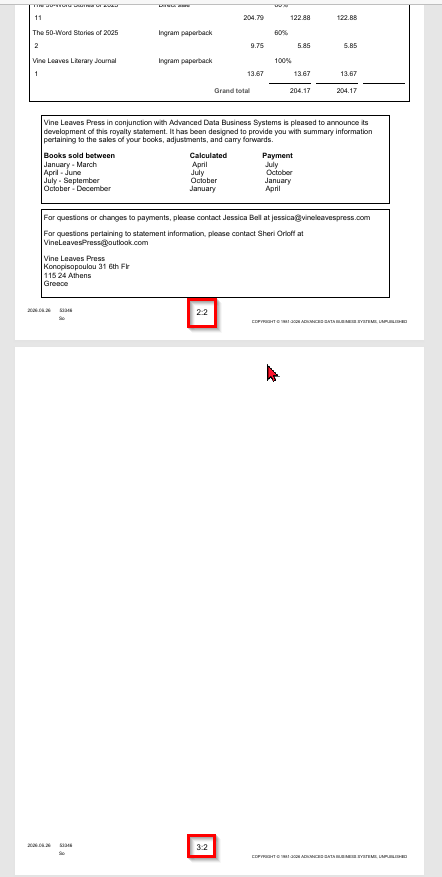
Has anyone else had a problem getting Access' reports to count the pages properly?
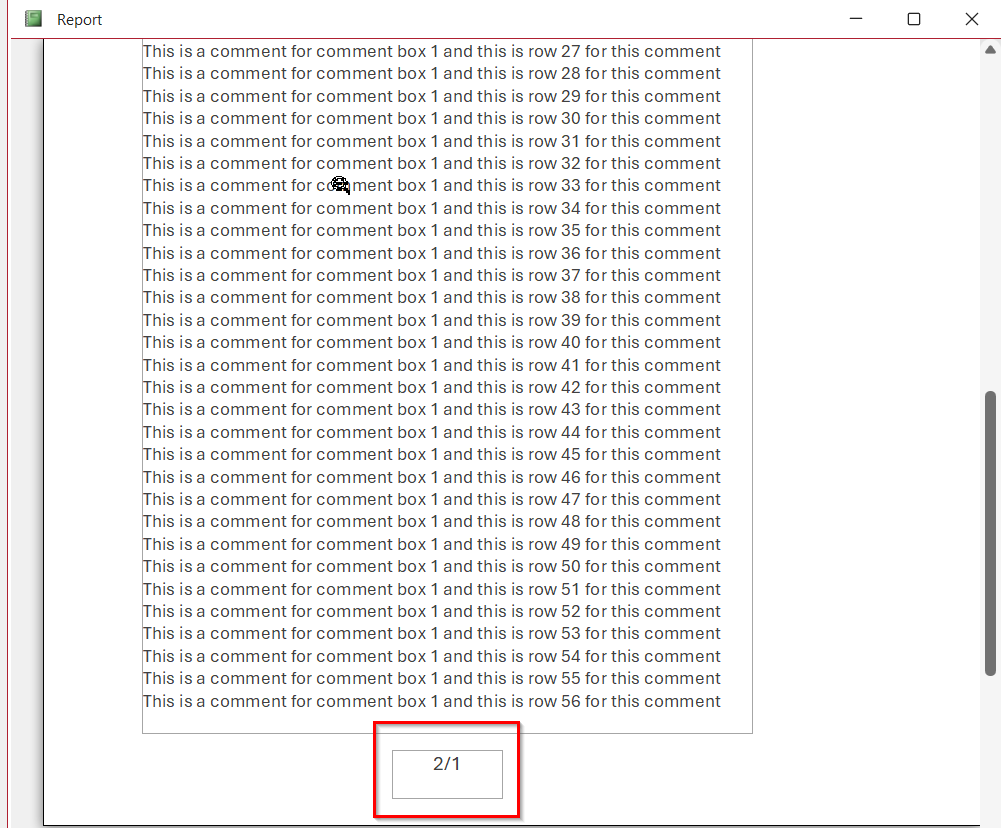
Notice page three is blank, okay, we've lived with that for decades in Word, but getting the total number of pages wrong?!!! Come on Micro$oft.
Anybody got a fix?
Thomas Gonder OP  @Reply  
      
2 months ago

Richard Rost  @Reply  
          
2 months ago
That's definitely an odd one. Access's built-in page numbering (=[Page] & "/" & [Pages]) is usually pretty reliable. If it were just a skipped page because of an extra page break, I'd expect to see 2 of 3 followed by 3 of 3, not 3 of 2.

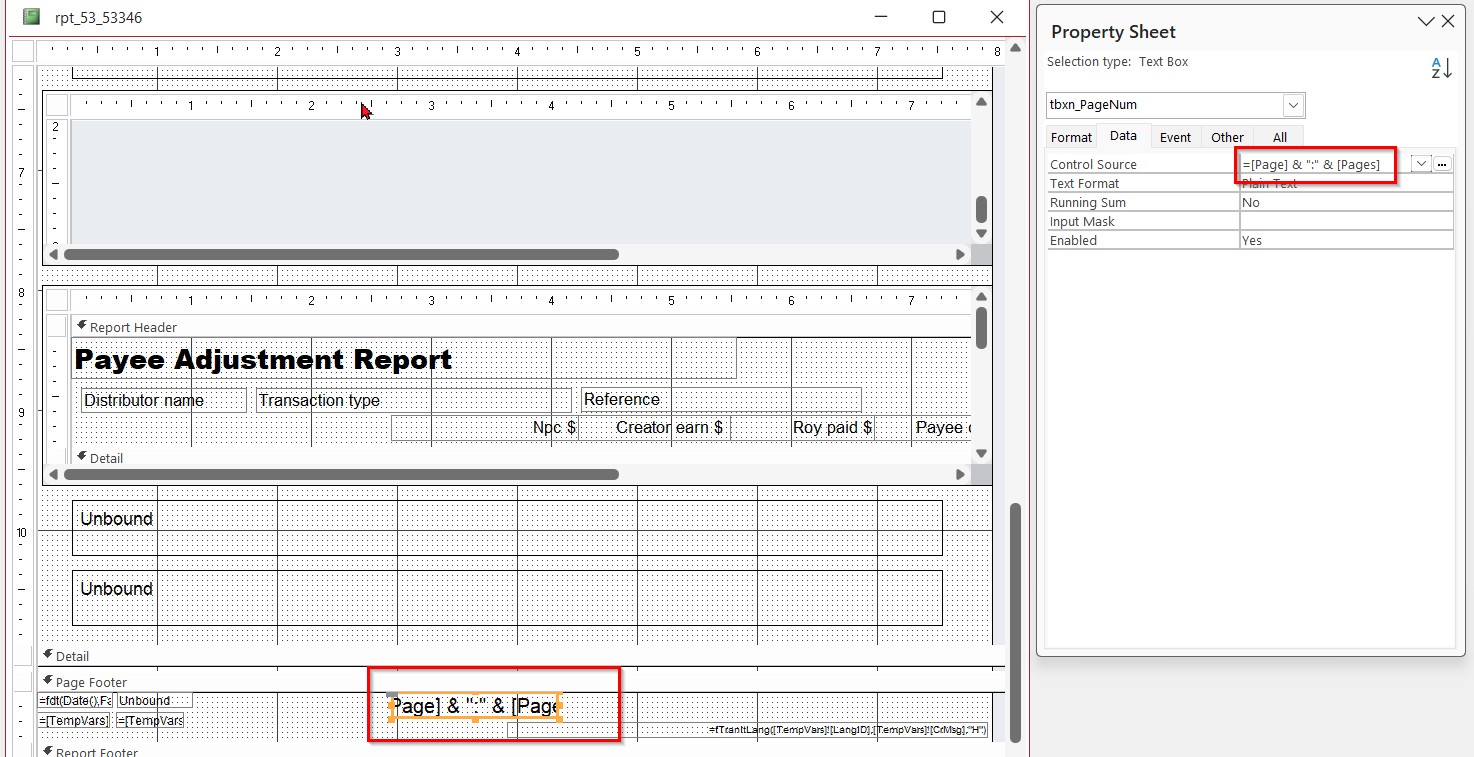
My first question would be: do you have any VBA code or expressions that manipulate the page number or the text box displaying it? Also, does the problem still happen if you replace your custom page number control with a brand new text box containing just:

=[Page] & "/" & [Pages]

If it's still happening, I'd also check for anything unusual in the report, like a subreport forcing repagination, CanGrow/CanShrink controls, Keep Together settings, or code in the Format or Print events that's changing the layout. Those can sometimes produce some pretty strange paging behavior.

Can you post a screenshot of the report design (especially the page footer) and let us know if there's any code behind the report?
Thomas Gonder OP  @Reply  
      
2 months ago

Thomas Gonder OP  @Reply  
      
2 months ago
The sad part is that I'm sure this bug has been reported many, many times over the past 25 years and yet Microsoft still hasn't been able to fix it just as they haven't been able to fix it in Word.
Thomas Gonder OP  @Reply  
      
2 months ago
There's a fair amount of code behind the report, but far less than for my forms. There are two sub reports (they don't do paging and Access doesn't duplicate the header), yes to growing and shrinking text boxes. Nothing in code that plays with the pages.

It's a typical problem with M$ programmers that they don't check if a page has anything before rendering one. If a page is full, they just add a new one without a final check. Having done this kind of report programming in assembly, I kinda know what logic they forgot to add or did wrong. Amateurs.
Richard Rost  @Reply  
          
2 months ago
Thomas One thing I'd be curious about: does it happen if you export the report to PDF, or only in Print Preview? Also, are any controls or subreports changing size or visibility during the Format event? Access actually formats reports multiple times while determining page breaks, so if the layout changes between formatting passes, especially with CanGrow/CanShrink or subreports, you can wind up with some very odd page numbering.

I'd also be interested to know if scrolling all the way to the end of the report and then back to page 1 causes the page count to correct itself. Does the same thing happen on a report with no code and no subreports? Does changing your default printer, for example to Microsoft Print to PDF, make any difference?

I'd actually love to be able to reproduce this one consistently. If we can isolate it down to a simple sample database that demonstrates the behavior, I'd be happy to dig into it. Those kinds of oddball Access bugs often make for great TechHelp or Developer lessons because once you know what triggers them, there's usually a workaround.

If you can strip the report down to the smallest example that still produces "Page 3 of 2," email it to me. Even if it turns out to be an Access bug, we may be able to figure out what's causing the pagination to get out of sync and find a reliable fix or workaround.

And just as a side note, let's not be too hard on the Microsoft programmers. I've met the folks on the Access team, and they're doing the best they can with the limited resources they have. They're genuinely good people. I can't speak for the earlier teams that originally built Access, but the current group is working hard with what they've got.
Thomas Gonder OP  @Reply  
      
2 months ago
Richard I've had horrible luck with viewing reports in the "Report" view. It renders totally out of whack in so many places. I've resorted to doing one statement at a time, to Microsft PDF printer. That's the view I showed originally.

It's a pretty massive report, mostly because of the variety of queries required and the two sub reports. Trimming it down? That's not feasible at this point, given that I would have to include the whole ADS, because the report drives off of lots of tempvars and various tables. I've tried in the past with bugs, and it gets tedious with this sub needs that sub which needs that sub and a whole host of tables for the subs.

Even doing it with some other data set, and another report, it could be hours to find just the right combination to trigger the error, since one page has to end exactly on the last line. But I can try.


Richard Rost  @Reply  
          
2 months ago
I hear ya. It's no big deal. If you can, you can. It's hard to figure out what the problem is if you can't reproduce it reliably. If you're able to, great. If you could put together a little small database that it works in, let me know. I've seen this happen before, but I've never been able to reliably reproduce it. It'll happen once in a print preview, and then I'll close it and reopen it, and it goes away. I don't know. It's probably a glitch in there somewhere.
Thomas Gonder OP  @Reply  
      
2 months ago
It's easy to be hard on everything Microsoft. Let's see, when I wrote my report writer years ago, of course the first attempts were full of bugs and had LOTS of logic errors. I even made the same paging errors, over and over until I found the right combination. The difference is, I tested my software, with all the extremes and middle-ground samples. Rather than wait for the users to find my bugs for me, so that I could ignore them while moving on to the next big thing.

As you have pointed out many times, it's perseverance that wins the war. Unfortunately, some anti-competitive business practices also can win a war, and have.
Thomas Gonder OP  @Reply  
      
2 months ago
Richard I'm very good at finding bugs (usually requires nothing more than paying attention) and fixing them, at least in my own code, and sometimes, even in the CPU chips designed by others (that required ten lines of code, once boiled down after two years of reviewing thousands of lines from various developers). I'm sure I could spend a day or two creating this report bug in a simple db.

The problem is, I'm not an employee getting paid by Microsoft. I don't get "rewards" from them. And when I do create a db that demonstrates a bug, all I get for the effort is to be ignored, or the admonition to work around the bug (as if that's going to fix it?). If you've had luck getting the MS Access Team to "pay attention", well then maybe I'll make the effort, even for free.
Thomas Gonder OP  @Reply  
      
47 days ago
Here is a link to an .accdb that demonstrates the paging problem.
https://drive.google.com/file/d/1oUm9fYsHGrSIsztl4uUEtpnWIcTvbVm2/view?usp=sharing
(let me know if Google Drive won't let you download it, there is often a gremlin)

This layout is based upon my much larger and more complicated report.
You can run this report first in "Report View" and see that the comment box at the bottom isn't filled in with the VBA code for the form.

Then switch to "Print Preview" to see the odd page numbering (2/1).

My application requires placing the data to show in the group section, not doing so causes different problems to appear. By playing with where the controls are placed in the report, you can get lots of strange behaviors like fantom first pages and last pages, data disappearing, etc.

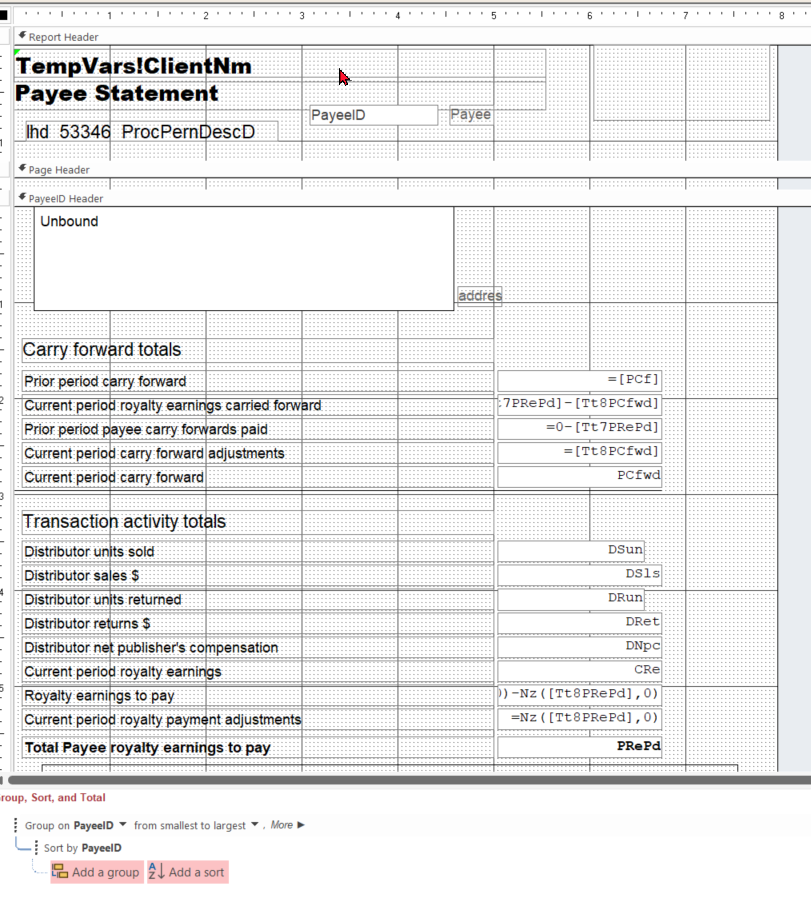
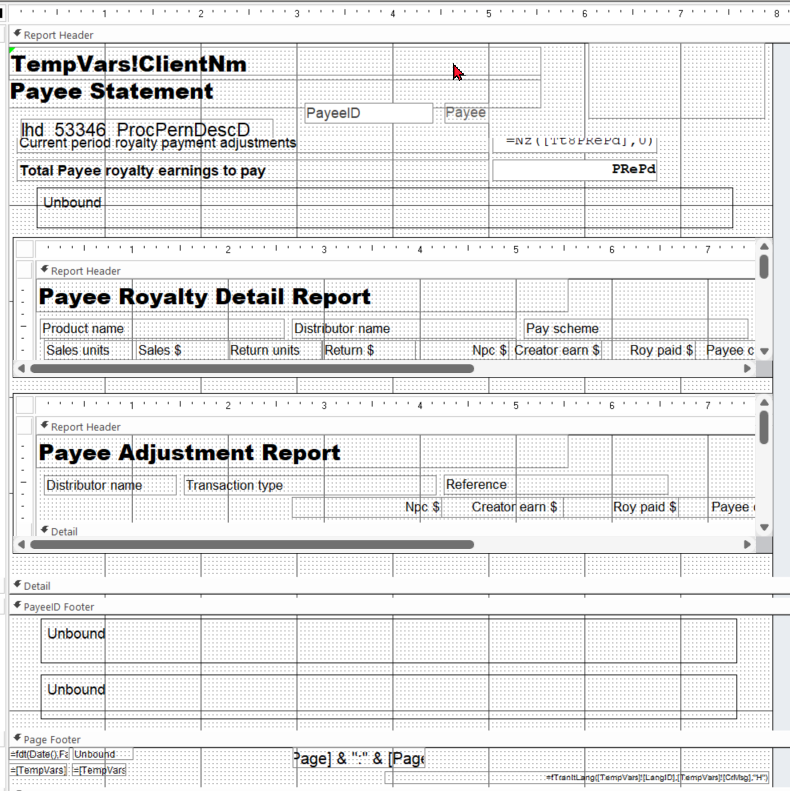
Below I will give two print screens of the larger report so you can see the layout is comparable.
Thomas Gonder OP  @Reply  
      
47 days ago

Thomas Gonder OP  @Reply  
      
47 days ago

Thomas Gonder OP  @Reply  
      
47 days ago
This is how Report appears on my Office 365 MSO Version 2605 Build 16.0.20026.20182 64-bit laptop.
And below is the image of the paging problem.
Thomas Gonder OP  @Reply  
      
47 days ago

This thread is now CLOSED. If you wish to comment, start a NEW discussion in Access Developers.
 

Next Unseen

 
New Feature: Comment Live View


The following is a paid advertisement
Computer Learning Zone is not responsible for any content shown or offers made by these ads.
 

Learn
 
Access - index
Excel - index
Word - index
Windows - index
PowerPoint - index
Photoshop - index
Visual Basic - index
ASP - index
Seminars
More...
Customers
 
Login
My Account
My Courses
Lost Password
Memberships
Student Databases
Change Email
Info
 
Latest News
New Releases
User Forums
Topic Glossary
Tips & Tricks
Search The Site
Code Vault
Collapse Menus
Help
 
Customer Support
Web Site Tour
FAQs
TechHelp
Consulting Services
About
 
Background
Testimonials
Jobs
Affiliate Program
Richard Rost
Free Lessons
Mailing List
PCResale.NET
Order
 
Video Tutorials
Handbooks
Memberships
Learning Connection
Idiot's Guide to Excel
Volume Discounts
Payment Info
Shipping
Terms of Sale
Contact
 
Contact Info
Support Policy
Mailing Address
Phone Number
Fax Number
Course Survey
Email Richard
[email protected]
Blog RSS Feed    YouTube Channel

LinkedIn
Copyright 2026 by Computer Learning Zone, Amicron, and Richard Rost. All Rights Reserved. Current Time: 8/17/2026 4:23:55 AM. PLT: 1s