Free Lessons
Courses
Seminars
TechHelp
Fast Tips
Templates
Topic Index
Forum
ABCD
 
Home   Courses   TechHelp   Help   Contact   Merch   Join   Order   Logon   Forums   
 
Back to Purge Image Gallery    Comments List
Upload Images   @Reply   Bookmark    Link   Email   Next Unseen 
Lots of Stuff in My Gallery!
Richard Rost 
           
13 hours ago
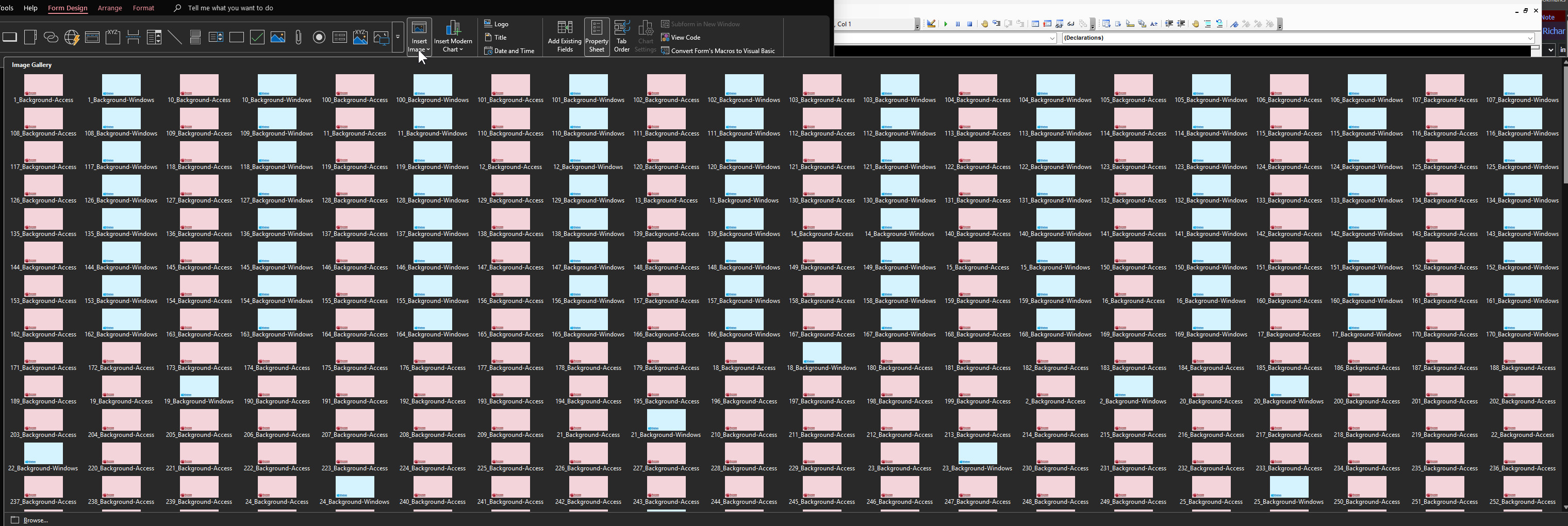
I was trying to figure out why a relatively small database of mine was already over 800 MB, and then I realized I should check the image gallery and look. Look what I found...
Richard Rost OP  @Reply  
           
13 hours ago

Richard Rost OP  @Reply  
           
12 hours ago
I just stumbled across something while working on my AI slide generator that I wanted to share.

My database had mysteriously grown to almost 1 GB, and I couldn't figure out why. I wasn't storing images in tables. I wasn't embedding huge graphics in reports. So where was all that space going?

It turns out the culprit was the Picture Type property on an Image control.

By default, when you add an Image control to a form or report, its Picture Type is set to Shared. That's fine if you're using static images that you insert at design time. But if you're like me and you're changing the image in VBA...

BackgroundImage.Picture = CurrentProject.Path & "\Images\" & BGImage

...then you might be in for a surprise.

I'm building a slide generator that swaps different background images in and out as I move from slide to slide. Every time the code assigned a new image, Access quietly added another copy to the Image Gallery. Even worse, it added duplicates of the same image over and over again. My Image Gallery ended up looking like this:

* Background-Access
* 1_Background-Access
* 2_Background-Access
* 3_Background-Access
* ...

Hundreds of duplicate images later, my database had ballooned to nearly a gigabyte!

The fix was simple. Change the Image control's Picture Type property from Shared to Linked. After doing that, I could swap images all day long without Access stuffing copies into the Image Gallery.

I then purged the Image Gallery (as shown in the video above), compacted the database, and my file size dropped from about 800+ MB to 111 MB.

So if you're dynamically changing images in VBA, make sure your Image controls are set to Linked instead of Shared. It'll save you a lot of disk space and a lot of head scratching.

I'm planning to make a follow-up TechHelp video on this because I think it's one of those little Access quirks that can catch a lot of developers by surprise. Stay tuned!

Add a Reply Upload an Image
Next Unseen

 
New Feature: Comment Live View


The following is a paid advertisement
Computer Learning Zone is not responsible for any content shown or offers made by these ads.
 

Learn
 
Access - index
Excel - index
Word - index
Windows - index
PowerPoint - index
Photoshop - index
Visual Basic - index
ASP - index
Seminars
More...
Customers
 
Login
My Account
My Courses
Lost Password
Memberships
Student Databases
Change Email
Info
 
Latest News
New Releases
User Forums
Topic Glossary
Tips & Tricks
Search The Site
Code Vault
Collapse Menus
Help
 
Customer Support
Web Site Tour
FAQs
TechHelp
Consulting Services
About
 
Background
Testimonials
Jobs
Affiliate Program
Richard Rost
Free Lessons
Mailing List
PCResale.NET
Order
 
Video Tutorials
Handbooks
Memberships
Learning Connection
Idiot's Guide to Excel
Volume Discounts
Payment Info
Shipping
Terms of Sale
Contact
 
Contact Info
Support Policy
Mailing Address
Phone Number
Fax Number
Course Survey
Email Richard
[email protected]
Blog RSS Feed    YouTube Channel

LinkedIn
Copyright 2026 by Computer Learning Zone, Amicron, and Richard Rost. All Rights Reserved. Current Time: 7/29/2026 8:59:18 AM. PLT: 1s