Free Lessons
Courses
Seminars
TechHelp
Fast Tips
Templates
Topic Index
Forum
ABCD
 
Home   Courses   TechHelp   Help   Contact   Merch   Join   Order   Logon   Forums   
 
Back to Access Developers    Comments List
Upload Images   @Reply   Bookmark    Link   Email   Next Unseen 
Access Corruption From Power Outage
Donald Blackwell 
       
2 days ago
Hi all, last night I was working on a project and my power snapped off for about 90-seconds. This of course caused all connections and external monitors to reset but my laptop switched to battery power for the interruption.

The problem is that when I tried getting back to work, I ran into unfriendly error messages, etc. Such as "File Not Found" when trying to edit my VBA code. Mind you, I could get to the vba of all forms, but as soon as I'd try to type, the error would pop up.

Tried copying all open forms in to fresh forms and recopy the vba. Same error.
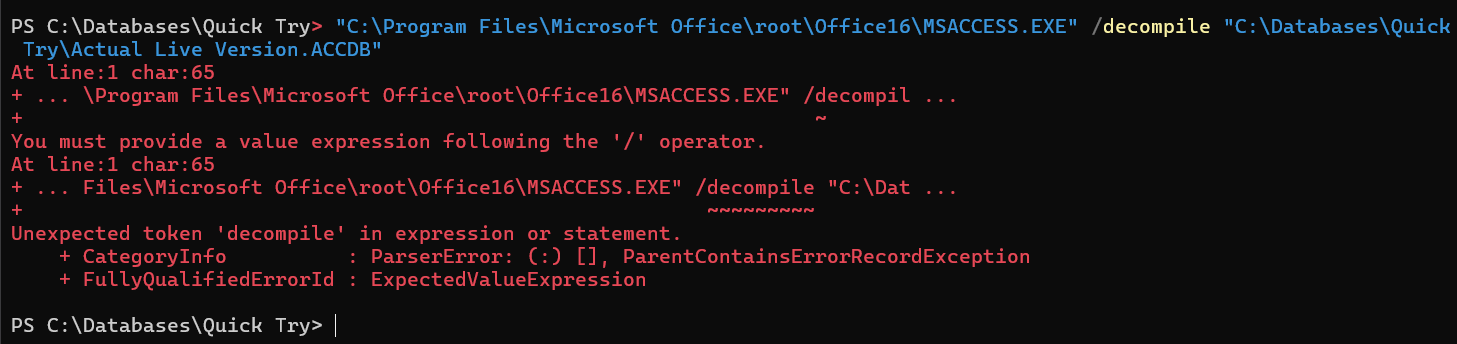
So started going through Richard's Troubleshooter. And when I got to the "Decompile" phase, something new happened. Screenshot to follow.

Note: I have verified all file locations.
Donald Blackwell OP  @Reply  
       
2 days ago

Donald Blackwell OP  @Reply  
       
2 days ago
It's basically telling me "decompile" isn't a valid command.
Donald Blackwell OP  @Reply  
       
2 days ago
Ugh, ok, got past the decompile issue... A recent windows update switched me from "Command" to "Powershell" in Terminal and powershell didn't recognize the command. Unfortunately, didn't resolve anything - Still won't compile and says files are missing. All references are intact so I guess tomorrow I'll start moving the objects into a fresh file.
Richard Rost  @Reply  
          
2 days ago
Before you start rebuilding objects, did you completely shut down and restart everything - Access, the laptop, and any external drives or network connections involved? Sometimes after a power event, Windows or Access can be left holding onto a bad file handle or connection even though everything appears to be back online.

Since the database was open when the power dropped, make a backup copy first, then try Compact and Repair on a copy of the file. If it still will not compile after a restart, importing the objects into a new blank database is a reasonable next step. That can clear out corruption in the container that is not obvious from the references list.

Also, this is exactly why I recommend a UPS battery backup. Your laptop battery saved the laptop, but the monitors, external devices, router, and anything else connected to wall power still took the hit. A decent UPS gives everything a few minutes to ride through a short outage and, just as importantly, protects against the little power glitches that can cause trouble.

Here in SW Florida we get afternoon thunderstorms almost every daym. I've got UPSes throughout my whole house. Lol.
Matt Hall  @Reply  
           
27 hours ago
When I lose power at work, I have problems until I cycle power on my Dell "docking station", along with the laptop.  Appearantly, they have firmware in them too.
Donald Blackwell OP  @Reply  
       
22 hours ago
Richard I rebooted everything to be safe early on. However in this case, I haven't split the database yet so the file is located on the laptop. My most recent backup was about 10-mins before the power snap so worst case scenario, I'm not losing a ton. I literally was just getting ready to click save/close to make another backup when it went out because I was almost finished coding another form.

As for the UPS, yeah, I have to make some adjustments. I gave mine up for my mother's medical equipment and just have to get off my... and put it back on my computer equipment since she passed.
A Toykan  @Reply  
      
13 hours ago
Donald press Win + R and and type cmd the press Shift + Enter to run command line as admin and run this
"C:\Program Files\Microsoft Office\root\Office16\MSACCESS.EXE" /decompile "C:\Databases\Quick Try\Actual Live Version.ACCDB"
(don't forget the double qoutes at the beginning and at he end of the code) or Run powershell as admin and run this
& "C:\Program Files\Microsoft Office\root\Office16\MSACCESS.EXE" /decompile "C:\Databases\Quick Try\Actual Live Version.ACCDB" (same dont forget the qoutes AND THE AMPERSAND at the beginning !!!!)
after executing one above open your project shift pressed thentry debuging and compact & repair.
A Toykan  @Reply  
      
13 hours ago
Apologies for the typos, guys. Double De Quervain's sometimes limits not only just my thumbs but my fingers strength while typing, and I submitted before realizing it.
A Toykan  @Reply  
      
13 hours ago
Matt, yes, docking stations have firmware in them too. Sometimes they can crash because of a power outage, wrong handling, etc., and need to be flashed again.
Donald Blackwell OP  @Reply  
       
13 hours ago
A Thanks, that is what I had done, but it failed, but the tip about the ampersand in front for powershell is good to know, thanks!
Richard Rost  @Reply  
          
7 hours ago
Yeah, surge protection and battery backup are no joke, especially down here in the lightning capital of the United States. I keep everything in my office on UPS units, including the laptops. Even though a laptop has its own battery, that little power brick plugged into the wall can still get fried by a spike.

My router, modem, Wi-Fi, monitors, and even the office lights are all on UPS power. The only exception is the printer, because printers have weird power requirements and I print something maybe once a month - usually an Amazon return. Lol.

I also have a whole-house surge protector installed by my electrician, plus a whole-house battery backup that runs about half of the house. It is 110V only, so it doesn't cover the 220V circuits, but I had a separate junction box installed for it.

We get enough lightning around here that someone is on the news almost every month because of a lightning-related house fire or worse. So yes, it is definitely worth getting that UPS back on your computer equipment.
Richard Rost  @Reply  
          
7 hours ago
FYI, you can get a decent UPS now for under $60. They're a lot more affordable than they used to be.

For smaller, less critical items, I use the inexpensive CyberPower ST425 units. They're great for things like Wi-Fi routers, cable modems, TVs, lights, and other low-power equipment where I mainly want protection from those annoying little one- or two-second power outages. I don't expect these little units to keep a computer running for half an hour. They're basically there to keep small electronics from rebooting every time the power flickers and to provide another layer of surge protection. There's nothing worse than having a two-second power outage interrupt an episode of Star Trek.

For my important equipment, I use the larger CyberPower CP1500. That's what I put on things like my main computer/server, router, cable modem, and other equipment that I really don't want going down. It has a much larger battery and can keep everything running considerably longer. Even though I have a whole-house battery backup, I still keep UPS units on the critical equipment. Think of them as a second line of defense. The UPS handles the immediate power interruption, and the house battery takes over from there.

I've used APC and Tripp Lite units over the years too, but I've had the best luck with CyberPower. They seem to last longer for me. Yes, you can replace the batteries in many of these units, but I've found that by the time an older UPS needs a battery, the cost of the replacement battery plus the hassle of taking the thing apart often makes buying a new UPS more attractive. Your mileage may vary, but that's generally what I do.

Full disclosure: yes, those are my Amazon affiliate links. I'll get something like three cents if you buy one. LOL. But my rule has always been that I don't recommend products to you guys unless I actually use them myself. I've bought multiple CyberPower UPS units over the past few years, both the smaller and larger models, and they've worked very well for me. I use them throughout my own home and office, and I stand behind the recommendation.
Donald Blackwell OP  @Reply  
       
6 hours ago
Yeah, my current UPS was 59.99 last year as I don't have as much critical stuff. The plan was to get a few more for my hardware and mother's equip, but never got around to it and now still just putting what I already have here to best use before getting more.
Add a Reply Upload an Image
Next Unseen

 
New Feature: Comment Live View


The following is a paid advertisement
Computer Learning Zone is not responsible for any content shown or offers made by these ads.
 

Learn
 
Access - index
Excel - index
Word - index
Windows - index
PowerPoint - index
Photoshop - index
Visual Basic - index
ASP - index
Seminars
More...
Customers
 
Login
My Account
My Courses
Lost Password
Memberships
Student Databases
Change Email
Info
 
Latest News
New Releases
User Forums
Topic Glossary
Tips & Tricks
Search The Site
Code Vault
Collapse Menus
Help
 
Customer Support
Web Site Tour
FAQs
TechHelp
Consulting Services
About
 
Background
Testimonials
Jobs
Affiliate Program
Richard Rost
Free Lessons
Mailing List
PCResale.NET
Order
 
Video Tutorials
Handbooks
Memberships
Learning Connection
Idiot's Guide to Excel
Volume Discounts
Payment Info
Shipping
Terms of Sale
Contact
 
Contact Info
Support Policy
Mailing Address
Phone Number
Fax Number
Course Survey
Email Richard
[email protected]
Blog RSS Feed    YouTube Channel

LinkedIn
Copyright 2026 by Computer Learning Zone, Amicron, and Richard Rost. All Rights Reserved. Current Time: 8/15/2026 5:34:43 AM. PLT: 1s