Free Lessons
Courses
Seminars
TechHelp
Fast Tips
Templates
Topic Index
Forum
ABCD
 
Home   Courses   TechHelp   Help   Contact   Merch   Join   Order   Logon   Forums   
 
Home > TechHelp > Directory > Access > Field Selector > Using Datasheet View by Kevin Yip >
Back to Field Selector    Comments List
Upload Images   @Reply   Bookmark    Link   Email   Next Unseen 
Using Datasheet View
Kevin Yip 
     
7 days ago
Hi Richard, as you say in the video, datasheet view would solve this kind of problem.  Every form has datasheet view already built-in, so you don't need to do anything extra.  To bring up datasheet view, you just need one line of VBA code:

     DoCmd.RunCommand acCmdSubformDatasheetView

Doing so would not lose continuous form view, which can be brought back with:

     DoCmd.RunCommand acCmdSubformFormView

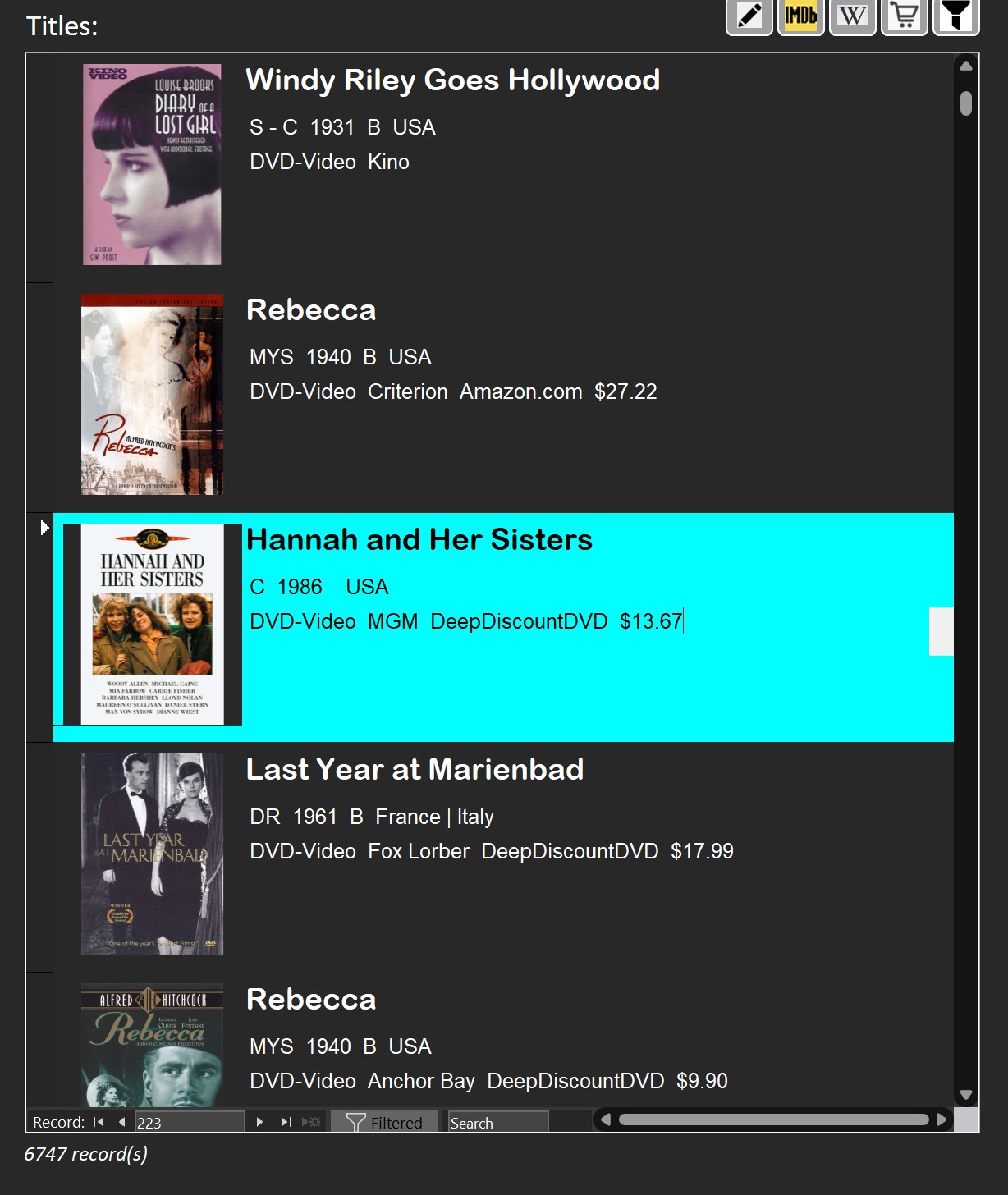
Continuous forms have advantages, of course, but you always seem favor them over datasheets in your lessons.  I use continuous forms only when I need irregular layout designs, like the one pictured below.  Continuous forms are more high-maintenance as you have shown (such as in this video and others), so I would only use them when I must.  In most usages, such as the many examples used in your videos, continuous forms are just regular grids with plain text, which is when datasheets would suffice.  I humbly suggest you show your students the need to prioritize datasheet first, continuous form second.

Kevin Yip OP  @Reply  
     
7 days ago

Richard Rost  @Reply  
          
7 days ago
I respect that, Kevin. I think a lot of this just comes down to personal preference and what the particular database needs.

If I'm simply displaying a basic grid of data and don't need much control over the presentation, Datasheet View is perfectly fine and certainly quicker to set up. I've just always had a preference for continuous forms. They're a little more work, but I like having more control over the layout and appearance, being able to use different kinds of controls, combo boxes, buttons, conditional formatting, and so on. I also think they generally look better when you're building a polished user interface.

So I wouldn't necessarily say one should always come before the other. I'd say use whichever is appropriate for the job. For the kinds of databases I tend to build and teach, I usually prefer continuous forms, but that's definitely a style choice as much as anything else.

You do make a good point that I probably don't spend as much time showing what you can do with Datasheet View, though. I could certainly cover more of that in future lessons.
Kevin Yip OP  @Reply  
     
7 days ago
Thanks for commenting on this, since I've always wondered where you stand on this.  One big advantage of Access is that every form comes with both form and datasheet view, and they can be switched from one to the other with one line of code.  In other environments, both views have to be designed and coded separately.  In my opinion, form view is better for data entry UI, while datasheet view is better for browsing records.  So I would like to see datasheets used and taken advantage of more often.
Richard Rost  @Reply  
          
6 days ago
Yeah, I'll admit that Datasheet View is definitely underutilized in my videos. I could do a lot more with it. From a personal standpoint, I've always focused more on designing continuous forms, but you're right: Datasheet View has a lot of flexibility.

Another area that I haven't focused much on is Layout View. I got a really bad taste in my mouth for Layout View when it first came out because it was pretty buggy. I'm sure many of those bugs have been fixed by now. About the only thing I really like in Layout View is anchoring.

Both Datasheet View and Layout View are things I could spend more time with in my videos because they do have a lot of benefits.

And I agree with your general distinction: Form View is often better for a focused data-entry interface, while Datasheet View is excellent for browsing, sorting, filtering, resizing, and working with lots of records in a grid. The ability to switch between the two views with a line of code is a nice built-in Access feature that probably deserves more attention.

Thanks for bringing this up.
Donald Blackwell  @Reply  
       
6 days ago
My 2 nickel DataSheet forms are nice and easy to put together for many list type form views. I use them often especially for back end type lists such as settings and such that end users aren't really going to use often or for lists where a user may want to do a lot of sorting and filtering. These types of lists often I've found people are less worried about a specific aesthetic than they are about functionality and DataSheets act much like spreadsheets which they are often more familiar with. Continuous forms shine when you really want to "gloss up" a list, adding things like photos, business cards, etc. As a note, for safety, I do have "disable table design changes in DataSheet View" checked in the backstage of most projects.

I use layout grids a lot when laying out forms due to issues with my hands I often have trouble moving things into precise positions so the grids help build things in a clean layout. Plus they have the added advantage that they will usually automatically adjust tab order for you as you place stuff and move things around in the grid. Then, if I'm not using features that need the grid enabled, such as gridlines or Accordion functionality, then I will often remove the grid when the form is complete.

That said, I still don't use Layout View. In fact, I have it disabled in my backstage most of the time. If I run into a situation where I'm having trouble getting something lined up, for instance in the example Richard always uses of aligning labels above columns of a listbox, I'll put all the controls on the form, get the listbox where I want it, then pull up the Immediate pane and use code to move and size precisely where I want them and save the form. While I haven't run into the issues Richard has passed described with Layout View, but I just loathe Layout View as much as Richard loathes themes, lol.
Add a Reply Upload an Image
Next Unseen


What's This?


The following is a paid advertisement
Computer Learning Zone is not responsible for any content shown or offers made by these ads.
 

Learn
 
Access - index
Excel - index
Word - index
Windows - index
PowerPoint - index
Photoshop - index
Visual Basic - index
ASP - index
Seminars
More...
Customers
 
Login
My Account
My Courses
Lost Password
Memberships
Student Databases
Change Email
Info
 
Latest News
New Releases
User Forums
Topic Glossary
Tips & Tricks
Search The Site
Code Vault
Collapse Menus
Help
 
Customer Support
Web Site Tour
FAQs
TechHelp
Consulting Services
About
 
Background
Testimonials
Jobs
Affiliate Program
Richard Rost
Free Lessons
Mailing List
PCResale.NET
Order
 
Video Tutorials
Handbooks
Memberships
Learning Connection
Idiot's Guide to Excel
Volume Discounts
Payment Info
Shipping
Terms of Sale
Contact
 
Contact Info
Support Policy
Mailing Address
Phone Number
Fax Number
Course Survey
Email Richard
[email protected]
Blog RSS Feed    YouTube Channel

LinkedIn
Copyright 2026 by Computer Learning Zone, Amicron, and Richard Rost. All Rights Reserved. Current Time: 9/25/2026 5:04:52 AM. PLT: 1s