Free Lessons
Courses
Seminars
TechHelp
Fast Tips
Templates
Topic Index
Forum
ABCD
 
Home   Courses   TechHelp   Help   Contact   Merch   Join   Order   Logon   Forums   
 
Back to Field Selector    Comments List
Public Thread ?
Upload Images   @Reply   Bookmark    Link   Email   Next Unseen 
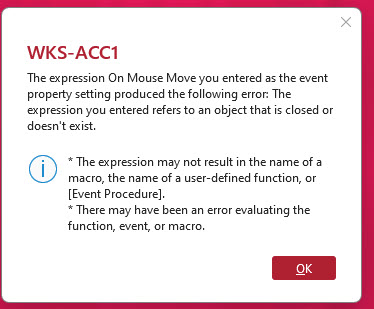
MouseMove Event Error Loop
Werner Mildt 
      
7 days ago
Is there any way to find this kind of error in my program?
I just added Richards new FormLayOutF Function.
It really Workes very good, thanks Richard.
I don't know if this error is related to the FormLayOutF Form or
I have another problem some ware else!
Calling the FormLayOutF from my CustomerListF Form did not work. ERROR
Using the FormLayOutF it worked???

Werner Mildt OP  @Reply  
      
7 days ago

A Toykan  @Reply  
      
7 days ago
It’s reporting that the code in the MouseMove event has an error, which naturally triggers every time the mouse moves. You mentioned added Richard's FormLayoutF function - I'm not completely sure which code it is, and actually I'm away from my computer right now, so I couldn't locate it through my phone- but I don't think there should be any code in the MouseMove Event in the first place. Looks like you accidentally put something there, check MouseMove event event and clear any unnecessary code from there.
Werner Mildt OP  @Reply  
      
7 days ago
This has nothing to do with Richards FormLayoutF Form.
PS Rechard, I reviewed  FormLayoutF Form and found why it did not work correctly.
I forgot to put the Public Function OpenFormLayout() into the Global module, it works just fine.
The only question I have, why are the settings not saved.
When I reopen the CutomerListF Form, the setting are all lost.

The error happens when I try to go into Design View.
Kevin Robertson  @Reply  
          
7 days ago
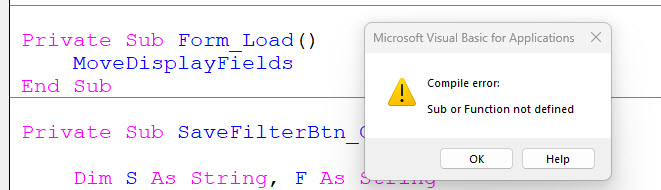
Have you added =MoveDisplayFields() to the Load event so CustomerListF knows to load the settings when the form loads?
Richard Rost  @Reply  
          
7 days ago
Kevin is right. Saving the layout and restoring it are two separate steps. Once FormLayoutF has stored the control positions, CustomerListF still needs to call MoveDisplayFields when it opens so those saved positions get applied again.

Put it in the CustomerListF Load event, for example:

Private Sub Form_Load()
    MoveDisplayFields
End Sub

Or, if you are using the event property directly, use:

=MoveDisplayFields()

Also make sure the code that saves the positions is actually being run before you close CustomerListF.

The MouseMove error is a separate issue. As A Toykan pointed out, MouseMove fires constantly, so any error in that event will keep popping up every time the mouse moves over the form. Open the MouseMove event for CustomerListF, find the exact line that fails, and fix or remove that code if it does not belong there.

I would also go into the VBA editor and run Debug > Compile. That will often catch errors hiding elsewhere in the form's code before they surprise you at runtime.
Werner Mildt OP  @Reply  
      
6 days ago
Well, In Richards CustomerListF it is not working either, the code is in the onload event procedure.
I have not touched and changed anything???
What else could I be missing?
Thanks
Werner Mildt OP  @Reply  
      
6 days ago
Missing Function, MoveDisplayField
View picture!
Werner Mildt OP  @Reply  
      
6 days ago

Kevin Robertson  @Reply  
          
6 days ago
Is the Function in the Form Module, or an external Module?
If in an external Module ensure that it is a Public Function, as opposed to Private.
Richard Rost  @Reply  
          
6 days ago
Which database exactly is this from? Is it from one of my lessons specifically? If so, let me know the exact lesson and video you got it from so I can go rewatch it and refamiliarize myself with what I did there.

I've got over 20 years of material on the website, so I can't remember every lesson without occasionally refreshing my memory.
Werner Mildt OP  @Reply  
      
6 days ago
Richard, this is the function missing from your last tech help form (FormLayoutF Form)
Every else works except on re opening the form.
The MoveDisplayField Function does not excist!
Richard Rost  @Reply  
          
6 days ago
Okay, now it makes a whole lot more sense. In the future, try to post your comments directly on the page where the video appears. It makes it much easier for me to figure out exactly what you're referring to.

You're right: there is no MoveDisplayFields function in this FormLayoutF video. I was thinking of a different layout system. This video uses the SetLayout function in FormLayoutF to apply the saved layout changes.

Also, I did not use any MouseMove events anywhere in that video. So that Design View error is coming from something else in your database. You've got code, a macro, or an expression in the MouseMove event that isn't working. My guess is that you may have accidentally put a Click event expression or procedure into the MouseMove property.

Open CustomerListF in Design View, select the form itself, go to the Event tab, and check the On Mouse Move property. If it says [Event Procedure], click the Build button and see what code is in the Form_MouseMove event. If you don't intentionally need anything there, remove it.
Add a Reply Upload an Image
Next Unseen


What's This?


The following is a paid advertisement
Computer Learning Zone is not responsible for any content shown or offers made by these ads.
 

Learn
 
Access - index
Excel - index
Word - index
Windows - index
PowerPoint - index
Photoshop - index
Visual Basic - index
ASP - index
Seminars
More...
Customers
 
Login
My Account
My Courses
Lost Password
Memberships
Student Databases
Change Email
Info
 
Latest News
New Releases
User Forums
Topic Glossary
Tips & Tricks
Search The Site
Code Vault
Collapse Menus
Help
 
Customer Support
Web Site Tour
FAQs
TechHelp
Consulting Services
About
 
Background
Testimonials
Jobs
Affiliate Program
Richard Rost
Free Lessons
Mailing List
PCResale.NET
Order
 
Video Tutorials
Handbooks
Memberships
Learning Connection
Idiot's Guide to Excel
Volume Discounts
Payment Info
Shipping
Terms of Sale
Contact
 
Contact Info
Support Policy
Mailing Address
Phone Number
Fax Number
Course Survey
Email Richard
[email protected]
Blog RSS Feed    YouTube Channel

LinkedIn
Copyright 2026 by Computer Learning Zone, Amicron, and Richard Rost. All Rights Reserved. Current Time: 9/25/2026 6:39:38 AM. PLT: 1s