Free Lessons
Courses
Seminars
TechHelp
Fast Tips
Templates
Topic Index
Forum
ABCD
 
Home   Courses   TechHelp   Help   Contact   Merch   Join   Order   Logon   Forums   
 
Back to Extended Customer Form    Comments List
Public Thread ?
Upload Images   @Reply   Bookmark    Link   Email   Next Unseen 
Option Group Wizard Display Issue
Constance Britten 
      
5 days ago
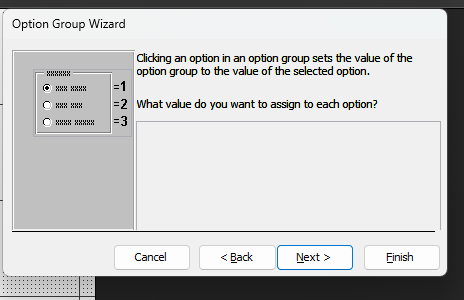
At ~3:12 in the video, where the option values are assigned, the assignment datasheet doesn't appear in my wizard -- there's a blank space where it should be. Instead, the datasheet appears in the next step, covering up the radio buttons that select to either save or store the value.

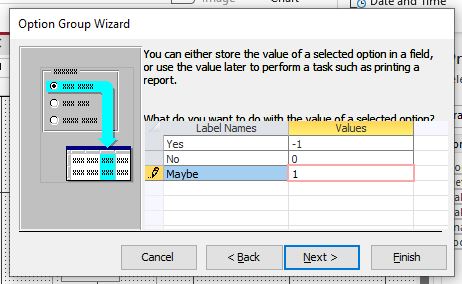
And yes, I *can* still set the values in that misplaced datasheet. I just can't get to the radio buttons underneath. The next steps behave as per the video.

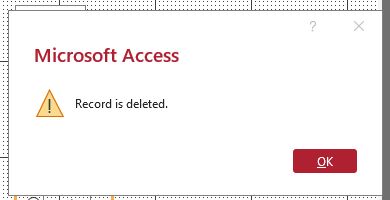
HOWEVER, immediately after the wizard finishes, a popup titled "Microsoft Access" appears with an "OK" button and the message "Record is deleted".

(Seriously? To which record are we referring oh wizard?)

Both Access 2021 and the Windows 10 ESU OS its running on are up-to-date.

Has anyone else seen this? Is this a known issue in Access 2021?
Donald Blackwell  @Reply  
        
5 days ago
Not sure how many versions are affected, but I see similar behavior on my beta machine:
Win 11 Home Insider Preview build 29648.1000 - 260807-1623
Microsoft(R) Access(R) for Microsoft 365 MSO (Version 2610 Build 16.0.20515.20000) 64-bit
Constance Britten OP  @Reply  
      
5 days ago
Donald Ouch. Thanks for posting, much appreciated.

(And to edit my original post's grammar wince: OS its running on --> OS it's running on.)
Richard Rost  @Reply  
          
4 days ago
Yeah, this definitely looks like the Option Group Wizard itself is misbehaving. I went back and checked the lesson, and at that point the wizard should display the Option Values page normally, followed by the page where you select which field will store the value. If that grid is showing up on the wrong page and covering the controls underneath it, that's not normal behavior.

Donald's seeing something similar on a newer Insider build too, so I'm leaning toward this being an Access wizard/display issue rather than something specific you're doing wrong. I haven't found anything from Microsoft confirming this exact problem yet, though, so I don't want to call it a known Access 2021 bug just yet.

As a quick test, try creating a brand-new blank database with a simple table containing an AutoNumber ID and a Number field. Make a form and try creating an Option Group there. If the wizard is messed up in the new database too, that strongly points toward the Access installation/build rather than your database. If it works correctly there, then I'd try a Compact & Repair on your original database, and possibly import everything into a fresh database if necessary.

You can also completely bypass the wizard. Turn Control Wizards off, add the Option Group manually, add your Option Buttons inside it, set each button's Option Value property, and set the Option Group frame's Control Source to the field where you want the value stored. That's ultimately all the wizard is doing for you anyway.

As for the "Record is deleted" message, that's definitely not something the Option Group Wizard should normally be producing. Since the wizard UI is already obviously malfunctioning, I'd first see whether that error also disappears when you test this in a clean database.

Let us know what happens with the blank database test. That should tell us quite a bit.
Donald Blackwell  @Reply  
        
4 days ago
Just tested again on another beta machine:
Microsoft(R) Access(R) for Microsoft 365 MSO (Version 2610 Build 16.0.20515.20000) 64-bit running on Windows 11 25H2  build 26200.9457

An image of the option dialog where you're supposed to be able to enter values to follow
Donald Blackwell  @Reply  
        
4 days ago

Constance Britten OP  @Reply  
      
4 days ago
Richard Thanks for posting! I did the test table and form as you described.

(FWIW, I didn't customize any options -- e.g. I left the database's document window option in the default Tabbed Documents mode.)

I put 5 records into the table, assigning values either -1, 0, or 1 to the Number field.

Running the wizard, the option assignment screen appears exactly as Donald has kindly posted above -- no assignment datasheet.

As before, the missing assignment datasheet appears in the next step, covering the radio buttons that select what to do with the value. That stray datasheet can't be moved out of the way, but it can be used to assign values to the radio buttons as it was intended.

However, in this bare bones test, when the wizard ends, the "Record is deleted" popup did not appear.
Constance Britten OP  @Reply  
      
4 days ago

Constance Britten OP  @Reply  
      
4 days ago
Ha! New info: I added a second Option Group (in order to take a screenshot of the stray assignment datasheet) and guess what? When the wizard finished, this time the "Record is deleted" popup popped up!
Constance Britten OP  @Reply  
      
4 days ago

Constance Britten OP  @Reply  
      
4 days ago
I just checked, and all 5 records in the table are still present.
Richard Rost  @Reply  
          
4 days ago
Thanks, Constance. That pretty much confirms this is not anything in your database. The fact that it happens in a brand-new test database, and Donald can reproduce the misplaced grid on a current Microsoft 365 Insider build, makes this look like an Access Option Group Wizard bug.

The fact that the "Record is deleted" message appears after adding the second Option Group, yet all five table records remain intact, is especially telling. I think the wizard is likely doing some internal cleanup involving one of its temporary records or objects, then incorrectly displaying that generic message. Annoying and confusing, but it does not appear to be deleting one of your actual table records.

At this point, I would treat the wizard as unreliable on that build. You can still use it if you can work around the misplaced grid, but honestly I would probably just create the Option Group manually or build the first one and then copy/paste/edit the Option Buttons as needed. Once the controls are on the form, the wizard is no longer involved.

Donald, thanks for testing and posting the screenshot. It is helpful to know this is occurring on a completely different machine and Access channel too.
Richard Rost  @Reply  
          
4 days ago
Thanks, Constance. I did a little more digging into this, and it definitely appears to be an Access bug rather than anything specific to your database.

The important part is that Donald was able to reproduce the misplaced Option Values grid on Access 365 Version 2610 Build 20515.20000, and you're seeing the same basic behavior in Access 2021. Between that and your clean-database test, we've got a pretty solid reproducible case.

I haven't found an official Microsoft acknowledgment of this exact issue yet, so I'm going to report it to the Access MVP team and see if anyone there is already aware of it or can get it in front of the right people at Microsoft.

Thanks again to both of you for testing and documenting it. This is exactly the kind of information that makes a bug report useful.
Constance Britten OP  @Reply  
      
4 days ago
Richard Excellent! *Thank you* for reporting this to your MVP team.

Donald, *thank you* for confirming and documenting this issue.

Yes, I agree, reproducible bugs have a much better chance of getting fixes. I'm crossing fingers on this one.
Add a Reply Upload an Image
Next Unseen


What's This?


The following is a paid advertisement
Computer Learning Zone is not responsible for any content shown or offers made by these ads.
 

Learn
 
Access - index
Excel - index
Word - index
Windows - index
PowerPoint - index
Photoshop - index
Visual Basic - index
ASP - index
Seminars
More...
Customers
 
Login
My Account
My Courses
Lost Password
Memberships
Student Databases
Change Email
Info
 
Latest News
New Releases
User Forums
Topic Glossary
Tips & Tricks
Search The Site
Code Vault
Collapse Menus
Help
 
Customer Support
Web Site Tour
FAQs
TechHelp
Consulting Services
About
 
Background
Testimonials
Jobs
Affiliate Program
Richard Rost
Free Lessons
Mailing List
PCResale.NET
Order
 
Video Tutorials
Handbooks
Memberships
Learning Connection
Idiot's Guide to Excel
Volume Discounts
Payment Info
Shipping
Terms of Sale
Contact
 
Contact Info
Support Policy
Mailing Address
Phone Number
Fax Number
Course Survey
Email Richard
[email protected]
Blog RSS Feed    YouTube Channel

LinkedIn
Copyright 2026 by Computer Learning Zone, Amicron, and Richard Rost. All Rights Reserved. Current Time: 9/25/2026 11:42:47 AM. PLT: 0s