Free Lessons
Courses
Seminars
TechHelp
Fast Tips
Templates
Topic Index
Forum
ABCD
 
Home   Courses   TechHelp   Help   Contact   Merch   Join   Order   Logon   Forums   
 
Home > Courses > Access > Developer > D62 > Access Developer 62 Handbook Ready by Richard Rost >
Back to Access Developer 62    Comments List
Upload Images | @Reply | Bookmark | Link | Email | Next Unseen |
Access Developer 62 Handbook Ready
Richard Rost 
          
2 days ago
The PDF course handbook for Access Developer 62 is now ready for download.

If you've already purchased the handbook with the class, you can find it on the course page in the Resources section.

If you've purchased the video course but did not get the handbook, visit the Handbooks page.

If you haven't ordered this course yet, what are you waiting for? Order today.
Kevin Yip  @Reply  
      
2 days ago
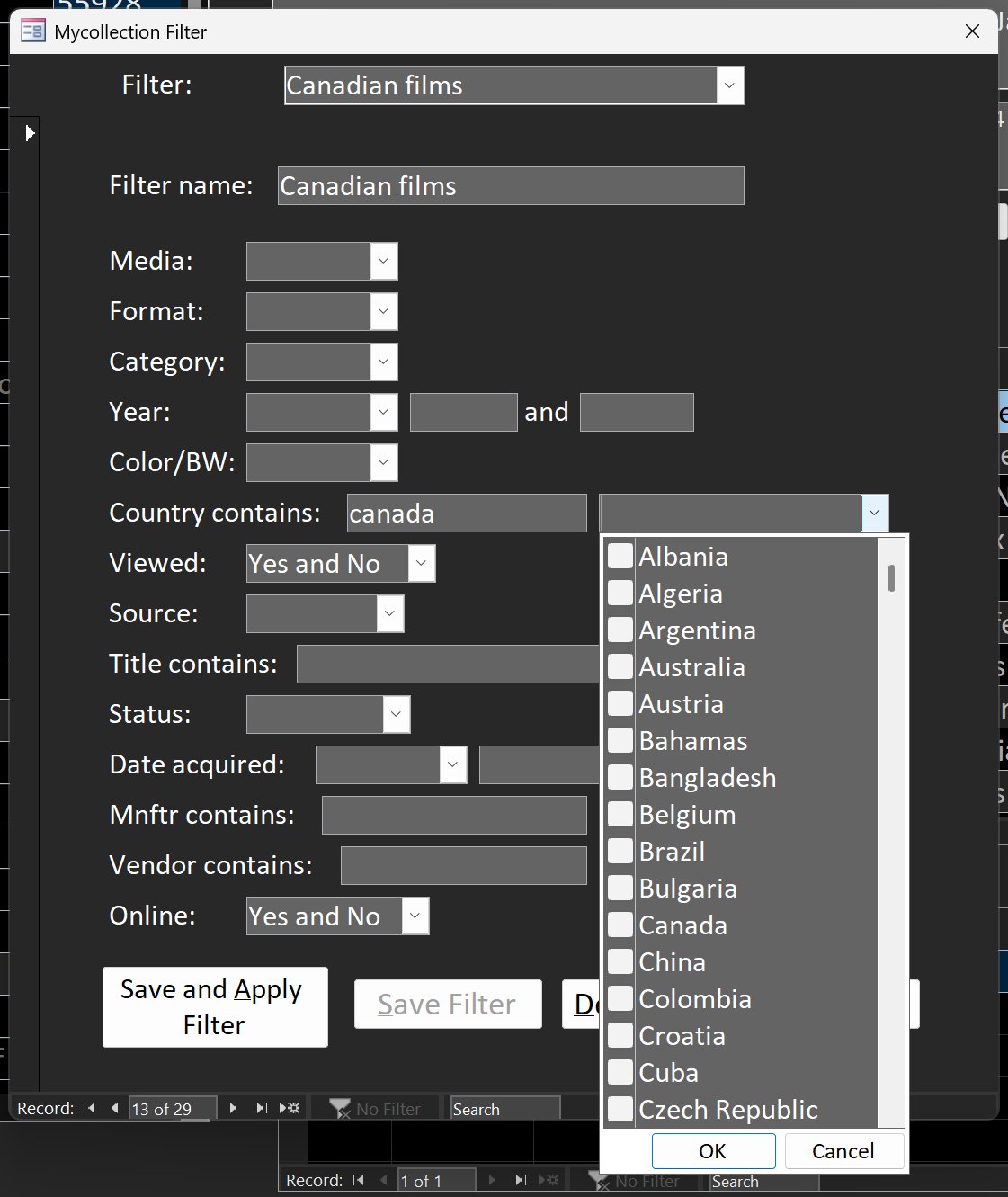
Regarding using multi-value fields to create a combo box with checkboxes, I did something like that in my movie collection database (picture below).  The caveat is that a multi-value field must reside in a table.  If you avoid using MV fields in your database like many of us do, then you most likely have to create a dummy table with a MV field, which was what I did.  In other platforms, like SQL Server, .NET, etc., where MV fields don't exist, a combo box like this must be done in some other, more complicated ways.  One way is to create a fake combo box with a fake form or grid that has checkboxes.
Kevin Yip  @Reply  
      
2 days ago

Richard Rost OP  @Reply  
          
2 days ago
Yeah, creating a dummy table to store the filtering settings is exactly what I did, but shh, don't give away all my secrets. I got puppies to feed. LOL. :)
Kevin Yip  @Reply  
      
2 days ago
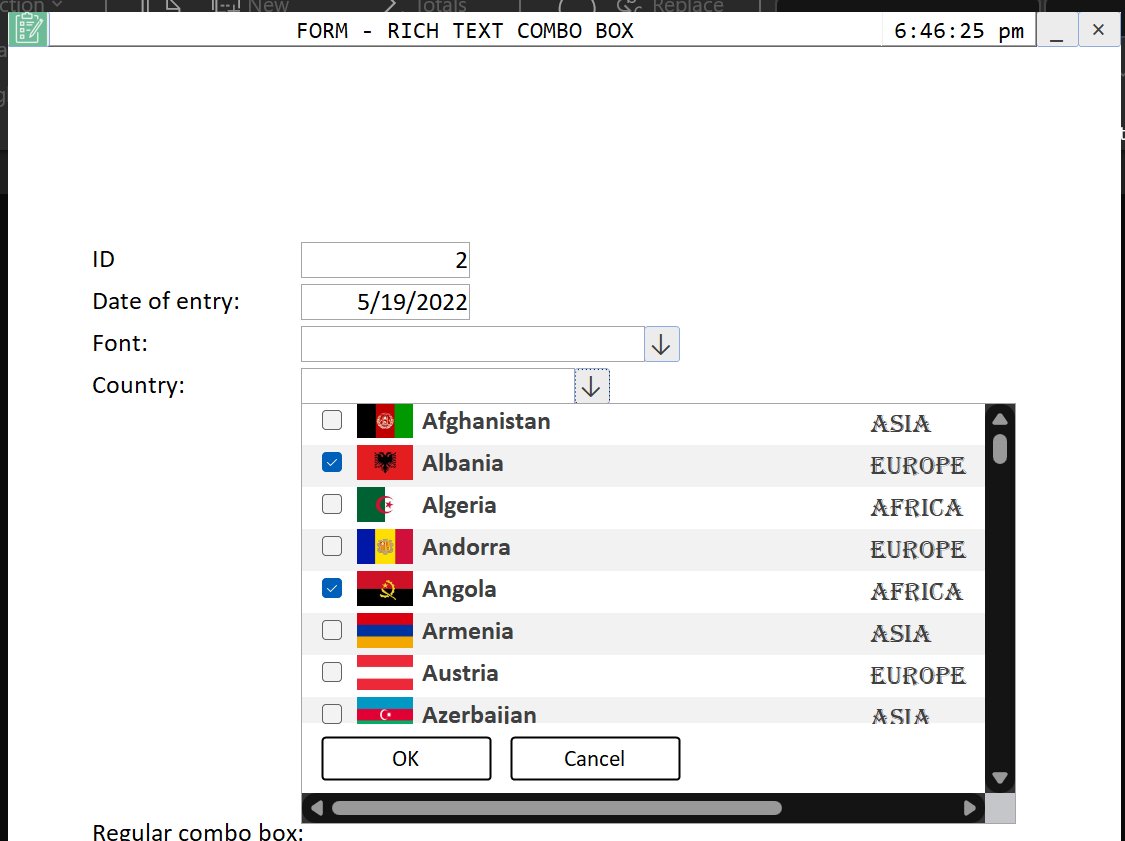
Another way to do this is to create a "fake combo box" that is a continuous form, which allows all kinds of formatting as pictured below.  This trick you did teach us, in this YouTube video from 2020:

     Can you have a List Box or Combo Box with Formatting and Colors in Microsoft Access?"
     https://www.youtube.com/watch?v=FET8JG8w4Xg

Kevin Yip  @Reply  
      
2 days ago

Richard Rost OP  @Reply  
          
2 days ago
Yeah, I taught the basic trick of using a continuous form as a "fake" list/combo box in that video, but I don't think that database in your screenshot is mine. My example was just about getting different colors and formatting in the list.

I don't remember ever doing one like that with checkboxes, flags/images, and multiple selections inside the fake combo box. I searched through my old stuff too and couldn't find one. So I think the general continuous-form trick came from my video, but that particular implementation wasn't one that I built.
Kevin Yip  @Reply  
      
32 hours ago
Richard  Sorry for the confusion.  That was my work, but based on the idea you taught in the video: a subform disguised as a dropdown or list box.  (Also, the form footer can be used to place the OK and Cancel buttons, making it look just like the one done with multi-value fields.)

I wouldn't mind you doing another video on this.  This trick is often used in other environments too, such as web app, Power Apps, etc., because the built-in features often don't allow much formatting.  You often have to create fake panels, frames, or what not, and disguise them as something else.
Richard Rost OP  @Reply  
          
25 hours ago
Yeah, I like what you did with the flags there. Maybe I'll add it to the list.
Add a Reply Upload an Image
Next Unseen


What's This?


The following is a paid advertisement
Computer Learning Zone is not responsible for any content shown or offers made by these ads.
 

Learn
 
Access - index
Excel - index
Word - index
Windows - index
PowerPoint - index
Photoshop - index
Visual Basic - index
ASP - index
Seminars
More...
Customers
 
Login
My Account
My Courses
Lost Password
Memberships
Student Databases
Change Email
Info
 
Latest News
New Releases
User Forums
Topic Glossary
Tips & Tricks
Search The Site
Code Vault
Collapse Menus
Help
 
Customer Support
Web Site Tour
FAQs
TechHelp
Consulting Services
About
 
Background
Testimonials
Jobs
Affiliate Program
Richard Rost
Free Lessons
Mailing List
PCResale.NET
Order
 
Video Tutorials
Handbooks
Memberships
Learning Connection
Idiot's Guide to Excel
Volume Discounts
Payment Info
Shipping
Terms of Sale
Contact
 
Contact Info
Support Policy
Mailing Address
Phone Number
Fax Number
Course Survey
Email Richard
[email protected]
Blog RSS Feed    YouTube Channel

LinkedIn
Copyright 2026 by Computer Learning Zone, Amicron, and Richard Rost. All Rights Reserved. Current Time: 10/4/2026 7:40:02 PM. PLT: 1s